
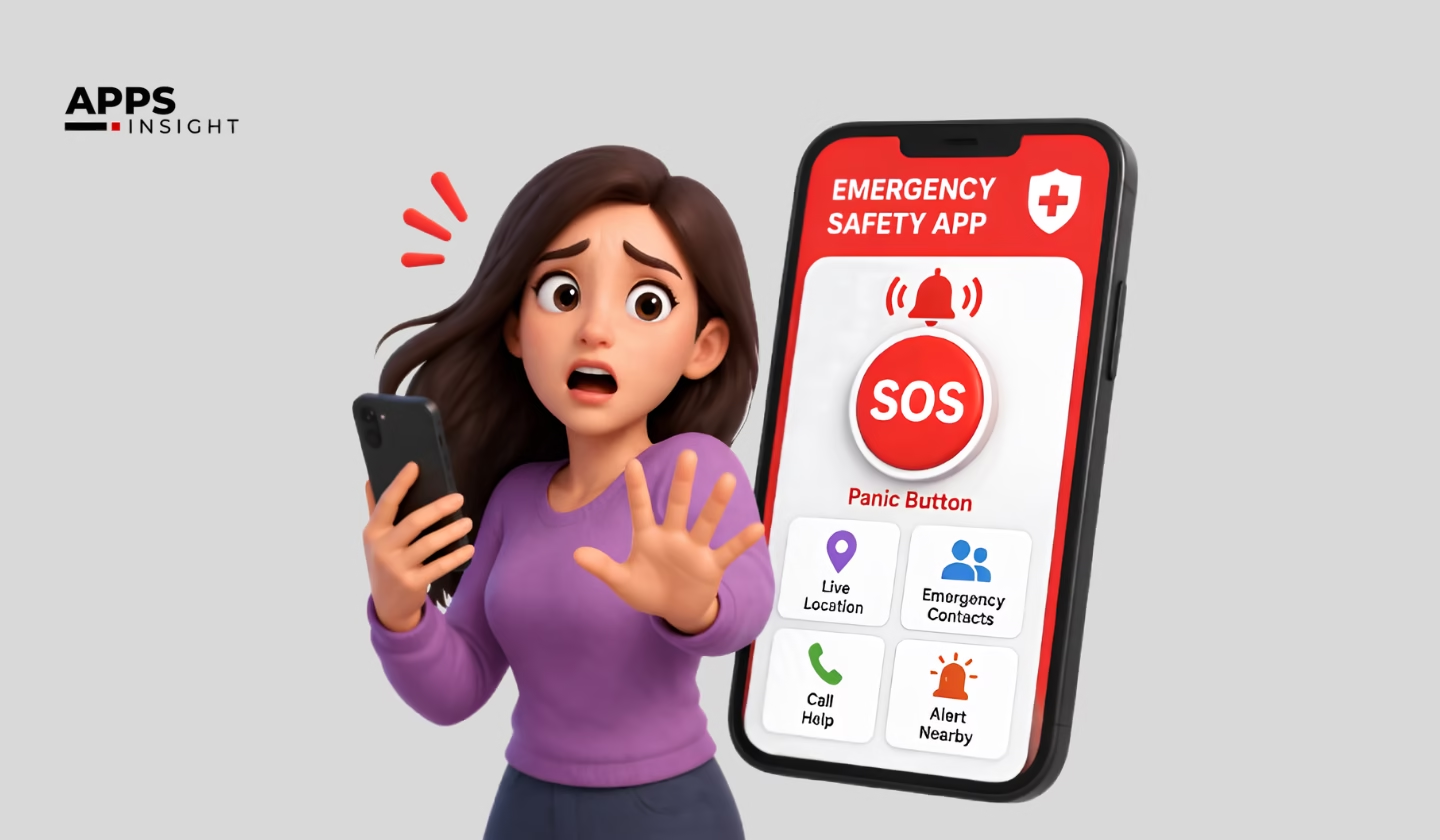
Imagine reaching out for help and getting no response. The connection fails, the alert doesn’t go through, and no one can locate you. That’s where a dependable emergency safety app becomes critical—its absence can have serious consequences.
An emergency safety app is a mobile solution designed to send SOS alerts, share real-time GPS location, record audio and video evidence, and quickly notify trusted contacts during emergencies.
Data from CTIA shows that Americans make over 240 million 911 calls each year. Still, many people lack a dependable backup when networks fail, panic takes over, or they’re unable to communicate.
Top emergency response apps address this gap by creating a system that performs reliably in real-life situations, not just under perfect conditions with stable connectivity.
Whether you’re part of a product team, a campus safety leader, or a founder in the U.S. tackling a real-world challenge, this guide explains how to build an app that works when it matters most.
Emergency Alert Apps: Key Questions and Expert Answers
What is an emergency safety app and how does it work?
An emergency safety app allows users to send SOS alerts, share live location, and notify contacts instantly. It works with a one-tap trigger that activates tracking, alerts, and incident recording automatically.
Which is the best emergency safety app for personal use?
The best emergency safety apps offer one-tap SOS, real-time GPS tracking, and reliable alerts. The ideal choice depends on ease of use, speed, and performance during real emergencies.
How much does it cost to build an emergency safety app?
The cost typically ranges from $15,000 to $80,000+, depending on features, platform, and complexity. Advanced apps with AI and real-time systems can cost higher.
Can emergency safety apps work without internet?
Yes, some apps support offline functionality by recording data locally and syncing it once the connection is restored. However, real-time alerts require internet access.
What features should the best safety app include?
The best safety apps include one-tap SOS alerts, live location tracking, background recording, trusted contact notifications, and a complete incident reporting system.
What Is an Emergency Safety App and Why Does It Matter Right Now?
The global personal safety app market is projected to reach approximately USD 7.7 billion by 2034, rising from USD 1.8 billion in 2024, with a steady growth rate of 15.6% CAGR during the forecast period. In 2024, North America led the market, accounting for over 34% of the total share and generating around USD 0.61 billion in revenue.

Most people assume safety apps are just basic alert tools, but that’s not the case. Today’s emergency safety apps function as coordinated systems built around a full session lifecycle.
When someone triggers an SOS, the app doesn’t simply send a message. It initiates a live incident session that simultaneously handles location tracking, media capture, contact notifications, and structured data logging.
This difference is critical because emergencies are unpredictable and stressful. A person in danger can’t manage multiple actions or remember to press several buttons. The app needs to handle everything seamlessly in the background.
According to MarketsandMarkets, the global emergency notification systems market is expected to reach $6.5 billion by 2028, fueled by increased smartphone usage and growing demand for safety compliance in organizations.
In the United States, safety software is no longer considered optional. It has become a standard requirement across schools, campuses, businesses, and for individual users.
The gap in the market is clear. There is a significant difference between apps that only send alerts and those that generate a real-time, documented emergency record. That gap is where advanced product teams are focusing their efforts.
Looking for? Location Tracking Apps
What the SOS Alert Emergency & Safety App Does
Our solution is centered on one simple concept: a single action triggers the entire system. As soon as a user activates the SOS, everything else happens automatically without further input.
Here’s what happens after that trigger:
- Instant location tracking begins, sharing the user’s live GPS location with trusted contacts.
- Background audio and video recording starts, capturing evidence linked to the active incident.
- Emergency notifications are sent to selected contacts, alerting them and providing a live map view.
- Live streaming is enabled when internet access is available, with automatic fallback to local recording if it’s not.
- An incident record is created, storing route history, media files, timestamps, and alert logs.
All of this is tied to a single session ID. This ensures everything remains unified, even in high-stress situations, with no disconnect between alerts, location data, and evidence.
This integrated approach is what sets a true safety solution apart from basic, single-function apps—and it’s exactly what we prioritized while building this system.
Core Features of the Best Emergency Response Apps for Personal Safety
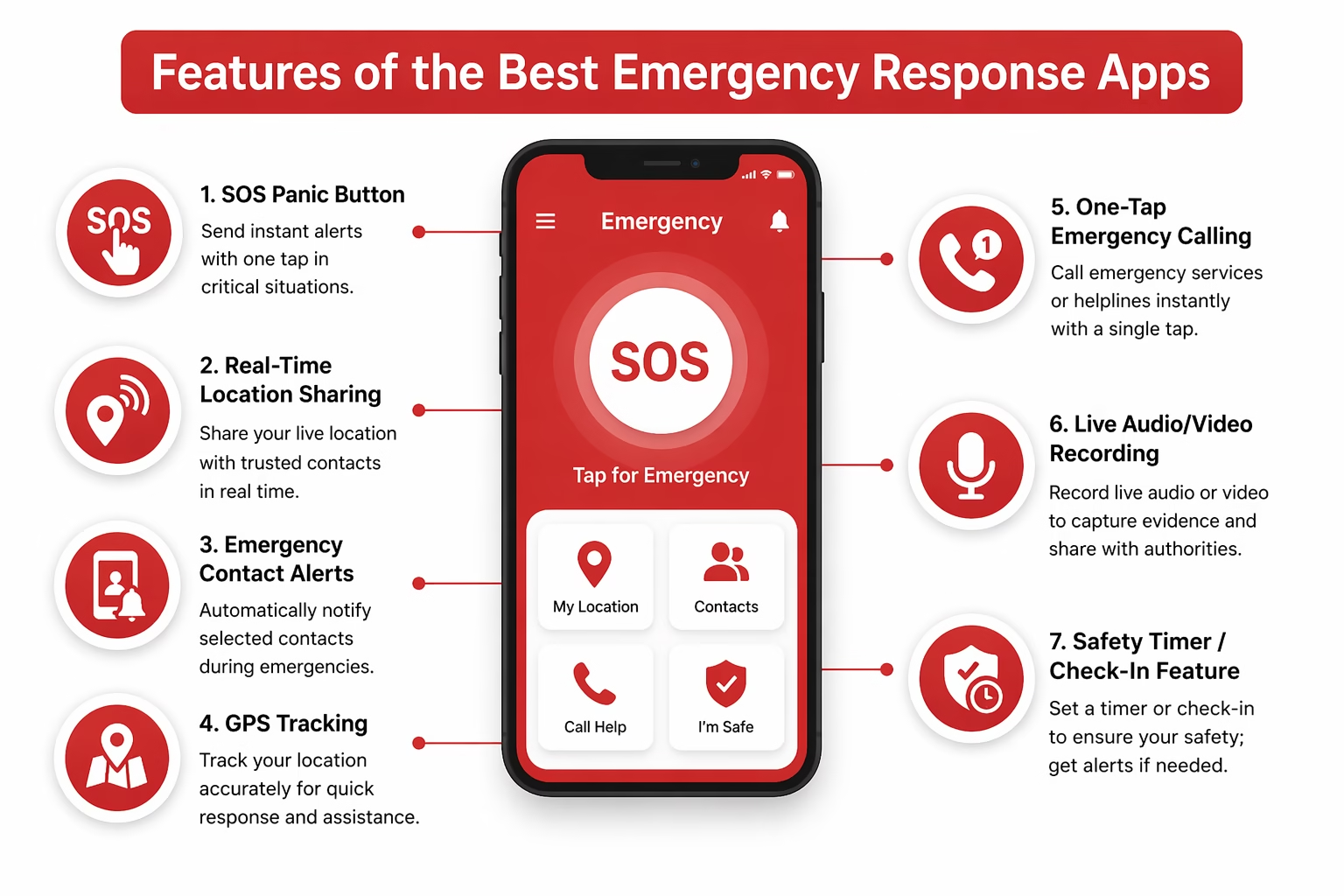
Strong features only work when they’re built on a reliable and well-thought-out system. In emergency situations, speed, simplicity, and clarity matter more than anything else. Here’s a refined breakdown of the key features we designed into the app, along with why each one plays a critical role in real-world safety scenarios.
One-Touch SOS Trigger for Instant Emergency Activation
In high-stress situations, users don’t have time to think or navigate through multiple steps. A well-designed emergency app removes friction completely. With a single tap, the SOS trigger activates the entire emergency flow—no logins, no menus, and no unnecessary confirmations.
This approach ensures that help can be requested instantly, reducing response time and minimizing the risk of user error during critical moments.
Real-Time Location Sharing
Accurate and continuous location tracking is essential during emergencies. The app streams live GPS data to trusted contacts as soon as the SOS is activated.
Beyond just showing the current location, it also records movement history. This allows responders to understand the user’s path, identify patterns, and act more effectively, especially if the user is on the move.
Background Audio & Video Capture During SOS Sessions
Capturing real-time evidence can be crucial for both safety and legal purposes. The app automatically records audio and video in the background once an SOS session begins.
This hands-free approach means users don’t need to interact with their device or hold it up, allowing them to focus entirely on their safety while still documenting the situation.
Trusted Contact Notification System
Reliable communication is key. The app instantly alerts pre-selected contacts through push notifications, including a direct link to a live tracking session.
While the app ensures notifications are delivered to installed users, it also allows others to access shared location links without needing the app. This balance improves accessibility while maintaining a dependable alert system for close contacts.
Session-Based Incident Records
Every emergency session is stored as a structured record, including alerts, location data, timestamps, and captured media.
This organized data can be reviewed later for multiple purposes—personal safety analysis, legal documentation, or improving future app performance. It turns a moment of crisis into actionable insight.
Cross-Platform Support for Android & iOS
Accessibility is essential for any safety tool. The app is designed to work seamlessly across both Android and iOS devices using a unified codebase.
This ensures a consistent experience for all users, regardless of their device, and helps expand reach without compromising performance or reliability.
The effectiveness of an emergency response app doesn’t come from individual features alone, but from how well they work together. By focusing on speed, simplicity, and real-world usability, these features create a system that users can rely on when it matters most.
We have listed! Web and Mobile App Ideas for American Entrepreneurs
How Safety Apps Help Colleges Respond Faster During Emergencies
This is one of the most common questions in the campus safety space, and the reality is more practical than many assume.
When you look closely at how safety apps improve emergency response in colleges, one clear pattern emerges: faster response times are driven by pre-configured systems and automation, not manual processes.
According to a 2023 report by Rave Mobile Safety, campuses that use dedicated emergency notification platforms have reduced incident acknowledgment times by up to 40% compared to those relying on traditional methods like emails or phone trees. This highlights how technology directly impacts response efficiency.
Modern campus safety apps replace outdated communication models with instant, automated alerts. With a single action, the system can notify relevant contacts, share real-time location data, and create a digital record for campus security teams. This allows responders to act quickly without requiring the student to stay connected on a call or manage multiple steps during a stressful situation.
One of the most important features in these apps is the trusted contact escalation system. Instead of relying on the user to reach out manually, the app automatically follows a structured chain—starting with a peer contact, then moving to a resident advisor, and finally alerting campus security if needed. All of this happens within seconds, ensuring no delay in communication.
In addition, many advanced safety apps now include features like real-time tracking, incident history logs, and integration with campus security systems. These capabilities further improve coordination and decision-making during emergencies.
This type of layered and automated response system is not overly complex to build once a strong technical foundation is in place. In fact, it often evolves naturally from a well-designed prototype into a full-scale, production-ready safety solution for campuses.
We have listed! Top Questions Before Hiring App Development
What’s the Right Way to Use Emergency SOS & Safety Apps?
Many people install a safety app and forget about it. Unfortunately, that’s the easiest way to ensure it doesn’t work when it matters most. These apps are only effective when they are properly set up and tested in advance.
Before an Emergency
Preparation is everything. Start by adding trusted contacts and informing them so they know how to respond if they receive an alert. Test the SOS feature in a safe setting to build familiarity and quick response under pressure. Make sure location access is set to “Always Allow” so tracking works continuously. Also, double-check notification settings to ensure alerts reach your contacts even if their devices are on silent or in Do Not Disturb mode.
During an Emergency
When a situation arises, activate the SOS feature once and let the app handle the process. Avoid multitasking, such as calling and using the app at the same time. Keep your phone on you—either in your hand or pocket—since most apps can record audio, video, and location in the background without requiring active use. Trust the system to capture and store critical data.
After an Emergency
Once the situation is resolved, review the incident report. It typically includes your location timeline, recorded media, and alert logs. This information can be shared with authorities or trusted contacts for further action. Having a structured report makes communication clearer and more effective.
In the end, the best safety apps are built around real human behavior during stressful moments. They are designed not just for functionality, but for reliability when quick decisions and simplicity matter most.

Emergency Alert App for Android vs iOS: What Developers Should Know
Building a cross-platform emergency alert app may seem straightforward at first, but real challenges appear once you deal with platform-specific limitations. Android and iOS handle background processes very differently, and these differences directly impact how a safety app performs in critical situations.
Instead of creating two completely separate apps, a smarter approach is to use a shared codebase with platform-aware logic. Technologies like React Native make this possible by handling common functionality while still allowing custom modules where Android and iOS behave differently. This ensures efficiency without compromising performance or reliability.
Key Platform Differences
| Feature Area | Emergency Alert App for Android | Emergency Alert App for iOS |
|---|---|---|
| Background Location | Uses foreground services; generally more flexible | Strict limits; requires “Always” location permission |
| Background Audio | Supported via platform channels and APIs | Needs AVAudioSession configured for background use |
| Push Notifications | Uses FCM; strong background delivery | Uses APNs; affected by Focus Mode and throttling |
| Session Persistence | Handles long-running tasks better | May require silent pushes to maintain sessions |
| Camera Access | Possible in background with proper setup | Mostly restricted; limited workarounds available |
This is exactly why architecture decisions come before UI design when building safety-critical applications. Choosing the right structure early ensures smoother performance, better user experience, and reliability during emergencies. Developers also need to focus on testing across real-world scenarios, as these apps must work flawlessly under pressure.
In addition, factors like battery optimization, permission handling, and real-time responsiveness play a crucial role in overall app success. A well-planned, platform-aware strategy not only improves performance but also builds user trust, which is essential for any emergency-focused application.
We have listed! Top AI App Ideas
How to Build an Emergency Safety App: Step-by-Step
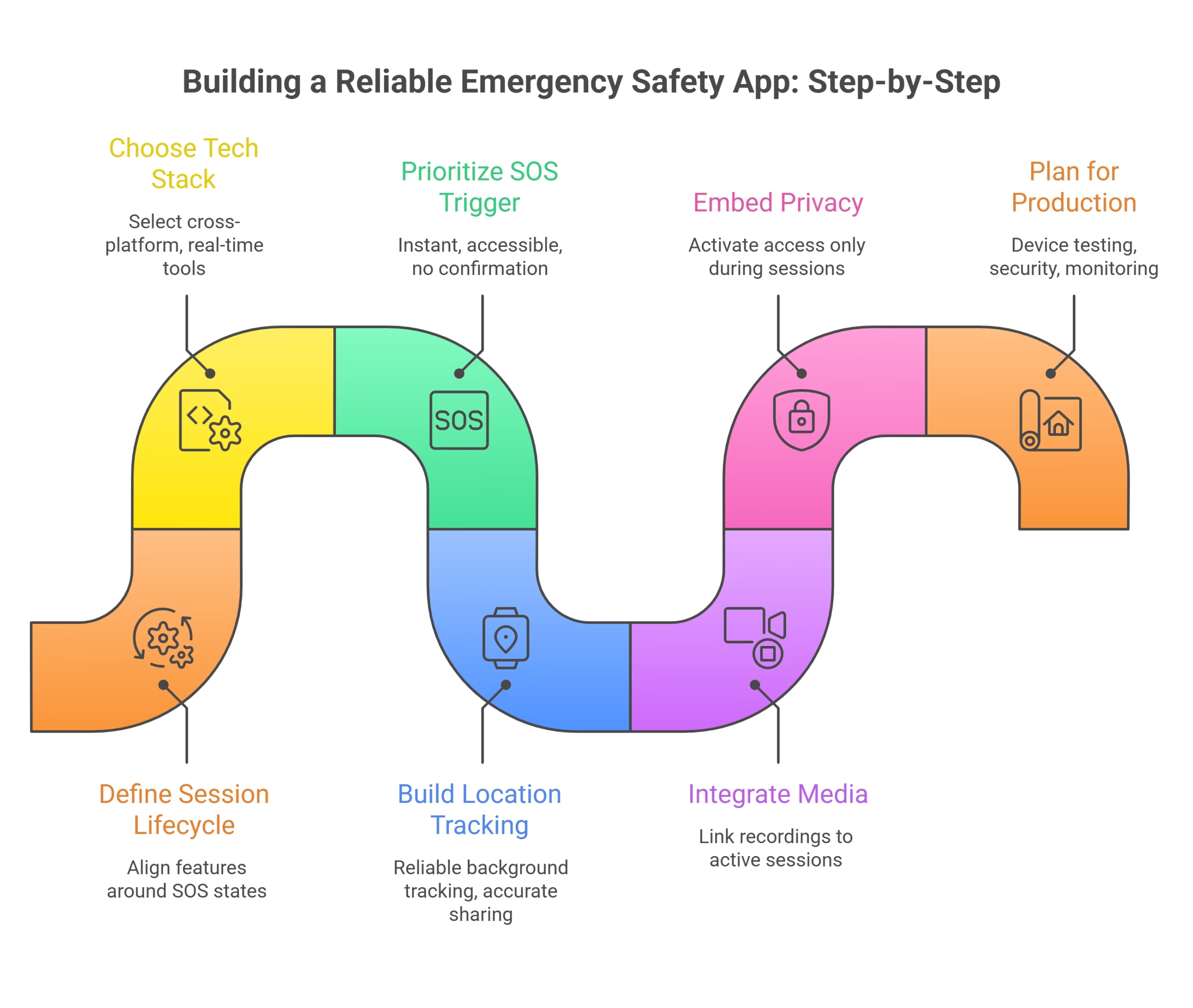
If you’re planning to build an emergency safety app, focus on the system architecture before designing the interface. The core of the product is the session lifecycle, which connects every feature and ensures the app works reliably in critical situations. A well-structured foundation helps avoid technical issues later and improves user trust.
Step 1: Define the Session Lifecycle First
Every feature should revolve around the SOS session states: opened, active, paused, and closed. Establishing this structure early keeps location tracking, alerts, media, and logs aligned. It also ensures a smooth flow of data during emergencies without fragmentation.
Step 2: Choose the Right Tech Stack
A practical stack includes React Native with Expo for cross-platform development. On the backend, Node.js with Express manages APIs, PostgreSQL handles structured data, and Firebase supports real-time updates and notifications. This setup enables faster development while handling real-world constraints like background tasks, connectivity issues, and permissions.
Step 3: Prioritize the SOS Trigger
The SOS trigger is the most important part of the user experience. It should be accessible instantly from any screen, require no confirmation during emergencies, and activate the session immediately. Speed and simplicity here can directly impact user safety.
Step 4: Build Location Tracking First
Before adding notifications, ensure live location tracking works reliably. It should function seamlessly in the background and across devices. Accurate location sharing is often the most critical information for emergency contacts.
Step 5: Integrate Media Within Sessions
Audio and video recording should be linked directly to the active session instead of being standalone features. This keeps all evidence organized under a single incident, making it easier to review and manage later.
Step 6: Embed Privacy by Design
Privacy should be built into the system from the beginning. Camera, microphone, and GPS access should activate only during an active session and stop immediately when it ends. This builds user trust and ensures compliance with regulations.
Step 7: Plan for Production Early
A prototype proves the concept, but production requires much more. You need thorough device testing, security enhancements, monitoring systems, and proper error handling. Planning for scalability and compliance early prevents delays during launch.
Step 8: Focus on Reliability and Real-World Use
Beyond core features, consider real-life scenarios like low battery, poor network conditions, and accidental triggers. Adding fallback mechanisms, offline capabilities, and simple UI flows can significantly improve usability and reliability in emergencies.
If you need help turning your idea into a production-ready solution, working with experienced software development teams or a custom software development approach can streamline the process and ensure your app is secure, scalable, and user-focused.
Look at once! Best App Ideas With Features, Benefits, & Costs
Key Challenges in Building an Emergency Safety App (and How to Address Them)
1) Making Activation Fast and Stress-Free
In emergencies, users don’t have time to think through multiple steps. The solution is to reduce everything to a single, clear action that instantly starts the entire emergency process. Eliminating menus and confirmations ensures users can act without hesitation.
2) Handling Live Media with Poor Connectivity
Live streaming can fail when network conditions are weak. A better approach is to stream when possible and automatically switch to local recording when the connection drops. Once the network is restored, all data can sync into one complete session.
3) Dealing with iOS and Android Differences
iOS and Android manage background activities in different ways, which makes a universal solution unreliable. Using platform-specific handling ensures the app works smoothly within each system’s limitations instead of forcing a single approach.
4) Balancing Privacy with User Experience
Permissions like location, camera, and microphone access can feel intrusive. The key is to request them only when needed and clearly explain their purpose within the app. This builds trust without overwhelming the user.
5) Maintaining a Complete Incident Record
Emergency data can become scattered if not managed properly. By structuring every event as a single session that includes alerts, location history, and media, the entire incident remains organized, easy to review, and reliable.
We have listed! Android App Ideas For Startups
Emergency Notification Apps for Businesses: Why They Matter More Than Ever
For founders, CTOs, and product leaders across the U.S., building an effective emergency notification app isn’t just about adding features. It’s about creating a system that delivers clear operations and long-term reliability.
A well-structured emergency workflow can significantly improve response times, provide better visibility to key stakeholders, and ensure incidents are properly documented. At the same time, it minimizes product risk by embedding privacy and security into the core design from day one.
Unlike typical apps, emergency notification solutions are held to a much higher standard. Users may tolerate minor delays in other apps, but they expect instant and reliable alerts in critical situations. There’s no room for failure when safety is involved.
Companies that successfully build these systems gain a strong competitive edge. The underlying logic, trust framework, and real-time coordination required for a robust emergency app are complex and not easy to replicate. This creates a durable advantage that competitors cannot quickly match.
Look at once! Most Downloaded Apps In USA
How AppsInsight Helps You Build an Emergency Safety App

Building an emergency safety app is not just about development. It requires the right strategy, trusted partners, and a clear understanding of security, scalability, and user trust. This is where AppsInsight plays a key role.
AppsInsight connects you with top-rated app development companies and IT consulting experts who specialize in building secure and high-performance applications. Instead of spending weeks researching vendors, you get access to a curated list of agencies that already have experience in safety, real-time communication, and mission-critical systems.
The platform also helps you make better decisions. You can compare companies based on their expertise, pricing, client reviews, and past projects. This makes it easier to choose a partner who understands features like real-time alerts, location tracking, emergency workflows, and data privacy compliance.
Another advantage is visibility into the latest trends. AppsInsight regularly publishes insights on technologies like AI, IoT, and cloud infrastructure, which are essential for building modern emergency apps. This helps founders and product teams stay updated and build future-ready solutions.
If you’re launching or scaling an emergency safety app, AppsInsight simplifies the process by helping you find the right team, reduce risk, and build a product that users can trust when it matters most.
Read once! Mobile App Development Trends To Watch
Final Thoughts
An emergency safety app should go beyond sending a simple alert. It must function as a reliable response system that performs effectively in real-world situations, not just under ideal conditions.
The key difference lies in how the product is structured from the beginning. When the workflow is designed properly, users can request help instantly, trusted contacts receive real-time updates, and every action is recorded as a clear and usable incident report. At the same time, sensitive data such as location, camera, and microphone access should remain secure, controlled, and transparent.
Many safety apps fail not due to a lack of features, but because their core systems are not built for reliability. These issues often become visible after launch, when fixing them is more complex, time-consuming, and costly.
A smarter approach is to validate the core architecture early, consider platform limitations in advance, and move forward with a well-tested foundation.
At AppsInsight, we focus on helping businesses and product teams make informed decisions when building scalable digital solutions. Our platform connects you with trusted experts and insights to ensure your app is built on a strong, reliable framework that performs when it matters most.
If you’re planning to build an emergency safety app, start with clarity. Define your requirements, structure your system properly, and understand what it takes to succeed in real-world conditions.
Get the right direction with AppsInsight and move forward with a clear, production-ready strategy.

FAQs
What is an emergency safety app and how does it work?
An emergency safety app is a mobile application designed to help users quickly alert contacts or authorities during a crisis. It works by allowing users to trigger an SOS alert, which shares real-time location, sends notifications, and may activate features like audio/video recording. Advanced apps also log incidents and provide continuous updates until the situation is resolved.
What is the best emergency response app for personal safety?
The best emergency response app depends on your needs, but top-performing apps typically include features like one-tap SOS alerts, live location tracking, trusted contact integration, and offline functionality. A reliable app should be fast, easy to use, and capable of working even in low-network conditions.
How are safety apps helping colleges respond quickly in emergencies?
Safety apps enable colleges to send instant alerts to students and staff during emergencies. They support real-time communication, campus-wide notifications, and location tracking, allowing authorities to act faster. Many institutions also use them for incident reporting, ensuring better coordination and quicker response times.
What is the difference between an emergency alert app for Android and iOS?
The core functionality is similar on both platforms, but differences lie in system permissions, background processing, and integration capabilities. iOS offers stricter privacy controls, while Android provides more flexibility in background operations. The choice often depends on user preference and device ecosystem.
How do I build a safety and emergency alert app from scratch?
Start by defining core features like SOS alerts, location sharing, and contact notifications. Then design a secure architecture, choose the right tech stack, and build a scalable backend for real-time communication. Testing is critical, especially for performance under stress conditions. Partnering with experienced developers or platforms like AppsInsight can help ensure a reliable build.
What makes a safety app trusted during real emergencies?
A trusted safety app is fast, reliable, and consistent under pressure. Key factors include instant alert triggering, accurate location tracking, minimal downtime, and strong data privacy. User trust also depends on how well the app performs in real scenarios, not just in testing environments.
What’s the right way to use emergency SOS & safety apps before an emergency happens?
Users should set up trusted contacts, enable permissions (location, notifications), and test the app beforehand. Familiarizing yourself with how the SOS feature works ensures quick action during real emergencies. Regular updates and practicing usage can make a significant difference when timing is critical.