


Render
Cloud hosting that deploys from Git: web services, databases, cron jobs and static sites in one…
Free planPaid from $0
- Web app
- API / SDK
- CLI / Terminal

Heartbeat monitoring and alerts for cron jobs that stop checking in
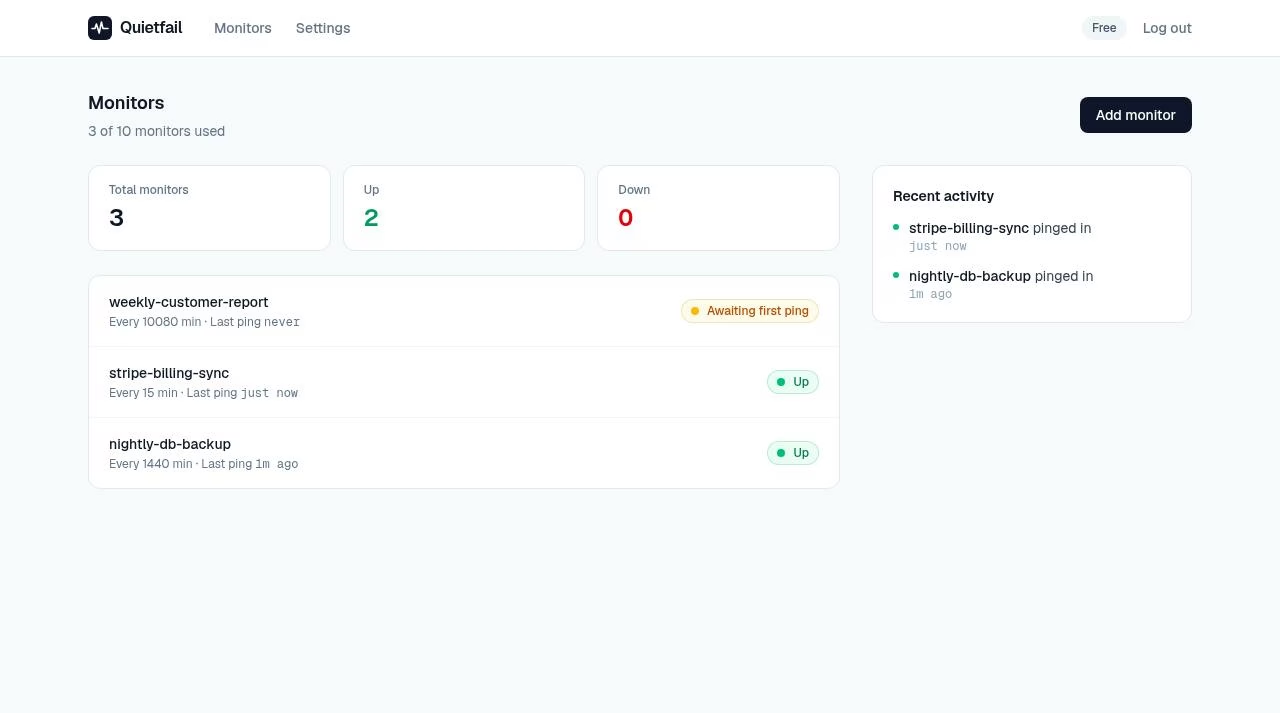
Heartbeat monitoring and alerts for cron jobs that stop checking in Quietfail is a hosted cron monitoring tool for scheduled jobs that stop reporting success.
Quietfail makes one operational question easy to scan: did the scheduled job check in? The free 10-monitor plan and one-line heartbeat fit small projects. Use it as an extra signal rather than your only safeguard: alerts and uptime are not guaranteed and self-hosting is not available. This is a source-based review; we did not test alert delivery.
Quietfail is a hosted cron monitoring tool for scheduled jobs that stop reporting success. Instead of watching a web page or collecting every log line, it waits for a heartbeat sent to a unique ping URL. When that check-in misses the configured interval and grace period, Quietfail sends an alert.
The small scope is useful for nightly backups, billing syncs, scheduled reports and CI tasks. A job can disappear after a server reboot or keep exiting without doing useful work. A success-only heartbeat gives you a separate signal that the expected run reached the point you chose.
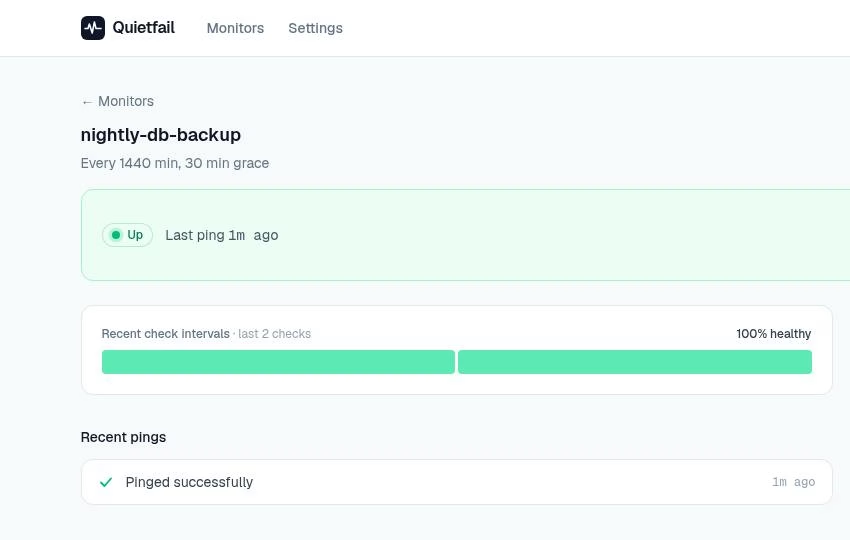
Create a monitor, name the job and set its expected interval. Add a GET or POST request to the monitor’s ping URL at the end of the script. Quietfail lists monitors as up, down or awaiting the first ping and shows recent activity. Its public examples cover cURL,
Quietfail is a hosted cron monitoring tool for scheduled jobs that stop reporting success. Instead of watching a web page or collecting every log line, it waits for a heartbeat sent to a unique ping URL. When that check-in misses the configured interval and grace period, Quietfail sends an alert.
The small scope is useful for nightly backups, billing syncs, scheduled reports and CI tasks. A job can disappear after a server reboot or keep exiting without doing useful work. A success-only heartbeat gives you a separate signal that the expected run reached the point you chose.
Create a monitor, name the job and set its expected interval. Add a GET or POST request to the monitor’s ping URL at the end of the script. Quietfail lists monitors as up, down or awaiting the first ping and shows recent activity. Its public examples cover cURL, Python, Node.js, PHP, Ruby, Go, GitHub Actions and Vercel Cron.
Put the ping after the actual work and its success checks. A scheduled request sent independently of the job proves only that the request ran, not that your backup is usable or your billing sync finished correctly. Quietfail’s alert is a signal to investigate, not proof of the underlying cause.
The free plan includes up to 10 monitors, email alerts, a five-minute minimum check interval and seven days of ping history. The limit prevents creating an eleventh monitor; the FAQ says existing monitors keep running. Pro costs $9 USD per month and raises the limit to 100 monitors, reduces the minimum interval to one minute, keeps 90 days of history and adds Slack or Discord webhook alerts.
The FAQ says the background checker runs every minute and describes alert delivery within about a minute after the expected interval plus grace period expires. That is a vendor description, not a measured guarantee. The plan’s minimum interval is separate from the time it takes the checker and email delivery to report a missed heartbeat.
Quietfail fits developers who need a readable list of scheduled jobs without installing an agent or maintaining a self-hosted service. It can be a useful extra check alongside existing logs and backups. It is less suitable when you need tracing, infrastructure metrics, on-call escalation rules or a contractual uptime commitment. Self-hosting is not currently supported.
The terms identify Karan Parikh in India as the operator. Lemon Squeezy handles payment collection, taxes and invoices. Paid subscriptions renew until cancelled in account settings; cancellation takes effect at the end of the billing period. Partial-period refunds or credits are not offered except where the law requires them.
Quietfail says it collects account email, monitor names, ping timestamps and configured alert webhook URLs. Payment card details stay with Lemon Squeezy. Treat ping URLs and alert-channel webhooks as sensitive operational credentials. The service is provided as available and does not guarantee that every missed check-in will generate an alert. Keep independent backups and logging rather than making this your only safeguard.
Our assessment uses the current official homepage, FAQ, terms and genuine product-interface images supplied through Product Hunt. We did not create an account, trigger a live alert, inspect uptime history or test webhook delivery. The clear free allowance and simple heartbeat workflow are the main strengths. Hosted-only operation, limited notification channels and the absence of a reliability guarantee are the main tradeoffs.
Source review of the current official homepage, FAQ and terms plus genuine Product Hunt dashboard/detail screenshots. No account creation, heartbeat submission, alert delivery measurement or uptime audit. No separate privacy-policy link was found; the terms state data practices.
| Pricing | Free+Paid |
|---|---|
| Starting price | $9/month |
| Free plan | Yes |
| Free trial | No |
| Pricing page | View pricing |
| Platforms | Web app |
| API | No |
| Company | Quietfail |
| Apps Insight Score | 36/100 |
Editorial points are assigned by AppsInsight editors and cannot be purchased or influenced.
| Feature | Quietfail | Render | Mastra | Bitrise |
|---|---|---|---|---|
| Rating | 3.6 / 5 | 4.5 / 5 | 4.0 / 5 | 4.0 / 5 |
| Pricing | Free+Paid | Free+Paid | Free+Paid | Free+Paid |
| Starting price | $9/month | $0 | $0 | From $99 |
| Free plan | Included | Included | Included | Included |
| Free trial | No | No | No | Yes (30 days) |
| Platforms | Web app | Web app, API / SDK, CLI / Terminal | Web app, API / SDK, CLI / Terminal | Web app |
| Best for | Developers watching cron jobs Small teams with backup or sync scripts Side projects needing email heartbeat alerts | Startups, indie developers and small teams who want to deploy web apps and APIs from Git without managing servers | TypeScript and Node developers building production AI agents who want observability and evals alongside the code. | Mobile engineering teams from indie developers to enterprises that want managed CI/CD, release management and build caching tuned for iOS and Android. |
Quietfail vs Render Quietfail vs Mastra Quietfail vs Bitrise
$0 /mo
$9 /mo
Cloud hosting that deploys from Git: web services, databases, cron jobs and static sites in one…

Open source TypeScript framework for building, observing and improving AI agents

Mobile DevOps platform for building, testing and releasing iOS and Android apps on dedicated Apple silicon…

Free domain, IP and ASN reports for hosting, DNS, network routes and public website diagnostics.

Free, open-source desktop client for Kubernetes clusters
Manage Linux servers from a local desktop app with AI-assisted terminal commands
Mobile DevOps platform for building, testing and releasing iOS and Android apps on dedicated Apple silicon…
Cloud hosting that deploys from Git: web services, databases, cron jobs and static sites in one…
Manage Linux servers from a local desktop app with AI-assisted terminal commands

No reviews yet. Be the first to review this app.
Already have an account? Log in to track your reviews.