


Render
Cloud hosting that deploys from Git: web services, databases, cron jobs and static sites in one…
Free planPaid from $0
- Web app
- API / SDK
- CLI / Terminal

Free domain, IP and ASN reports for hosting, DNS, network routes and public website diagnostics.
Free domain, IP and ASN reports for hosting, DNS, network routes and public website diagnostics. heade.rs review: a clear first look at a website’s public infrastructure Editorial draft in Ashley Richmond’s voice.
A readable first stop for public domain/IP/ASN infrastructure checks, with no-key JSON, terminal formats and MCP. Use only non-sensitive targets: queried names appear in public activity. Verify high-stakes findings separately; CDN location, nearby-probe traces, header grades and metadata-based CVEs are clues, not complete audits. Public UI inspection and desk research only.
Editorial draft in Ashley Richmond’s voice. Desk research and public interface inspection, October 1, 2026. heade.rs is a free web tool for looking up a domain, IP address or autonomous system number. It brings hosting, registration, DNS, mail policy, certificates, response headers, network data and visible website technology into one report. It also offers JSON, terminal-friendly text, Markdown and an MCP endpoint. This is network reconnaissance for legitimate diagnostics, not a payment product or an AI model.
My recommendation is straightforward: use it to orient yourself before reaching for a more specialized tool. A readable answer is useful when the alternative is several tabs and a pile of raw records. But it is not a complete security audit, proof of an origin server’s location or a trace from your actual home router. There is an important privacy cost too:
Editorial draft in Ashley Richmond’s voice. Desk research and public interface inspection, October 1, 2026. heade.rs is a free web tool for looking up a domain, IP address or autonomous system number. It brings hosting, registration, DNS, mail policy, certificates, response headers, network data and visible website technology into one report. It also offers JSON, terminal-friendly text, Markdown and an MCP endpoint. This is network reconnaissance for legitimate diagnostics, not a payment product or an AI model.
My recommendation is straightforward: use it to orient yourself before reaching for a more specialized tool. A readable answer is useful when the alternative is several tabs and a pile of raw records. But it is not a complete security audit, proof of an origin server’s location or a trace from your actual home router. There is an important privacy cost too: the homepage publishes recent queried names and a seven-day most-looked-up list. Do not put a confidential target into a public tool simply because it asks for no account.
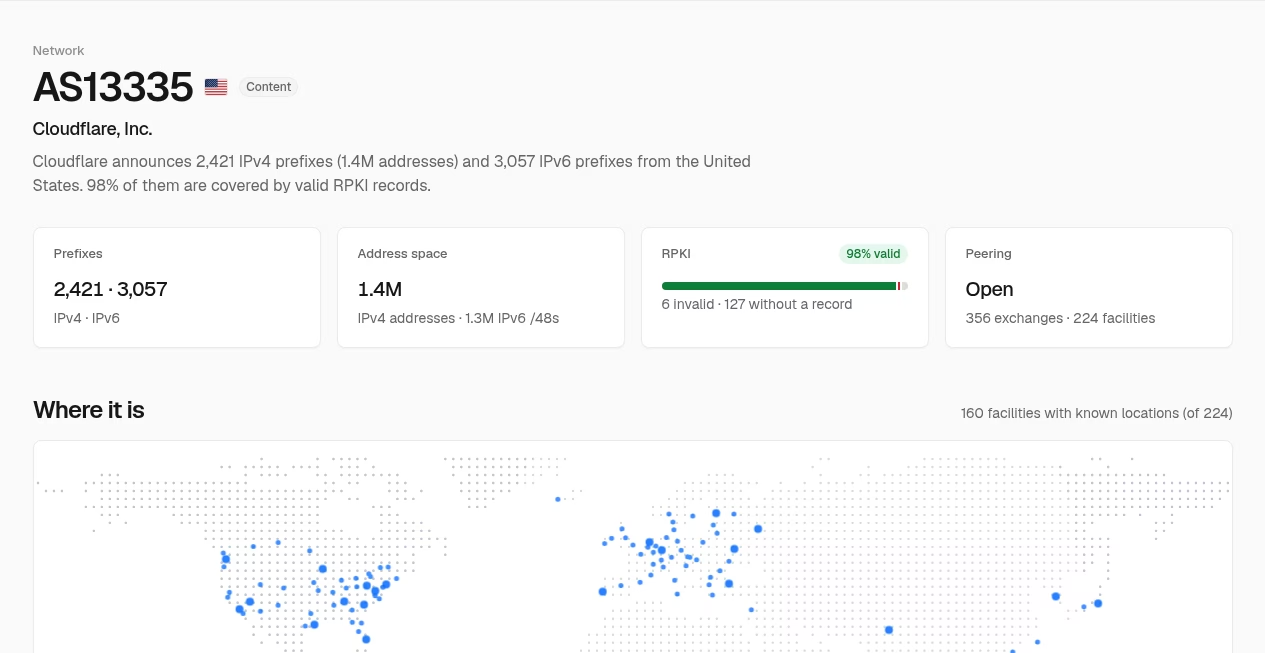
The search accepts a domain, IPv4/IPv6 address, AS number or a URL from which it extracts the hostname. Domain and IP reports combine address resolution, a network and BGP prefix, RPKI status, location and hosting classification, registration and applicable website records. ASN reports instead focus on address space, prefixes, upstreams, peers, exchanges, peering policy and registration. Those are different views of infrastructure, not interchangeable answers.
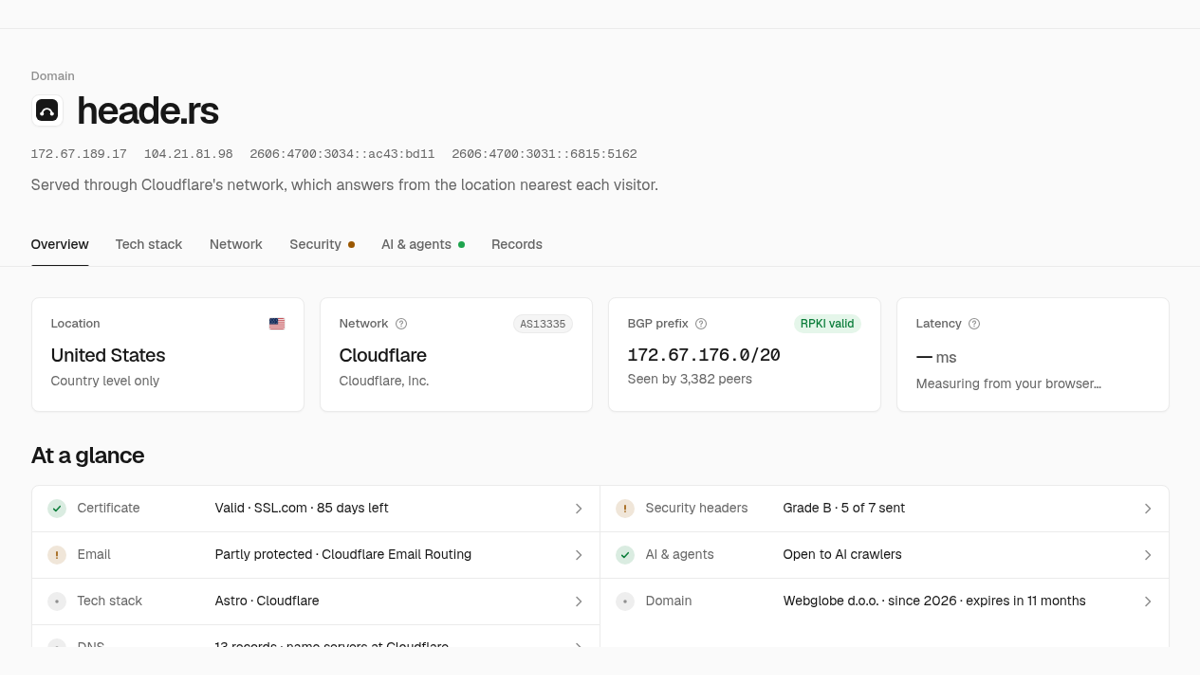
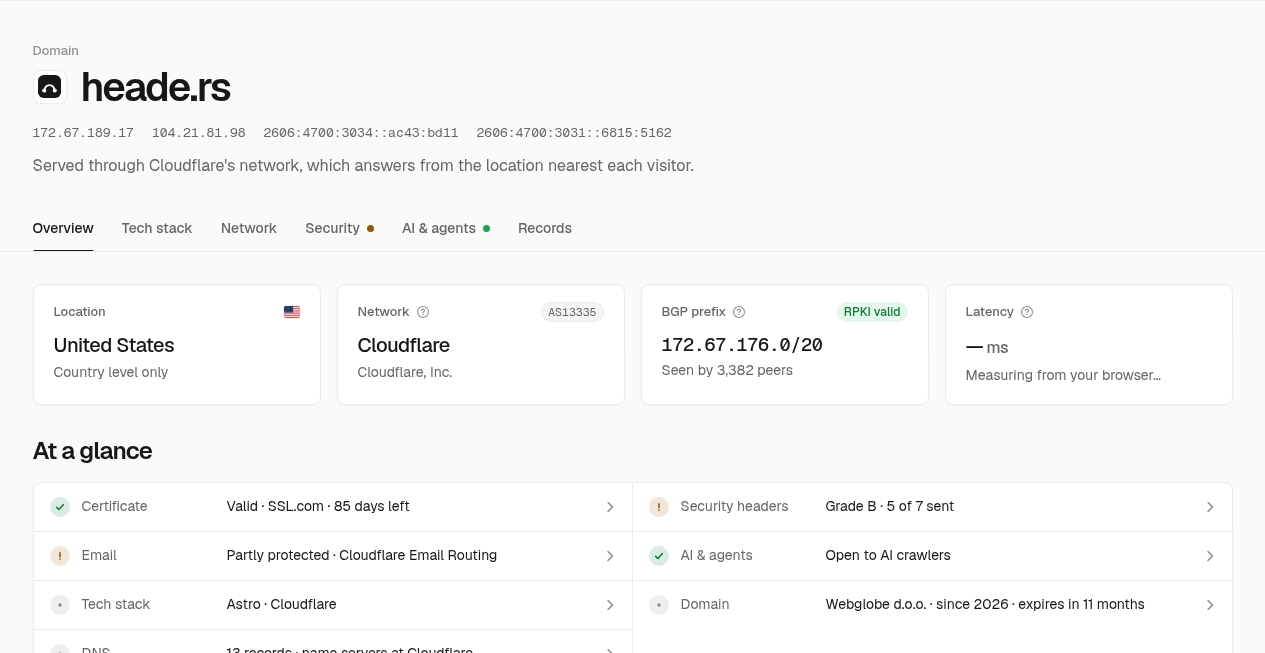
Each lookup has a reusable report address. Browser reports have tabs for overview, technology, network, security, AI/agent support and records. A JSON link exposes the corresponding structured report. We inspected the vendor’s own heade.rs domain and its listed AS13335 example, not the user’s websites, private IPs or internal services. The public interfaces and screenshots in this review are genuine live views, with values that can change after capture.
The OpenAPI description includes reserved/private-address handling and fields that can return a source failure or null rather than a result. Missing data is not a clean bill of health. A failed RDAP source, an undisclosed software version and a feature that does not apply should remain distinguishable from a verified negative finding.
A report can show the resolved address, network, announced prefix, hosting/CDN classification and a cloud region when the available data supports it. That helps explain why an apparently local website resolves through a global provider. In the self-domain example, the UI explicitly says Cloudflare answers from a location near each visitor and labels the geographic result at country level.
A CDN edge address is not necessarily the application server behind it. IP geolocation can be approximate, and a country-level result should not be upgraded into a city, building or company headquarters. Different IPv4/IPv6 addresses can also lead to different visible results. The API describes the main IP section as the first resolved address, which makes inspecting the selected address important.
RPKI validity indicates whether a signed route-origin record authorizes a network to announce a prefix. It is not a verdict that the website, business or content is safe. Peering counts, facilities and upstream relationships are network context, not evidence that every visitor takes the same path.
The browser view adds a Globalping traceroute and separately advertises latency measured from the browser. In the inspected self-domain report, the route was traced from a Chicago probe on RCN, selected near the browsing environment. That is not the reader’s home network. The probe’s location does not establish the reader’s current location.
Globalping’s own documentation describes a distributed probe network for ping, traceroute and related commands. The route shown by heade.rs is useful for understanding a nearby vantage point, but should not be described as a packet-by-packet trace from your laptop or router. Provider paths, anycast destinations and network conditions can differ. Routers that do not answer probes can produce empty hops without proving an outage.
Latency and server-response timing also need their labels preserved. A browser measurement, a probe round trip and an HTTP response from the service’s data center are different measurements. They do not establish page performance for all users or replace a repeated, controlled benchmark. We did not perform a cross-region benchmark or independent packet capture.
heade.rs displays DNS records, name servers, DNSSEC state and registration information obtained through RDAP or WHOIS. Registration dates and expiry can help with investigation, but a domain’s creation date is not the product’s founding year. Redacted or unavailable registrant details do not establish an operator’s identity.
The mail section covers provider/MX information, SPF, DMARC, MTA-STS, TLS reporting and BIMI where available. This can expose an obvious missing policy without needing to read several DNS answers manually. It does not prove that every message is authenticated, that every sender uses the right configuration or that a domain is protected against all impersonation. We did not send a test email, verify mailbox delivery or perform a full mail-security assessment.
The service combines certificate information from Certificate Transparency with HTTPS behavior and a security-header grade. It reports controls such as HSTS, framing protection, content-type protection, referrer policy, permissions, CSP and isolation. These are useful questions to ask of a site’s front page.
A valid certificate does not mean an application is trustworthy. A favorable header grade does not inspect login logic, authorization, sensitive data, dependencies that are not visible, or all paths of an application. Headers can also differ behind redirects or by page. Our screenshots show the diagnostic UI, not a certification of heade.rs or any example target. No penetration test, exploit, credential access or private system scan was attempted.
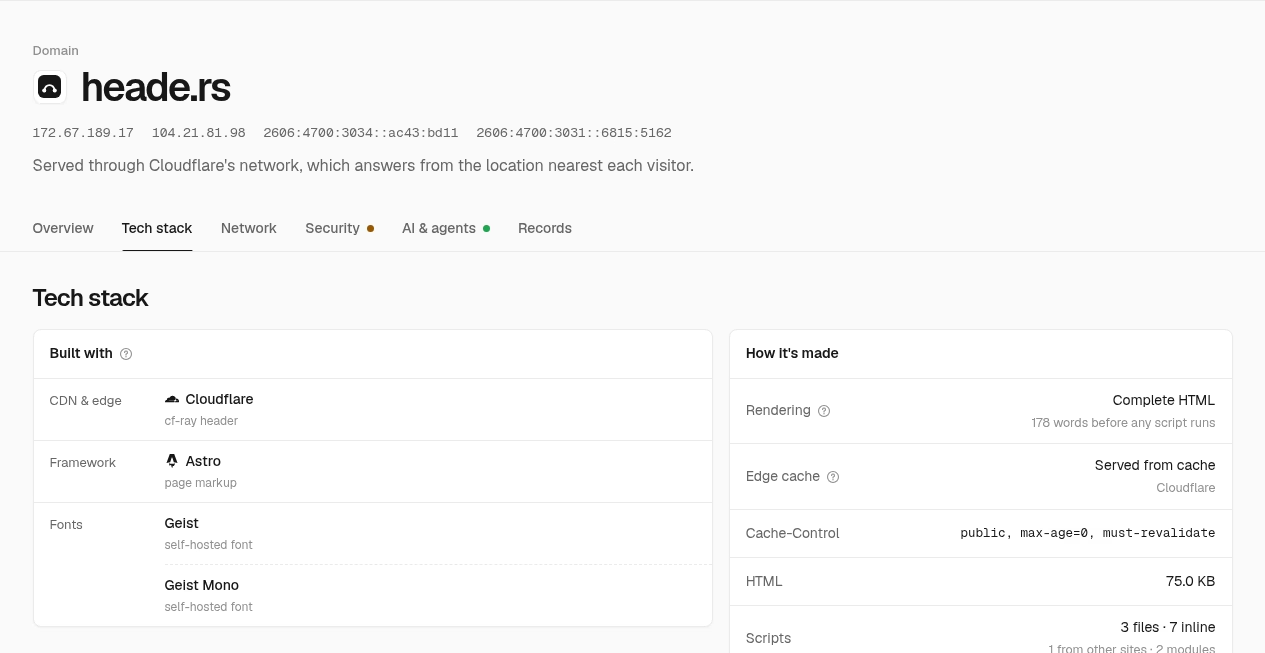
The technology view groups visible CDN, server, framework, CMS, library, font and build clues. The UI explains what gave a finding away, such as a header, cookie name, asset path or page markup. Where versions are revealed, the documentation describes checks against endoflife.date and OSV. An undisclosed version cannot reliably be classified as supported or patched from these signals alone.
The report also describes rendering, cache behavior, HTML/script counts, outside scripts and integrity checks. Its own explanatory text limits inspection to what the HTML loads, not everything a tag manager might add after execution. A missing integrity attribute on a changing analytics script is not automatically an exploitable flaw, and a visible library name is not proof that a particular vulnerable code path is in use.
Open-port and possible-CVE information comes from Shodan InternetDB. That provider says its vulnerability information is based on service metadata. Treat it as a lead for an authorized investigation, not a confirmed exploit or a complete current scan. The listing does not grant permission to test other people’s systems, and we did not run attacks or independent port scans.
The AI/agents section reads published crawler rules and indicators such as text available without JavaScript, Markdown responses, llms.txt, structured data and machine-readable catalogs. It can surface MCP servers and API descriptions, as well as declared browser tools and other discoverable agent interfaces. That is infrastructure information, not a guarantee that a site appears in a search answer or has given legally meaningful consent to all model training.
robots.txt is one signal. The report itself warns that a provider such as Cloudflare can block crawlers at the edge even when those directives allow them. Actual access, rendering, indexing and citation can differ. A “can cite” label should not be rewritten as “already cited,” high ranking or guaranteed AI traffic. We did not connect an AI account, install a connector or verify search inclusion.
The official help and OpenAPI pages document HTML in the browser, plain text for common command-line clients, Markdown through content negotiation and JSON reports through the API. The product is not a native Windows/macOS application; terminal use is an HTTP workflow, not a separately installed desktop client.
The MCP endpoint offers the lookup tool over Streamable HTTP with no sign-in. The official API documentation says no key or account is needed and sets a limit of thirty lookups per minute per client. That makes light investigation easy to start, but it is not evidence of an unlimited service or an enterprise availability commitment. No premium plan, free trial, service-level agreement or support guarantee was verified. The source is not being labeled open-source simply because some data providers and client formats are open.
Vendor-authored setup examples describe capabilities; they are not instructions this review followed. We did not add the MCP server to any account, change a user’s configuration or grant a tool access to private queries. Available client protocols are described in prose rather than inventing product-specific integration chips.
The documentation distinguishes live sources from mirrored ones. DNS, registration, front-page/header information and several public data providers are queried live. bgp.tools routing/network names, RPKI data and the MCP Registry are mirrored hourly. Provider address ranges, PeeringDB and ASPA records are mirrored daily. GeoLite2 locations are mirrored twice weekly.
Those schedules are vendor descriptions, not an independent audit of refresh jobs. The outside Glama connector page says data is live or mirrored within an hour, which is broader than the official source schedule. This review follows the detailed vendor breakdown rather than treating every location and peering field as updated hourly. Provider failure, coverage gaps and stale metadata remain possible.
The homepage explicitly describes public latest lookups and top queried names from the past seven days, also exposed as a JSON activity list. A query can reveal that someone is investigating an unreleased domain, customer system or unfamiliar IP even without displaying their name. Do not submit internal hostnames, private targets or URLs carrying sensitive data. Extracting a hostname does not make the act of submitting a confidential URL safe.
We found no product privacy, terms or dedicated support policy in the reviewed homepage, report links, help/OpenAPI documentation and targeted search. We did observe Google tagging and a Cloudflare analytics script on the public site. That is not an audit of what each script transmits, and missing policies do not prove misconduct; they leave retention, visitor-identification handling, query deletion and provider-processing details unresolved. No-account access should not be marketed as no tracking or complete anonymity.
The product directly credits Colin Armstrong and links his personal site; the API contact does the same. That supports naming him as maker/publisher. His personal biography discusses founding Paragraph and living in the Bay Area, but does not establish a heade.rs legal entity, headquarters, team size or founding year. Those metadata fields stay blank. His personal contact address is not being treated as a verified product support inbox.
heade.rs is a useful first-stop tool for developers, site operators and network investigators who want public infrastructure facts in a readable form. The broad report and no-key JSON/MCP options are its best features. It can save the effort of assembling basic clues across several services without pretending those clues are final answers.
I would use it on public, non-sensitive targets and verify consequential findings with the underlying provider or the system owner. Public query activity, absent policy detail, source-dependent freshness and the nearby-probe route are meaningful limits. Our 3.6/5 editorial rating reflects the documented feature breadth and inspected UI, not a security clearance, independent accuracy benchmark or guarantee of service availability.
This review uses official homepage/help/llms/OpenAPI and public example reports, the linked maker page, Globalping and Shodan provider documentation, plus the Glama connector listing for a limited outside check. No account, payment, MCP installation, private query, email, exploit or user-network diagnosis was performed. The screenshots are genuine official public interface views of heade.rs’s own domain and its listed AS13335 example. Captured network counts, dates and grades are examples at the time of capture, not permanent claims. Any unexplained policy gap should be rechecked before publication.
Sources: official site; help; product and data-source documentation; OpenAPI; self-domain report; ASN example; linked maker; Globalping; Shodan InternetDB; Glama connector; launch.
Official-source desk research October1 2026 plus genuine public UI inspection of vendor own heade.rs domain and listed AS13335 example. Read help, llms data-source docs, API catalog/OpenAPI/MCP card and public activity; checked linked maker, Globalping and Shodan docs and Glama contrast. No account, private/user target, MCP installation, payment, penetration test, independent network scan or accuracy benchmark. Route is probe-near-browser not actual user path. Public lookup activity and unknown privacy/terms/retention policy disclosed. Screenshots show actual official reports; values can change.
| Pricing | Free plan |
|---|---|
| Free plan | Yes |
| Free trial | No |
| Pricing page | View pricing |
| Platforms | Web app, API / SDK, CLI / Terminal |
| API | Yes |
| Company | Colin Armstrong |
| Apps Insight Score | 38/100 |
Editorial points are assigned by AppsInsight editors and cannot be purchased or influenced.
| Feature | heade.rs | Render | Mastra | Bitrise |
|---|---|---|---|---|
| Rating | 3.6 / 5 | 4.5 / 5 | 4.0 / 5 | 4.0 / 5 |
| Pricing | Free plan | Free+Paid | Free+Paid | Free+Paid |
| Starting price | Free | $0 | $0 | From $99 |
| Free plan | Included | Included | Included | Included |
| Free trial | No | No | No | Yes (30 days) |
| Platforms | Web app, API / SDK, CLI / Terminal | Web app, API / SDK, CLI / Terminal | Web app, API / SDK, CLI / Terminal | Web app |
| Best for | Developers investigating public website infrastructure Site operators checking DNS and mail-policy clues Network investigators using non-sensitive targets | Startups, indie developers and small teams who want to deploy web apps and APIs from Git without managing servers | TypeScript and Node developers building production AI agents who want observability and evals alongside the code. | Mobile engineering teams from indie developers to enterprises that want managed CI/CD, release management and build caching tuned for iOS and Android. |
Cloud hosting that deploys from Git: web services, databases, cron jobs and static sites in one…

Open source TypeScript framework for building, observing and improving AI agents

Mobile DevOps platform for building, testing and releasing iOS and Android apps on dedicated Apple silicon…

Heartbeat monitoring and alerts for cron jobs that stop checking in

Free, open-source desktop client for Kubernetes clusters
Manage Linux servers from a local desktop app with AI-assisted terminal commands
Heartbeat monitoring and alerts for cron jobs that stop checking in
Mobile DevOps platform for building, testing and releasing iOS and Android apps on dedicated Apple silicon…
Cloud hosting that deploys from Git: web services, databases, cron jobs and static sites in one…
Manage Linux servers from a local desktop app with AI-assisted terminal commands
No reviews yet. Be the first to review this app.
Already have an account? Log in to track your reviews.