


Mastra
Open source TypeScript framework for building, observing and improving AI agents
Free planPaid from $0
- Web app
- API / SDK
- CLI / Terminal

Cloud hosting that deploys from Git: web services, databases, cron jobs and static sites in one dashboard
Cloud hosting that deploys from Git: web services, databases, cron jobs and static sites in one dashboard Render is a cloud platform for hosting the kind of apps most small teams actually build: a web service in Node, Python, Ruby, Go, Rust or Elixir, a Postgres database behind it, a cron job or two, and a static front end.
Git-push deploys, zero-downtime releases and one dashboard for web services, Postgres, Key Value, cron jobs and static sites, with prices published per instance.
Render is a cloud platform for hosting the kind of apps most small teams actually build: a web service in Node, Python, Ruby, Go, Rust or Elixir, a Postgres database behind it, a cron job or two, and a static front end. You connect a GitHub, GitLab or Bitbucket repo, pick a compute plan, and Render builds and deploys it. Push to the linked branch and it redeploys on its own.
Auto-deploy on commit is the default for a new service. You can switch it to run only after CI checks pass, or turn it off and deploy by hand. Every service type redeploys with zero downtime unless it has a persistent disk attached. Service previews spin up a temporary copy of a web service or static site with its own onrender.com URL so you can test a pull request, and Blueprints (a render.yaml file
Render is a cloud platform for hosting the kind of apps most small teams actually build: a web service in Node, Python, Ruby, Go, Rust or Elixir, a Postgres database behind it, a cron job or two, and a static front end. You connect a GitHub, GitLab or Bitbucket repo, pick a compute plan, and Render builds and deploys it. Push to the linked branch and it redeploys on its own.
Auto-deploy on commit is the default for a new service. You can switch it to run only after CI checks pass, or turn it off and deploy by hand. Every service type redeploys with zero downtime unless it has a persistent disk attached. Service previews spin up a temporary copy of a web service or static site with its own onrender.com URL so you can test a pull request, and Blueprints (a render.yaml file in your repo) describe a whole stack of services and databases as code.
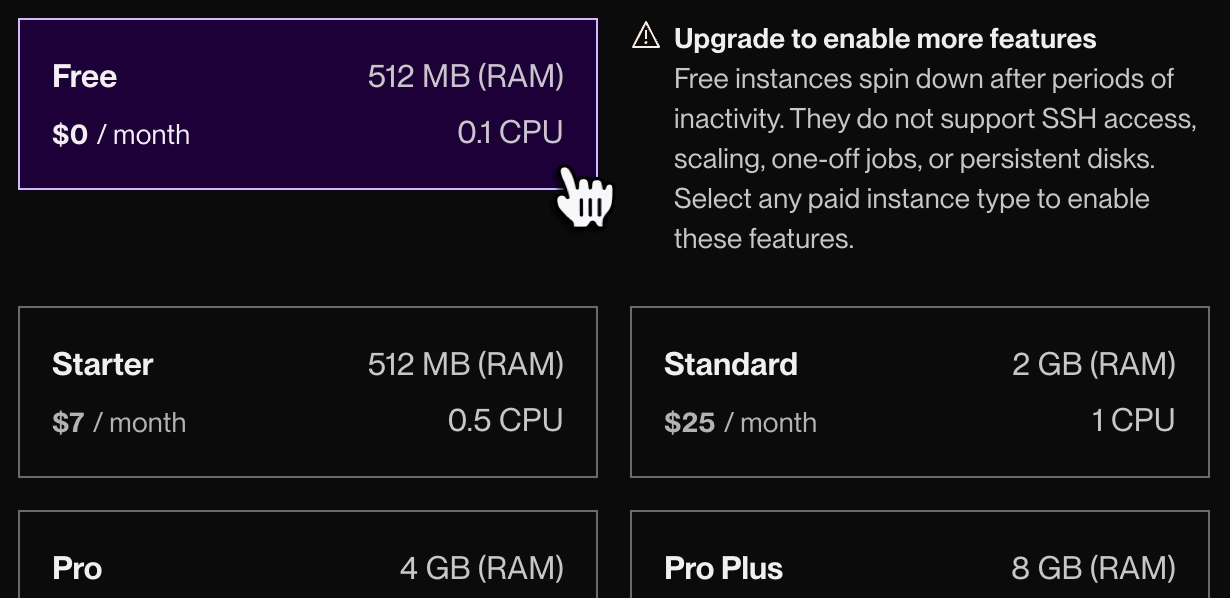
Free web services, Postgres and Key Value instances are meant for testing, and Render says not to use them for production. A free web service spins down after 15 minutes without traffic and takes about a minute to wake up. It gets 750 free instance hours a month per workspace, cannot scale past one instance, has no persistent disk or SSH access, and cannot send mail over ports 25, 465 or 587. Its filesystem is wiped on every restart or redeploy. A free Postgres database holds 1 GB, has no backups, and expires 30 days after creation, with a 14 day grace period to upgrade before it is deleted.
Pricing has two layers. The workspace plan sets platform features: Hobby is $0 a month, Pro is $25 a month and Scale is $499 a month, with Enterprise on custom pricing. Compute is billed on top, prorated by the second. A web service on the Free plan costs nothing, a 0.5 CPU / 512 MB instance is $7 a month, 1 CPU / 2 GB is $25 a month, and 2 CPU / 4 GB is $85 a month. Managed Postgres starts at $6 a month for 256 MB, and a 1 GB instance is $19 a month. You can run multiple instances on any paid plan, up to 100 for most sizes, but horizontal autoscaling needs a Pro workspace or higher. Bandwidth is included per plan (5 GB on Hobby, 25 GB on Pro, 1 TB on Scale), and overage is billed.
Render is easy to start on and the dashboard is clear about what each service costs. The price of that is that production setups add up: a paid web service, a paid database and a Pro workspace for autoscaling and unlimited seats come to well over the headline $0. Teams that want fine-grained control over networking and infrastructure will hit the limits of a managed platform sooner than they would on a hyperscaler. For indie projects, startups and small teams that want Git-to-live without managing servers, it is a sensible pick.
Pricing, free-tier limits and deploy behavior checked against render.com/pricing and the Render docs on October 9, 2026.
| Pricing | Free+Paid |
|---|---|
| Starting price | $0 |
| Free plan | Yes |
| Free trial | No |
| Pricing page | View pricing |
| Platforms | Web app, API / SDK, CLI / Terminal |
| API | Yes |
| Company | Render |
| Apps Insight Score | 45/100 |
| Implementation | Easy |
| Learning curve | Beginner |
Editorial points are assigned by AppsInsight editors and cannot be purchased or influenced.
| Feature | Render | Mastra | Bitrise | heade.rs |
|---|---|---|---|---|
| Rating | 4.5 / 5 | 4.0 / 5 | 4.0 / 5 | 3.6 / 5 |
| Pricing | Free+Paid | Free+Paid | Free+Paid | Free plan |
| Starting price | $0 | $0 | From $99 | Free |
| Free plan | Included | Included | Included | Included |
| Free trial | No | No | Yes (30 days) | No |
| Platforms | Web app, API / SDK, CLI / Terminal | Web app, API / SDK, CLI / Terminal | Web app | Web app, API / SDK, CLI / Terminal |
| Best for | Startups, indie developers and small teams who want to deploy web apps and APIs from Git without managing servers | TypeScript and Node developers building production AI agents who want observability and evals alongside the code. | Mobile engineering teams from indie developers to enterprises that want managed CI/CD, release management and build caching tuned for iOS and Android. | Developers investigating public website infrastructure Site operators checking DNS and mail-policy clues Network investigators using non-sensitive targets |
$0/mo /mo
$25/mo /mo
$499/mo /mo
Custom /mo
Open source TypeScript framework for building, observing and improving AI agents

Mobile DevOps platform for building, testing and releasing iOS and Android apps on dedicated Apple silicon…

Free domain, IP and ASN reports for hosting, DNS, network routes and public website diagnostics.

Heartbeat monitoring and alerts for cron jobs that stop checking in

Free, open-source desktop client for Kubernetes clusters

Manage Linux servers from a local desktop app with AI-assisted terminal commands
Heartbeat monitoring and alerts for cron jobs that stop checking in
Mobile DevOps platform for building, testing and releasing iOS and Android apps on dedicated Apple silicon…
Manage Linux servers from a local desktop app with AI-assisted terminal commands

No reviews yet. Be the first to review this app.
Already have an account? Log in to track your reviews.