Getting your business noticed online is not always easy, especially when thousands of companies are offering similar services. That is why business listing platforms have become very important for companies that want more visibility, trust, and leads.
AppsInsight is one of the platforms where businesses can create a profile and showcase their services to potential clients. Whether we run a startup, software company, digital agency, or app development business, having a profile on a trusted platform can help more people discover our company online.
Many businesses now use platforms like AppsInsight to improve their online presence and attract clients looking for reliable service providers. A proper company profile can also help build credibility because clients often check business directories before contacting a company.
In this guide, we will explain everything step by step in very simple words. We will learn how to list a company at AppsInsight, what details we should prepare, how the submission process works, and what we can do to create a stronger company profile that gets better visibility.
We will also share practical tips, common mistakes to avoid, and simple ways to improve the chances of getting approved faster.
Let us first understand what AppsInsight actually is and why many businesses are using it today.
What is AppsInsight?
AppsInsight is an online platform where businesses can create company profiles and showcase their services to potential clients. It helps companies improve visibility and connect with people searching for software, app development, IT, marketing, and business services.
We can think of AppsInsight as a place where businesses present their company information in an organized way. Companies can add details like services, contact information, website links, business descriptions, portfolios, and branding elements to help clients understand what they offer.
Many businesses use AppsInsight as an IT company listing platform because it helps them reach a targeted audience looking for technology and digital services. Startups, IT outsourcing, software firms, SaaS companies, and app development businesses can all benefit from creating a profile.
The platform also works similarly to a SaaS company directory, where users explore different companies based on their services and expertise. This helps businesses gain more exposure and improve trust online.
One useful thing about AppsInsight is that it allows companies to showcase their strengths in a professional way without needing a complex setup process. Even small businesses can create a profile and present themselves more professionally online.
For companies offering software, design, development, marketing, or consulting services, AppsInsight can become a helpful source of visibility and lead generation over time.
In the next section, we will understand why creating a company profile on AppsInsight can be beneficial for business growth.
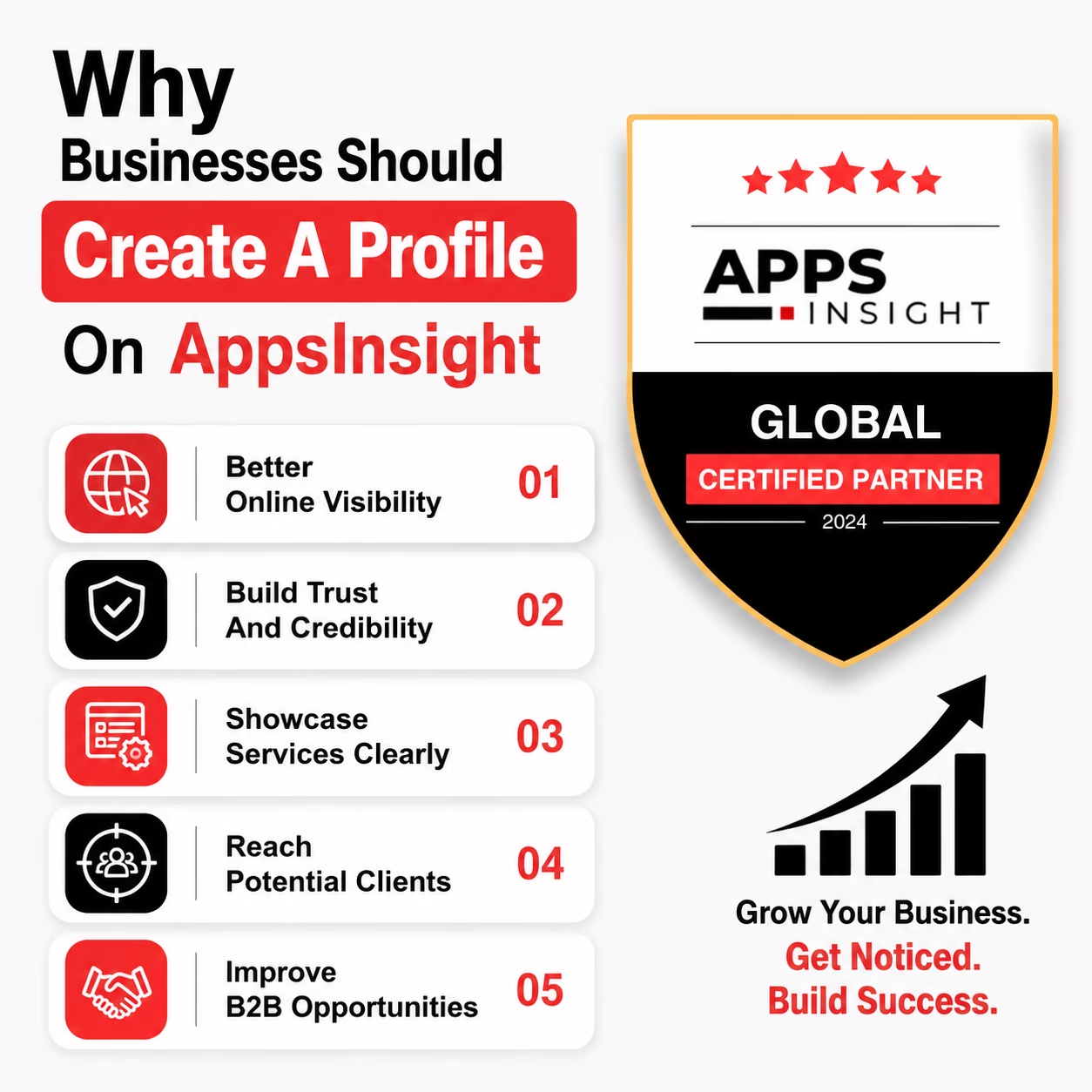
Why Businesses Should Create A Profile On AppsInsight
Creating a company profile on AppsInsight can help businesses improve visibility, build trust, and attract more clients online. Many users search company directories before choosing a service provider, so having a professional profile can make a strong difference.
Better Online Visibility
When we create a business profile, our company becomes easier to discover through category searches and platform listings. This helps more people learn about our services and business expertise.
Build Trust And Credibility
A complete company profile with business details, contact information, logos, and service descriptions looks more professional. Clients usually trust companies more when they see them listed on a trusted platform.
Showcase Services Clearly
AppsInsight allows businesses to explain their services, skills, and experience in one place. It works well for companies looking for an organized way to present their offerings online.
Reach Potential Clients
Many users visit business directories while searching for software, design, development, and marketing services. A strong company profile can help businesses receive more inquiries and leads.
Helpful For Agencies And Tech Companies
Many businesses use AppsInsight as an Agency listing platform to improve visibility and attract clients searching for digital services. Technology businesses also use it to showcase expertise and connect with companies looking for professional solutions.
Improve B2B Opportunities
Platforms like AppsInsight can help businesses connect with other companies and improve networking opportunities. Many brands use this type of platform as part of their B2B business directory strategy for long-term growth.
Useful For IT And Service Businesses
For software and development companies, AppsInsight can also work like an IT services marketplace where businesses present their services to a targeted audience searching for reliable providers.
Overall, creating a profile on AppsInsight is a simple but valuable step for improving online presence and business credibility.
Things We Should Prepare Before Listing A Company
Before creating a company profile on AppsInsight, it is important to prepare all the necessary information properly. A complete and professional profile increases the chances of approval and also helps create a better impression on potential clients.
Here are the main things we should prepare before submitting the listing.
1) Company Name
We should use the official business name exactly as it appears on our website and business documents. Keeping the name consistent helps build trust and improves branding.
2) Website URL
A working website link is very important because clients often visit the company website to learn more about services, projects, and business information.
3) Business Description
We should prepare a simple and clear company description that explains:
- What services we offer
- Who we work with
- What makes our business different
- Our experience and expertise
The description should be easy to understand and written in natural language.
4) Contact Information
Make sure all contact details are correct, including:
- Business email
- Phone number
- Office address
- Social media profiles
Incorrect information can reduce trust and cause approval issues.
5) Company Logo
A professional logo helps improve branding and makes the profile look more complete. We should upload a high-quality logo with a clean background if possible.
6) Business Images
Images of the office, team, projects, or services can make the profile more attractive and professional.
7) Service Details
We should clearly list the services our company provides. This helps users understand whether our business matches their requirements.
For businesses offering software or development services, this can also support App development company listing visibility within the platform categories.
8) Portfolio Or Previous Work
Adding portfolio samples, project screenshots, or case studies helps build credibility and shows real work experience.
9) Social Media Links
Adding LinkedIn, Facebook, Instagram, or other social links can improve trust and help users connect with the company more easily.
Preparing all these details before starting the submission process makes the listing process faster, smoother, and more professional.
Step-by-Step Process To List A Company On AppsInsight
Listing your business on AppsInsight is a simple process. We just need to prepare the correct company information and share the details with the AppsInsight team for review.
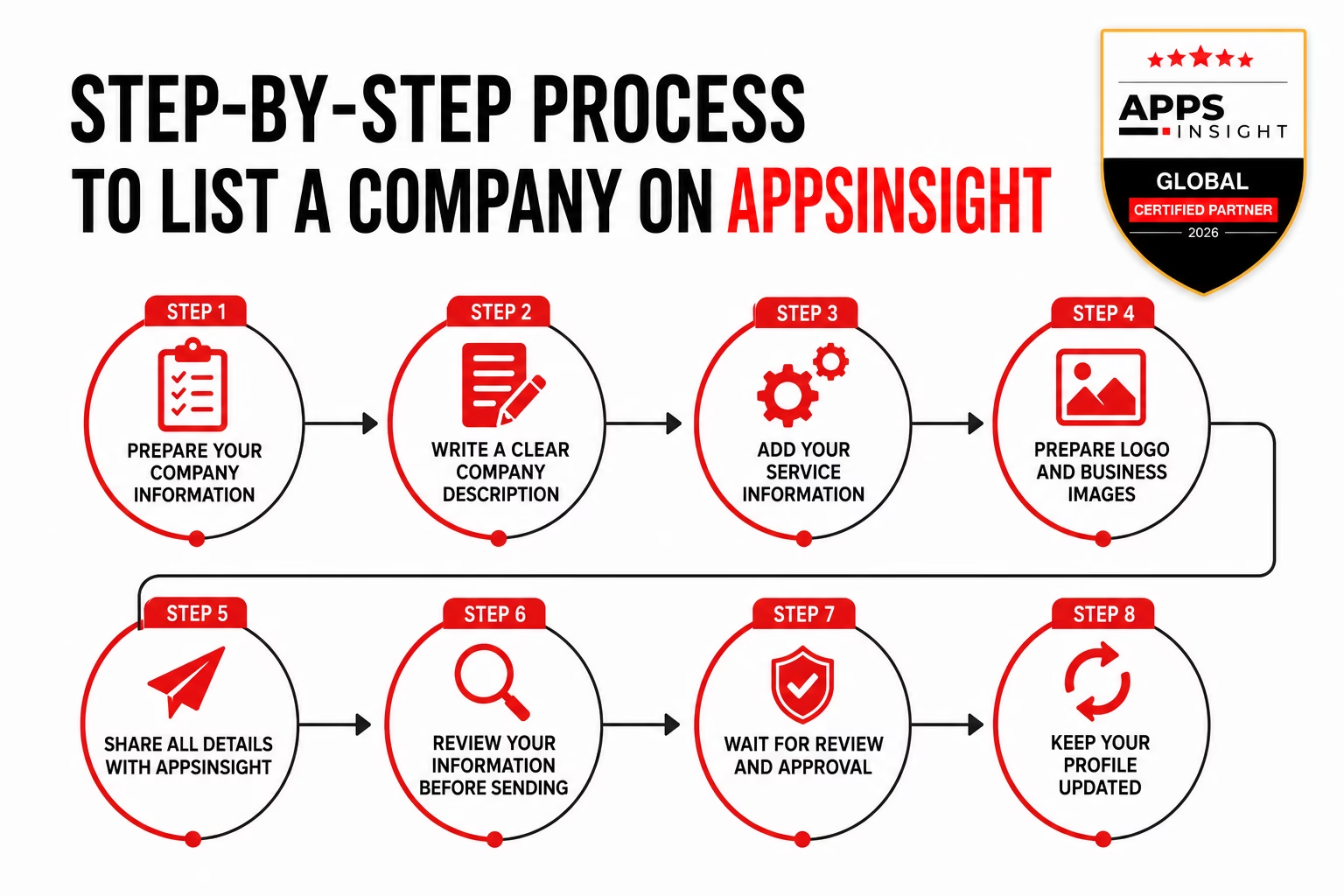
Let us go through the full process step by step.
Step 1: Prepare Your Company Information
Before sending your business details, we should prepare all the important information properly. This helps make the submission process faster and smoother.
Here are the main details we should keep ready:
- Company name
- Website URL
- Business email
- Phone number
- Company description
- Services offered
- Social media links
- Company logo
- Portfolio or project details
- Office address if available
A complete profile always creates a better impression and improves approval chances.
Step 2: Write A Clear Company Description
The company description is one of the most important parts of the listing.
We should explain:
- What our company does
- Which services do we provide
- Industries we work with
- Our experience and strengths
The description should be simple, clear, and easy to understand. Avoid overly technical language or unnecessary promotional wording.
Step 3: Add Your Service Information
Now we should prepare proper service details.
Instead of only writing service names, it is better to explain each service briefly so users understand our expertise clearly.
For example:
- Mobile app development
- Website development
- SaaS solutions
- UI/UX design
- SEO services
- Digital marketing
This helps improve the quality of the company profile and makes the listing more informative for potential clients.
Step 4: Prepare Logo And Business Images
Professional branding helps the profile look more trustworthy.
We should prepare:
- Company logo
- Team images
- Office photos
- Portfolio screenshots
- Project visuals
Good-quality images make the profile look more professional and attractive.
Step 5: Share All Details With AppsInsight
After preparing all the information, we can send the company details directly to:
We should include all business information clearly in the email along with:
- Company description
- Contact details
- Website URL
- Services
- Logo and images
- Social media links
This process helps businesses complete their AppsInsight company listing more easily.
Step 6: Review Your Information Before Sending
Before sending the email, we should carefully review all details.
Check for:
- Spelling mistakes
- Incorrect website links
- Missing contact information
- Low-quality images
- Incomplete service descriptions
A properly organized submission creates a better professional impression.
Step 7: Wait For Review And Approval
After sending the details, the AppsInsight team may review the information before publishing the company profile.
If everything is correct and complete, the listing process usually becomes smooth and fast.
Businesses that properly Submit company to AppsInsight with accurate information often improve their approval chances.
Step 8: Keep Your Profile Updated
Once the profile becomes active, it is important to keep the information updated regularly.
We should update:
- Services
- Portfolio
- Contact details
- Business descriptions
- Company achievements
This helps maintain profile quality and improves trust with potential clients looking for reliable businesses online.
Tips To Create A Strong Company Profile
A strong company profile helps businesses look more professional and trustworthy. When people visit a business listing, they usually decide within a few seconds whether they want to contact the company or not. That is why we should focus on creating a profile that is clear, complete, and easy to understand.
Here are some simple tips that can help improve the quality of the profile.
1) Use A Clear Business Description
The company description should explain the business in simple words.
We should clearly mention:
- What services we offer
- Who we work with
- Our experience
- What makes our company different
Avoid writing very long or confusing paragraphs. Short and clear explanations work much better.
2) Add Real And Accurate Information
Always use correct business details.
This includes:
- Company name
- Website URL
- Email address
- Phone number
- Social media profiles
Wrong information can reduce trust and may create problems during profile review.
3) Upload Professional Images
Images help make the profile more attractive.
We should use:
- High-quality company logo
- Team photos
- Office images
- Portfolio screenshots
- Project visuals
Good visuals create a more professional impression for visitors.
4) Explain Services Properly
Instead of only listing service names, we should explain what each service includes.
This helps visitors understand our expertise more clearly and improves the overall profile quality.
5) Keep The Profile Updated
Business information changes over time. We should regularly update:
- Services
- Portfolio
- Contact details
- Company achievements
- Social links
Updated profiles usually perform better and build more trust.
6) Use Simple Language
Many businesses make the mistake of using overly technical words. Simple language always works better because visitors can quickly understand the services and company strengths.
7) Add Portfolio Or Previous Work
Sharing previous projects or case studies helps build confidence with potential clients.
Even small portfolio examples can improve credibility and show real experience.
8) Focus On Professional Presentation
A clean and organized profile always looks more trustworthy than an incomplete profile.
Taking a little extra time to organize the details properly can make a big difference in how people view the company online.
Common Mistakes To Avoid While Creating A Listing
Many businesses create company profiles quickly without paying attention to important details. Small mistakes can make the profile look unprofessional and may reduce trust with potential clients. That is why we should avoid common errors while creating the listing.
Here are some important mistakes to avoid.
1) Adding Incomplete Information
One of the biggest mistakes is leaving sections incomplete.
Missing details like:
- Website URL
- Contact information
- Services
- Company description
- Social links
can make the profile look weak and unfinished.
A complete profile always creates a stronger impression.
2) Using Poor Quality Images
Low-quality logos or blurry images can make the company look less professional.
We should always use:
- Clear logos
- Professional team photos
- High-quality portfolio images
Good visuals help improve profile quality and trust.
3) Choosing The Wrong Category
Selecting incorrect categories can make it difficult for users to find the business. We should always choose categories that properly match the services we provide.
4) Writing Very Short Descriptions
Some businesses only write one or two lines about their company. A weak description does not explain:
- What the business does
- Which services it offers
- Why clients should trust the company
We should always provide a proper business overview in simple words.
5) Using Too Many Keywords
Adding too many keywords unnaturally can make the profile difficult to read.
The content should always sound natural and easy to understand.
6) Sharing Incorrect Contact Information
Wrong phone numbers, broken website links, or inactive email addresses can create a bad experience for potential clients.
We should double-check all contact details before submitting the profile.
7) Not Updating The Profile
Some businesses create a listing once and never update it again. Outdated information can reduce credibility over time. It is important to regularly update:
- Services
- Portfolio
- Contact details
- Business achievements
8) Ignoring Branding
Profiles without proper logos, images, or branding elements often look less trustworthy. Simple branding improvements can make the company profile look far more professional.
Avoiding these common mistakes can help create a stronger business profile and improve the chances of attracting more clients through the platform.
Final Words

Creating a company profile on AppsInsight is a simple but valuable step for improving online visibility and business credibility. A professional profile helps businesses present their services clearly and makes it easier for potential clients to discover and contact them.
In this guide, we covered the full process step by step, including:
- Preparing company information
- Sharing details properly
- Creating a stronger profile
- Avoiding common mistakes
- Keeping the profile updated
We also learned why business listings are important for SEO, trust, brand visibility, and lead generation.
The most important thing is to keep the profile complete, accurate, and professional. Simple improvements like better descriptions, updated portfolio images, and correct contact details can make a big difference over time.
If you want to improve your company’s online presence, now is a good time to prepare your business details and send them to: hello@appsinsight.co
A strong business profile can help create more visibility, better trust, and new business opportunities in the long run.
FAQ
Is AppsInsight free for company listings?
The listing process and available options may depend on the platform policies. It is best to contact the AppsInsight team directly to get the latest information about listing availability and requirements.
How can we send company details to AppsInsight?
We can prepare the company information and send all details through email to: hello@appsinsight.co
It is important to include complete business information, services, website links, and branding materials for better profile quality.
What information should we include in the company submission on appsinsight.co?
We should include:
- Company name
- Website URL
- Contact details
- Company description
- Services
- Logo and images
- Social media links
- Portfolio or project details
Complete information helps create a stronger profile.
How long does the approval process take?
The review time can vary depending on the platform review process and the completeness of the submitted information.
Profiles with clear and accurate details are usually easier to review.
Can we update the company profile later?
Yes, businesses should update their profile regularly whenever services, portfolio items, or contact details change.
Keeping the profile updated improves professionalism and trust.
Why is a professional company profile important?
A professional profile helps businesses:
- Improve visibility
- Build trust
- Attract potential clients
- Showcase services clearly
- Create better first impressions
Can small businesses also create listings?
Yes, small businesses, startups, agencies, and software companies can all benefit from having a professional company profile online.
Why do business listings help SEO?
Consistent business listings help search engines trust company information more easily. This can improve online visibility and help businesses appear more reliable online.