
In an era where knowing where matters almost as much as knowing when, Location Tracking Apps have quietly become a part of everyday life. Whether you’re checking if your child arrived safely at school, coordinating a delivery team, or finding a misplaced phone, location tracking now underpins how people stay connected and informed.
A 2024 report by Statista estimated that over 1.2 billion people worldwide use some form of location-based service daily, underscoring just how integral these tools have become in both personal and professional settings.
These apps work behind the scenes to transform satellite signals, Wi-Fi networks, and mobile data into real-time geographic insights. Unlike earlier tracking technologies that required dedicated GPS devices, today’s smartphones come equipped with built-in sensors and APIs that allow apps to pinpoint a user’s position within just a few meters.
This seamless integration has made location tracking more accessible, accurate, and context-aware, helping users navigate, monitor, and plan with minimal effort.
Understanding how these systems operate is essential for anyone who values security, coordination, or accountability. Yet, while their usefulness is undeniable, not all tracking solutions are the same. Some focus on family safety and shared visibility, others prioritize business logistics or personal fitness goals.
Many of these innovative tools are built by leading mobile app development companies that specialize in creating precise, user-friendly, and secure tracking applications. For users, the real challenge lies in choosing an app that balances accuracy, privacy, and usability without unnecessary complexity or cost.
This article explores 15 of the most effective and widely adopted Location Tracking Apps currently available. You’ll gain a clear understanding of how they function, what sets them apart, and what factors to consider when selecting the right one for your needs. By the end, you’ll see how these quiet digital companions are reshaping the way we move, connect, and ensure safety—often without us even noticing.
Understanding Location Tracking Apps
Before choosing among the many available options, it’s useful to understand what Location Tracking Apps actually are and how they function. In simple terms, these applications use a combination of GPS (Global Positioning System), cellular networks, and Wi-Fi signals to determine a device’s precise geographical position.
The app then translates that raw coordinate data into readable, real-world information — such as showing your child’s location on a map, displaying your running route, or notifying a delivery company when a driver reaches a destination.
Most smartphones, tablets, and even wearables now come with integrated GPS chips capable of communicating with satellites orbiting the Earth. When you open a tracking app, your device calculates its position by measuring the time it takes signals to reach it from at least four GPS satellites.
This information is then combined with Wi-Fi or cell tower data to refine accuracy, especially in urban areas or indoors where satellite visibility is limited. The result is a near-instant, highly precise location display updated every few seconds.
These real-time location tracking apps often use APIs like Google Location Services or Apple Core Location, which handle the complex calculations behind the scenes. The user only sees an intuitive interface — usually a map with icons representing tracked devices. Behind that simplicity lies a sophisticated data exchange process that balances performance with battery efficiency and privacy control.
In everyday use, best location tracking apps serve a variety of purposes. Parents use family location tracking apps to ensure their children’s safety and coordinate pickups. Businesses rely on them for logistics, field service management, or verifying time and attendance.
Fitness enthusiasts use the best fitness apps along with location sharing tools to monitor their runs, hikes, or cycling routes more accurately. These apps not only track distance and performance but also help users analyze progress over time. Even law enforcement and emergency responders depend on location tracking technology to improve response times and situational awareness.
However, it’s equally important to recognize the privacy and ethical considerations. Because these apps collect continuous location data, responsible use requires consent, secure data handling, and transparency about who can access the information.
Modern operating systems allow users to set permissions — for example, limiting location access to “while using the app” or turning off background tracking entirely.
In short, Location Tracking Apps bridge the gap between physical movement and digital insight. They make everyday coordination easier, but their value depends on how thoughtfully they are used — balancing convenience, security, and trust.
How Location Tracking Works
To appreciate how effective Location Tracking Apps have become, it helps to look closely at the process behind them. At their core, these apps rely on a combination of hardware sensors, communication networks, and software algorithms that work together to determine, verify, and display a device’s position on a map in near real time.
The process begins with GPS satellites. There are currently about 30 satellites orbiting the Earth as part of the Global Positioning System. Each satellite continuously transmits signals containing the exact time and its orbital position. When your smartphone’s GPS receiver detects these signals, it measures how long each one takes to arrive. Using data from at least four satellites, your device can calculate its precise latitude, longitude, and altitude within a few meters of accuracy.
However, GPS alone doesn’t always provide consistent results. Urban environments, tall buildings, or bad weather can interfere with satellite signals. To improve accuracy and continuity, most Location Tracking Apps—especially those built by a skilled iOS App Development firm, use hybrid positioning, which combines GPS data with Wi-Fi networks and nearby cell tower information. For example, if a user enters a shopping mall where satellite access is weak, the app automatically switches to Wi-Fi-based location detection. This ensures a continuous tracking experience without noticeable disruption.
Once the device determines its location, the app transmits this data to a secure server, where it’s stored and processed. Many real-time location tracking apps refresh this information every few seconds, allowing others in a shared group — such as family members or team supervisors — to view live updates. Apps like Life360 and FollowMee use encrypted communication protocols to maintain privacy while transmitting this data, preventing unauthorized access or misuse.
Location information is then displayed through an interface layer — typically a digital map. Here, users can see movements, set geofences (custom areas that trigger alerts when entered or exited), or generate reports over time. Some apps also integrate with machine learning algorithms to predict frequent routes or estimate arrival times, enhancing both usability and insight.
From a technical standpoint, energy management is a significant challenge. Constant GPS activity can drain a device’s battery quickly. To counter this, developers optimize refresh rates and location polling frequency. For instance, apps may track in high precision only when movement is detected, reverting to low-power modes when the device is stationary.
Overall, Location Tracking Apps work through a layered system: data capture (GPS and network signals) → data transmission (secure connection to servers) → data visualization (maps and alerts).
Understanding this process helps users make informed decisions about which apps align best with their privacy preferences, accuracy needs, and device performance expectations.
For users — whether parents monitoring safety, managers overseeing logistics, or travelers sharing routes — knowing how tracking technology works builds confidence and ensures responsible use.
Criteria for Evaluating a Location Tracking App
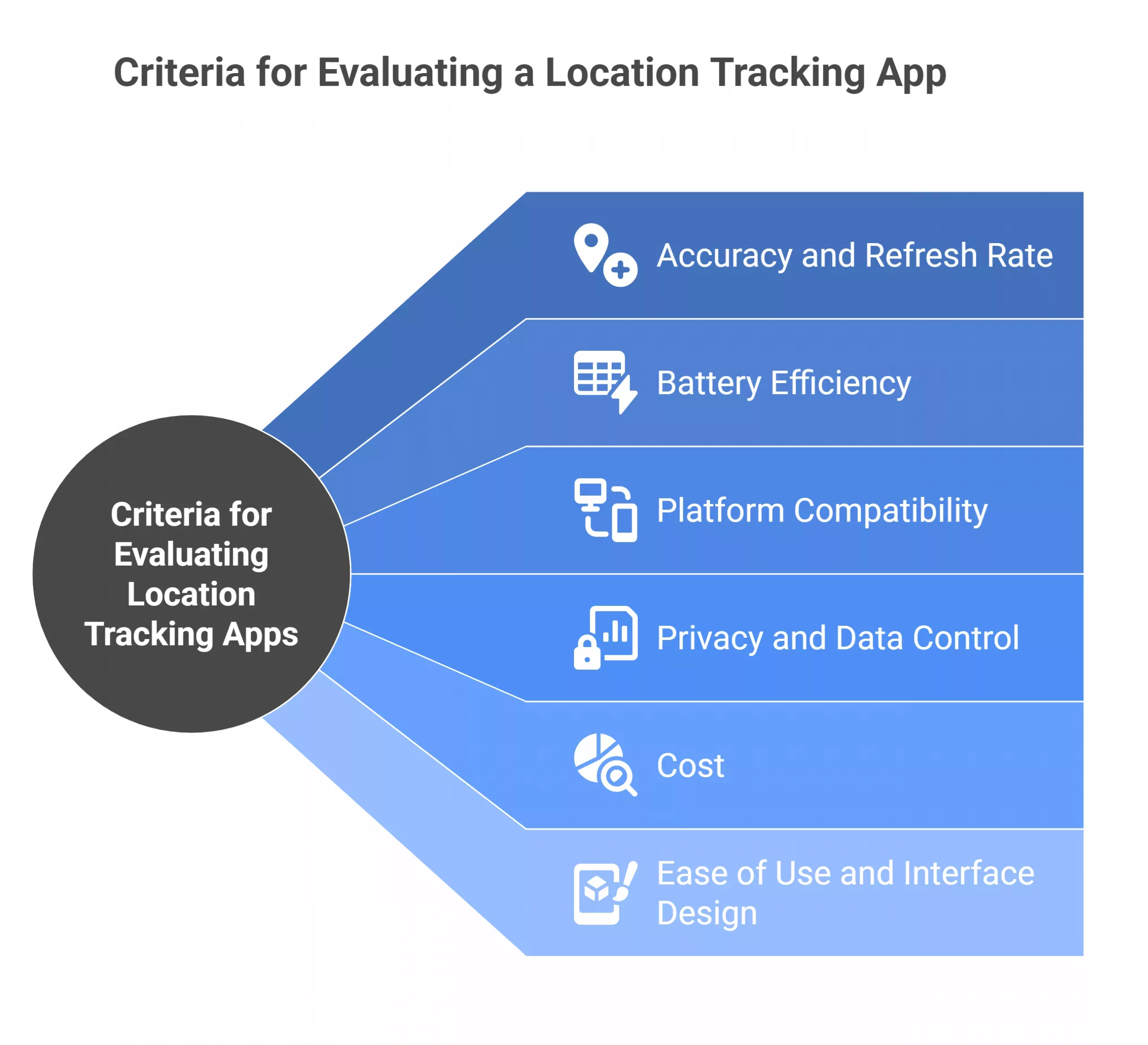
With hundreds of Location Tracking Apps available, choosing the right one depends on understanding the factors that define performance, reliability, and overall user value. Whether you’re selecting a family location tracking app, a business solution, or a fitness companion, the following criteria can help you make an informed decision.
1. Accuracy and Refresh Rate
The most important factor in any tracking app is how accurately it reports location data and how often it updates. Apps use different tracking intervals — some refresh every few seconds, others every few minutes to save battery.
For instance, Google Maps provides near real-time location updates, while lighter tools like GeoZilla refresh data periodically. The ideal balance depends on your use case: a parent monitoring a child’s commute may prefer live tracking, whereas a fitness app can operate effectively with periodic updates.
2. Battery Efficiency
Frequent GPS polling can quickly deplete a device’s battery. Efficient apps minimize this by using adaptive tracking, where the app increases update frequency when movement is detected and reduces it when the device is stationary. Some apps also allow users to set custom power-saving modes, offering control over the trade-off between accuracy and battery life.
3. Platform Compatibility
Not all tracking apps perform equally across platforms. While Apple’s Find My iPhone works seamlessly within the iOS ecosystem, it offers limited integration with Android. Cross-platform apps such as Life360 or iSharing perform well on both iOS and Android, making them better choices for families or teams using mixed devices. Checking compatibility with wearables or web dashboards can also improve usability for business or fitness applications — something the Best Fitness App Development Companies focus on when building cross-device solutions that deliver consistent performance and accurate tracking.
4. Privacy and Data Control
Because tracking involves sensitive personal data, privacy should always be a primary consideration. Look for apps that clearly explain what information they collect, how it’s stored, and who can access it. Many newer best location tracking apps to keep your family safe now include end-to-end encryption and allow users to control who sees their location. Transparency reports and compliance with privacy laws (such as GDPR or CCPA) are strong indicators of responsible data handling.
5. Cost: Free vs Paid Location Tracking Apps
While free versions often provide essential tracking features, they may come with limitations such as reduced accuracy, ads, or fewer customization options. Paid versions generally offer faster refresh rates, advanced safety features, and ad-free experiences. For example, a free app might only show a user’s last known location, while a paid version provides continuous route tracking and geofence alerts. Evaluating total cost should include both subscription fees and potential data usage.
6. Ease of Use and Interface Design
An effective location tracking app should present data in a simple, intuitive format. Cluttered interfaces or complex setup processes can reduce trust and usability. Apps that integrate mapping features (like Google Maps or Glympse) tend to offer smoother experiences, especially for users who are less familiar with technology.
When evaluating Location Tracking Apps, it’s helpful to test them in real-world conditions rather than relying solely on app store reviews. A quick trial run can reveal how the app performs in your specific environment — for instance, how it handles areas with weak connectivity or how fast it responds to a location change.
Ultimately, the best choice is not the most feature-rich app but the one that fits your goals and respects your data. Whether it’s for family coordination, employee monitoring, or fitness tracking, understanding these evaluation factors ensures you select a tool that is accurate, efficient, and secure.
Top 15 Location Tracking Apps (Detailed Overview)
The following 15 Location Tracking Apps represent a mix of family safety, personal fitness, and professional tracking solutions. Each has unique strengths, and understanding how they function helps users choose the one best suited to their specific needs.
1) Google Maps – Best Live Tracking App
Google Maps remains one of the most comprehensive and widely used Location Tracking Apps globally. Beyond navigation, it serves as a powerful live tracking tool that helps individuals share their real-time location with friends, family, or coworkers.
The app integrates data from GPS, mobile networks, and Wi-Fi signals to deliver accurate positioning, even in low-signal areas. Users can set duration-based sharing, meaning others see their live route for a chosen time before it automatically expires.
Its integration with Google’s vast mapping infrastructure allows seamless route planning, public transport information, and ETA updates. Businesses also rely on Google Maps APIs for delivery tracking and service coordination.
However, despite its accuracy and convenience, prolonged live sharing can drain battery life and raise privacy considerations. Overall, Google Maps stands out as a dependable, accessible, and data-rich platform that makes both daily commuting and real-time location sharing highly efficient and transparent.
How It Works: Uses GPS, Wi-Fi, and cellular signals to provide precise positioning and route optimization. Users can share their live location temporarily with selected contacts.
Key Features: Turn-by-turn navigation, live traffic updates, route history, and location sharing.
Strengths & Limitations: Highly reliable and integrated with Android and iOS; however, constant GPS use can increase battery consumption.
2) FamiSafe – Best Location-Sharing App
FamiSafe is an advanced family-oriented location tracking app designed to help parents monitor their children’s whereabouts and ensure digital safety. It combines live GPS tracking with a set of parental control tools such as screen time management, driving reports, and app activity monitoring.
Users can define “safe zones” like home, school, or extracurricular areas; when a child enters or leaves these zones, parents receive instant notifications. FamiSafe also provides historical route data, enabling caregivers to review travel patterns and confirm safe movement throughout the day. The app’s dashboard presents information clearly, allowing parents to manage multiple devices from one account.
Privacy is prioritized through consent-based monitoring, where both parties are aware of data sharing. While FamiSafe’s advanced features require a subscription, its layered safety and educational focus make it one of the best location tracking apps for families seeking a reliable balance between oversight and trust.
How It Works: Tracks device location using GPS and mobile networks, providing instant alerts when children enter or leave pre-defined areas.
Key Features: Geofencing, activity reports, and driving behavior analysis.
Strengths & Limitations: Excellent for family monitoring; however, advanced features require a paid subscription.
3) Find My iPhone – Best App for Tracking iPhone Location

Find My iPhone, now integrated into Apple’s unified Find My service, is a critical tool for Apple users seeking to locate lost or stolen devices. The app works through iCloud, using a combination of GPS, Bluetooth, and Apple’s encrypted “Find My network,” which leverages nearby Apple devices to detect missing ones even offline.
It allows users to pinpoint exact locations on a map, play a sound to locate the device nearby, or remotely lock and erase it to protect personal data. The system is highly secure, as location data is encrypted and cannot be accessed without proper authentication. Its seamless integration across iPhone, iPad, Apple Watch, and Mac makes it effortless for users to monitor all devices under one account.
Although unavailable on Android, Find My iPhone remains one of the most dependable Location Tracking Apps for security-conscious users within Apple’s ecosystem.
How It Works: Uses Apple’s iCloud system to triangulate the device’s last known location, even when offline, using nearby Apple devices via the Find My network.
Key Features: Remote lock, erase function, sound alerts, and offline detection.
Strengths & Limitations: Highly secure within Apple’s ecosystem but unavailable for Android users.
4) iSharing | Track Cell Phone Location Free – Best Location Sharing App

iSharing is a user-friendly cross-platform app that allows close friends and families to share real-time location updates securely. Unlike many enterprise-oriented tools, iSharing focuses on personal use cases — such as keeping loved ones informed during travel or ensuring safety during emergencies.
The app uses GPS and network triangulation to display precise locations on an intuitive map interface. It includes a built-in messaging feature that lets users communicate directly, reducing the need for multiple apps. A panic alert option can instantly notify contacts of emergencies, transmitting both current location and message details.
iSharing also keeps a limited history of movements, allowing users to review recent routes. It emphasizes user privacy by requiring mutual consent before sharing begins. While its accuracy may fluctuate in low-signal areas, iSharing remains a dependable choice for individuals looking for a location sharing app that balances simplicity, accessibility, and safety.
How It Works: Uses GPS and network-based tracking to share location updates among invited users.
Key Features: Real-time updates, private chat, and panic alerts.
Strengths & Limitations: Easy to use; however, location precision can vary with connectivity strength.

5) FollowMee GPS Tracker | Real-Time GPS Tracking Mobile App

FollowMee transforms any smartphone into a dedicated GPS tracker suitable for both personal and business applications. The app continuously captures location data and transmits it to a secure online dashboard, allowing users to monitor multiple devices from one central account.
For small business owners, this functionality supports fleet monitoring, employee location verification, and field service coordination. For personal use, FollowMee provides a straightforward way to locate family members or track outdoor activities. It supports both live updates and historical playback, offering insights into travel routes and time spent at specific locations.
The app is also known for its offline tracking ability — storing location data when the network is unavailable and syncing it later once the connection is restored. With strong customization options, privacy settings, and an efficient tracking engine,
FollowMee has become a trusted name in real-time location tracking apps for individuals and organizations alike.
How It Works: Converts any mobile device into a GPS tracker that continuously updates location to a web-based dashboard.
Key Features: Web monitoring, multiple device tracking, and route history.
Strengths & Limitations: Provides reliable tracking but requires manual setup for group monitoring.
6. GeoZilla – Find My Phone, Locator & GPS Tracker
GeoZilla combines GPS tracking and safety monitoring in a simple, family-oriented interface. It allows users to create private “circles,” where only approved members can share and view each other’s real-time locations. Beyond basic tracking, GeoZilla offers behavior summaries such as daily distance traveled and time spent in specific areas.
Geofencing alerts notify users when someone arrives or leaves designated zones like work or school. One of its standout features is energy optimization — the app tracks location only when movement is detected, significantly reducing battery drain. It also includes built-in communication tools for quick check-ins and updates.
GeoZilla places strong emphasis on user privacy, encrypting all shared data and offering transparent permission controls. While some advanced features are locked behind a subscription, GeoZilla remains one of the most widely adopted location tracking apps for families prioritizing simplicity, safety, and energy efficiency.
How It Works: Combines GPS and mobile network data to update location in near real time.
Key Features: Location history, private circles, and automatic arrival notifications.
Strengths & Limitations: User-friendly design; premium features are subscription-based.
7) Find360 – Safe Location Tracker
Find360 is designed to help families and small groups maintain location visibility while prioritizing privacy. Unlike many tracking tools that store extensive historical data, Find360 focuses on temporary, encrypted location sharing that automatically expires after a set period.
It uses GPS and Wi-Fi positioning to provide accurate, real-time updates, with alerts for arrivals, departures, and route deviations. Its minimal data retention policy appeals to users concerned about long-term data storage and third-party access. The interface is intuitive, showing all tracked individuals on a single dashboard with easy customization for alerts and safe zones.
Find360 also provides driving summaries and route efficiency insights, helping parents or managers identify patterns in travel behavior. While it lacks integrations with other productivity or fitness tools, Find360’s privacy-first approach makes it an appealing choice among best location tracking apps for those seeking dependable functionality without compromising data control.
How It Works: Tracks location data and stores it temporarily on encrypted servers before deleting old logs.
Key Features: Family group tracking, driving summaries, and limited-time location sharing.
Strengths & Limitations: Prioritizes privacy; however, its limited third-party integrations may not suit business users.
8. Find My Friends
Find My Friends is a straightforward Location Tracking App developed by Apple that enables users to share real-time location data with trusted contacts. Designed for simplicity, it allows iOS users to see one another’s positions on a map, making coordination easy for family gatherings, commutes, or social events.
The app uses Apple’s Core Location framework to maintain high-precision GPS tracking while optimizing for minimal battery impact. Sharing is permission-based—users choose who can view their location and for how long, ensuring full control and privacy. Its integration with iCloud and Apple Maps allows quick, reliable updates without requiring any manual setup.
While it lacks the advanced alert and historical route features found in some third-party tools, its reliability and ease of use have made it a standard for millions of iPhone owners. For families or close friends within Apple’s ecosystem, Find My Friends provides a practical balance of visibility, security, and simplicity.
How It Works: Uses Apple’s Core Location API for accurate GPS-based sharing between iOS users.
Key Features: Real-time updates, contact-based sharing, and map view.
Strengths & Limitations: Lightweight and reliable but lacks advanced monitoring features like alerts or logs.
9) Life360 – Location Sharing, Safety & Family Tracking App
Life360 is among the most recognized family location tracking apps globally, providing a centralized platform for location visibility, safety alerts, and emergency communication. Users form “circles” — private groups where members can view one another’s real-time locations, set geofences, and receive automatic notifications about arrivals or departures. The app also includes driving analysis, crash detection, and emergency response services in premium tiers.
Life360 collects data using GPS and Wi-Fi triangulation to deliver continuous, real-time updates with minimal delay. Its historical route tracking helps parents review travel behavior over time, enhancing situational awareness. Security is reinforced through encrypted data transmission and transparent permission management. While the free version covers core features, premium subscriptions unlock detailed reports and extended safety functions.
With its combination of accessibility, reliability, and safety-first design, Life360 continues to be one of the best location tracking apps for families prioritizing accountability and peace of mind.
How It Works: Creates “circles” where members can view each other’s live locations, set geofences, and receive automatic alerts.
Key Features: Real-time tracking, crash detection, emergency help button, and detailed route history.
Strengths & Limitations: Comprehensive safety features; subscription tiers unlock additional tools like roadside assistance.
10. MapMyRun by Under Armour – A Complete Set of Tracking & Training Tools
MapMyRun is a fitness-oriented Location Tracking App that transforms GPS data into actionable insights for athletes and active users. It tracks runs, walks, and cycling routes, displaying pace, distance, and elevation metrics in real time.
The app syncs seamlessly with wearable devices such as smartwatches and heart-rate monitors, allowing users to analyze performance trends over time. Its route-mapping tool lets runners discover and share local paths, while voice feedback provides instant updates during workouts. MapMyRun also integrates with the Under Armour Connected Footwear line for automatic workout logging.
Data privacy and control are clearly explained, giving users the choice to share or keep their information private. While not designed for family or security monitoring, MapMyRun excels in precision tracking for physical activity. For fitness enthusiasts, it represents how Location Tracking Apps can extend beyond safety—serving as effective companions for health, performance, and motivation.
How It Works: Logs runs, walks, and cycling routes using GPS, providing performance summaries and route maps.
Key Features: Activity tracking, community sharing, and integration with wearables.
Strengths & Limitations: Excellent for athletes but less relevant for family or enterprise use.
11) Family Locator – Best GPS Tracking and Monitoring App for Families
Family Locator is designed to simplify real-time family monitoring by combining intuitive map displays with strong alert systems. Using GPS and network-based tracking, it allows parents to view their children’s locations, set safety zones, and receive notifications when boundaries are crossed.
The app supports multiple profiles under one account, making it suitable for larger families. It also stores recent travel histories, helping parents review routes or confirm safe arrivals. Family Locator emphasizes clarity through a clean interface, where users can toggle between live views and historical data easily.
It incorporates SOS alerts for emergencies and even a chat feature for quick communication within the app. Though it requires continuous location access—which can impact battery life—the accuracy and speed of updates make it a reliable choice. For households seeking an efficient, easy-to-use GPS tracking app, Family Locator remains one of the most practical and trusted options available.
How It Works: Tracks family members’ devices and sends instant notifications if someone enters or leaves a set zone.
Key Features: Geofencing, emergency alerts, and historical location data.
Strengths & Limitations: Highly user-friendly; battery consumption can be high during continuous tracking.
12. Glympse – A Platform with Real-Time Geo-Location Technology
Glympse offers a unique, privacy-friendly approach to real-time location sharing. Instead of requiring account registration or constant tracking, it allows users to send temporary, web-based links that display their live movement for a chosen duration. Once the timer expires, sharing stops automatically, ensuring that data isn’t stored or accessible afterward.
The app works across platforms and can be viewed on any browser, making it ideal for coordinating travel plans, deliveries, or meetups without long-term data exposure. Glympse relies on GPS and network data for accuracy while minimizing battery consumption by running only during active sessions. Its simplicity and flexibility have made it popular among professionals and casual users alike.
However, it lacks ongoing monitoring and historical data functions. As a short-term location sharing app, Glympse exemplifies a balance between utility and privacy, providing real-time visibility without requiring permanent data exchange or sign-ups.
How It Works: Generates shareable links that transmit live location updates for a chosen duration.
Key Features: Real-time location sharing, no registration required, and compatibility with any browser.
Strengths & Limitations: Great for short-term sharing but lacks long-term tracking or analytics.
13) mSpy – Parental Tracking and Monitoring Tool
mSpy is a comprehensive monitoring and location tracking app primarily used for parental control and supervision. It operates discreetly, collecting GPS data, app usage logs, and communication details from the child’s device with appropriate consent.
The app offers a centralized dashboard accessible via web or mobile, where parents can view real-time locations, movement history, and alerts triggered by specific keywords or app activity. Beyond physical tracking, mSpy’s insights help identify potential digital risks, such as unsafe online interactions or excessive screen time. Its location tracking uses both GPS and Wi-Fi positioning to maintain accuracy indoors and outdoors.
While the app is powerful, it must be used ethically and within privacy regulations to ensure transparency and legal compliance. For parents seeking comprehensive awareness of both device and location behavior, mSpy provides a structured, data-driven tool for responsible digital oversight.
How It Works: Operates discreetly in the background, tracking device activity, GPS location, and communication logs.
Key Features: GPS tracking, app usage reports, and alert settings.
Strengths & Limitations: Offers detailed insights but must be used responsibly, adhering to consent and legal standards.
14. Find My Kid – GPS Tracker for Kids to Keep Your Family Safe and Secure
Find My Kid is purpose-built for parents who want to ensure their children’s safety without intrusive monitoring. The app provides live GPS tracking, route playback, and customizable safety zones that send notifications when children arrive or depart from specific places such as home, school, or friends’ houses. A built-in SOS button allows kids to alert parents instantly in emergencies, transmitting their exact location and situation details.
Find My Kid also supports two-way voice communication, letting parents call directly through the app. Data is stored securely and accessible only to verified family members, with transparent settings to manage visibility and permissions. The interface is bright and easy for children to understand, promoting trust rather than surveillance.
Though limited to child-parent scenarios, its focus on usability and safety makes Find My Kid one of the best location tracking apps to keep your family safe.
How It Works: Parents can track children’s real-time location and receive alerts when routes deviate from expected paths.
Key Features: SOS button, geofencing, and voice communication.
Strengths & Limitations: Reliable and intuitive for families; limited functionality for broader tracking use.
15) Verizon Smart Family – Location Tracking & Parental Protection
Verizon Smart Family integrates location tracking with broader digital supervision tools for Verizon customers. It enables parents to view their children’s locations, set time-based usage limits, and manage access to calls, texts, and apps.
By using Verizon’s cellular network data in combination with GPS, the app delivers highly accurate real-time positioning, even when GPS signals are weak. Users can establish geofences, receive automatic notifications, and review weekly activity summaries. One advantage of being carrier-integrated is data reliability—location updates continue even if Wi-Fi is turned off. The app also features driving insights, helping parents monitor speed and route adherence.
While Verizon Smart Family is only available to Verizon subscribers, its deep network integration enhances stability and precision. For households seeking an all-in-one safety and monitoring solution, it remains a well-structured and effective Location Tracking App that balances convenience with control.
How It Works: Uses Verizon’s network infrastructure for accurate location reporting and device management.
Key Features: Location alerts, screen time limits, and call/text controls.
Strengths & Limitations: Works best for Verizon subscribers; limited availability outside the carrier network.
Benefits and Limitations of Using Location Tracking Apps
The widespread use of Location Tracking Apps has changed how families, professionals, and organizations manage movement, safety, and efficiency. However, while these tools offer measurable advantages, they also present challenges related to privacy, accuracy, and responsible use. Understanding both sides helps users make better, more informed choices.
Enhanced Safety and Connectivity
One of the strongest benefits of Location Tracking Apps is their role in improving personal safety and communication. Families can see loved ones’ real-time locations, reducing uncertainty and stress, while businesses can track vehicles or field employees to ensure timely service delivery.
Apps like Life360 and FamiSafe notify users automatically when someone enters or leaves a designated zone, eliminating the need for constant calls or messages. In emergencies, SOS alerts or crash detection features can speed up response times. This combination of visibility and proactive alerts makes location tracking an essential safety tool for many households and organizations.
Accountability and Operational Efficiency
In professional environments, Location Tracking Apps support transparency and productivity. Fleet management teams use apps like FollowMee or GeoZilla to monitor routes, minimize idle time, and improve delivery performance. This data-driven approach enhances accountability by providing objective information on travel time and route adherence.
For individuals, apps such as MapMyRun transform movement into measurable insights, helping users identify trends and optimize routines. By turning raw GPS data into actionable metrics, tracking apps encourage both personal and professional growth — ensuring users can make informed, evidence-based decisions.
Precision and Real-Time Insights
Modern real-time location tracking apps have evolved far beyond basic GPS. They now use hybrid tracking systems that combine GPS, Wi-Fi, and mobile networks to achieve meter-level accuracy. Some even employ predictive routing algorithms to estimate travel time or movement patterns.
This level of precision improves reliability, especially in contexts where timing and coordination are critical — for example, coordinating delivery drivers or ensuring a child safely reaches a destination. For users, this accuracy translates into better planning, faster decision-making, and improved situational awareness.
Convenience and Coordination
Location tracking simplifies daily interactions by reducing the effort required for coordination. Tools like Glympse allow temporary sharing of live locations without complex setup, making it easier for friends or colleagues to meet or track arrivals.
For families, these apps replace uncertainty with clarity — for instance, checking if a child arrived safely at school without needing to call. For businesses, they streamline logistics by showing real-time progress, helping to align operations. The result is a smoother flow of communication and coordination between users.
Privacy and Ethical Concerns
While the benefits are significant, the most frequently discussed limitation is privacy. Because these apps continuously collect and store sensitive location data, misuse or unauthorized access can pose real risks. Responsible developers use encryption, anonymization, and permission-based sharing to protect users, but privacy still depends largely on how users manage settings and consent.
In shared environments like families or workplaces, ethical use requires transparency — every participant should understand when and why tracking occurs. Without this, tracking can lead to mistrust or perceived surveillance rather than collaboration.
Battery Consumption and Technical Constraints
Continuous GPS activity consumes significant power, which can shorten device battery life. To address this, many apps now include adaptive tracking, reducing update frequency when the device is idle. However, apps that rely solely on GPS without Wi-Fi support still face higher energy use.
Accuracy also depends on environmental factors. In dense urban areas or indoors, GPS signals can be weak or distorted, leading to small but noticeable variations in reported location. Understanding these limitations helps users interpret data realistically and choose apps optimized for their environment.
Responsible Use and User Awareness
Ultimately, the value of any Location Tracking App depends on responsible use. Users should review privacy settings, limit data sharing to trusted contacts, and ensure that tracking aligns with mutual consent. Awareness of these boundaries allows technology to serve its purpose — enhancing safety and efficiency — without undermining trust.
| Benefits | Limitations |
|---|---|
| Improved safety and emergency response | Privacy and ethical concerns |
| Greater coordination and communication | Battery consumption |
| Accurate, real-time tracking | Potential data misuse if settings ignored |
| Increased accountability and productivity | Signal and environment limitations |
| Convenience and time savings | Need for user awareness and consent |
They connect people, enhance safety, and improve planning but they must be paired with thoughtful privacy practices and realistic expectations about technology performance. The goal is not just to track movement, but to use location data wisely, ethically, and securely.
Choosing the Right Location Tracking App for Your Needs
Selecting the right Location Tracking App depends on understanding your specific goals, comfort with data sharing, and the context in which you plan to use the tool. While all tracking apps rely on similar technologies — such as GPS and network-based positioning — the way they handle data, privacy, and features can differ significantly.
Evaluating these factors in relation to your purpose ensures a safer and more efficient experience.
For Families and Personal Safety
If your main goal is safety and peace of mind, apps like Life360, Family Locator, and Find My Kid are ideal choices. These tools allow family members to share real-time locations, receive automated arrival alerts, and communicate within private groups. Their geofencing capabilities are particularly useful for parents who want to be notified when children reach or leave specific places such as school or home.
How it helps: Families benefit from increased awareness without needing constant phone calls or text updates. The ability to see patterns over time also promotes open discussions about routines and independence.
When evaluating family location tracking apps, prioritize features such as encrypted sharing, customizable privacy controls, and clear notification systems. Free plans may suffice for occasional use, but paid options often add SOS alerts, driving insights, and location history — valuable features for families with teenagers or frequent travelers.
For Businesses and Teams
For professional applications such as delivery services, logistics, or fieldwork, accuracy and reporting are key. Tools like FollowMee and GeoZilla provide multi-device dashboards, enabling managers to track employee locations and analyze travel routes in real time.
How it helps: This improves accountability and efficiency, reducing idle time and ensuring resources are allocated effectively.
When assessing business-focused apps, consider whether the tool supports data export, real-time alerts, and role-based access control. It’s also important to review data retention policies, especially if location data is tied to employee performance or compliance monitoring. Choosing a solution that aligns with your organization’s privacy and legal standards protects both employers and staff.
For Fitness and Outdoor Activities
If your primary goal is self-improvement rather than supervision, MapMyRun and similar fitness-oriented apps offer GPS tracking tailored to athletic use. They measure pace, distance, and routes, helping users analyze performance and stay motivated.
How it helps: Fitness tracking apps convert movement data into actionable insights, showing progress trends over time.
In this case, precision and device integration matter more than social or safety features. Look for apps that work seamlessly with wearables, minimize battery drain, and provide accurate data even in remote areas.
Balancing Free vs Paid Options
When comparing free vs paid location tracking apps, users should focus on total value rather than feature count. Free versions typically offer basic live tracking and limited alerts, while paid tiers unlock advanced tools like detailed reports, unlimited location history, or multi-user management.
How it helps: Evaluating cost-to-benefit ensures you only pay for features you actually need — whether that’s family safety, operational control, or athletic analytics.
Choosing the best app is less about finding the most advanced technology and more about aligning with your goals, comfort level, and trust in how your data is handled. Before committing, it’s advisable to test an app for a few days in real conditions. Pay attention to battery performance, update accuracy, and privacy settings.
Ultimately, the most effective Location Tracking App is one that fits naturally into your lifestyle — enhancing awareness and safety without adding unnecessary complexity. For startups, this can mean faster customer response times; for families, greater peace of mind; and for individuals, better control over how and when they share their location data.
Contribute and Gain Visibility on AppsInsight
The world of mobile applications continues to evolve rapidly, and staying visible within that ecosystem depends on knowledge sharing and collaboration. For professionals, developers, and app-based businesses, contributing to reputable industry platforms is one of the most effective ways to build credibility and reach new audiences.
At AppsInsight, we welcome insightful contributions from writers, app developers, and technology firms who want to share practical perspectives on mobile technology, software development, or user experience. Whether it’s a detailed guide on app performance optimization, an analysis of security trends, or a case study on innovative app deployment, publishing with AppsInsight helps your voice reach a wide community of tech readers and decision-makers.
If you have expertise or experience to share, consider visiting our Write for Us page. Articles published on AppsInsight are carefully reviewed for quality and relevance, ensuring that every piece adds educational value to our growing library of app-focused content. By contributing, you not only showcase your thought leadership but also help others navigate complex topics such as mobile security, app usability, or analytics best practices.
For technology firms and app developers, another opportunity lies in listing your company on AppsInsight. Adding your firm to our directory can significantly increase visibility among professionals, potential clients, and industry peers. It’s a practical way to establish credibility, generate inquiries, and be discovered by users seeking trusted app solutions.
In short, sharing your expertise through AppsInsight isn’t just about publishing an article — it’s about becoming part of a collaborative ecosystem that values clarity, accuracy, and informed discussion.
Sum up
Location Tracking Apps have evolved from optional utilities into everyday tools that simplify communication, improve safety, and enhance operational efficiency. Whether used for family coordination, business logistics, or fitness tracking, they demonstrate how location data — when used responsibly — can make daily life more organized and secure.
Throughout this guide, we’ve explored fifteen of the most effective and widely adopted Location Tracking Apps, learned how they function, and discussed practical criteria for choosing the right one. We’ve also examined the balance between convenience and privacy, a factor that continues to shape how individuals and organizations use tracking technology.
Exploring this topic ensures that users not only benefit from the power of tracking but also maintain full control over their digital footprint.
FAQs
Are Location Tracking Apps accurate indoors or in areas with poor GPS signal?
Accuracy depends on the signal sources used by the app. While GPS is highly precise outdoors (usually within 5–10 meters), it becomes less effective indoors or in dense urban areas. To maintain accuracy, many apps combine GPS with Wi-Fi positioning and cell tower triangulation, which help estimate location even when satellite signals are weak.
Some advanced tools also use motion sensors to improve short-range accuracy. Users can enhance precision by keeping Wi-Fi enabled and granting location permissions for both GPS and network-based tracking.
How do Location Tracking Apps protect user privacy?
Most reputable tracking apps now employ end-to-end encryption, which means location data is securely transmitted between devices and servers without exposure to third parties. In addition, many apps provide permission-based sharing, allowing users to decide who can see their location and for how long.
Regularly reviewing app settings, using strong account passwords, and enabling two-factor authentication further improves privacy. Users should also verify whether the app complies with privacy regulations like GDPR or CCPA, especially if it stores or shares user data across borders.
Can Location Tracking Apps be used without an internet connection?
Yes — some apps, such as FollowMee, allow offline tracking by temporarily storing location data on the device. Once the connection is restored, the app uploads all stored coordinates to its server.
However, most real-time tracking features require at least a minimal data connection to share live updates. For areas with unreliable connectivity, users should choose apps with built-in offline capabilities or caching systems, ensuring tracking continuity without data loss.
What are geofences, and how do they work in Location Tracking Apps?
A geofence is a virtual boundary set around a real-world location — for example, a school, office, or home. When a tracked device enters or exits that boundary, the app triggers an automatic alert. This function relies on GPS coordinates and operates continuously in the background.
Geofences are particularly useful for parents monitoring children’s movement or for businesses tracking delivery vehicles. Setting smaller, specific zones improves accuracy and reduces unnecessary notifications, while respecting privacy boundaries ensures ethical use of this feature.
What factors should I check before installing a Location Tracking App?
Before downloading any app, users should review its permissions, developer credibility, and data handling policies. Reliable apps come from recognized developers, have transparent privacy statements, and maintain consistent updates.
Checking user reviews on official app stores provides insight into real-world performance and potential issues. It’s also important to confirm cross-platform compatibility if you plan to share tracking between Android and iOS devices.
Finally, users should read the app’s data retention policy to understand how long location data is stored and whether it’s shared with third parties.