Choosing the right supply chain software starts with one simple question: What supply chain problem does your business need to solve? The right system should fit your workflows, connect with the tools you already use, provide useful data, and remain practical as your business grows. It should not be selected simply because it has the largest feature list or the newest technology.
For founders, operations leaders, procurement teams, and technology decision-makers, this distinction matters. Supply chains involve purchasing, suppliers, inventory, warehouses, transportation, orders, and delivery. When these activities rely on disconnected spreadsheets or systems, teams can spend more time collecting information than acting on it.
The market for supply chain management software is also substantial. Gartner reported that worldwide supply chain management software revenue reached approximately $33.4 billion in 2024, up 12.4% from 2023. Gartner also forecasts that annual spending on supply chain management software could reach $62 billion by 2028.
That growth does not mean every business needs a large enterprise platform. A small retailer, manufacturer, distributor, or logistics company may need a much smaller system. The goal is to match the software to the business.
Why the Right Supply Chain Software Matters
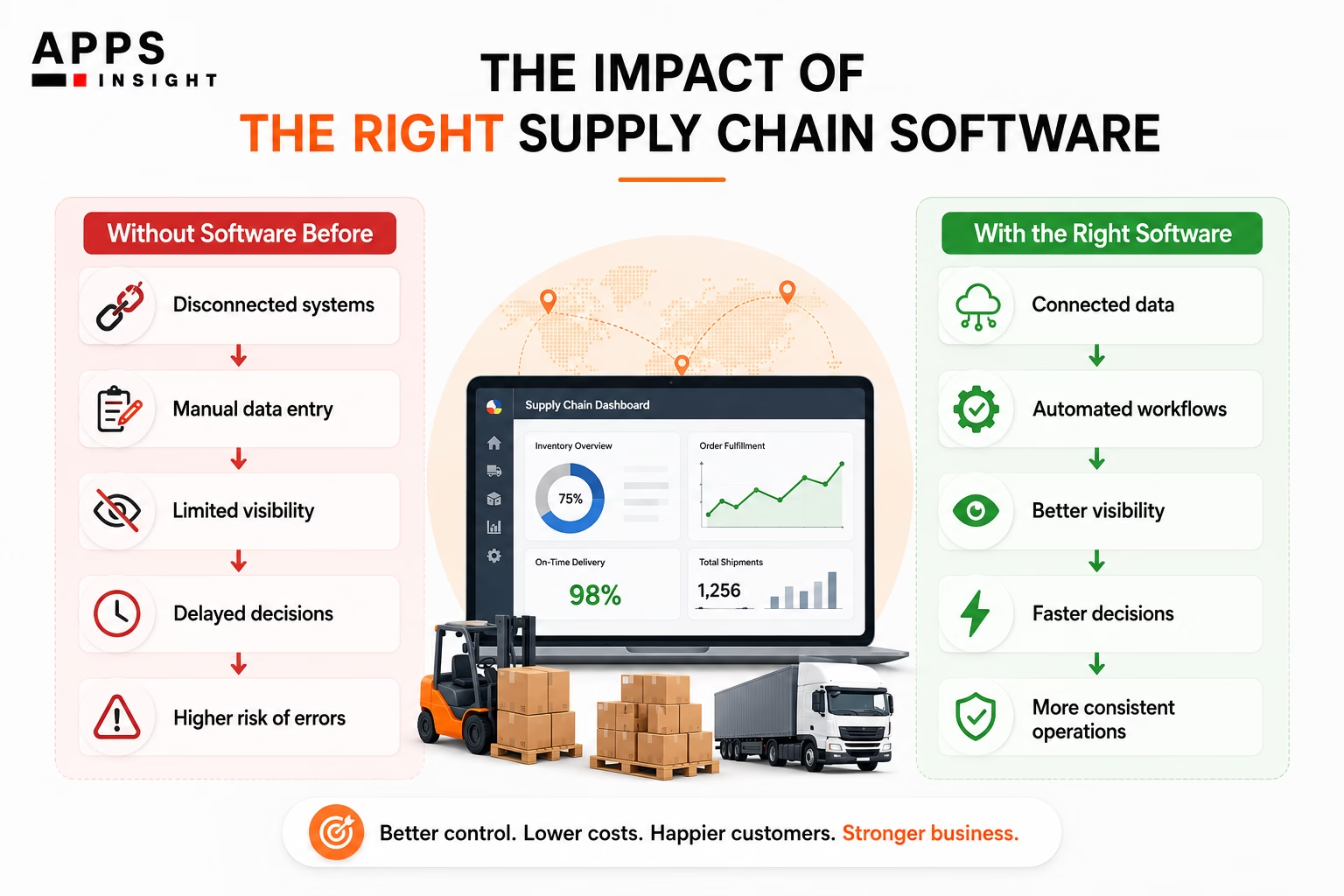
Supply chain software brings operational information into a system that teams can use to plan, monitor, and manage activities. Depending on the product, it can cover inventory, procurement, warehouse operations, transportation, supplier management, demand planning, order management, and analytics.
The practical benefit is better coordination. For example, imagine a distributor that receives orders through an e-commerce platform, manages inventory in a separate spreadsheet, uses an accounting system for invoices, and receives shipment updates from carriers through email. Employees may have to manually move information between systems.
A suitable platform can connect these processes so that an order, inventory level, shipment, and delivery status can be viewed through a more consistent flow of information.
This is important because supply chain visibility remains a challenge. McKinsey found that 45% of surveyed companies either had no visibility into their upstream supply chain or could see only as far as their first-tier suppliers.
Software cannot solve every supply chain problem. Poor supplier relationships, inaccurate data, weak processes, and unclear ownership can still create problems. However, the right system can give teams better information and make repeatable processes easier to manage.
Top 10 Tips for Choosing Supply Chain Software
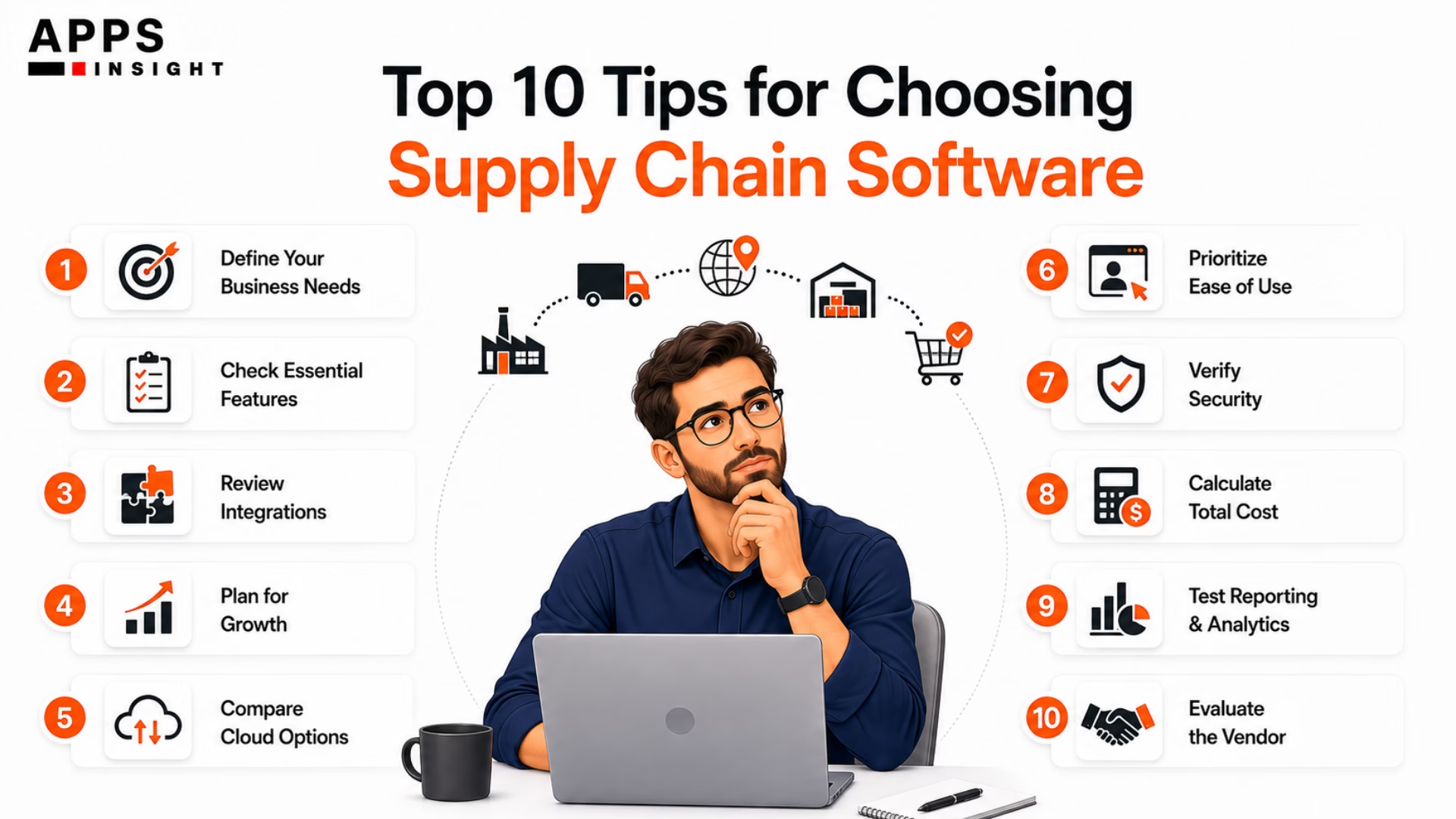
1. Start With Business Requirements
Before comparing vendors, document what your business actually needs. Start with your current supply chain process. Map how products or materials move from suppliers to customers and identify where delays, manual work, errors, or limited visibility occur. Ask questions such as:
- How many suppliers do you manage?
- How many products or SKUs do you handle?
- Where is inventory stored?
- How many warehouses or locations are involved?
- How are purchase orders created?
- How are shipments tracked?
- How are returns handled?
- Which processes are still managed through spreadsheets?
- Which reports do managers need every day or week?
Then separate requirements into three categories: essential, useful, and optional.
For example, a small distributor may consider inventory tracking, purchase orders, barcode support, and accounting integration essential. Advanced demand forecasting may be useful but not necessary at the current stage. This approach prevents teams from paying for functionality they will not use.
2. Identify the Features You Actually Need
The right feature set depends on the type and complexity of your supply chain. Common Supply Chain Management Software Features include:
- Inventory management
- Procurement management
- Supplier management
- Purchase order management
- Warehouse management
- Transportation management
- Shipment tracking
- Demand forecasting
- Order management
- Returns management
- Reporting and dashboards
- Alerts and notifications
- Role-based access
- Mobile access
- API integrations
Do not judge a platform only by the number of features listed on its website. Look at how each feature works in a real business process.
For example, if your main problem is stockouts, check whether the system can monitor inventory levels, establish reorder points, generate alerts, and support demand planning. If delivery visibility is the problem, examine tracking, carrier integration, estimated delivery times, and customer notifications. The feature should connect directly to a business requirement.
3. Check Integration Before You Buy
Integration is one of the most important technical considerations. Your supply chain software may need to exchange information with an ERP, accounting platform, e-commerce store, CRM, warehouse system, transportation platform, payment system, or supplier portal.
Ask vendors:
- Does the software provide APIs?
- Which systems already have native integrations?
- Are integrations included in the subscription?
- Is real-time synchronization available?
- How are integration failures handled?
- Can data be exported in standard formats?
- Does the vendor provide integration documentation?
Technology In Supply Chain Management increasingly depends on connected systems rather than isolated applications.
For example, when an online order is placed, the inventory system should ideally receive the order information without requiring an employee to manually enter it. When the shipment is dispatched, the customer-facing system may need the tracking information. Integration reduces duplicate data entry and can make processes easier to audit.
4. Consider Scalability
A system that works for 500 orders per month may not work equally well at 10,000 orders per month. Consider your expected growth in:
- Orders
- SKUs
- Suppliers
- Warehouses
- Employees
- Countries
- Customers
- Transactions
- Data volume
Also consider organizational growth. You may initially need inventory and purchasing functions, then later require advanced planning, supplier portals, warehouse automation, or transportation management.
Scalability is not simply about whether a vendor says its platform can handle more users. Ask about actual transaction limits, database architecture, API limits, performance, and pricing changes at higher volumes.
This is especially important for startups and growing companies. Choosing software that must be replaced after a short period can create another migration project.
5. Compare Cloud and SaaS Options Carefully
SaaS Supply Chain Management Software is typically hosted by the software provider and accessed through the internet under a subscription model.
A cloud-based system can reduce the need for a company to maintain its own application infrastructure. Updates, hosting, and some security responsibilities are generally managed by the provider. However, cloud software is not automatically the right choice for every organization.
Check:
- Data ownership
- Data export options
- Service availability
- Backup policies
- Disaster recovery
- Security certifications
- User access controls
- Data residency requirements
- Contract terms
- Service-level commitments
Also determine how frequently the provider releases updates and whether customers can control the timing of major changes. The important question is not simply whether software is cloud-based. It is whether the delivery model fits your company’s technical, operational, and compliance requirements.
6. Evaluate Ease of Use
A technically capable platform can still fail if employees do not use it correctly. Ask real users to participate in product demonstrations. Warehouse staff, procurement employees, operations managers, finance teams, and administrators may have different requirements. During a demo, ask users to perform common tasks instead of watching a generic presentation.
For example:
- Create a purchase order.
- Receive inventory.
- Move stock between locations.
- Process a customer order.
- Create a shipment.
- Check delivery status.
- Generate a management report.
Observe how many steps are required. Good usability reduces training requirements and makes adoption easier. It can also reduce the risk of employees creating unofficial spreadsheets because the official system is difficult to use.
7. Review Security and Compliance
Supply chain platforms can contain commercially sensitive information such as supplier prices, customer data, inventory levels, purchase orders, shipment information, and financial details.
Security should therefore be part of the evaluation rather than an issue considered after implementation. Check whether the vendor provides:
- Encryption
- Multi-factor authentication
- Role-based access controls
- Audit logs
- Regular security testing
- Backup and recovery procedures
- Incident response processes
- Data retention policies
If your business operates in regulated industries or multiple countries, also check applicable compliance requirements. Ask for documentation instead of accepting general claims about security.
A procurement team should also understand who is responsible for each part of security. Cloud providers, software vendors, customers, and third-party integrations may each have different responsibilities.
8. Calculate the Total Cost
The purchase price is only one part of Supply Chain Management Software Cost. Your total cost can include:
- Subscription or license fees
- Implementation
- Data migration
- Integration
- Customization
- Training
- Hardware
- Support
- Additional users
- Additional warehouses
- Transaction fees
- Premium modules
- Future upgrades
For example, a platform with a lower monthly subscription may become more expensive if it requires significant customization or charges separately for integrations.
Compare costs over at least three years when possible. This gives decision-makers a better picture of the financial commitment. Also ask how pricing changes when the business grows. A company should understand what happens to its bill if order volume doubles, another warehouse is added, or more employees need access. The objective is not to choose the cheapest platform. It is to understand the full financial impact before signing a contract.
9. Test Reporting and Analytics
Supply chain decisions depend heavily on accurate information. A useful system should help managers answer questions such as:
- Which products are running low?
- Which suppliers have frequent delays?
- What inventory is moving slowly?
- What orders are overdue?
- Which shipments are in transit?
- What is the average supplier lead time?
- Where are fulfillment delays occurring?
- Which warehouses have excess stock?
Modern platforms may also provide forecasting and predictive analytics.
However, analytics are only as reliable as the underlying data. McKinsey’s research has repeatedly identified visibility and data quality as important foundations for resilient supply chain planning. In one survey, companies with digital dashboards for end-to-end visibility were twice as likely as others to report avoiding certain supply chain problems during the disruption period studied.
Before buying, test dashboards using your own sample data if possible. Check whether users can filter, export, compare, and drill down into information without requiring technical assistance.
10. Evaluate the Vendor and Implementation Plan
Software selection is also vendor selection. Look beyond product demonstrations and marketing materials. Evaluate:
- Industry experience
- Customer references
- Implementation methodology
- Training resources
- Technical support
- Product roadmap
- Financial stability
- Integration capabilities
- Contract flexibility
- Data migration support
Ask for references from businesses with similar order volumes, supply chain complexity, and operational requirements.
Implementation deserves particular attention. Define who will clean the data, configure workflows, build integrations, train users, test the system, and manage the transition. For complex projects, a phased implementation may reduce operational risk.
For example, a company could begin with inventory and procurement, stabilize those workflows, and then introduce transportation or advanced planning. The software should support the implementation strategy, not dictate it.
Common Mistakes to Avoid when choosing Supply Chain Software
One common mistake is selecting software based on a long feature list. More features do not necessarily mean better results. Another mistake is ignoring existing systems. If a new platform cannot communicate effectively with your ERP, e-commerce system, accounting software, or warehouse tools, employees may continue using manual processes.
Companies also sometimes underestimate data migration. Old product records, supplier information, inventory balances, customer records, and transaction history may need cleaning before they can be imported.
Another problem is failing to involve end users. Operations employees often know the practical problems that may not appear in a management-level requirements document.
Finally, avoid evaluating only the first-year subscription price. Compare the full cost of ownership, including implementation, integration, support, training, and future expansion.
How to Compare Your Shortlist
After initial research, reduce the options to three or five systems. Create a simple scoring model. For example:
| Evaluation Area | Suggested Weight |
|---|---|
| Business fit | 25% |
| Integration | 15% |
| Usability | 15% |
| Scalability | 10% |
| Security | 10% |
| Reporting | 10% |
| Implementation | 5% |
| Support | 5% |
| Total cost | 5% |
Adjust the weights based on your business. Then give each shortlisted system a score from 1 to 5. Do not allow a high score in one category to hide a major weakness in another. If a system has excellent reporting but cannot integrate with a critical ERP, that should be treated as a serious issue.
A pilot project can provide additional evidence. Use a limited business process and real or representative data. Measure how long common tasks take, how many errors occur, how quickly users learn the system, and whether the reports provide useful information.
When Custom Software Makes More Sense
Off-the-shelf software is not always the best option. A business may consider Custom Web Apps For Supply Chain Management when its workflows are highly specialized, existing systems cannot meet critical requirements, or integration needs are unusual.
Custom development can provide more control over workflows and interfaces, but it also creates additional responsibilities. The business must consider development, testing, security, infrastructure, maintenance, upgrades, and long-term ownership.
The decision should therefore be based on requirements rather than the assumption that custom software is automatically better.
For companies exploring external development partners, AppsInsight provides directories and research covering software development providers and supply chain technology services. Its supply chain software development resource can also help businesses understand the difference between custom and off-the-shelf approaches.
A Practical Decision Framework
The selection process can be simplified into five stages:
Stage 1: Define the problem.
Identify the operational problems that software needs to solve.
Stage 2: Define requirements.
Separate essential capabilities from optional features.
Stage 3: Shortlist vendors.
Compare products based on functionality, integrations, scalability, security, and cost.
Stage 4: Test the software.
Use realistic workflows and involve employees who will use the system.
Stage 5: Calculate long-term value.
Consider implementation, adoption, support, future growth, and total ownership cost.
This approach helps prevent a common purchasing mistake: choosing technology first and trying to fit the business around it later.
Final Thoughts
The right supply chain platform is the one that solves your most important operational problems without creating unnecessary complexity.
For a small company, that might mean reliable inventory tracking, purchasing, order management, and integrations. For a larger organization, requirements may include demand planning, warehouse management, transportation, supplier risk monitoring, analytics, and multi-location operations.
The market is expanding, but software selection should remain practical. Gartner’s latest market analysis shows that supply chain management software is already a major software category, with approximately $33.4 billion in worldwide provider revenue in 2024.
At the same time, McKinsey’s research shows that supply chain visibility and risk management remain difficult for many companies.
That is why the selection process should begin with business needs rather than technology trends. When evaluating Supply Chain Software for business, focus on fit, integration, usability, scalability, security, data quality, implementation, and total cost. A system that employees can use consistently and that connects reliably with the rest of the business is generally more useful than a system with features the organization never adopts.
The best purchasing decision is not the platform with the longest feature list. It is the platform that fits the company’s current processes, supports its next stage of growth, and provides reliable information for better operational decisions.
Related Queries
What is supply chain software?
Supply chain software is a digital system used to manage activities such as procurement, inventory, warehousing, transportation, orders, suppliers, and delivery. Depending on the platform, it can also provide forecasting, analytics, automation, and supply chain visibility.
How do I choose supply chain software?
Choose supply chain software by first identifying your operational requirements, then comparing features, integrations, scalability, security, usability, implementation requirements, vendor support, and total cost. Testing shortlisted systems with realistic workflows can help confirm which option fits your business.
What features should supply chain software have?
Common features include inventory management, procurement, supplier management, warehouse management, order management, shipment tracking, demand forecasting, reporting, dashboards, alerts, integrations, role-based access, and analytics. The required features depend on the company’s supply chain processes.
How much does supply chain software cost?
Supply chain software costs vary based on the number of users, modules, transaction volume, implementation requirements, integrations, customization, and support. Businesses should calculate total ownership cost rather than comparing subscription or license prices alone.
Is cloud-based supply chain software better?
Cloud-based supply chain software can provide easier remote access, centralized data, provider-managed updates, and reduced infrastructure management. However, businesses should also evaluate security, integration, data ownership, availability, compliance, pricing, and vendor support before choosing a cloud platform.