
Mobile apps have become a core part of how startups engage customers, deliver services, and gather data. Whether a startup is building a marketplace, a scheduling system, or a delivery platform, the app often becomes the main source of customer interaction. The decision on how to build this app shapes cost, performance, scalability, and long term flexibility.
Most new companies consider two primary paths. One option is to use a template-based mobile app builder, which offers pre-built layouts and limited feature sets. The other is to invest in a custom solution designed to match the business model.
This article explains how both approaches work, why many early stage companies begin with templates, and why they eventually shift to custom solutions.
How Startups Typically Approach Mobile App Development
Most early stage companies begin with limited budgets. Teams are often small, focusing on product strategy, early customer acquisition, and validation of the business model. Because of this, many founders look for ways to launch quickly and experiment.
Why templates appeal at first
A template app builder usually offers:
- Pre-designed screens
- Drag and drop tools
- Automated publishing
- Monthly subscription fees instead of upfront costs
This is attractive for founders who want to test an idea or show a basic product to investors. For example, a founder creating a fitness booking app might use a template to generate login screens, calendar pages, and payment options with minimal coding.
When the limits start appearing
As soon as a startup moves beyond early testing, it often needs:
- A unique customer flow
- A stronger brand identity
- Integrations with external software
- Analytics that support decision making
- Features that do not exist in the template system
This is where many teams begin considering custom development. Templates can be helpful for prototyping, but they rarely support complex business logic or growth-driven features.
Read once! Why Startups Should Invest in Custom App Development
What Template Based Mobile Apps Provide
Template based apps are built from predefined structures. Instead of writing code, the user selects pages, buttons, and interactions from an existing library.
How templates work
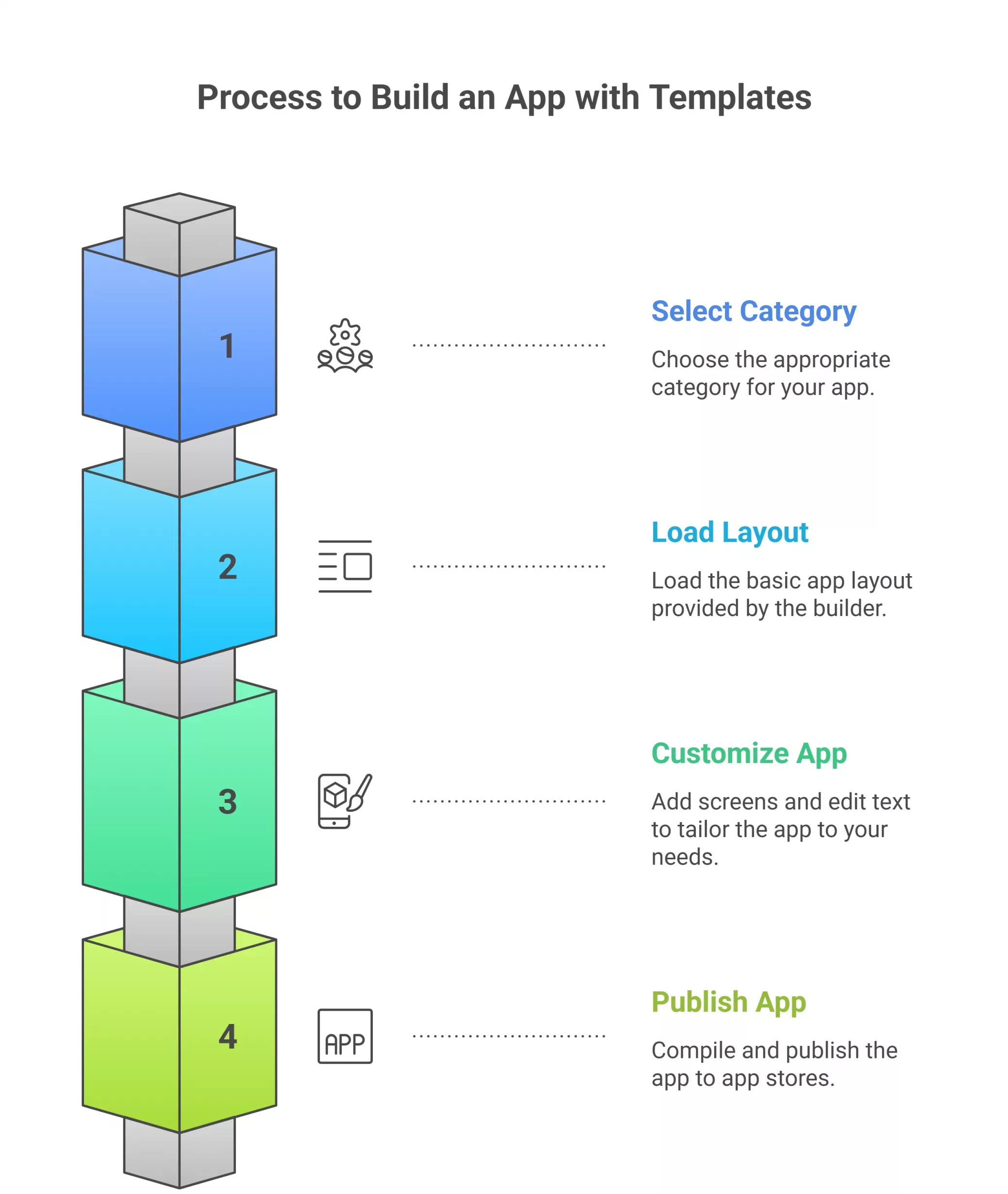
A typical template builder works like this:
- The startup selects a category, such as e-commerce or education.
- The builder loads a basic app layout.
- The startup customizes the app by adding screens and editing text.
- The platform compiles and publishes the app to app stores.
Everything that the startup builds comes from the platform’s predefined components. If a component is not available, it cannot be added without switching platforms or using plugins created by the template provider.
Examples of well known template platforms include drag and drop builders, no-code tools, and subscription based app generators.
Strengths of template based mobile apps
Templates offer several practical advantages:
- Speed. It is possible to launch an app within days.
- Lower upfront costs. Monthly fees make early experimentation affordable.
- Less technical knowledge required. Non-technical founders can build prototypes.
These strengths matter in early testing stages.
Limitations of template apps
As soon as a startup demands more specialized functionality, templates begin to limit progress. Common limitations include:
- Restricted customization. The design and user flow must fit predefined patterns.
- Performance constraints. Template apps often run slower because they rely on generic components intended to work for many app types.
- Limited API integrations. Integrating external systems requires deep customization, which template platforms rarely allow.
- Scaling issues. Templates are not built to handle thousands of active users or complex data structures.
- Data restrictions. Some platforms store data in shared databases that cannot be configured for advanced analytics.
These issues often appear when a startup begins attracting more users or adding feature variations.
Want to know? How Much Does it Cost to Develop an Android App?
What Custom Mobile App Development Provides
Custom app development follows a complete lifecycle that turns business requirements into a tailored product. Unlike templates, a custom app is built f rom the ground up.
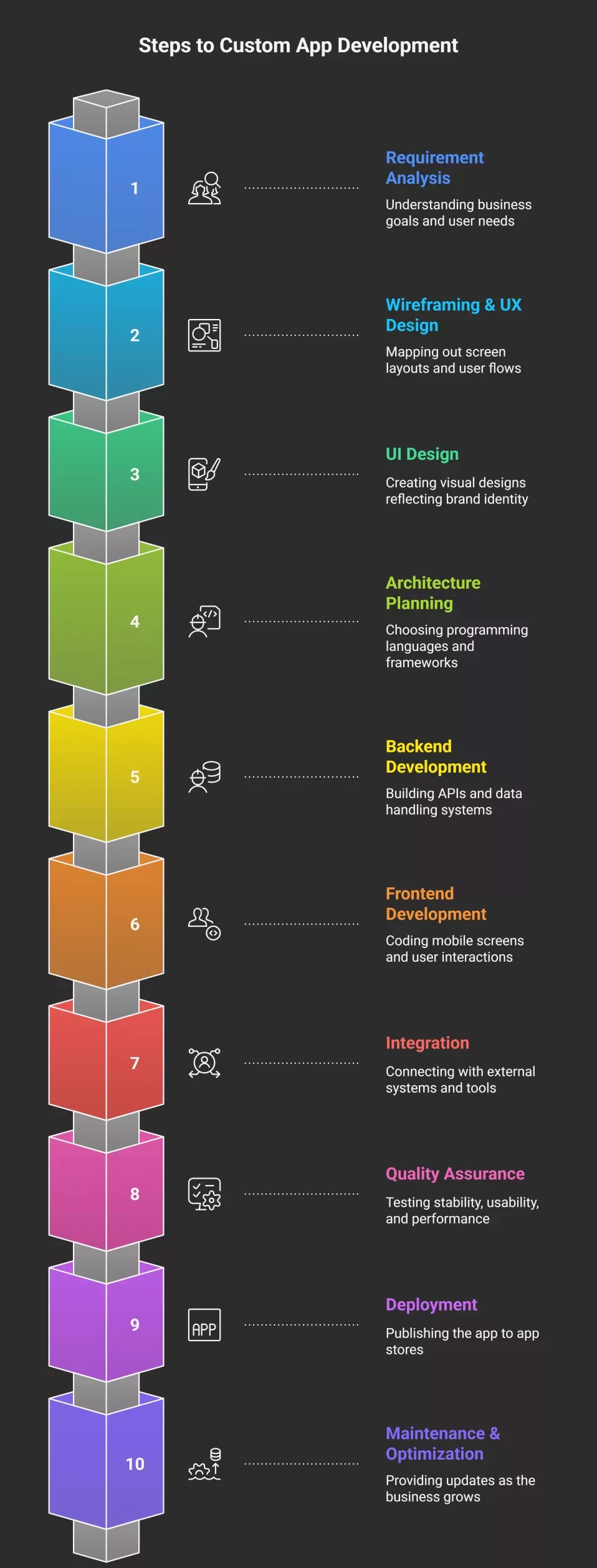
How custom development works
Most teams follow a stages-based approach that includes:
- Requirement analysis. The team studies business goals, target audience, workflows, and technical needs.
- Wireframing and UX design. Designers map out screen layouts and user flows.
- UI design. Visual designs reflecting brand identity are created.
- Architecture planning. Developers choose programming languages, frameworks, database structures, and server environments.
- Backend development. APIs, data handling systems, and logic are built.
- Frontend development. Mobile screens and user interactions are coded.
- Integration. The app is connected with payment systems, analytics tools, or external platforms.
- Quality assurance. Testers verify stability, usability, and performance.
- Deployment. The app is published to app stores.
- Maintenance and optimization. Updates are provided as the business grows.
Each step can be adjusted based on the startup’s stage and priorities.
A real world example
Imagine a logistics startup building a delivery tracking app. The founder needs:
- Real time driver location
- A dashboard for customers
- A backend that handles thousands of requests
- Integration with mapping services
- Automated notifications
A template builder cannot support this level of complexity. A custom app, however, can create these flows using tailored architecture that matches the business model.
Strengths and limitations of custom development
Strengths include:
- Full control over features, architecture, and scalability.
- Better performance, since the app is optimized for specific usage.
- Clear brand identity, since the design is built from scratch.
- Advanced security, since developers can implement encryption, data isolation, and compliance requirements.
- Easier scaling, since the backend can be expanded at any time.
Limitations include:
- Higher upfront costs compared to templates.
- Longer development timelines.
- Need for technical expertise or external partners.
- More complex planning, which requires detailed requirements and roadmaps.
Even with these limitations, many early stage companies choose to invest in custom solutions once their prototype proves viable.

Detailed Comparison: Custom Apps and Template Apps
Understanding the differences between custom apps and template apps helps startups choose an approach that aligns with their stage, resources, and long term plans.
Here, we summarize how both options compare across the factors that usually influence product decisions, such as performance, flexibility, integrations, and scalability. This gives founders a practical reference point before committing to either path.
| Comparison Area | Custom App | Template App |
|---|---|---|
| Feature Flexibility | Built from scratch to match business logic, allowing any feature or workflow | Restricted to predefined components and limited layouts |
| User Experience | Designed for specific user behavior, supporting unique flows and branding | Reuses common patterns that look similar across many apps |
| Performance | Optimized code and architecture that support faster load times and heavy usage | Often slower due to shared systems and general purpose frameworks |
| Integrations | Can connect with any external API, system, or internal tool | Limited to plugins supported by the template platform |
| Data Management | Full control of database structure, analytics, and reporting | Restricted access to deeper data layers and limited analytics options |
| Scalability | Can grow by expanding infrastructure, optimizing queries, and adding services | Struggles with large user loads due to fixed backend constraints |
| Security | Supports encryption, compliance standards, and custom authentication | Shared infrastructure and limited control reduce security flexibility |
| Long Term Cost | Higher upfront cost but lower dependency fees over time | Lower initial cost but ongoing subscription fees and add ons increase expenses |
| Ownership | Startup owns the full codebase and can modify anytime | Ownership tied to the platform; leaving may require rebuilding |
Read once! Best Mobile Apps: Native App vs Hybrid App vs Web Apps?
Why Many Startups Outgrow Templates
As companies grow, they require more complex features, custom branding, and stable performance. This is when limitations start affecting business outcomes.
Growth in users
Template apps may slow down or crash during peak usage. Custom infrastructure can be expanded to handle higher traffic.
Need for data analytics
Growing companies track metrics such as:
- User behavior patterns
- Conversion rates
- Drop off points
- Retention trends
Templates rarely provide in depth analytics.
Unique branding and customer experiences
Templates reuse common designs, making apps look similar. Custom Swiss development supports unique layouts, colors, animations, and interactions.
Technical debt
Technical debt refers to the cost of reworking parts of a system due to earlier shortcuts. Template apps accumulate debt quickly, as workarounds are used to add unsupported features.
Case example
A subscription based education startup once used a template builder to create its first app. As user numbers increased, the platform could not support more than a few hundred active users at the same time. The team had to rebuild from scratch using custom mobile app development to support video lessons, quizzes, and real time tracking.
Want to know? How To Choose A Best Mobile App Development Company
Key Reasons Startups Choose Custom Mobile Apps
Startups often begin with template based tools because they offer speed and lower upfront costs. As the product grows, the limitations of templates become more noticeable, especially when the business model depends on features or workflows that cannot be created with pre-built components.
Custom mobile apps offer flexibility, control, and scalability that support long term growth. The sections below break down the specific reasons many startups shift toward custom solutions once they move beyond early experimentation.
1) Alignment With Business Models and Unique Workflows
Every startup introduces a different structure for how users interact with its product. Some depend on multi-step onboarding, while others need dynamic pricing or real time data updates. Templates cannot adapt to these specialized flows.
Custom development allows the team to design each step around the actual business logic. For example, a marketplace startup can build separate dashboards for buyers and sellers, advanced filtering tools, or automated payout systems. This level of precision helps the product reflect real customer needs instead of forcing users into a generic structure.
2) Improved Performance Under Real Usage
Performance becomes important when user numbers increase or when the product handles time-sensitive data, such as booking slots, delivery updates, or transaction confirmations.
Template apps often struggle with heavy workloads because they rely on shared hosting and general-purpose frameworks. Custom apps, on the other hand, can use optimized code, efficient database queries, and dedicated servers. Startups benefit from smoother interactions, shorter load times, and fewer system errors. This becomes especially important when customer retention depends on the reliability of the app.
3) Advanced Integrations With External Systems
Modern startups work with multiple tools, such as payment gateways, CRM systems, cloud services, and analytics platforms. Templates limit integration to whatever plugins the platform supports.
Custom development removes this restriction. Developers can create direct API connections, build automated workflows, or integrate with specialized industry tools. For example:
- A logistics app may connect with mapping services or fleet management systems.
- A subscription service may integrate with billing platforms and user analytics tools.
- A health app may sync data with secure medical databases.
This ability to integrate helps startups reduce manual work and maintain consistent data across their systems.
4) Long Term Scalability and Architecture Control
Scalability refers to the app’s ability to grow without major performance issues. Template platforms often limit database size, number of requests, and available server resources. This makes them unsuitable for products expecting substantial user growth.
Custom development allows teams to plan scalable architecture from the beginning. Developers can:
- Add servers as traffic increases
- Use caching systems for faster responses
- Separate features into microservices
- Optimize database queries
- Expand storage with cloud tools
This ensures the product remains stable even as demand increases. For startups, this helps avoid rebuilding the entire system later.
5) Stronger Security and Compliance Options
Security matters as soon as an app handles personal information, payment details, or sensitive industry-specific data. Template systems often use shared infrastructure, which gives startups less control over storage methods, encryption, and authentication.
Custom development supports:
- Data encryption
- Secure user authentication
- Custom access rules
- Compliance with standards such as GDPR, HIPAA, or SOC 2
- Isolated databases for improved protection
This is essential for industries like healthcare, finance, legal services, or education, where data handling must follow precise rules.
6) Full Code Ownership and Control Over Future Development
When using template systems, startups do not fully own the code. If the provider changes pricing, removes features, or discontinues the service, the startup has limited control. Migrating to another platform often requires a complete rebuild.
Custom development provides full ownership of:
- Source code
- Databases
- APIs
- User interface components
This gives startups freedom to introduce new features, redesign the interface, or change infrastructure without depending on a third party. Ownership also increases long term stability because the product can evolve with the company’s needs.
Want to know? How Custom Software in Business Drives Innovation and Growth
7) Ability to Build Unique Branding and User Experiences
Brand differentiation can influence customer trust and retention. Template apps tend to look similar because they reuse the same layouts and interface elements. This makes it difficult for a startup to create a visual identity that stands out.
Custom development allows:
- Tailored color schemes
- Custom animations
- Unique screen flows
- Visual elements that match the brand’s personality
A stronger brand presence can improve recognition, perceived value, and user engagement.
8) Support for Advanced Analytics and Data-Driven Features
Startups rely on data to refine their product, understand user behavior, and make informed decisions. Template apps usually offer basic analytics, but they rarely support deeper tracking of user interactions or custom reports.
Custom apps can:
- Capture detailed event-level data
- Track patterns across different user segments
- Build automated reports
- Connect with advanced analytics tools
This data helps the team understand how users move through the app, where they get stuck, and which features provide the most value.
We have listed! Key App Development Technologies
Costs, Risks, and Trade-offs of Custom Development
Custom development is not automatically the better choice for every scenario. Founders should understand the trade-offs clearly.
Costs
Custom development often includes:
- Design costs
- Backend development
- Frontend development
- Testing
- Maintenance
Although upfront costs are higher, long term fees may be lower compared to subscription based templates.
Risks
Risks include:
- Overbuilding early features
- Misunderstanding user needs
- Long timelines delaying launch
How to manage risks
Startups can reduce these risks by:
- Building a Minimum Viable Product first
- Prioritizing the most important features
- Testing user flows early
- Using analytics to guide updates
A structured roadmap helps ensure that development stays aligned with business needs.
Do you know? Cost of Hiring an App Development Company
Choosing the Right Approach for Each Stage
Not every startup needs a custom app immediately. The choice depends on timing, resources, and goals.
When templates are suitable
Templates are useful for:
- Early stage prototypes
- Small, simple apps
- Short term testing
- MVPs used for investor presentations
When templates should be avoided
Templates are not suited for:
- Complex workflows
- Apps needing integrations
- Apps expecting high user volumes
- Products requiring strict security
Signs you are ready for custom development
You might be ready if:
- Users demand features unavailable in templates
- You need a stronger brand identity
- Performance issues affect user experience
- You need advanced analytics or automation
- Template fees continue rising with add-ons
Decision checklist
- What is the complexity of your business model?
- How fast is your user base growing?
- Do you require integrations?
- Does your app need unique user flows?
- Do you require strict security or compliance?
- What is your long term product vision?
This checklist helps founders avoid building systems that limit future growth.
We have listed! Reasons to Hire A Custom Software Development Company
Best Practices for Startups Building a Custom App
Building a custom mobile app is a significant undertaking for any startup. It demands clear priorities, structured planning, and steady feedback from users. While the flexibility of custom development makes it possible to build exactly what the business needs, it also requires careful management to avoid unnecessary complexity or delays.
The following best practices provide a practical framework that early stage teams can use to guide development from the initial concept to ongoing improvements.
1) Start With a Clear Problem Statement
Before any design work begins, define the specific problem the app will solve. Many early stage teams attempt to build too many features at once, which creates confusion for developers and leads to higher costs.
A clear problem statement should answer:
- Who is the primary user?
- What task or friction point does the app help solve?
- How will the app improve the user’s experience compared to alternatives?
For example, a scheduling startup might focus on reducing the number of steps it takes for a customer to book an appointment. This clarity informs the design, required features, and app flow.
2) Build a Minimum Viable Product First
A Minimum Viable Product (MVP) is the simplest version of the app that delivers real value. The purpose is to test assumptions, gather feedback, and guide future development based on real user behavior.
An MVP should include:
- Essential user flows
- Basic but functional interface
- Limited scope, focused on the core use case
This allows the startup to validate the concept without spending resources on features users may not need.
3) Prioritize Features Using User Feedback
Feature prioritization helps ensure the product remains manageable and aligned with user needs. Startups can use a simple system such as:
- Must have: Needed for the core user experience
- Should have: Important but not required for launch
- Could have: Optional features that can wait
- Won’t have now: Features postponed for future versions
Regular feedback sessions, surveys, or usability tests can clarify which features users value most.
4) Choose Development Partners Carefully
Whether working with freelancers, in house developers, or an external agency, selecting the right team is critical. Look for:
- Proven experience with similar apps or industries
- Transparent communication practices
- Ability to explain technical choices in non technical language
- A development process that includes testing and documentation
Reviewing past work, speaking with references, and evaluating their planning approach helps ensure a reliable partnership.
5) Validate the User Experience With Prototypes
Before coding begins, create wireframes or clickable prototypes. These help startups test:
- User flows
- Screen layout
- Navigation patterns
- Clarity of actions
Prototypes can uncover usability issues early, reducing the cost of changes later. Even simple prototypes give insight into whether users understand how to complete tasks within the app.
6) Use Analytics to Guide Decisions
Analytics tools track how users interact with the app. Metrics such as time spent on screens, drop off points, and conversion rates help reveal where improvements are needed.
Key metrics might include:
- Onboarding completion rate
- Session length
- Feature usage frequency
- Retention rate
Data driven decisions prevent unnecessary development and help refine features based on what users actually do, not assumptions.
7) Plan for Scalability From the Start
Scalability refers to how well the app can handle growth, such as more users or added features. Even if growth is slow at first, planning for scalability prevents major rebuilds later.
Scalability planning may include:
- Modular architecture
- Reliable cloud hosting
- Load balancing options
- Database structures that support growth
These choices allow the app to handle increased traffic without performance issues.
8) Test in Multiple Stages
Testing ensures the app works correctly across devices, user types, and use cases. The testing process usually includes:
- Functional testing
- Performance testing
- Security testing
- Usability testing
- Device compatibility testing
Testing catches issues early, which helps protect user experience and reduce long term maintenance costs.
9) Keep the App Updated Regularly
Once the app launches, regular updates are essential. Updates may address:
- Bug fixes
- New operating system requirements
- Feature improvements
- Security patches
- User feedback
Small, frequent updates tend to be more manageable and reduce the risk of breaking existing features.
10) Maintain Clear Documentation
Documentation helps developers understand how the system is built. It also supports future maintenance and onboarding of new team members.
Important documentation includes:
- API references
- Architecture diagrams
- Database schemas
- Deployment processes
- Coding conventions
Good documentation reduces dependency on specific individuals and helps ensure continuity.
11) Protect User Data and Follow Compliance Standards
Security should be built into the development process from the start, not added later. Startups should consider:
- Encryption for data in transit and at rest
- Secure authentication methods
- Regular vulnerability testing
- Compliance requirements such as GDPR or HIPAA (if applicable)
This reduces risks and increases trust with users and stakeholders.
12) Create a Long Term Roadmap
A roadmap outlines what features will be built and when. This helps maintain realistic expectations and ensures development remains aligned with business goals.
A good roadmap includes:
- Prioritized features
- Expected timelines
- Past learnings from user testing
- Goals for each release cycle
A roadmap should be flexible enough to adjust based on user feedback or new opportunities.
Read once! Off The Shelf vs Custom Mobile App Development: Which One to Choose?
FAQs
Why Do Startups Prefer Custom Mobile Apps Over Templates?
Startups often prefer custom apps because templates limit functionality, performance, and branding. Custom development allows the product to reflect the business model and scale reliably as usage increases.
What Are the Advantages of Custom-Built Mobile Apps for Startups?
Custom built apps provide better control, more flexible features, stronger performance, full ownership of code, and the ability to integrate with any external system.
Is Custom App Development Better Than Using App Templates?
It depends on the stage of the business. Templates work for early testing, but custom development is better for long term growth, security, and specialized features.
What Are the Major Drawbacks of Template-Based Mobile Apps?
Major drawbacks include limited customization, fixed layouts, restricted integrations, weaker performance, and difficulty handling large user volumes.
How Do Custom Mobile Apps Benefit New Businesses?
Custom apps help new businesses build workflows tailored to their goals, offer distinct brand experiences, and capture detailed analytics that support decision making. These are key benefits of custom mobile apps.
What Are the Performance Benefits of Custom Mobile Apps?
Custom code can be optimized for speed, efficient data handling, and device level performance, leading to smoother user experiences.
How Does Custom App Development Improve Scalability for Startups?
App Developers can design systems that scale by adding servers, separating services, and optimizing databases. This ensures stable performance even as user numbers grow.
What Are the Security Advantages of Custom Mobile Apps?
Custom apps can include encryption, secure data storage, authentication systems, and compliance with privacy standards. This level of control is not available in most template systems.
Why Do Template Apps Limit Business Growth?
Template apps use generic structures that cannot adapt to complex workflows or high user volumes. This restricts the ability to add features, optimize performance, or differentiate the product.
Sum up
Startups choose custom apps because they support growth, performance, and long term stability. Templates help teams launch quickly, but they limit design, functionality, and scalability as the product grows.
Custom development offers stronger security, full ownership of data, and the ability to build user experiences aligned with business goals. Although it requires more planning and investment, it creates a foundation that supports long term sustainability. This is why many teams ultimately invest in custom mobile app development for startups as they move beyond early validation.
For founders, the decision should be based on business goals, user demands, and technical requirements. Understanding how each approach works helps avoid costly mistakes and ensures that the product evolves in a way that supports growth. Whether you begin with a template or go directly to custom development, clarity in decision making will help your startup build a stable and effective app.