


draw.io
Free flowcharts and diagrams in your browser or on your desktop
Open sourceFree plan
- Web app
- macOS
- Windows
- Linux

Free browser editor for text-based flowcharts and technical diagrams
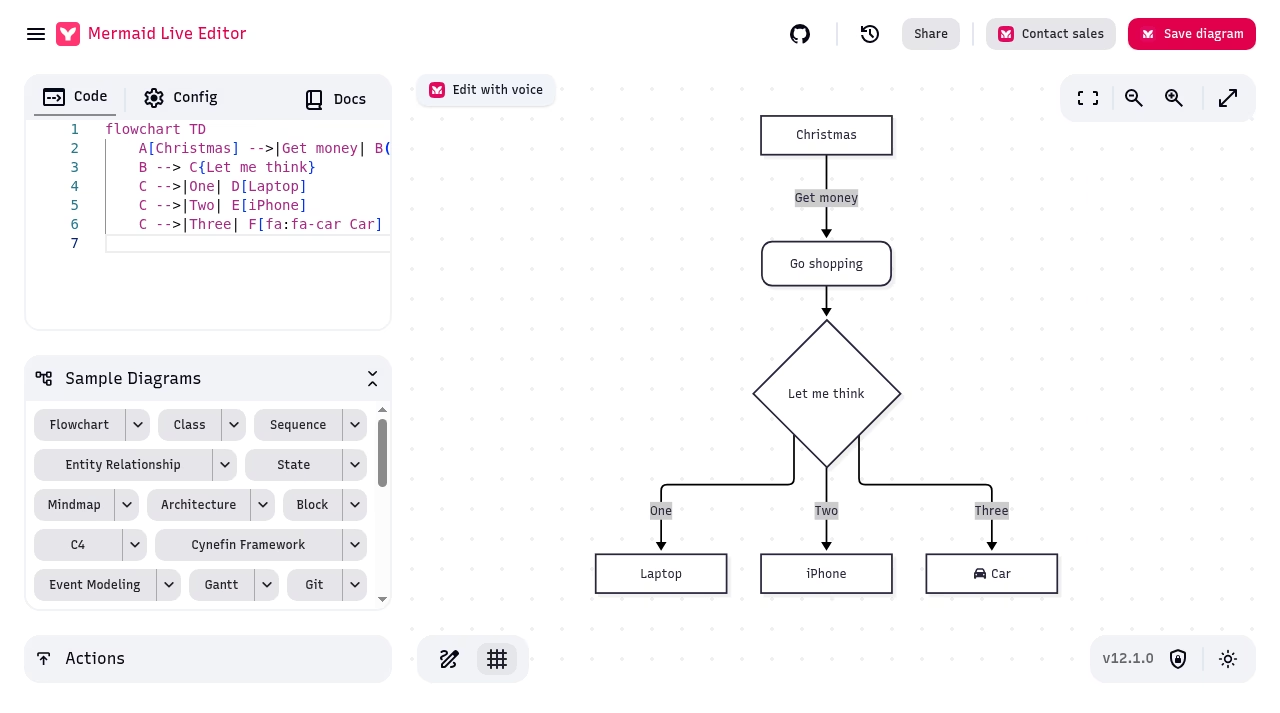
Free browser editor for text-based flowcharts and technical diagrams Mermaid Live Editor is a free browser editor for creating diagrams from Mermaid text.
Mermaid Live Editor is useful when a flowchart belongs alongside editable technical text. Start with a small non-sensitive example, keep your source separately and inspect the destination output. Use a visual editor instead when precise manual layout is the main need.
Mermaid Live Editor is a free browser editor for creating diagrams from Mermaid text. Type the diagram source in one pane and see the rendered result in the other. It is a useful starting point for flowcharts and technical documentation when keeping the source as editable text matters more than placing every shape by hand.
This listing covers the open-source editor at mermaid.live. Mermaid is also a diagram-rendering library, while Mermaid Chart is a separate commercial product promoted inside the editor. A button leading to AI, visual editing or a cloud workspace does not make those features part of the free Live Editor.
A flowchart starts with a diagram declaration such as flowchart TD, followed by named nodes and connections. Labels describe the steps; arrows describe how they relate. Mermaid chooses the layout from that source. The live preview makes it easier
Mermaid Live Editor is a free browser editor for creating diagrams from Mermaid text. Type the diagram source in one pane and see the rendered result in the other. It is a useful starting point for flowcharts and technical documentation when keeping the source as editable text matters more than placing every shape by hand.
This listing covers the open-source editor at mermaid.live. Mermaid is also a diagram-rendering library, while Mermaid Chart is a separate commercial product promoted inside the editor. A button leading to AI, visual editing or a cloud workspace does not make those features part of the free Live Editor.
A flowchart starts with a diagram declaration such as flowchart TD, followed by named nodes and connections. Labels describe the steps; arrows describe how they relate. Mermaid chooses the layout from that source. The live preview makes it easier to notice a missing connection or a label that does not fit.
This approach works well for a small process explanation that changes along with a README or technical note. Keep the source in your own file or repository if you need a durable record. The editor helps prepare the diagram, but it does not automatically commit changes to your documentation.
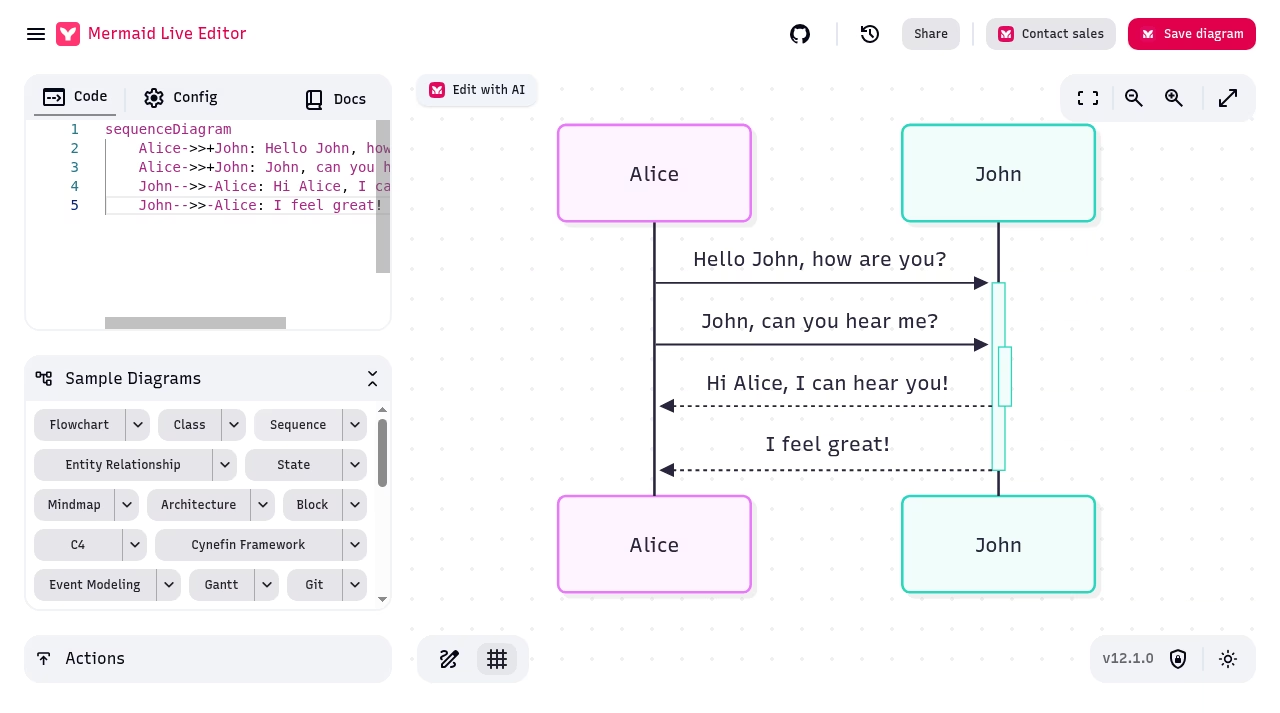
The current interface includes sample diagrams for flowcharts, sequences, entity relationships, state diagrams, Gantt charts and other formats. Samples are useful for learning a type’s syntax, not evidence that a finished diagram meets a technical standard. A drawn process can still contain an incorrect decision or omit a real dependency.
The Config pane and supported Mermaid settings let you adjust appearance and rendering behavior. Different diagram types use different syntax and options. If an example fails after you paste it into another system, check the renderer version and that system’s configuration before rewriting the whole diagram.
The Actions area includes PNG and SVG controls, image-service links, Kroki and other output options. Choose the route that fits your destination and inspect the result at the size people will read. An SVG preserves scalable shapes and text, while a raster image needs enough resolution for its intended use.
Share creates a link containing the encoded diagram state. Encoding is not encryption or an access-control system. Anyone with that link may recover the diagram, and a link can be copied into browser history, chat logs or other records. Use a non-sensitive example when you are learning the workflow.
The current Share panel also offers embed controls. Embedding an interactive diagram means your page depends on that editor route and its behavior. For a document that needs to remain stable, retain source and an inspected export rather than treating a long URL as the only backup.
The live Privacy & Security panel says the ordinary client-side editor stores diagrams in the URL and browser local storage. It also describes anonymous usage metadata collected through Plausible Analytics. Local editing and optional service actions should not be described as the same data path.
The same panel explicitly warns that external services, including image-service exports, Kroki, Mermaid Chart saves and AI actions, share the diagram with those third parties. Do not put confidential architecture or customer data into an external action without permission for that destination. The interface highlights external actions on hover; read the destination before using one.
Mermaid text can describe links and other behavior, so untrusted diagram input deserves care in systems that embed the rendering library. Use current library guidance and appropriate security configuration. This listing does not claim an independent security certification or that an encoded URL is private.
The current editor has a History control. Treat browser-local history as a convenience rather than a shared version-control system or a guaranteed backup. Clearing browser data or moving to another device can change what remains available. Keep important source separately.
The official live privacy panel describes offline use as a Progressive Web App. That is not a promise that a first visit or an external export service works without a connection. Test the installed/cached workflow you intend to use and keep the source accessible outside the browser.
The MIT-licensed repository documents Docker and self-hosting. A custom deployment can configure renderer endpoints, analytics and commercial-product links at build time. Self-hosting adds maintenance work; it is not the same as turning every hosted feature into an offline feature.
The core Live Editor is free and open source under MIT. You can use its browser-based code editor without a paid account. Promotional trial language and advanced-product links refer to Mermaid Chart, which has separate plans and terms. No Mermaid Chart subscription, AI quota or team-storage entitlement is included in this profile’s $0 tier.
Browser access is the relevant platform classification here, not a native Windows, macOS or Linux desktop application. A wider screen makes the source and diagram panes easier to use. The repository is the source for developer deployment instructions, but the hosted editor is the easiest route for a quick example.
Mermaid’s automatic layout saves manual drawing, but is less suited to someone who needs precise positioning of every shape. Dense diagrams can become hard to read. Break a large explanation into smaller diagrams, shorten labels and test direction or subgraph options instead of assuming more nodes improve the explanation.
A diagram that works in the Live Editor may render differently in another platform that uses a different Mermaid version or styling. Inspect the destination rather than promising identical output. Independent reviews raise layout and syntax concerns; this review does not turn those experiences into a fixed node limit.
draw.io is a relevant visual-editing alternative, while yEd Graph Editor offers a desktop diagram workflow with automatic layouts. Choose Live Editor when text-based source and quick syntax checking are the main benefit, not when you need a full shared diagram-management workspace.
Mermaid Live Editor is a useful free tool for technical writers and developers who want diagrams to remain editable text. It has a syntax learning curve, automatic-layout tradeoffs and action-specific privacy limits. We recommend starting with a small non-sensitive process and checking both source and final output before adding it to documentation.
We inspected the current hosted interface and its built-in flowchart and sequence samples on October13,2026, including Share, Actions and Privacy & Security. Screenshots show that real interface, not a generated mockup. We also checked the repository, MIT license, official syntax/security guidance, an independent review and community discussions. We did not test production deployments, enterprise support or third-party service security.
Our editorial inputs total19/30: quality7/10, ease3/5, depth3/5, innovation3/5, value2/3 and confidence1/2, scaled to3.2/5. Unknown company founding, headquarters, founders and team size are left blank. No usage count, award or certification is inferred from product promotion.
Inspected current hosted editor on October 13, 2026 using built-in flowchart and sequence samples, Actions, Share and Privacy & Security. Reviewed official repository, MIT license, syntax/security guidance, independent review and community discussions. No production-deployment benchmark or third-party security audit. Screenshots are actual current UI. Company year, founders, HQ, team size and unsupported badges stay blank.
Current hosted UI inspected October 13, 2026 shows Mermaid v12.1.0, local History, Share/embed controls and separate Mermaid Chart promotions. This is an observed interface version, not a native-app release claim.
| Pricing | Open source |
|---|---|
| Free plan | Yes |
| Free trial | No |
| Pricing page | View pricing |
| Platforms | Web app |
| API | No |
| Company | Mermaid open-source community |
| Apps Insight Score | 37/100 |
| Implementation | Easy |
| Learning curve | Intermediate |
Editorial points are assigned by AppsInsight editors and cannot be purchased or influenced.
| Feature | Mermaid Live Editor | draw.io | yEd Graph Editor |
|---|---|---|---|
| Rating | 3.2 / 5 | 3.2 / 5 | 3.3 / 5 |
| Pricing | Open source | Open source | Free plan |
| Starting price | — | — | Free |
| Free plan | Yes | Yes | Included |
| Free trial | No | No | No |
| Platforms | Web app | Web app, macOS, Windows, Linux | macOS, Windows, Linux |
| Best for | Technical writers, developers, diagrams kept as text | Free flowcharts, Local/offline diagrams, Teams with an existing documentation storage workflow | Individual process documentation, technical graphs, data-driven layouts |
Mermaid Live Editor vs draw.io Mermaid Live Editor vs yEd Graph Editor
0 /mo
0 billed annually
Free flowcharts and diagrams in your browser or on your desktop

Free desktop flowchart and graph editor with automatic layout and data import
Free desktop flowchart and graph editor with automatic layout and data import
Free flowcharts and diagrams in your browser or on your desktop
No reviews yet. Be the first to review this app.
Already have an account? Log in to track your reviews.