


Quo
Shared business phone system for small teams, formerly OpenPhone, with AI call summaries and automations
Paid Subscription$19/user/mo annual7-day trial
- Web app
- iOS (iPhone & iPad)
- Android

Manage Teams and WhatsApp messages from Slack
Manage Teams and WhatsApp messages from Slack Keep Slack as your working inbox convly connects Slack with Microsoft Teams and WhatsApp, so people can read and reply to cross-platform conversations without asking contacts to change their messaging app.
A practical bridge for Slack-first teams with clients on Teams or WhatsApp. The free single-seat plan, detailed setup guides and actual demo UI make a small pilot reasonable. Check routing permissions, paid feature limits and platform-account risk before broad deployment.
convly connects Slack with Microsoft Teams and WhatsApp, so people can read and reply to cross-platform conversations without asking contacts to change their messaging app. It is an interoperability layer, not a new standalone messenger, help desk or CRM. The operator is convly SAS, whose legal notice lists a registered office in La Rochelle, France. Its About page names Andro Mousad, Charles Barat and Luis Ferrer as co-founders. A founding year and total team size were not verified.
Install the convly app in Slack with workspace permission. For Teams, connect a professional Microsoft account and choose a tenant if the account has more than one. Personal/free Teams accounts are not supported. For WhatsApp, pair an existing Personal or Business number by scanning a QR code through Linked Devices. No installation or account change is required on the contact’s side.
Teams
convly connects Slack with Microsoft Teams and WhatsApp, so people can read and reply to cross-platform conversations without asking contacts to change their messaging app. It is an interoperability layer, not a new standalone messenger, help desk or CRM. The operator is convly SAS, whose legal notice lists a registered office in La Rochelle, France. Its About page names Andro Mousad, Charles Barat and Luis Ferrer as co-founders. A founding year and total team size were not verified.
Install the convly app in Slack with workspace permission. For Teams, connect a professional Microsoft account and choose a tenant if the account has more than one. Personal/free Teams accounts are not supported. For WhatsApp, pair an existing Personal or Business number by scanning a QR code through Linked Devices. No installation or account change is required on the contact’s side.
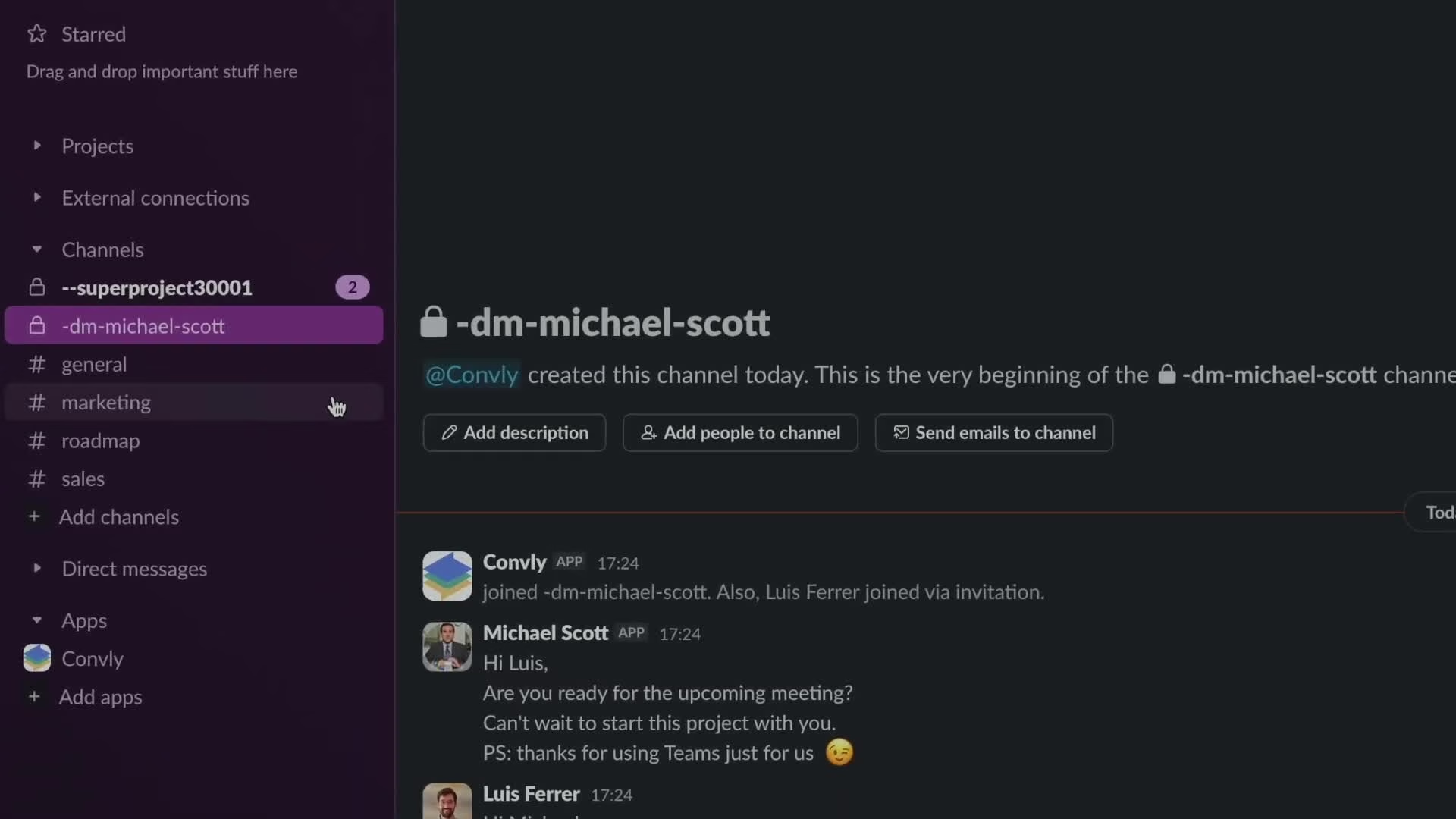
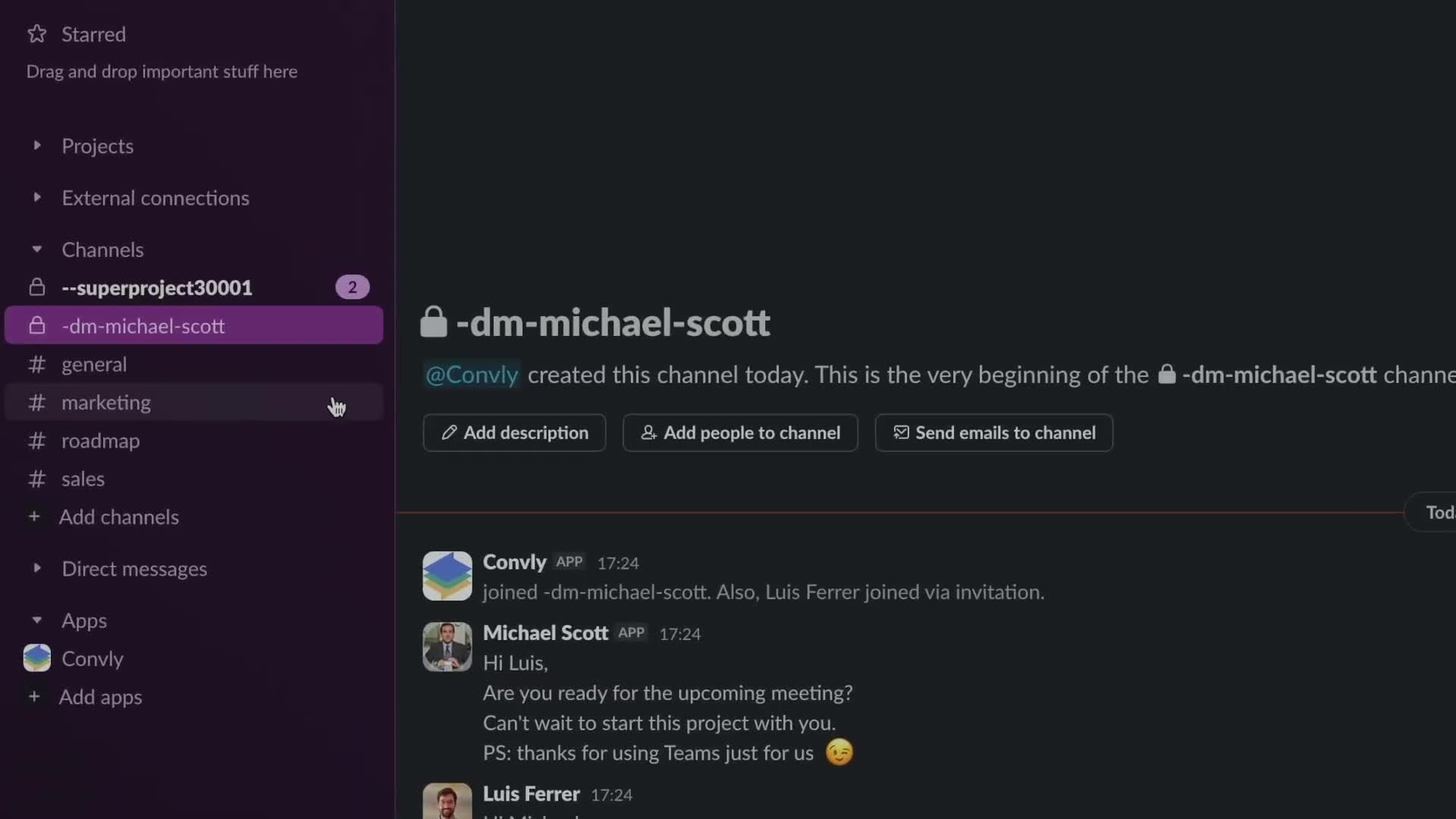
Teams DMs and group chats appear as dedicated private Slack channels. Slack channels can be linked to Teams group chats, but this is not native Teams-channel synchronization: the official comparison marks Teams channels unsupported. You can search Teams users, initiate DMs and manage members. WhatsApp offers automatic syncing of conversations with new activity or manual selection. An older conversation can also be synced manually.
The published feature matrix supports messages, rich text, files, images, edits/deletions, replies, reactions and mentions in both directions, with platform-specific limits. A Slack thread reply maps to a quoted reply on WhatsApp; posting directly in its mirrored Slack channel sends a standalone message. Voice-message exchange is advertised for WhatsApp. Free Slack workspaces are supported, but mentions cannot synchronize on Slack Free. Reactions and mentions are paid Pro features. Meeting transcripts/summaries and advanced scope/automatic settings are marked coming soon and are not counted as shipping features here.
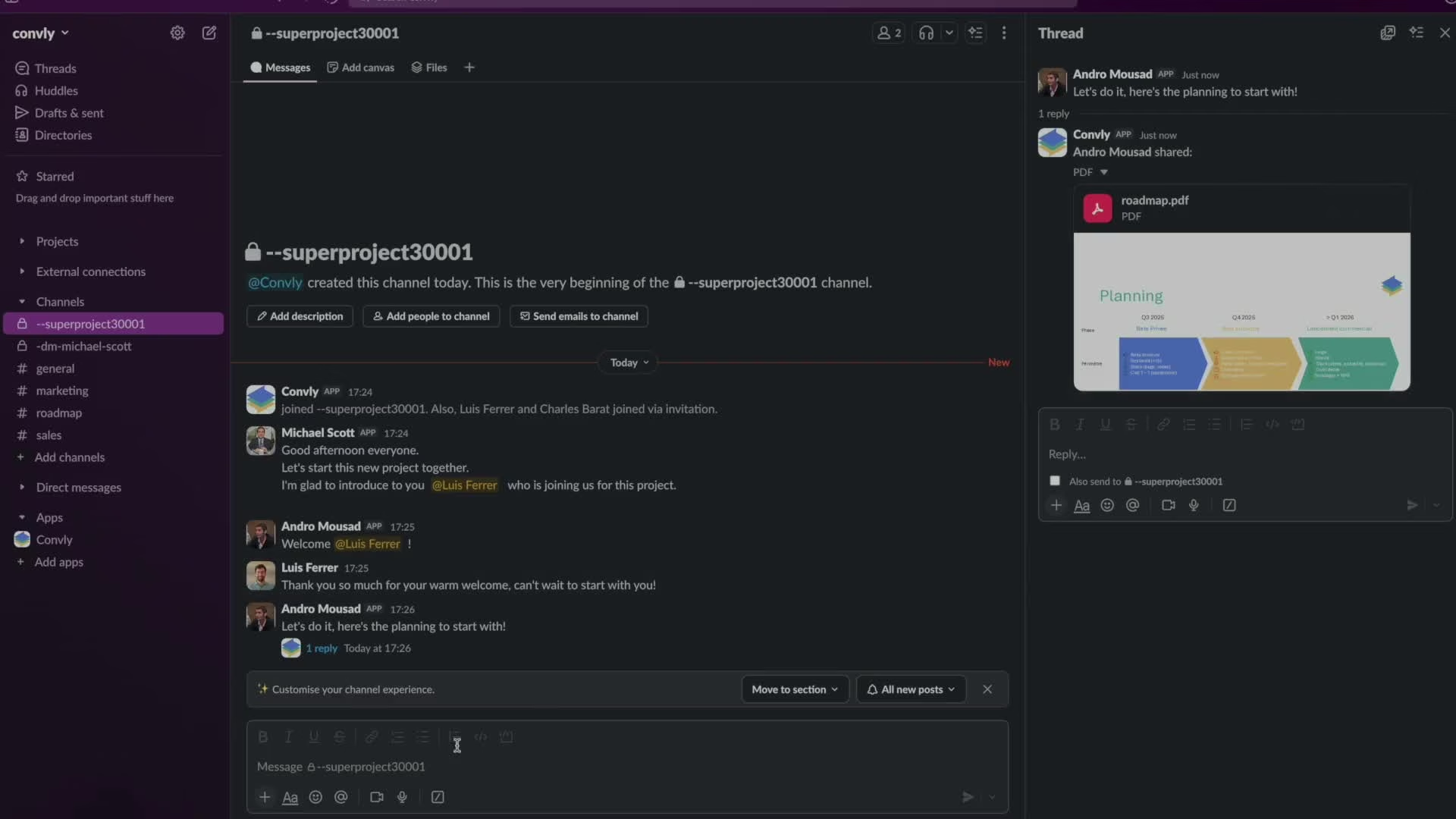
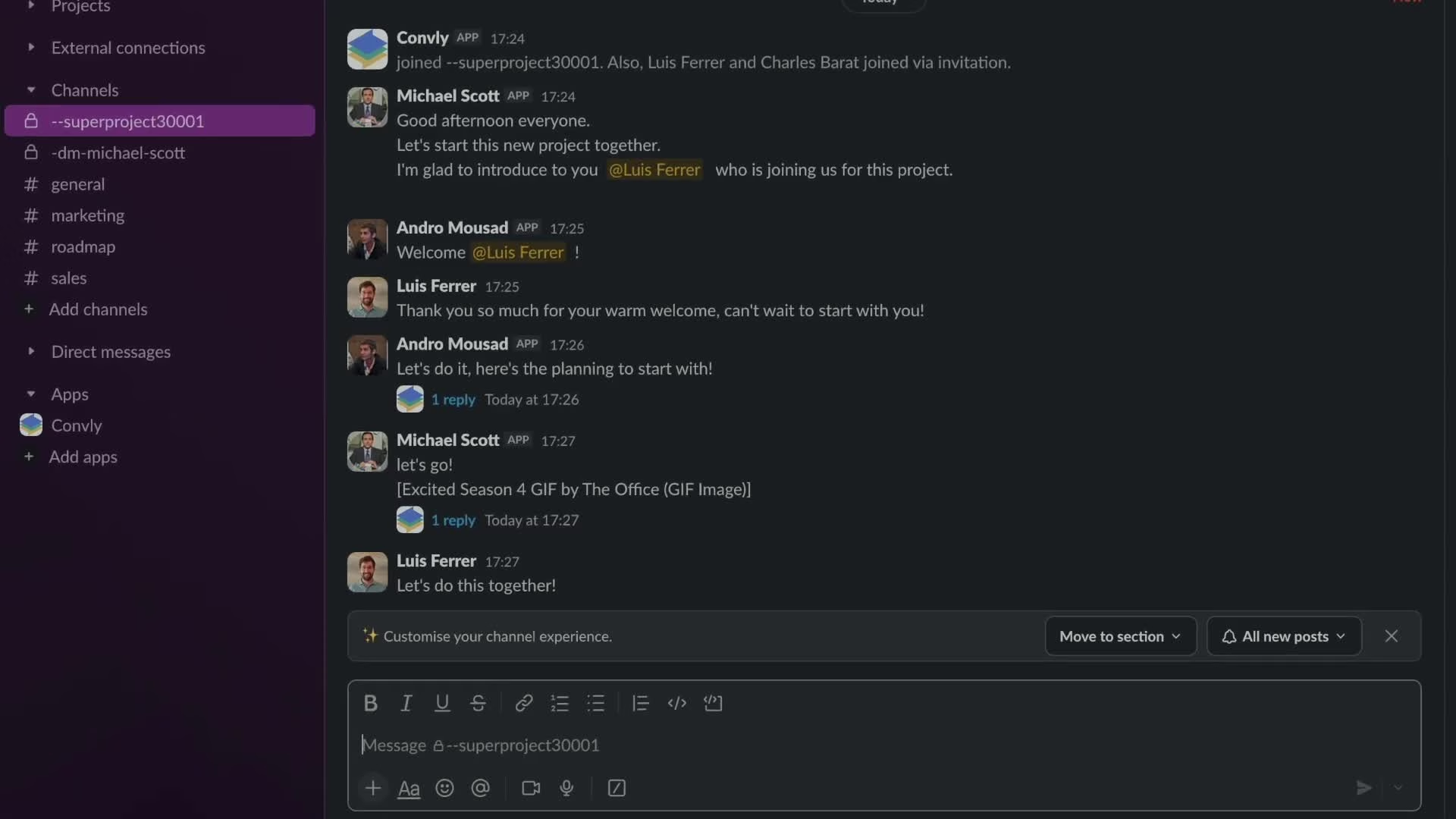
The current homepage has styled illustrative chat panels rather than product screenshots. For media, I inspected frames from the actual Teams walkthrough embedded by the official site. They show mirrored private Slack conversations, a project group and a file shared in a thread. These are vendor demonstration views, not a test of the reviewer’s own Slack, Teams or WhatsApp accounts.
The live pricing page lists Solo free for one seat, including unlimited messages/channels and Teams/WhatsApp accounts per seat. Pro covers one to one hundred seats and adds reactions and mentions; several advanced settings remain labelled soon. At the one-seat selector, Pro is USD 12.50 per seat/month or USD 10.50 per seat/month billed annually. EUR prices are 11.50 monthly or 9.50 monthly equivalent billed annually. The annual selector advertises two months free, but the displayed equivalents should be used rather than assuming an exact two-month arithmetic discount. This review did not reach checkout or verify a final annual invoice or taxes. A seat is a user with active cross-platform message synchronization; do not assume every external contact needs a seat.
Enterprise is custom-priced for fifty or more seats, with an account manager, onboarding, priority support, data-residency control, on-premise and custom-development options. These are quoted offerings, not proof that standard accounts can select their hosting region. Paid plans offer a fourteen-day trial. Terms updated September 28, 2026 allow payment information and charging after the trial unless cancelled. Fees are prepaid and generally non-refundable; cancellation takes effect at the paid-period end. Seat increases charge immediately pro rata. Decreases produce future-invoice credit usable within twenty-four months, not a cash refund, and can require removing excess users within twenty-four hours.
The vendor states that it does not persist message content or files, retains only operational metadata, encrypts inter-service messages with AES-256 and hosts standard infrastructure on AWS in Ohio. The privacy policy still describes transient processing, account/environment information and thirty-day logs. Account data lasts for the contract; the backup deletion timeframe is not specified. These are vendor statements, not an independent security audit or proof of end-to-end encryption across Slack, Teams and WhatsApp.
Bridging a WhatsApp conversation into Slack changes where the recipient’s words can be retained and who may see them. Review organization permissions, Slack channel membership, retention settings and the legal basis for processing before syncing personal or client chats. Standard processing may occur outside the EEA. The privacy policy lists Slack, Microsoft, Meta, AWS, Stripe and Chargebee as subprocessors, with transfer safeguards described. No independent SOC 2/ISO certification was verified.
The FAQ says convly is not listed in the Slack App Directory and gives its explanation for that absence; this is the vendor’s account, not an independently checked Slack policy. The terms explicitly say convly is an independent intermediary, not an official/certified partner unless separately stated, and third-party restrictions, throttling or account bans remain the customer’s risk. Do not treat a QR pairing or the use of platform APIs as a guarantee of official WhatsApp partnership or permanent interoperability.
I would shortlist convly for a Slack-first agency or customer-success team that keeps missing messages because clients live in Teams or WhatsApp. The one-seat free plan makes the idea accessible, and the setup guides explain the routing rather than only promising fewer app switches. The strongest feature is letting each side keep its own tool.
I would pilot a few approved conversations before turning on automatic WhatsApp syncing. Check which Slack members can see each mirrored chat, how replies and edits appear on the other side, and whether your administrators approve the requested access. This is useful for reducing inbox fragmentation, but it is not a substitute for a governed shared inbox, a full Teams-channel migration or platform-policy due diligence.
Review disclosure: Desk research of live official homepage, About, pricing monthly/annual USD/EUR selectors, legal notice, terms, privacy, security, FAQ and help pages on October 1, 2026. Inspected genuine UI frames from the Teams walkthrough embedded on the official site. No installation, OAuth approval, WhatsApp pairing, contact message, trial activation or payment. Sync reliability, permissions in an installed workspace and WhatsApp account-policy compatibility were not independently tested.
Desk research October 1 2026: official homepage, About, legal notice, pricing USD/EUR monthly/annual selectors, terms, privacy, security, FAQ and setup/help guides. Inspected actual UI frames from the official-site embedded Teams walkthrough. No Slack installation, OAuth grant, WhatsApp QR pairing, messages, trial or payment. Sync reliability and platform-policy compatibility untested. Security statements are vendor claims, not independent certification.
Current official site covers WhatsApp alongside Teams: existing Personal/Business number, QR pairing, automatic or selected conversation sync and voice messages. Advanced scope/sync settings and meeting transcript/summary features remain marked coming soon. No release date verified.
| Pricing | Free+Paid |
|---|---|
| Free plan | Yes |
| Free trial | Yes (14 days) |
| Pricing page | View pricing |
| Platforms | Slack app |
| API | No |
| Company | convly SAS |
| Apps Insight Score | 44/100 |
Editorial points are assigned by AppsInsight editors and cannot be purchased or influenced.
Shared business phone system for small teams, formerly OpenPhone, with AI call summaries and automations

AI-powered customer communications platform uniting voice, SMS and WhatsApp for sales and support teams.

AI-native support and feedback agent on one customer record, flat pricing with no per-seat fees

German AI voice agent platform that answers and makes phone calls, books appointments and follows up…
No reviews yet. Be the first to review this app.
Already have an account? Log in to track your reviews.