
If you have ever uploaded a photo and wanted to know where else it appears online then you are already in the world of reverse image and face search tools. The global reverse image search movement is growing fast with the market now valued at about 1.2 billion USD in 2024 and projected to hit 3.5 billion USD by 2033, expanding at around 12.5% CAGR from 2026 onward. Facial recognition alone hit roughly 5.2 billion USD in 2024 and is expected to grow to 8.3 billion USD by 2032. More than 650 million image‑based product searches happen every month, showing how people rely on visual lookups instead of just typing keywords.
Around 36% of online shoppers use image‑based search to find similar products confirming that visual search is now part of daily digital behavior. In this space TinEye Alternatives matter more than ever because no single tool does everything for every user.
Below you will find 16 powerful TinEye Alternatives that cover everything from general reverse image search to face‑specific matching, OSINT‑style social‑media checks, and even art‑and‑anime tracking. Each of these tools deserves attention because they expand what you can do beyond what TinEye alone offers.
About TinEye

TinEye is one of the oldest and most trusted reverse image search engines. It lets you upload or paste an image URL and then scans its privately indexed database of over 83 billion images to find where that image appears online. Unlike regular search engines it focuses on pixel‑level matching, so it can tell you when an image has been cropped, resized, or slightly edited. Developers and brands also use TinEye’s API (MatchEngine) to track unlicensed use of their images at scale.
TinEye’s main strengths are privacy (it claims not to store your search images) and long‑term project support via volume‑based paid plans. For many users TinEye Alternatives mean tools that either add face‑specific recognition, social‑media coverage, or easier pricing models while still offering the core reverse‑image idea.
What’s The Need To Look For TinEye Alternatives Apps?
Reverse‑image search is no longer a niche trick. With the market growing rapidly and visual search usage exploding, you may find TinEye Alternatives better suited to your exact use case. For example:
- You may need face‑specific search to track someone’s photos across the web, not just generic image copies.
- You might want tools that cover social media profiles, dating photos, or forums where TinEye’s index is limited.
- You may need free or low‑cost options before investing in enterprise‑level APIs.
- Some tools specialize in copyright protection, others in OSINT investigations or anime‑style artwork tracking.
If TinEye feels too general, too expensive, or too slow for your scenario then exploring TinEye Alternatives becomes a practical step. You can mix these tools with pimeyes alternative free options, Free Social Catfish Alternatives, and Cheaterbuster Alternatives for broader identity‑checking workflows. You can also pair them with Best Background Check Sites for Accurate Results when you move from image search to deeper identity validation.
Now let’s dive into each of the 16 TinEye Alternatives, structured with the headings you asked for.
1) PimEyes – Best For Deep Face‑Based Reverse Search

PimEyes is a leading face‑specific reverse search engine that uses facial‑recognition AI to scan thousands of open‑web sites for photos of a person. It goes beyond simple pixel‑matching and focuses on matching facial features across images, including different angles, lighting, and background changes. PimEyes is often treated as a PimEyes alternative free benchmark because many similar tools try to match its coverage and accuracy.
Unlike general reverse‑image tools it does not track every image on the web equally. Instead it prioritizes people‑centric content, which makes it useful for identity checks, fraud hunting, and even stalking‑prevention research. Some privacy experts warn that this kind of coverage can be risky so PimEyes offers filters and privacy‑management options to help users act responsibly. If you need a TinEye Alternative that specializes in faces rather than abstract images then PimEyes is a strong candidate.
Features
- Uses facial‑recognition AI to match a person’s face across different photos.
- Provides real‑time search and lets you refine sensitivity and match quality.
- Can find images even when the face is partially cropped or at an unusual angle.
- Allows you to manage alerts and notifications for new matches.
- Offers paid plans that scale from casual checks to ongoing monitoring projects.
Best For
- Tracking someone’s public photos across the web.
- Checking if your own photos have been used without consent.
- Supporting identity‑verification workflows alongside Cheateye Alternative and Cheaterbuster Alternatives checks.
2) FaceCheck.ID – Face‑Focused Reverse Search Engine
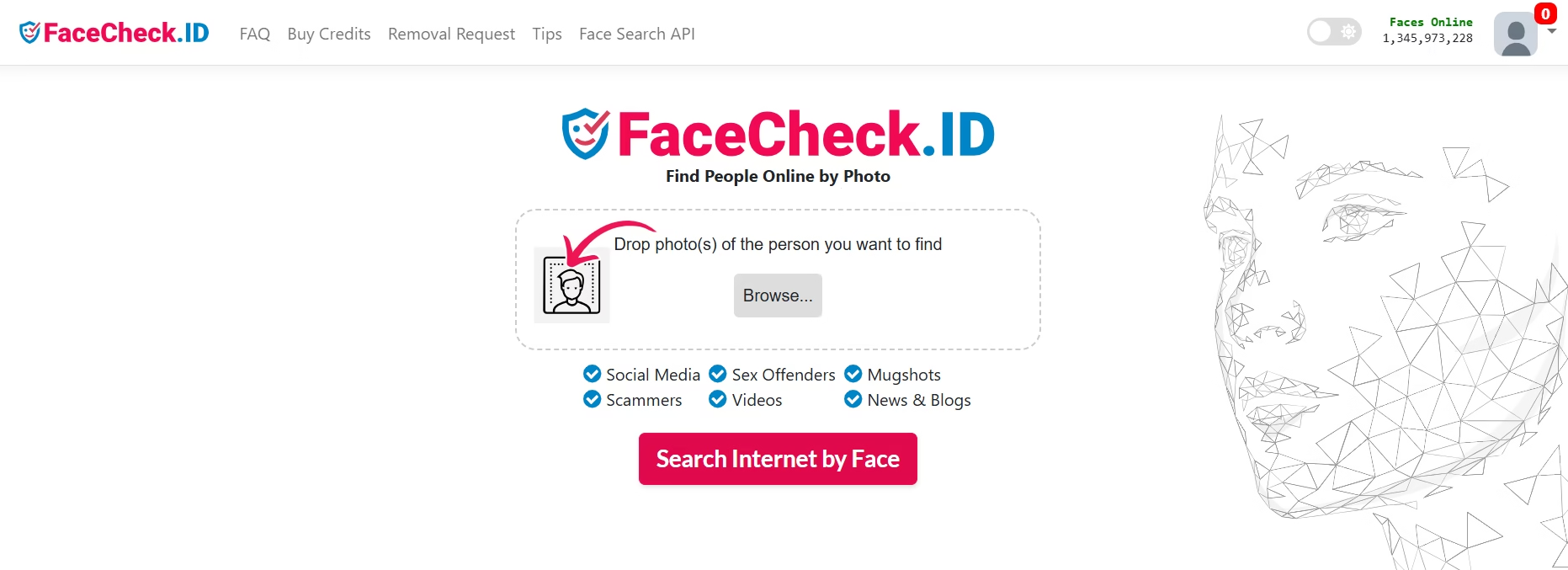
FaceCheck.ID is a face‑centric reverse search engine that focuses on finding people‑centric images from open‑web sources. It combines classic reverse‑image architecture with facial‑recognition shortcuts so you can upload a portrait and quickly see where that person appears. This tool is often compared to PimEyes and TinEye and is sometimes grouped among Best PimEyes Alternatives & Competitors lists.
FaceCheck.ID is useful when you care more about who is in a photo than what the image is. It can help you trace a person’s social presence, check for impersonation, or support deeper background checks. Because it focuses on faces it fits well into TinEye Alternatives stacks that already include more general image search tools.
Features
- Dedicated face‑match search with options to refine detection.
- Fast results page showing similar and exact matches.
- Basic filtering by date and source type.
- Simple upload or URL‑paste interface.
- Works well when combined with Best Background Check Sites for Accurate Results for full‑profile checks.
Best For
- Reversing portrait photos to find original sources.
- Supporting identity investigations or anti‑fraud checks.
- Acting as a lightweight Cheaterbuster Alternatives‑style helper for personal checks.
3) Lenso.ai – Modern PimEyes‑Style Tool

Lenso.ai is a face‑search engine that positions itself as a modern PimEyes alternative with a cleaner interface and strong accuracy. It lets you upload a face image and then finds exact and near‑exact matches across open‑web sources, including original URLs where the photo appears. The platform is designed to work even when the image is taken from different angles, under poor lighting, or from low‑resolution screenshots.
Lenso.ai is often listed among PimEyes alternative and TinEye Alternatives because it bridges the gap between general reverse‑image search and dedicated facial‑recognition tools. It appeals to users who want face‑first results without diving into heavy enterprise APIs or overly complex dashboards.
Features
- Face‑specific matching optimized for people photos.
- Finds original source URLs for each matching image.
- Handles different angles, lighting, and image quality.
- Simple drag‑and‑drop upload for quick checks.
- Integrates well into workflows that already use TinEye Alternatives.
Best For
- Checking if your own photos appear on unknown sites.
- Tracking public profiles of individuals for OSINT or safety checks.
- Acting as a pimeyes alternative free‑style tool for face‑based research.
4) Social Mapper – OSINT‑Driven Social Profile Search

Social Mapper is an open‑source OSINT tool that helps you search for people across social media platforms using a single input such as a name, email, or image. It is not a pure reverse‑image engine but it can be used in conjunction with TinEye Alternatives to find where a person’s photos appear on social networks. When you pair it with facial‑search tools you can build a powerful identity‑discovery stack.
Social Mapper is popular among security researchers, penetration testers, and privacy‑conscious users who want to see how much of their identity is exposed online. It is often mentioned alongside PimEyes alternative and Free Social Catfish Alternatives because it focuses on social‑media footprint discovery rather than copyright or image‑reuse tracking.
Features
- Cross‑platform social‑media search from limited inputs.
- Can be combined with image‑based tools to correlate faces with profiles.
- Open‑source and scriptable for advanced users.
- Works well for OSINT investigations and threat‑modeling.
- Helps you understand how your online presence can be pieced together.
Best For
- Running OSINT checks on yourself or others.
- Supporting identity‑verification workflows with Best Background Check Sites for Accurate Results.
- Acting as a Free Social Catfish Alternatives‑style helper for deeper social‑media checks.
5) Google Lens – Everyday Reverse Image Power

Google Lens is a visual‑search engine built into Google’s ecosystem that lets you search apps, Chrome, Android, and the web by pointing your camera or uploading an image. It is one of the most widely used TinEye Alternatives because it is free, fast, and deeply integrated into mobile and web workflows. Instead of focusing only on reverse‑image matching Google Lens blends image recognition, OCR, and product search into a single interface.
You can use Google Lens to identify objects, translate text, find products, discover similar images, and even search for where an image appears on the web. For casual users who do not want to pay for TinEye Alternatives or face‑specific tools this is often the first stop.
Features
- Camera‑based visual search from your phone.
- Text recognition and translation from images.
- Product and similar‑image search in e‑commerce.
- Integration with Google Photos and Google Search.
- Works offline in limited modes for basic recognition.
Best For
- Everyday reverse‑image lookups from your phone.
- Finding visually similar products using image‑based inputs.
- Acting as a quick TinEye Alternative for general use.
6) Social Catfish – Identity‑Validation Reverse Search

Social Catfish is a people‑search and verification platform that lets you upload an image or enter basic details to find background information about someone. It is often used as a Cheaterbuster Alternative style tool for checking dating‑profile authenticity. The platform combines reverse‑image search, social‑media checks, and public‑record lookups to help users verify identities.
While it is not a pure TinEye Alternative it sits in the same ecosystem of tools used for identity checks and fraud detection. Users who want to move beyond simple image matching will often pair Social Catfish with Best Background Check Sites for Accurate Results such as TruthFinder or PeopleFinders‑style services.
Features
- Reverse‑image search combined with profile analysis.
- Phone‑number and email‑address lookup.
- Social‑media and dating‑site checks.
- Basic criminal‑record and background‑data options.
- Reports organized for non‑technical users.
Best For
- Checking dating profiles or online acquaintances.
- Acting as a Cheaterbuster Alternatives‑style helper.
- Supporting identity‑verification workflows with TinEye Alternatives.
7) Berify – Anti‑Fraud & Image Monitoring

Berify is an image‑and‑brand‑monitoring service that helps you track where your photos or logos appear across the web. It acts as a TinEye Alternative focused on anti‑fraud and brand protection rather than general image search. You upload images or URLs and Berify continuously scans for matches, modified versions, and new appearances.
Berify is useful for influencers, small businesses, and brands that want to protect their visual content without building custom scrapers. It fits into stacks that already include TinEye Alternatives and Pixsy‑style tools for broader image‑protection coverage. For those who want to mix TinEye Alternatives with Cheateye Alternative‑style tools it offers a middle ground between technical and non‑technical workflows.
Features
- Continuous image‑monitoring and alerts.
- Detection of cropped, resized, and altered versions.
- Dashboard for tracking where your images appear.
- Option to take action such as sending takedown requests.
- Simple workflow for non‑technical creatives and small teams.
Best For
- Protecting influencer and creator photos from misuse.
- Supporting brand protection alongside TinEye Alternatives.
- Acting as a Cheateye Alternative‑style helper for anti‑fraud checks.
8) Yandex Image – Strong Free Image Search

Yandex Image is a free reverse‑image search engine from the Russian tech giant Yandex that often rivals Google and TinEye in coverage, especially for non‑English content. It lets you upload an image or paste a URL and returns similar and matching images from across the web. Because it focuses on open‑web indexing, Yandex Image can surface results that other TinEye Alternatives might miss.
Yandex Image is often recommended as a pimeyes alternative free‑style tool when you want a quick, no‑signup solution. It is also popular among users who want stronger coverage for images from Eastern Europe, Asia, and other regions where Google and TinEye may be thinner. When you combine it with TinEye Alternatives you get broader geographic coverage.
Features
- Free unlimited reverse‑image search with no login.
- Fast results for similar and exact matches.
- Good coverage for non‑English and regional content.
- Simple drag‑and‑drop upload and URL‑paste.
- Works well as a TinEye Alternative sidekick.
Best For
- Quick free checks before using paid tools.
- Searching for non‑English images or regional content.
- Acting as a TinEye Alternative for broad‑coverage checks.
9) Bing Visual Search – Microsoft’s Visual Search

Bing Visual Search is Microsoft’s built‑in image‑lookup engine that lets you drag, paste, or upload a picture and see where it appears online. It functions as a straightforward TinEye Alternative especially if you already live in the Microsoft ecosystem (Edge, Windows, Outlook, etc.). Instead of scanning only one index, Bing Visual Search aggregates results from Microsoft’s web crawl and often surfaces similar images, shopping links, and related pages that casual users can click through in seconds.
For many readers Bing Visual Search becomes a go‑to TinEye Alternative when they want something free, fast, and tightly integrated into their browser. It is especially useful for casual lookups, product hunting, or checking if a photo is reused on e‑commerce sites. When combined with tools like Yandex Image and Google Lens, it helps you cover a broader slice of the web than any single TinEye Alternative can manage alone.
Features
- Search by uploading an image, pasting a URL, or using the Edge “Search image” right‑click option.
- Shows similar images, product links, and web pages using that image.
- Works in Microsoft Edge, Bing, and some mobile apps.
- No signup required for basic reverse‑image lookups.
- Pairs well with TinEye Alternatives like Google Lens and Yandex Image for overlapping coverage.
Best For
- Everyday reverse‑image checks from your browser.
- Finding visually similar products or articles that use your photo.
- Acting as a quick, free TinEye Alternative before turning to paid or niche tools.
10) SauceNAO – Anime & Art Reverse Search

SauceNAO is a specialized reverse‑image engine built for anime, manga, and illustration tracking. It focuses on art‑based content including fan art, doujinshi, and meme images instead of generic web photos. Many users treat it as a TinEye alternative, but with a very narrow and powerful niche: identifying who drew an image, where it first appeared, and how it has been reused.
The platform is popular among artists, fans, and content moderators who want to track copyright‑related issues or credit the original creator. SauceNAO supports a large index of image‑boards and communities that general search engines like Google and Bing cover weakly. If you work with anime, gaming, or digital‑art content, SauceNAO often beats more generic TinEye Alternatives on precision.
Features
- Highly optimized for anime, manga, and illustration matching.
- Returns source URLs, artist names, and sometimes original upload dates.
- Handles crops, edits, and low‑quality screenshots reasonably well.
- Integrates with image‑board workflows and community moderation tools.
- Free tier available with optional donations to support the service.
Best For
- Tracking anime and fan‑art images to their original source.
- Checking content‑creator credits and watching for plagiarism.
- Acting as a TinEye Alternative within anime and gaming communities.
11) Pixsy – Copyright & Image Protection

Pixsy is a copyright‑protection and image‑monitoring platform designed for photographers, illustrators, and brands. It lets you upload your original images and then continuously scans the web for copies, derivatives, and unauthorized uses. Unlike basic TinEye alternatives, Pixsy focuses on taking action, not just listing matches. You can see where your images appear, send takedown notices, and even pursue compensation in some regions.
Pixsy is often grouped with TinEye Alternatives because it offers reverse‑image‑style detection but adds legal and workflow tools on top. For creatives who want to defend their work at scale, it slots neatly into a stack that includes Berify, TinEye, and other image‑protection tools. With the global image‑search market growing steadily, services like Pixsy help creators turn visual content into protected assets rather than free, uncontrolled material.
Features
- Continuous web crawling to detect where your images appear.
- Tracks cropped, resized, and watermarked versions of your photos.
- Generates takedown and licensing reports for legal action.
- Visual dashboard showing violations and potential revenue from licensing.
- Works as a long‑term copyright watchdog alongside TinEye Alternatives.
Best For
- Photographers and illustrators protecting original work from theft.
- Brands monitoring logo and product misuse online.
- Acting as a TinEye Alternative layer focused on copyright enforcement.
12) Search4Faces – Image‑Based People Search

Search4Faces is a face‑driven reverse‑image engine that lets you upload a person’s photo and search for where that face appears on the web. It sits between classic TinEye Alternatives and PimEyes‑style tools by focusing on people‑centric search rather than generic images. The platform is useful when you want to track a specific individual’s public photos, verify identity, or see how widely a portrait is shared.
Because it leans on facial‑recognition‑style matching Search4Faces is often used in privacy investigations, OSINT workflows, and personal safety checks. Some users pair it with tools like FaceCheck.ID or PimEyes to confirm findings and reduce false positives. With the facial recognition market expected to grow past 8 billion USD by 2032, tools like Search4Faces are becoming more accurate and widespread.
Features
- Face‑specific matching that works across different angles and lighting.
- Results list URLs where the face appears and sometimes captions or context.
- Basic filters for date and source type.
- Simple upload‑only interface without heavy dashboard clutter.
- Integrates into TinEye Alternatives stacks for deeper identity checks.
Best For
- Tracing someone’s public photos across forums, blogs, and sites.
- Supporting identity‑verification workflows or anti‑fraud checks.
- Acting as a TinEye Alternative tailored toward people‑image research.
13) FindClone – Face‑Based People Finder

FindClone is another face‑focused reverse‑search engine that scans open‑web sources to find where a person’s photo appears. It is often cited as a PimEyes‑style tool because it uses facial‑recognition logic to match portraits across different sites and contexts. FindClone is useful when you want to see how widely a face is shared, whether it matches known profiles, or if someone reuses another person’s image.
The tool is popular among privacy‑minded users who want to check their own digital footprint before entering dating ecosystems or sharing photos publicly. It also appears in lists of Cheaterbuster Alternatives and Free Social Catfish Alternatives because it helps users spot catfishing or identity‑reuse across social networks and dating sites. When combined with general TinEye Alternatives it adds a layer of person‑specific insight to your reverse‑image toolkit.
Features
- Face‑based search that tolerates varying angles and image quality.
- Shows source URLs where each matching face appears.
- Simple drag‑and‑drop upload for quick checks.
- Works well for one‑off identity checks rather than continuous monitoring.
- Fits into stacks that already use TinEye Alternatives and OSINT tools.
Best For
- Checking if your own photos are reused on unknown sites.
- Verifying dating‑profile authenticity before investing time.
- Acting as a TinEye Alternative with a face‑centric twist.
14) EagleEye – Enterprise‑Grade Reverse Search

EagleEye is an enterprise‑level reverse‑image search platform built for organizations that need to monitor large volumes of images at scale. It powers brand‑protection, copyright‑enforcement, and content‑moderation workflows for companies that cannot rely on casual TinEye Alternatives alone. Instead of a simple web search, EagleEye offers APIs, dashboards, and automation tools that let teams scan millions of images and flag duplicates, edits, or unauthorized uses.
Many brands use EagleEye alongside Pixsy and Berify to create a multi‑layered defense against image theft and reputation risks. With the global reverse image search market projected to grow at about 12.5% CAGR into the 2030s, tools like EagleEye are becoming core infrastructure for content‑heavy businesses. For readers who manage large image libraries or branded visuals EagleEye is less of a one‑off lookup and more of a strategic TinEye Alternative.
Features
- Scalable API and batch‑search capabilities for large datasets.
- Detection of cropped, blended, and partially altered images.
- Integration with internal workflows and content‑management systems.
- Dashboards for tracking violations, trends, and coverage over time.
- Works as a long‑term enterprise reverse‑image layer beyond free tools.
Best For
- Brands and agencies protecting large image libraries.
- Legal or compliance teams tracking copyright and trademark abuse.
- Acting as a high‑end TinEye Alternative for professional use.
15) SocialLinks.io – Social‑Profile Aggregation

SocialLinks.io is a social‑profile aggregation and discovery tool that helps you find and connect different accounts belonging to the same person. It is not a pure reverse‑image engine but it often pairs with TinEye Alternatives to turn a photo into a fuller identity map. When you already have a name or a partial profile, SocialLinks.io can surface related email addresses, social‑media profiles, and other endpoints that might otherwise stay hidden.
The tool is useful for OSINT researchers, recruiters, and privacy‑conscious users who want to understand how much of their identity is scattered across platforms. It complements face‑based tools like PimEyes, FindClone, and Search4Faces by adding social‑and‑contact data to your reverse‑image findings. For those exploring Cheaterbuster Alternatives or Free Social Catfish Alternatives workflows SocialLinks.io can help you move from a single image to a multi‑platform identity check.
Features
- Profile‑linking across multiple social‑media and professional networks.
- Email‑ and username‑based discovery instead of relying only on images.
- Simple interface for non‑technical users to see connected profiles.
- Often used in OSINT and identity‑validation workflows.
- Pairs well with TinEye Alternatives that focus on faces or images.
Best For
- Mapping scattered social profiles under one person.
- Supporting identity‑verification when combined with image‑based tools.
- Acting as a TinEye Alternative‑connected helper for OSINT and background checks.
16) CopySeeker.net – Lightweight TinEye‑Style Tool

CopySeeker.net is a lightweight, no‑frills reverse‑image engine that lets you find duplicate and near‑duplicate images across the web. It positions itself as a simple, cost‑effective alternative to TinEye and similar tools, especially for users who want to check specific images without heavy dashboards or subscriptions. The platform focuses on exact and near‑exact matches, making it useful for spotting plagiarism, re‑posts, or reused media.
Many users report that CopySeeker.net is slower than giants like Google or Yandex but it can be surprisingly accurate for exact duplicates. It is often mentioned in lists of TinEye Alternatives and Yandex Image Search Alternatives because it fills a niche: fast, simple checks with direct URLs and minimal noise. For solo bloggers, small businesses, and content creators it serves as a quick sanity check before publishing or disputing copyright issues.
Features
- Search by uploading an image or pasting a URL.
- Emphasis on exact and near‑duplicate matches.
- Lists source URLs where the image appears.
- Displays basic metadata such as possible EXIF data.
- Fits into TinEye Alternatives stacks for low‑cost, lightweight checks.
Best For
- Checking content plagiarism or reposted images.
- Performing quick copyright checks before legal action.
- Acting as a simple, accessible TinEye Alternative for everyday use.
AppsInsight Recommendation for image search Apps
| Use Case | Recommended Tools |
|---|---|
| Spotting fake profiles / catfish | ProFaceFinder, FaceCheck.ID, PimEyes |
| Tracking stolen or reused images | CopySeeker, Lenso.ai |
| Finding your own face online | PimEyes, Lenso.ai |
| Scam or sextortion lookup | FaceCheck.ID, ProFaceFinder, Social Catfish |
| Searching Russian/Eastern profiles | Search4Faces, FindClone |
| Quick free general search | Google Images, Yandex, Bing Visual Search |
| Multi-source identity check | Social Catfish |
| Alerts + monitoring over time | PimEyes, Lenso.ai |
How to Choose the Right TinEye Alternatives for You
When you have 16 TinEye Alternatives in front of you it is easy to feel overwhelmed. The key is to match each tool to your goal, budget, and comfort with privacy. You do not need to use them all at once. Instead start by asking yourself: What exactly do I want to find?
If your focus is finding reposted images and tracking copyright, then Pixsy, Berify, and EagleEye are natural fits. These tools dive deep into copyright and brand protection, which is exactly what you need if you manage photos, logos, or visual content at scale. For face‑based checks, PimEyes, Lenso.ai, Search4Faces, and FindClone are more powerful than generic image search because they treat faces as the primary search key instead of random pixels.
For everyday use, Google Lens, Yandex Image, Bing Visual Search, and CopySeeker.net cover the broadest ground. Many OSINT researchers recommend running the same image search on Google, Bing, and Yandex together because each engine returns different URLs and corners of the web. If you care about social‑media footprint and dating‑profile checks, then tools like Social Catfish, SocialLinks.io, and Social Mapper complement your TinEye Alternatives by turning a single photo into a multi‑platform identity map.
Finally, always think about cost and privacy. Some tools are free for basic checks but charge for continuous monitoring or high‑volume searches. Choose a TinEye Alternative that fits your budget, offers clear data‑handling rules, and aligns with how you want to use the results.
Wrapping Up
Reverse‑image and face‑search tools are no longer just for tech enthusiasts. With the reverse image search market projected to grow past 3.5 billion USD by 2033 and facial recognition on the same trajectory, these tools are becoming essential for creativity, security, and identity checks. Each of these TinEye Alternatives gives you a different angle: some focus on faces, others on copyright, and some on social‑media discovery. By combining two or three of them you often get a much clearer picture than any single tool can provide.
If you want to go deeper into AI‑driven tools beyond reverse image search, AppsInsight is a great place to discover the best AI apps and match them to your workflow. Whether you are building an OSINT stack, protecting your brand, or just checking a profile photo, the right mix of TinEye Alternatives can make your research faster, sharper, and more reliable.
FAQs
How does Pic Detective compare to Yandex for reverse image search?
Pic Detective and Yandex are both powerful options but they serve slightly different roles. Pic Detective is an AI‑enhanced reverse‑image platform that focuses on objects, shapes, colors, and faces inside an image, with a search index of over 146 billion images and strong support for formats like JPG, PNG, WEBP, and HEIC. It is especially useful when you want detailed image analysis, not just a list of URLs where the same photo appears.
Yandex, on the other hand, behaves more like a traditional reverse‑image search engine but with unusually strong coverage for faces and non‑English content, including Eastern European and Russian‑language sites. It is completely free, fast, and great for everyday checks, including facial matching and obscure‑location images. In OSINT practice many investigators use Yandex as a fallback when other tools do not return results, and Pic Detective as a more detailed, AI‑driven tier inside their TinEye Alternatives stack.
What are the best paid TinEye alternatives like ProFaceFinder or PimEyes?
For paid TinEye alternatives, tools like PimEyes, ProFaceFinder, Facecheck.ID, FaceSeek, and Lenso.ai stand out. These are all face‑centric engines that go beyond simple pixel‑matching and focus on facial‑recognition‑style search across social media, forums, and other open‑web sites.
- PimEyes is one of the most well‑known and charges a per‑search model, which can feel expensive for casual users but fits well for targeted investigations.
- ProFaceFinder positions itself as a PimEyes‑style alternative with lower‑cost, pay‑as‑you‑go pricing such as a few dollars for a small pack of searches, making it attractive if you only need occasional checks.
- Facecheck.ID and similar tools combine high‑accuracy face matching with limited free tiers and higher‑priced subscriptions, which work best for deeper identity‑verification or background‑check workflows that pair nicely with Best Background Check Sites for Accurate Results.
If you want a paid TinEye Alternative that leans into face‑specific matching, these tools are the core group to consider.
TinEye vs Google Lens: accuracy and limitations
TinEye and Google Lens both work as reverse image search tools, but they use different strategies and have different strengths.
TinEye is built for exact and near‑exact image matching. It uses proprietary computer‑vision algorithms to detect identical or slightly modified images, even when they are cropped, resized, or lightly edited. Its database is curated rather than gigantic, which leads to higher precision for exact matches but less coverage for niche or obscure pages. It excels in copyright protection, plagiarism checks, and long‑term monitoring projects because of its focus on accuracy and consistency.
Google Lens, in contrast, is more of a general‑purpose visual search tool. It blends image recognition, OCR, and product search so it is great for finding similar products, translating text‑in‑images, and identifying objects, but it can return many contextually similar results instead of strict duplicates. That means Google Lens is often more “useful” for everyday questions but less precise if you want to track where a specific image has been reused. OSINT users often recommend pairing TinEye and Google Lens together (and sometimes Bing and Yandex) so you get both precision matches and broader coverage.
What are the top tools for face‑recognition reverse image search?
Face‑recognition‑style reverse search tools are a subset of TinEye Alternatives optimized for people‑centric images. Some of the most effective today include:
- PimEyes – High‑accuracy facial‑match engine used for deep‑web social‑media and forum checks.
- Lenso.ai – AI‑powered face‑search that finds near‑exact matches across billions of images and returns original source URLs.
- ProFaceFinder – Privacy‑focused face‑search engine that scans public images for impersonation, fake profiles, and photo misuse.
- Facecheck.ID and FaceSeek – Face‑focused tools that balance accuracy and pricing, often recommended as PimEyes alternative options.
- FindClone and Search4Faces – More lightweight but still useful for tracing a person’s photos across open‑web sources.
These tools are often used by OSINT researchers, anti‑fraud investigators, and even regular users checking dating profiles or social‑media authenticity. For face‑recognition‑driven Cheaterbuster Alternatives‑style workflows, a mix of PimEyes, Lenso.ai, and ProFaceFinder tends to give the best coverage with minimal overlap.
Free vs paid reverse image search tools: pros and cons?
Choosing between free and paid reverse image search tools depends on how often you search, how deep you need to go, and what you are comfortable revealing to the service.
Free tools (Google Images, Yandex Image, Bing Visual Search, basic TinEye, CopySeeker.net, some Pic Detective searches)
- Pros:
- No cost for quick checks.
- Great for one‑off plagiarism, content checks, or casual identity‑verification.
- Widely accessible and easy to use for non‑technical readers.
- Cons:
- Limited coverage or precision compared with paid engines.
- Often no API, no continuous monitoring, and no advanced analytics.
- Less control over how long your data is stored or used.
Paid tools (TinEye bulk plans, PimEyes, ProFaceFinder, Pixsy, EagleEye, Facecheck.ID, some Lenso.ai tiers)
- Pros:
- Deeper search, higher accuracy, and more refined filters.
- Better for long‑term projects, brand monitoring, OSINT, or legal‑grade checks.
- Often include APIs, dashboards, alerts, and takedown or licensing support.
- Cons:
- Monthly or per‑search costs can add up for heavy users.
- Some tools are focused on specific use cases (face‑search, copyright, etc.), so you may need multiple services.
- Higher privacy and data‑handling risk if you upload sensitive or private images.
For most readers a hybrid approach works best: start with free TinEye Alternatives for quick checks and then move to paid tools when you need deeper, repeatable, or mission‑critical results.