


Directus
Open-source backend and headless CMS that turns any SQL database into instant REST and GraphQL APIs,…
Free planPaid from $0
- Web app
- Self-hosted / On-premise
- API / SDK
- CLI / Terminal

Free Chrome screen recorder with cinematic auto zoom and a built-in editor
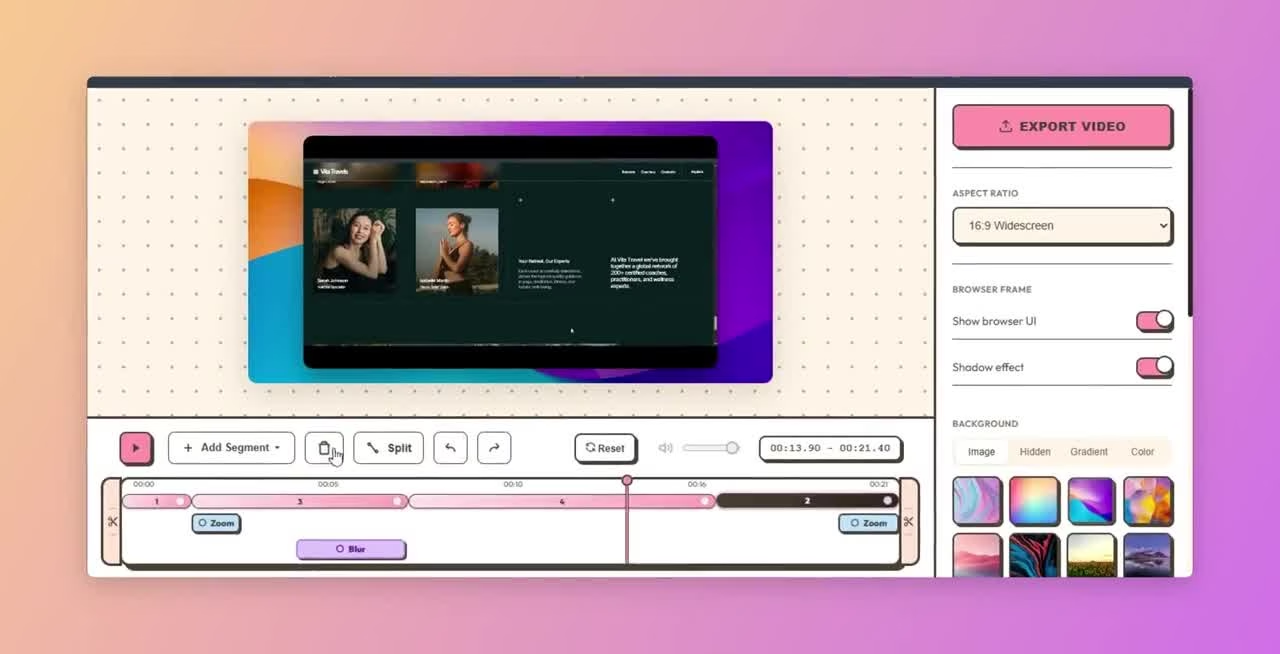
Free Chrome screen recorder with cinematic auto zoom and a built-in editor Lumiko is a Chrome extension for recording your screen and making product demos, tutorials and walkthroughs.
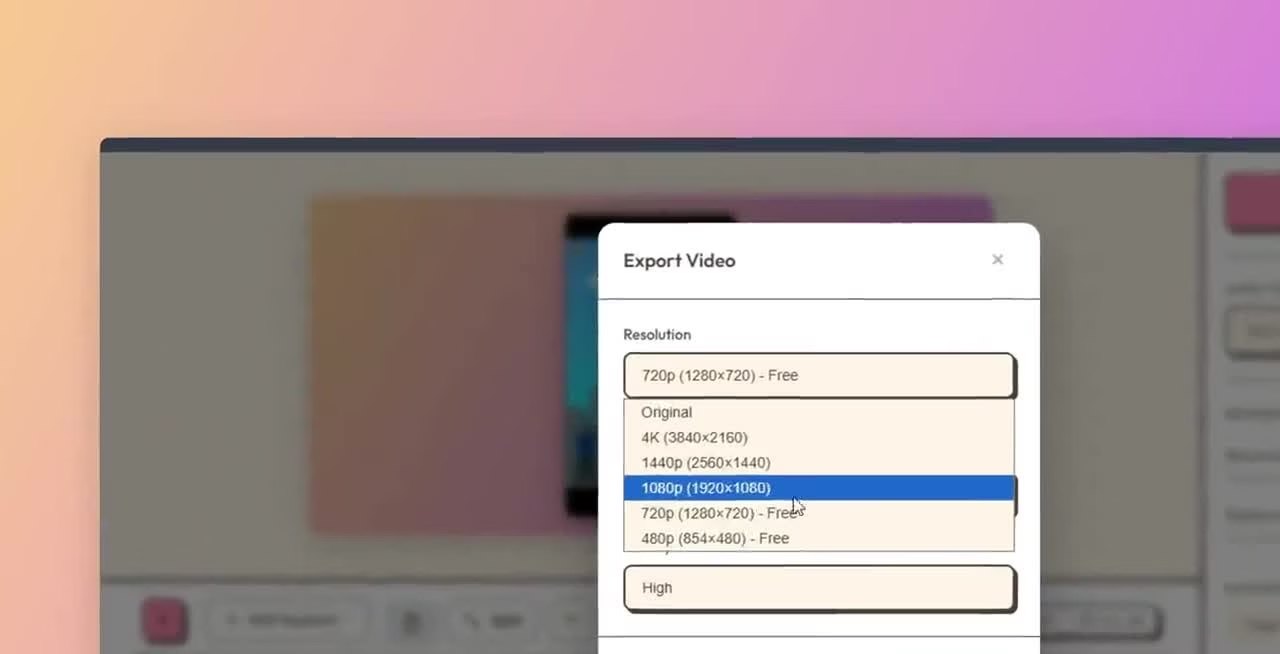
Lumiko has a sensible free-to-paid split for occasional demo makers: recording and zoom tools stay free, while watermark removal and 4K are a one-time upgrade. We would test an actual walkthrough on your machine before relying on it for client work. This assessment comes from official documentation, not a hands-on test.
Lumiko is a Chrome extension for recording your screen and making product demos, tutorials and walkthroughs. Its main distinction is automatic cursor zoom and panning, paired with a browser-based editor. The free plan includes unlimited recording and exports up to 1440p; Pro removes the watermark and adds 4K.
Although Lumiko installs in Chrome, the official FAQ says it uses Chrome desktopCapture to record a screen, window or standalone desktop application. You can record a walkthrough outside the browser, such as VS Code or Figma, while retaining the cursor-zoom workflow.
The product advertises an auto-zoom engine, click effects and timeline editing. Smart Blur helps hide sensitive information, and a webcam overlay adds a face-cam to a walkthrough. These are vendor-described capabilities, not features we have independently tested for output quality or performance.
Free includes unlimited recording without a time limit, automatic zoom, Smart Blur, webcam
Lumiko is a Chrome extension for recording your screen and making product demos, tutorials and walkthroughs. Its main distinction is automatic cursor zoom and panning, paired with a browser-based editor. The free plan includes unlimited recording and exports up to 1440p; Pro removes the watermark and adds 4K.
Although Lumiko installs in Chrome, the official FAQ says it uses Chrome desktopCapture to record a screen, window or standalone desktop application. You can record a walkthrough outside the browser, such as VS Code or Figma, while retaining the cursor-zoom workflow.
The product advertises an auto-zoom engine, click effects and timeline editing. Smart Blur helps hide sensitive information, and a webcam overlay adds a face-cam to a walkthrough. These are vendor-described capabilities, not features we have independently tested for output quality or performance.
Free includes unlimited recording without a time limit, automatic zoom, Smart Blur, webcam overlay, custom backgrounds and exports up to 1440p. Free exports carry the Made with Lumiko badge. Pro adds watermark removal, full 4K rendering and a lifetime license with up to three device activations.
The official website currently advertises Pro at $9 as a one-time lifetime deal, discounted from $29. It is not a monthly subscription. Check the current offer before buying, since promotional pricing can change.
Lumiko says recording and export processing happen locally in the browser, without uploading, viewing or retaining recording content. Its privacy page lists desktopCapture for selecting the recording target, activeTab and scripting for the recorder/editor and cursor tracking, and storage for local settings. It collects a Pro license identifier and optional crash/error logs, but says those logs contain no recording content.
Local processing reduces the need to upload a screen recording to an editing service. It does not replace reviewing what appears in the exported video. Check sensitive fields and blur placement before sharing a client or workplace walkthrough.
Lumiko is worth trying if you want to improve a screen demo without committing to another monthly tool. The free resolution ceiling is already useful for many tutorials, while the paid difference is easy to understand: clean exports and 4K. The trade-off is depending on a Chrome extension and its local processing rather than a separate desktop editing workflow.
Review basis: desk research of the official product website and privacy page, checked October 10, 2026. No hands-on test of zoom accuracy, rendering speed or recording reliability.
Desk research on October 10, 2026 using the official product, privacy and terms pages. No hands-on test of recording reliability, zoom accuracy or render performance. Screenshots are frames from the official timeline and rendering demos and show actual editor/export controls. Current Free exports up to 1440p; Pro is a $9 one-time offer, regular $29, with watermark removal, 4K and three device activations. Promotional pricing may change. Purchases are generally non-refundable under the terms, with technical-issue review requests within 14 days. Privacy claims are vendor-described, not independently audited. Sources: https://lumiko.dev/ ; https://lumiko.dev/privacy ; https://lumiko.dev/terms ; https://lumiko.dev/demo-timeline.mp4 ; https://lumiko.dev/demo-render.mp4
| Pricing | Free+Paid |
|---|---|
| Starting price | $9 one-time |
| Free plan | Yes |
| Free trial | No |
| Pricing page | View pricing |
| Platforms | Browser extension |
| API | No |
| Company | Lumiko |
| Apps Insight Score | 36/100 |
Editorial points are assigned by AppsInsight editors and cannot be purchased or influenced.
| Feature | Lumiko | Directus | Carousels Generator | SocialPilot |
|---|---|---|---|---|
| Rating | 3.5 / 5 | 4.2 / 5 | 4.1 / 5 | 4.1 / 5 |
| Pricing | Free+Paid | Free+Paid | Free+Paid | Paid Subscription |
| Starting price | $9 one-time | $0 | $19/mo ($16/mo billed yearly) | $20/mo |
| Free plan | Included | Included | Included | Included |
| Free trial | No | No | No | Yes (14 days) |
| Platforms | Browser extension | Web app, Self-hosted / On-premise, API / SDK, CLI / Terminal | Web app | Web app, iOS (iPhone & iPad), Android |
| Best for | Chrome users making product walkthroughs Tutorial creators Occasional client-demo makers | Developers and agencies building headless sites and apps, product teams that need a no-code admin on top of a SQL database, and teams that want governed AI or MCP access to business data. | Founders, creators and marketers who want a consistent LinkedIn or Instagram carousel presence without design skills, and small teams that publish on a schedule and want brand consistency baked in. | Marketing agencies, social media managers, multi-account brands, small marketing teams |
Lumiko vs Directus Lumiko vs Carousels Generator Lumiko vs SocialPilot
Open-source backend and headless CMS that turns any SQL database into instant REST and GraphQL APIs,…

AI studio that turns a topic or link into a branded LinkedIn or Instagram carousel

Plan and publish across ten social networks with team approvals and reporting.

Schedule and publish to 11 social platforms from one dashboard

AI visibility platform for small marketing teams: tracks your brand across ChatGPT, Perplexity and Google AI,…

AI clipping, captions, dubbing, and social publishing for long-form video.
AI visibility platform for small marketing teams: tracks your brand across ChatGPT, Perplexity and Google AI,…
Open-source backend and headless CMS that turns any SQL database into instant REST and GraphQL APIs,…

Auto-schedule, analyze, and grow your social presence - all in one visual workspace

No reviews yet. Be the first to review this app.
Already have an account? Log in to track your reviews.