


UltiMaker Cura
Free open-source desktop slicer for preparing compatible filament 3D prints
Open sourceFree plan
- macOS
- Windows
- Linux

Free, open-source 3D print preparation for supported FDM and resin printers
Free, open-source 3D print preparation for supported FDM and resin printers What is PrusaSlicer?
PrusaSlicer is worth considering for its documented combination of local slicing, printer and material profiles, editable supports and detailed preview tools. It offers room to grow from simpler settings into advanced print preparation without charging for a desktop software subscription.
Our recommendation is based on official documentation, not hands-on printing. Check your exact printer profile and material setup before choosing it. Beginners who want an almost automatic workflow may prefer a simpler tool, while anyone designing a model still needs separate CAD or modeling software.
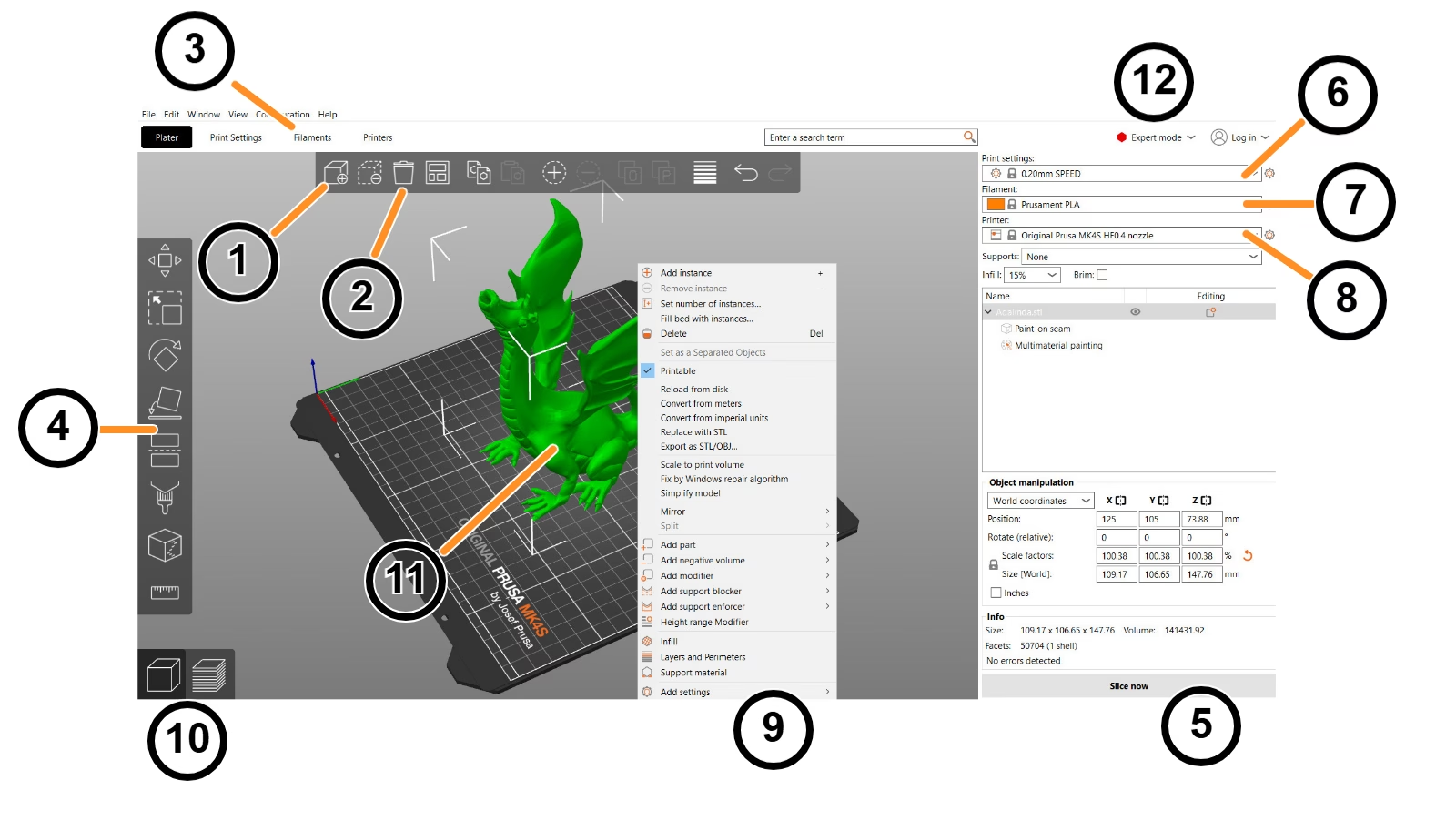
PrusaSlicer is a free, open-source desktop application for turning 3D models into instructions for a compatible 3D printer. It is developed by Prusa Research and builds on the Slic3r project. Its job is print preparation: import a model, position it on a virtual build plate, choose a printer and material profile, adjust supports and settings, then inspect the sliced result before exporting or sending the print file. It supports both FDM and mSLA workflows, but that does not mean every machine is supported without configuration.
The strongest fit is someone who wants detailed control over print preparation without a software subscription. Prusa printer owners get a closely matched workflow, while users of other manufacturers should check the available profile and firmware requirements. Windows, macOS and Linux versions are available. Slicing runs locally; optional online features and printer connections are separate choices.
Start by
PrusaSlicer is a free, open-source desktop application for turning 3D models into instructions for a compatible 3D printer. It is developed by Prusa Research and builds on the Slic3r project. Its job is print preparation: import a model, position it on a virtual build plate, choose a printer and material profile, adjust supports and settings, then inspect the sliced result before exporting or sending the print file. It supports both FDM and mSLA workflows, but that does not mean every machine is supported without configuration.
The strongest fit is someone who wants detailed control over print preparation without a software subscription. Prusa printer owners get a closely matched workflow, while users of other manufacturers should check the available profile and firmware requirements. Windows, macOS and Linux versions are available. Slicing runs locally; optional online features and printer connections are separate choices.
Start by selecting the correct printer, filament or resin, and print settings. Import the model and check its size, orientation and position. A model that looks fine on screen may still need supports or a different orientation to print well. PrusaSlicer provides manipulation tools, support painting, cutting and a preview of the generated instructions. Its Simple, Advanced and Expert modes let you expose more settings as you gain experience.
After slicing, inspect the preview for supports, thin features and unexpected toolpaths. Export the appropriate file for your printer or use a supported connection. The print estimate is a planning aid, not a guarantee: hardware, materials, calibration and conditions still affect the actual result. Save a project file when you need to revisit the model and settings rather than keeping only a final output file.
Organic supports aim to support difficult geometry with limited contact points. Paint-on controls let you specify where supports or material regions should go. The cut tool can split a model that is too large for a build plate and add alignment features. Multi-material options depend on the printer and extruder setup; software settings do not add hardware capabilities a machine lacks.
For repeatable work, printer and material profiles reduce the amount of setup you must repeat. The command-line interface can support batch preparation and automation. Supported integrations include Prusa Connect and local printer-transfer routes such as OctoPrint or Klipper configurations. These require the relevant service or printer connection to be set up; they are not a promise that any printer will work out of the box.
PrusaSlicer itself is free and open source. There is no paid PrusaSlicer subscription tier required for its desktop slicing tools. A compatible printer, materials and any separately purchased hardware or services are outside that software price. The source code is available under the GNU Affero General Public License v3.0; organizations distributing modified software should read that license rather than assuming open source means no obligations.
The main trade-off is complexity. A beginner can use the simpler mode, but troubleshooting failed prints still calls for an understanding of the printer, model and material. PrusaSlicer is not a full CAD application and does not replace a model-design tool. It is also not the same product as EasyPrint, the separate simplified workflow, or Prusa Connect, the printer-management service.
We recommend considering PrusaSlicer when a supported printer profile and local print preparation matter more than a simplified cloud-only experience. The documented combination of preview tools, editable supports, profiles and open-source code makes it a useful option for makers and print-preparation work. A sensible first check is to slice one known model with the exact printer and material configuration you plan to use, then compare the output with a successful print from that machine.
This profile is a desk review of official product documentation and publicly available product screenshots, not a hands-on print test. We have not measured speed, print quality or reliability against competing slicers. Sources checked October 13, 2026: official product page, official FAQ, general documentation, and project README.
Desk review of official PrusaSlicer product, general information, FAQ, GitHub and license pages plus official product screenshots on October 13, 2026. No hands-on print benchmark or compatibility test was performed. The 3.2/5 editor rating is the saved 19/30 editorial rubric scaled to five and rounded to one decimal; it is separate from the combined AppsInsight Score.
| Pricing | Open source |
|---|---|
| Free plan | Yes |
| Free trial | No |
| Pricing page | View pricing |
| Platforms | macOS, Windows, Linux, CLI / Terminal |
| API | No |
| Company | Prusa Research |
| Apps Insight Score | 39/100 |
| Implementation | Medium |
| Learning curve | Intermediate |
Editorial points are assigned by AppsInsight editors and cannot be purchased or influenced.
| Feature | PrusaSlicer | UltiMaker Cura | OrcaSlicer |
|---|---|---|---|
| Rating | 3.2 / 5 | 3.3 / 5 | 3.3 / 5 |
| Pricing | Open source | Open source | Open source |
| Starting price | — | — | — |
| Free plan | Yes | Yes | Yes |
| Free trial | No | No | No |
| Platforms | macOS, Windows, Linux, CLI / Terminal | macOS, Windows, Linux | macOS, Windows, Linux |
| Best for | Makers with supported FDM or mSLA printers, Prusa printer owners, Local print preparation and CLI automation | Hobbyists, educators, compatible filament-printing workflows | FDM printer tuning, calibration, detailed print controls |
$0 /mo
$0 billed annually
Free open-source desktop slicer for preparing compatible filament 3D prints

Free open-source FDM slicer with calibration tools and detailed print controls
Free open-source FDM slicer with calibration tools and detailed print controls
Free open-source desktop slicer for preparing compatible filament 3D prints
No reviews yet. Be the first to review this app.
Already have an account? Log in to track your reviews.