


PrusaSlicer
Free, open-source 3D print preparation for supported FDM and resin printers
Open sourceFree plan
- macOS
- Windows
- Linux
- CLI / Terminal
Free open-source FDM slicer with calibration tools and detailed print controls
Free open-source FDM slicer with calibration tools and detailed print controls OrcaSlicer is a free, open-source slicer for FDM 3D printers.
OrcaSlicer is worth a trial when built-in calibration and detailed FDM controls address a recurring print problem. Confirm your printer profile and connection, inspect a small physical test and keep a working setup before switching. This is a source-based review, not hands-on testing.
OrcaSlicer is a free, open-source slicer for FDM 3D printers. It prepares models for printing and generates printer instructions, with built-in calibration tools and detailed controls for walls, seams, supports and other print settings. Its strongest fit is a user who wants to diagnose a specific print problem rather than rely on a preset alone.
OrcaSlicer is maintained by an open-source community and is licensed under AGPL3. It builds on the history of Bambu Studio, PrusaSlicer and other open-source slicing work. This review covers the standard desktop application, not an included cloud subscription or a guarantee that every printer function works with every machine.
Choose a suitable printer profile, nozzle, filament and process before slicing. A related printer model is not proof of compatibility. Confirm the build volume, firmware assumptions and output method against your actual machine. A slicer cannot compensate for a profile
OrcaSlicer is a free, open-source slicer for FDM 3D printers. It prepares models for printing and generates printer instructions, with built-in calibration tools and detailed controls for walls, seams, supports and other print settings. Its strongest fit is a user who wants to diagnose a specific print problem rather than rely on a preset alone.
OrcaSlicer is maintained by an open-source community and is licensed under AGPL3. It builds on the history of Bambu Studio, PrusaSlicer and other open-source slicing work. This review covers the standard desktop application, not an included cloud subscription or a guarantee that every printer function works with every machine.
Choose a suitable printer profile, nozzle, filament and process before slicing. A related printer model is not proof of compatibility. Confirm the build volume, firmware assumptions and output method against your actual machine. A slicer cannot compensate for a profile that sends the wrong startup instructions or temperatures.
The preparation workflow includes model arrangement and print settings, followed by a preview of the sliced result. Keep an editable project file as well as the exported printer file. That makes it easier to return to the setup rather than reconstruct settings after a print problem.
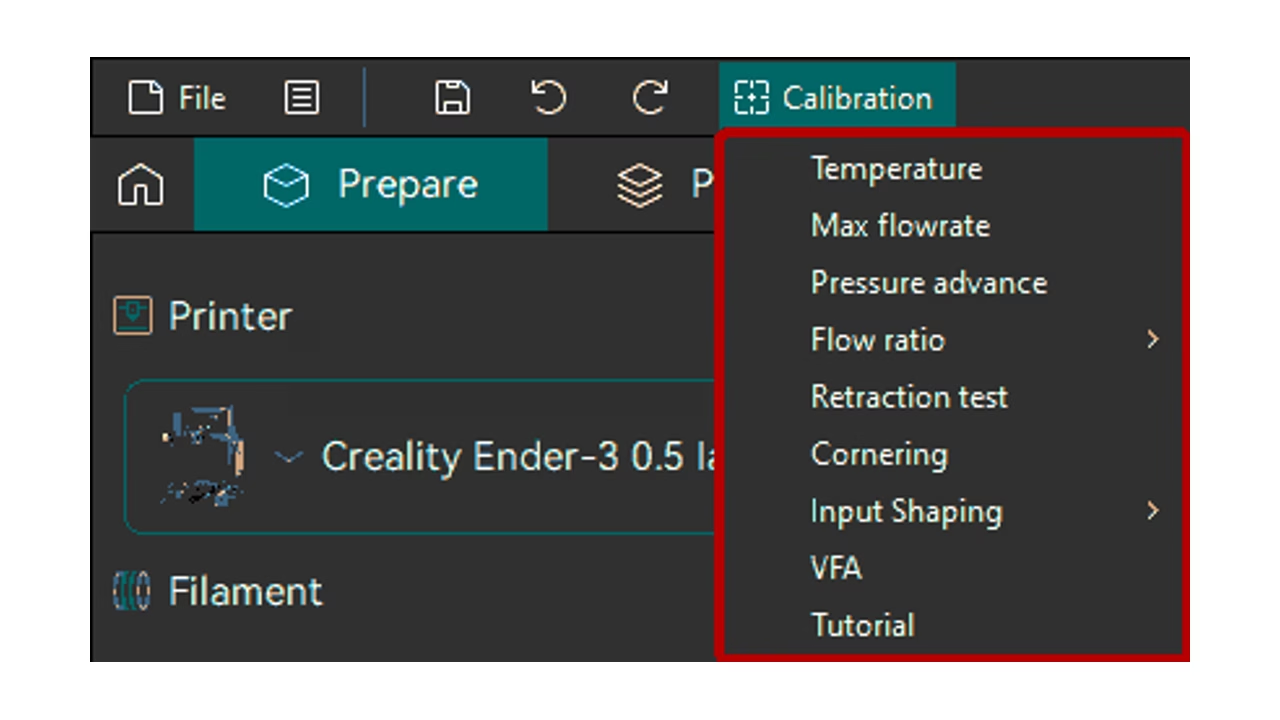
The official calibration guide covers temperature, flow rate, pressure advance, retraction and other tests. These tools generate controlled test models so you can examine a particular variable. They do not remove the need to inspect a physical print and choose an appropriate result.
Start with one question: is the problem temperature, flow, support removal or something else? Change one relevant setting at a time and keep notes. Running every calibration does not automatically produce a better part. Tests spend filament and time, and a setting that improves one model may not be ideal for every material or geometry.
OrcaSlicer exposes advanced wall and seam controls, tree supports and adaptive slicing options. That depth can help experienced users refine a print, but also increases the number of settings a beginner can change without understanding the effect. A sensible starting profile and a small test print are better than altering many defaults at once.
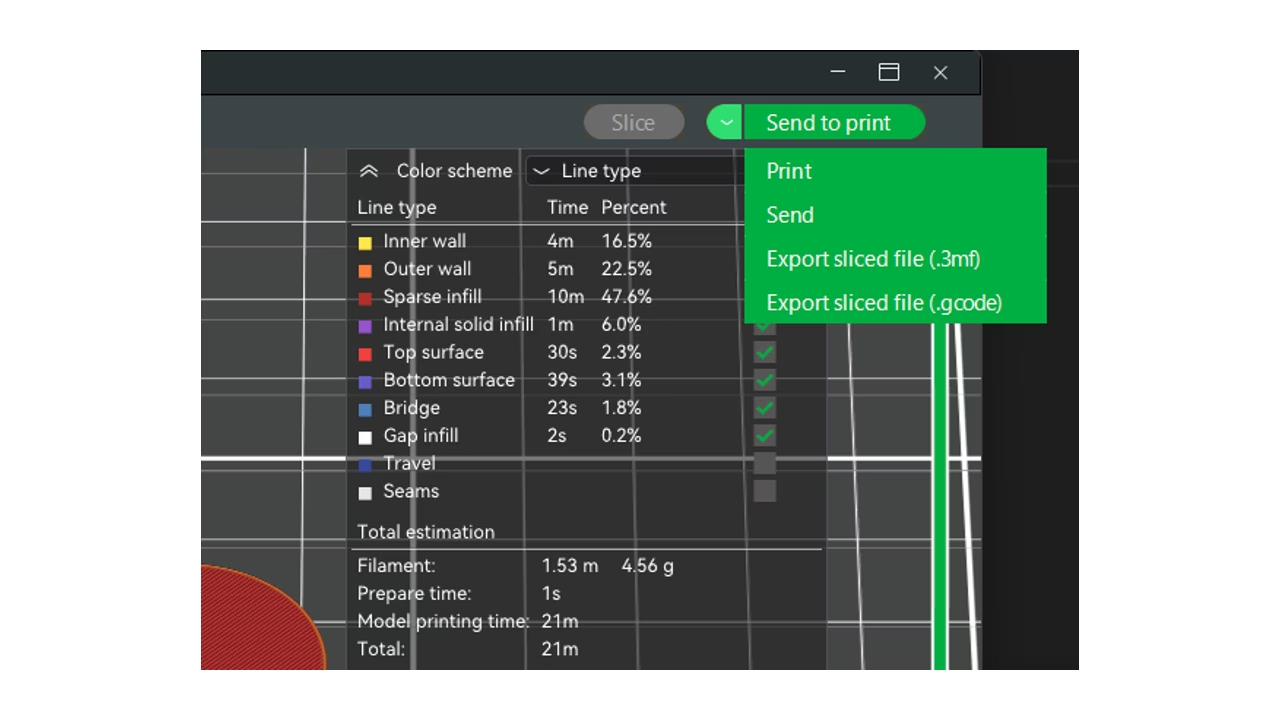
Use Preview to inspect planned layers, travel and extrusion before exporting G-code. Look for missing fine features, unsupported starts and supports that will be difficult to remove. The preview and estimated print time describe the planned job; they do not guarantee adhesion, strength, finish or dimensional accuracy.
The desktop privacy policy says local use needs no account and does not collect telemetry. It also explains network activity for update/profile checks and integrations you choose to enable. Those narrower statements are more useful than calling the application completely disconnected.
Optional Orca Cloud sync has separate terms. Print-host integrations can send printer files and use credentials you configure. The optional Bambu networking plugin contains non-free Bambu Lab libraries and its cloud traffic follows Bambu Lab’s policies. Verify the controls you need before replacing a vendor workflow, especially for remote printing or printer-specific features.
The core desktop software costs $0 under AGPL3. There is no paid slicing tier or time-limited core trial described here. Printer hardware, filament, optional services and any third-party cloud costs are separate. An open-source license is not a promise of a paid support response time.
Official builds are available for Windows, macOS and Linux. Choose the current installer for your processor and operating system from the official release links. The project repository identifies www.orcaslicer.com as its official website and warns about lookalike download sites. Use the repository or linked official download route rather than a search result that merely has the same product name.
The official wiki explains print settings and calibration, while the repository supplies release notes, issues and community discussions. This is community-supported software, so this listing does not promise a business SLA or independent security certification. For confidential models, review local and optional cloud handling separately.
The latest stable release found during this review was2.4.2, published July7,2026. Its maintenance notes cover preset loading, cloud-sync behavior, Bambu plugin installation and several crash fixes. Check the actual notes before updating a working setup, and retain projects and profiles you may need to return to. Screenshots from official documentation show real interface examples and may differ from the latest build.
OrcaSlicer is worth trying when calibration and detailed filament-print controls solve a recurring problem for you. It is less suitable for someone expecting an effortless switch with every vendor control preserved, or someone who needs a full CAD-design tool. A slicer prepares models; it is not a replacement for the entire design workflow.
PrusaSlicer and UltiMaker Cura are relevant alternatives. Test the same small model with your real printer and compare the result, preparation effort and output route. If an existing workflow is reliable, switch for a specific benefit rather than because another slicer has more settings.
This is a documentation-based assessment, not a hands-on print benchmark. Our six inputs total20/30: quality7/10, ease3/5, depth4/5, innovation3/5, value2/3 and confidence1/2, scaled to3.3/5. We checked the official repository, website, wiki, calibration guide, license, privacy policy and releases, plus an independent review and community discussion on October13,2026. We did not invent usage counts, awards or print-quality results.
Documentation-based review on October 13, 2026 using official repository, wiki, calibration guide, license, desktop privacy policy and releases, plus an independent review and community discussion. No hands-on slicing or printing benchmark. Authentic screenshots from official documentation, with white padding for layout; older interface examples may differ from the current release. Unknown company year, headquarters, team size and unsupported awards remain blank.
Latest stable release checked: 2.4.2 (July 7, 2026). Maintenance fixes include preset loading, optional cloud-sync behavior, Bambu plugin installation and crashes.
| Pricing | Open source |
|---|---|
| Free plan | Yes |
| Free trial | No |
| Pricing page | View pricing |
| Platforms | macOS, Windows, Linux |
| API | No |
| Company | OrcaSlicer open-source community |
| Apps Insight Score | 38/100 |
| Implementation | Medium |
| Learning curve | Intermediate |
Editorial points are assigned by AppsInsight editors and cannot be purchased or influenced.
| Feature | OrcaSlicer | PrusaSlicer | UltiMaker Cura |
|---|---|---|---|
| Rating | 3.3 / 5 | 3.2 / 5 | 3.3 / 5 |
| Pricing | Open source | Open source | Open source |
| Starting price | — | — | — |
| Free plan | Yes | Yes | Yes |
| Free trial | No | No | No |
| Platforms | macOS, Windows, Linux | macOS, Windows, Linux, CLI / Terminal | macOS, Windows, Linux |
| Best for | FDM printer tuning, calibration, detailed print controls | Makers with supported FDM or mSLA printers, Prusa printer owners, Local print preparation and CLI automation | Hobbyists, educators, compatible filament-printing workflows |
0 /mo
0 billed annually
Free, open-source 3D print preparation for supported FDM and resin printers

Free open-source desktop slicer for preparing compatible filament 3D prints
Free open-source desktop slicer for preparing compatible filament 3D prints
Free, open-source 3D print preparation for supported FDM and resin printers
No reviews yet. Be the first to review this app.
Already have an account? Log in to track your reviews.