


What is Bloque?
Hosted MCP gateway with team Hubs, shared servers, per-member keys and paid Playground Bloque review: one MCP gateway, with beta limits worth reading By Ashley Richmond.
Our verdict
Bloque is a focused hosted MCP gateway for technically led small teams tired of maintaining connector configs on every laptop. Hub keys, central server setup and paid Playground deserve a low-risk pilot. Current beta shares upstream identity, and uploaded workspace files are not encrypted at rest; it is not personal-account isolation or audited enterprise security. Desk research only, no live connection test.
Full review
Bloque review: one MCP gateway, with beta limits worth reading
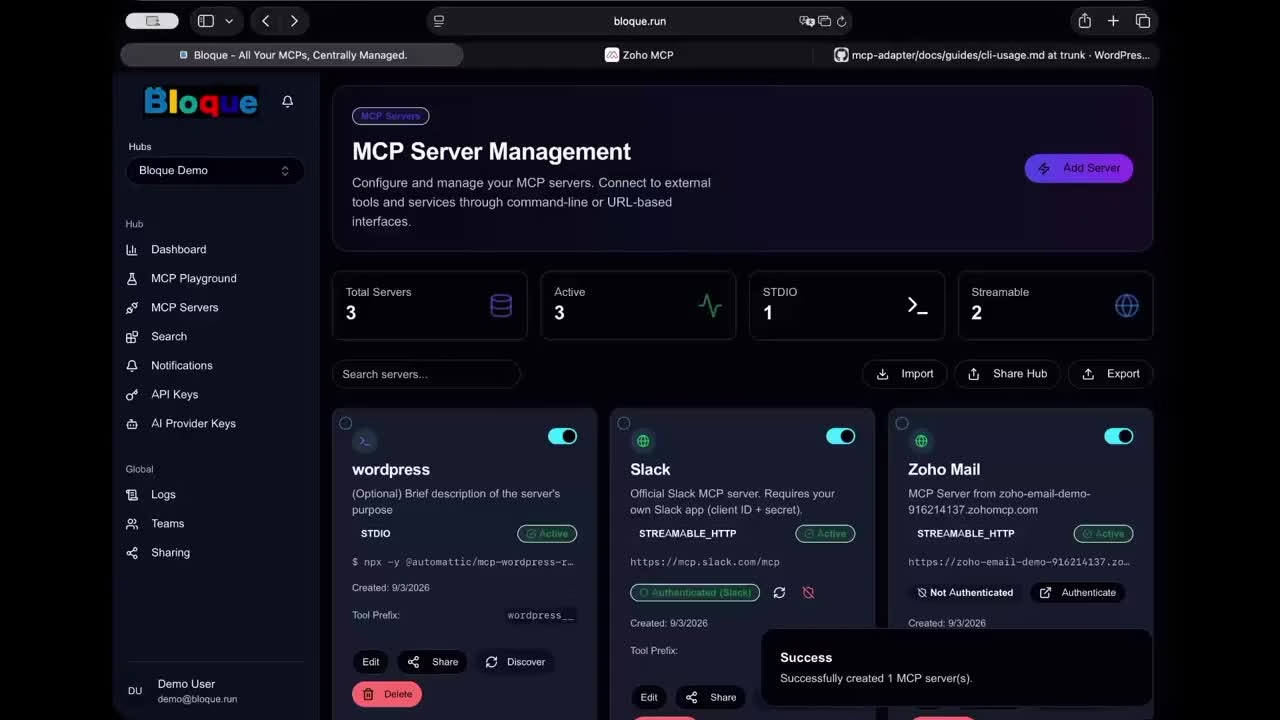
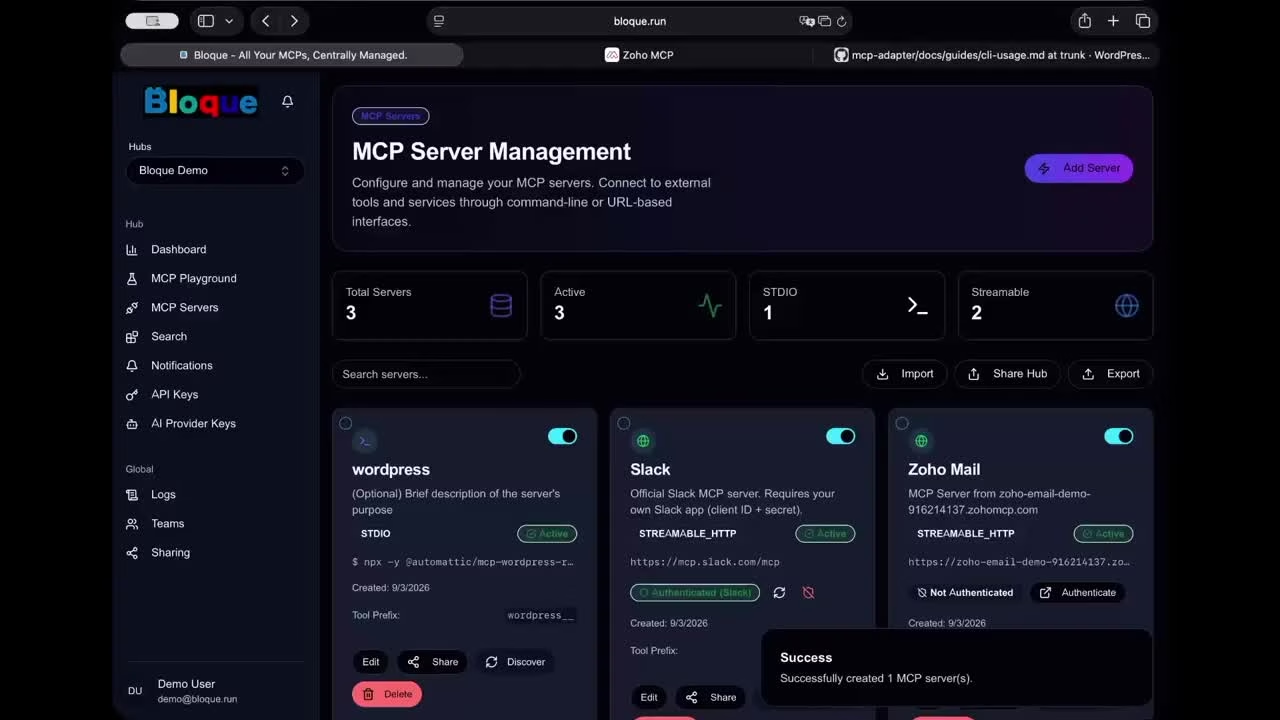
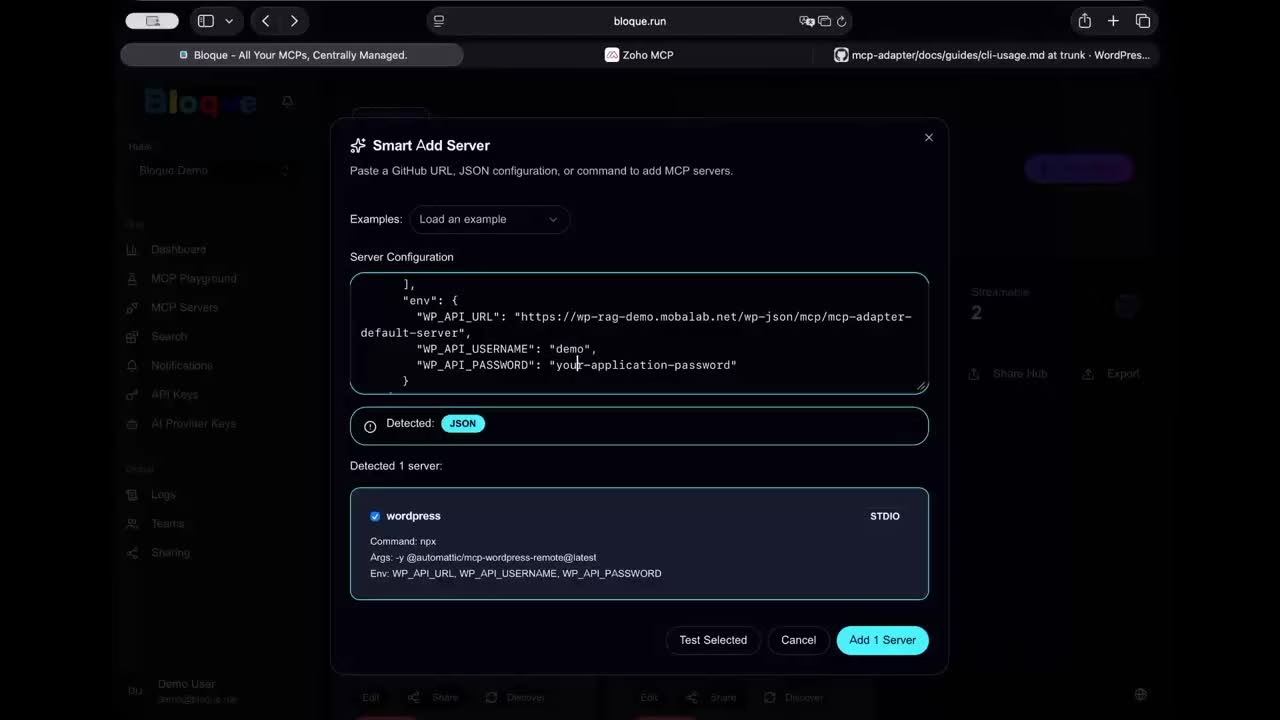
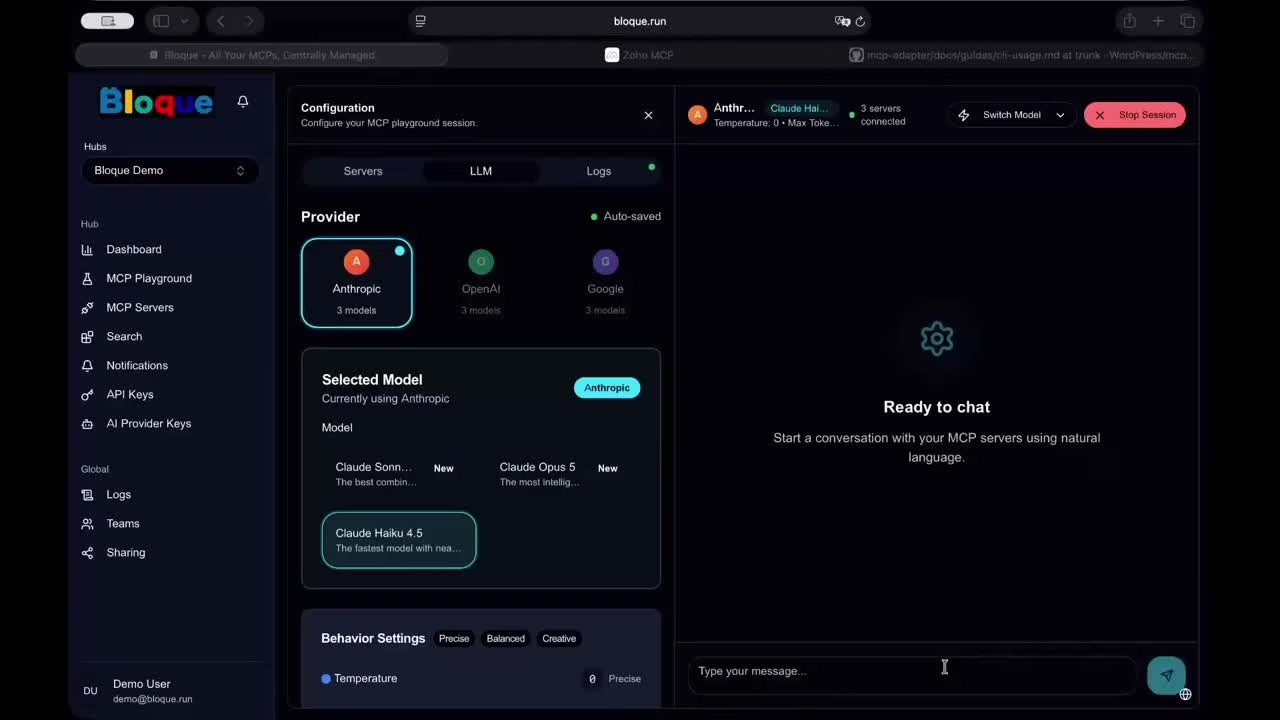
By Ashley Richmond. Desk research checked October 1, 2026. I reviewed Bloque’s public product page, annual and monthly pricing, legal disclosures, documentation, launch posts and the operator’s demonstration. I did not create an account, connect a client’s business systems, supply credentials, run MCP servers, pay for a plan or test offboarding. Screenshots are genuine console views from the Mobalab video linked on Bloque’s official site, not screenshots of our own deployment. They show a vendor demo and can differ from today’s console. There is no uptime, penetration-test or compliance assessment behind this review.
Bloque addresses an unglamorous problem: the person who first wired an AI client into Slack, GitHub or a shared database becomes the person everybody calls when it stops working. Moving that configuration into a hosted gateway could reduce the number of machines, keys and JSON files they
Bloque review: one MCP gateway, with beta limits worth reading
By Ashley Richmond. Desk research checked October 1, 2026. I reviewed Bloque’s public product page, annual and monthly pricing, legal disclosures, documentation, launch posts and the operator’s demonstration. I did not create an account, connect a client’s business systems, supply credentials, run MCP servers, pay for a plan or test offboarding. Screenshots are genuine console views from the Mobalab video linked on Bloque’s official site, not screenshots of our own deployment. They show a vendor demo and can differ from today’s console. There is no uptime, penetration-test or compliance assessment behind this review.
Bloque addresses an unglamorous problem: the person who first wired an AI client into Slack, GitHub or a shared database becomes the person everybody calls when it stops working. Moving that configuration into a hosted gateway could reduce the number of machines, keys and JSON files they must manage. That is a useful direction. It does not remove the need for someone to approve servers, understand permissions and take responsibility for the data passing through them.
My verdict is a cautious recommendation for a technically led small team using shared business resources. I would not use the current public beta as a promise of personal-account isolation. The September 22 launch post explicitly says shared servers currently use a shared upstream identity. Individual Bloque keys and logs identify activity at the gateway, but they do not make each coworker a separate Slack or GitHub user upstream. Per-user OAuth is described as a future GA feature, not something I verified as available.
What Bloque actually is
Bloque is a hosted, multi-tenant Model Context Protocol gateway operated by Mobalab, KK, a Japanese software company whose own site lists headquarters in Chiba. Its documentation names Kazuo Kashima as Bloque’s founder. The commercial disclosure supplies a Mobara, Chiba address and Japanese operating contacts. I have not verified a incorporation date, team headcount or legal registration independently, so those details should not be invented from the copyright footer.
The product previously appeared as MHaaS. The vendor explains that it began as a fork of Plugged.in, retained the MCP management core and rebuilt the hosted gateway around a router, isolated runners, team billing and member keys. That provenance is useful, but it does not mean Bloque includes every Plugged.in feature or that the hosted service can be self-hosted under the original project’s license. The unrelated bloque.app SDK and payment products are not this product.
A Hub is the workspace boundary for server configurations and connection keys. Clients connect to the documented endpoint https://mcp.bloque.run/mcp with a Hub API key. Instead of giving every machine a separate list of upstream server configurations, an administrator maintains the list centrally. Team Hubs add shared membership and central billing. This is infrastructure for existing AI clients and automation, not a new general-purpose chatbot or an autonomous workflow designer.
Setup: less local work, not zero technical work
The documented setup is sensible: create a Hub, issue a key, add servers, discover their tools and configure a compatible client. Smart Add accepts a repository or package URL, MCP JSON or manual configuration. It can help translate a setup recipe into a server entry. It cannot make an unsafe package safe or supply permission to expose confidential information.
Bloque runs stdio servers in hosted runners and proxies remote HTTP servers. Streamable HTTP is the current connection route; older SSE guidance is marked deprecated. The docs show npx and pipx configurations. Docker-in-Docker and arbitrary local installations are not supported as if this were your own unrestricted VM. A server that expects local files, native dependencies or a private network may not work simply because another MCP client supports it. Test that specific server before choosing a subscription.
Remote OAuth setup also varies by vendor. Dynamic Client Registration can make supported services such as Notion or Tally easier to connect. Some pre-approval flows are not supported. Slack and GitHub examples require your own OAuth application and appropriate scopes rather than a magic one-click connection to any workspace. The operator’s demo also shows WordPress setup and points to additional server-side work needed to expose useful abilities. A registry advertised as containing more than 1,500 servers is a discovery claim, not 1,500 audited or guaranteed-working integrations.
For a pilot, start with a disposable Hub, a low-privilege test connection and a read-only tool. Keep a record of the upstream scopes and which team members can reach them. Exercise revocation and observe both Bloque and the upstream account before moving to write tools. Those are evaluation steps I recommend, not tests I performed.
Client compatibility needs two sets of documentation
Bloque has configuration pages for Claude, ChatGPT, Claude Code, Codex and other MCP clients, including VS Code, Cursor, LM Studio, Dify and n8n. That is broader than a single assistant integration. The client still decides its plan availability, remote transport support, UI and approval rules. A gateway cannot override a workspace administrator or unlock a provider feature on an ineligible plan.
This matters most for ChatGPT. Bloque’s guide says custom apps and Developer Mode work on all plans, but the current OpenAI help page describes full MCP write support for Business and Enterprise/Edu on web, with administrator controls; Pro is described as read/fetch access in Developer Mode. I would not buy Bloque on the assumption that a Free ChatGPT account can use every tool, or that mobile setup matches the guide. Confirm the intended plan and actions against OpenAI’s current documentation.
Anthropic’s current help page says remote custom connectors are available on Free, Pro, Max, Team and Enterprise, with Free limited to one custom connector. Organization owners add Team and Enterprise connectors before members enable them. Remote connector calls originate from Anthropic’s servers, not a local desktop network. Local Claude Desktop JSON configuration is a different mechanism. Bloque’s one gateway can be useful here, but it is not evidence that every tool will work on every surface.
The integration labels on this listing mean documented connection paths, not a successful integration test. Slack, GitHub and Notion require their actual upstream setup and permissions. Claude and ChatGPT require an eligible client route. The operator’s own demo confirms the console can show those setup flows; it is not an independent reliability benchmark.
Playground: a paid diagnostic surface with your own model key
MCP Playground is a useful part of the proposition. It lets an administrator inspect servers and tools, select a model and try a conversation against configured servers before blaming the client. The docs support Anthropic, OpenAI and Google provider keys. You bring the provider key. Bloque’s subscription should not be read as bundled unlimited model usage; confirm and budget the separate provider charges.
The current pricing page and Playground docs put Playground on paid plans. The September launch post says there is a free tier to try Playground, which conflicts with those current sources. I use the paid-plan boundary here. Do not register expecting a free Playground session based only on that sentence. The demo displays a session and results, but I did not send any prompts or execute its tools.
Model behavior remains a separate risk. Tool descriptions, resources and returned text may contain misleading or hostile instructions, and servers may expose write actions. A hosted router does not certify all that content or guarantee the model will choose safely. Treat prompt-injection resistance, tool approval and least privilege as part of the pilot, not something solved by centralizing credentials.
Team access: the shared identity is the biggest current limitation
The paid public beta adds team resources, central billing and a key per member. That helps a small business remove a departing member’s gateway access without rebuilding the entire client setup. It is an improvement over copying the same upstream token into everybody’s laptop config. The underlying token still needs an owner and a scope policy.
The official beta announcement is unusually clear: shared servers use a shared upstream identity today. Bloque-side per-member keys and logs are not upstream per-user authorization. This is a reasonable fit for a shared organization resource where that arrangement is intended. It is not the same fit for each person’s private mailbox, personal files or a system whose permissions must differ by member. The vendor describes per-user OAuth for GA, roughly eight weeks after launch. Roadmap timing can change and no date is a guarantee.
Team Hubs and their configurations and API keys are available to team members under the documented membership model, with owner administration. Do not import a private Hub into a team casually. Gateway access revocation should not be confused with rotating a previously disclosed upstream secret or removing a separately granted OAuth connection. A central console narrows the job; it does not erase every other permission trail.
Encryption: separate credentials from uploaded files
The security detail is better in the privacy policy than in the broad landing-page shorthand. Bloque platform API keys are one-way HMAC-SHA256 hashes, not retained as recoverable raw keys. Upstream secrets that must be used again are encrypted with AES-256-GCM using a per-project data-encryption key wrapped by AWS KMS. The policy describes isolation, refresh handling and protected credential storage. These are vendor implementation statements, not controls I independently audited.
Uploaded shared-workspace files are a different class of data. The current policy explicitly says their raw bytes are not encrypted at rest. They are placed in an isolated workspace and removed on account deletion or approximately an hour after the last connection when the idle runner is evicted. That does not mean all account data disappears after an hour. Billing, configurations, logs and other stored records have separate rules.
I would not summarize this as “all data encrypted” or put sensitive documents into the workspace without an internal review. The policy distinguishes per-profile bubblewrap/namespace isolation in shared runners from dedicated containers. The current Pro card advertises a dedicated runner and Team one dedicated runner per team. An older Concepts page still labels the Pro dedicated runner coming soon. Current plan cards and billing docs support availability, but the actual purchased runner, resource limits and behavior remain untested.
There is no independent penetration test, DPA package, certification or measured uptime evidence established by this review. Contact the operator if your buyer needs processor details, contractual retention commitments, residency restrictions or audit material. A Japanese operator does not imply every processor or data path stays in Japan.
Logs and sharing: useful controls that need deliberate use
Docs describe 30-day logs with server, tool, time, status and diagnostic information, filtered and paged in the console. The privacy policy says request bodies, arguments, tool results, passwords and tokens are not recorded as such. It also mentions server stderr output. A server can emit unexpected sensitive content in diagnostic output; I have not audited the implementation or every third-party package’s logging. “Who called what” is a better description than a full copy of every business transaction, or proof of enterprise-grade immutable audit trails.
Public sharing is not the same thing as a private team invitation. A server and then a Hub can be shared, with individual credential fields selectively redacted. Anyone with the public link can browse or install the shared configuration. A public username also creates a profile route. Removing that username’s visibility is not equivalent to deleting separately shared items; visibility and deletion have separate controls.
For a team without an IT department, this deserves an explicit checklist. Review every config value before public sharing, including environment variables that look harmless but hold identifiers or secrets. Confirm the intended audience and unshare individual items when necessary. I did not publish any Hub, create a username or test a public-sharing link with credentials.
Pricing checked on the live monthly and annual toggle
- Free: $0 forever. One Hub, ten MCP servers per Hub, shared runner. Current plan card does not include Playground.
- Starter: $5 monthly or $50 per year upfront. Three Hubs, twenty servers per Hub, Playground and shared runner.
- Pro: $25 monthly or $250 per year upfront. Ten Hubs, thirty servers per Hub, Playground and advertised dedicated runner.
- Team: $29 monthly or $290 per year, includes two seats. Ten Hubs, thirty servers per Hub, Playground and one dedicated runner per team. Current beta additional seats show $7 monthly or $70 yearly, with future $9/$90 crossed out. The launch post says beta customers lock beta pricing for twelve months, while extra-seat pricing rises at GA.
- Enterprise: contact sales. No public amount or verified package of enterprise controls supplied by the live card.
Annual values are annual totals, not a monthly price billed annually. The commercial disclosure also lists Starter ¥780 monthly/¥7,800 annually and Pro ¥3,980/¥39,800. Currency, taxes and the real checkout quote govern what you will pay. The PH launch promotes one month free on Team, but I did not redeem it or verify eligibility, activation and renewal terms. It is not represented here as a general free-trial entitlement.
Subscriptions auto-renew under the terms. Cancellation normally stops renewal and preserves access to the paid period’s end; fees are generally non-refundable except where law requires. Downgrades can lock excess Hubs read-only. A failed or lapsed payment can lock Hubs and deprovision a paid runner while stored content is retained under the applicable policy. Export and continuity planning should come before cancellation if those Hubs matter to daily work.
The Free plan is a useful small configuration pilot, but its quota is not unlimited hosting. Paid Playground access and client/model subscriptions are separate considerations. I would compare the full bill and the work it removes, not multiply a headline seat price and assume every relevant charge is covered.
Who should shortlist it
My strongest fit is a small technical or professional-services team that already uses MCP, has someone capable of evaluating server packages and wants shared connections rather than per-person OAuth. Bloque’s narrow remit is attractive here: approved servers in one place, a documented endpoint, member keys, a diagnostic Playground and straightforward entry pricing. Start with the systems you are genuinely allowed to share.
My weakest fit is a regulated buyer requiring audited controls now, a business needing personal-account identity per member today, or a nontechnical owner expecting the gateway to choose permissions and maintain every community server. It is also not a match for arbitrary Docker-based services or private/local dependencies without a verified supported route. Calling the team “without an IT department” describes the buying problem; it does not make the security decisions disappear.
The vendor links Plugged.in as the broader self-hosted origin for teams wanting that direction. A direct client configuration can still be simpler for one person with one stable server. Those are evaluation paths, not price-verified alternatives or a claim that all features match. Decide whether the gateway reduces your real maintenance work enough to justify an additional data processor and dependency.
Ashley’s score and final assessment
Editorial rating: 3.5/5. Weighted score: 21/30. Product quality 7/10, ease 3/5, feature depth 4/5, innovation 4/5, value 2/3 and evidence confidence 1/2. This is an editorial desk-research judgment, not a customer-star average. The documented architecture, setup detail and affordable pilot support the score. Shared upstream identity, a young paid beta, plaintext workspace-file storage, inconsistent client/plan wording and the absence of our own operational tests cap it.
I like the focus. Bloque puts a concrete name and console around a maintenance burden many small teams already have. I would shortlist it, run a low-risk pilot and ask the operator about the precise runner, retention and identity model before wider use. I would not buy the roadmap as a current feature or hand it personal and regulated data because the pricing page looks approachable.
Source notes and review update
All current product, pricing, transport, isolation and policy descriptions are vendor claims unless separately attributed. Checked October 1, 2026. The September 22 public-beta and September 28 setup posts provide current release context. Older MHaaS/early-access branding and dedicated-runner “coming soon” wording are retained as conflicts rather than used to override the live offer. Revisit when per-user OAuth, pricing or storage controls change. No future feature is scored as delivered.
- Official product and live pricing toggle
- Official documentation and plans
- Public beta: shared upstream identity and beta seat pricing
- Connection reference, authentication and Playground
- Logs and public sharing
- Privacy policy, terms, commercial disclosure and contact
- Operator identity and headquarters and founder biography
- Official-site-linked Mobalab console demonstration and screenshot source
- OpenAI’s current MCP plan and workspace restrictions and Anthropic’s current remote connector rules
Who it's for
Best for
- Technically led small teams with shared MCP business resources and a low-risk pilot; developers who can vet packages and OAuth scopes.
Not ideal for
- Per-user upstream identity today
- regulated data without procurement review
- sensitive plaintext workspace files
- arbitrary Docker servers
- zero-technical-work expectations.
How we tested
Ashley Richmond desk research, October 1, 2026. Checked official product, monthly and annual pricing, docs, legal, Mobalab identity, beta blog, current client-provider help and vendor video pixels. No account, payment, credentials, server connection, sharing, tool execution, security audit, uptime or offboarding test. Media comes from official-site-linked Mobalab video, not our deployment.
What's new
September 22, 2026 paid public beta: Team Hubs, member gateway keys, central billing and shared upstream identity. Per-user OAuth remains GA roadmap. September 28 setup guide. Current Pro dedicated-runner offer conflicts with older Concepts; free Playground launch sentence conflicts with current paid plans. Beta extra seats $7/month or $70/year versus future $9/$90.
At a glance
| Pricing | Free+Paid |
|---|---|
| Free plan | Yes |
| Free trial | No |
| Pricing page | View pricing |
| Platforms | Web app |
| API | Yes |
| Company | Mobalab, KK |
| Apps Insight Score | 44/100 |
| Implementation | Medium |
| Learning curve | Intermediate |
Why this app scored 44/100
Editorial Review 21/30
- Product quality 7/10 7/10
- Ease of use 3/5 3/5
- Feature depth 4/5 4/5
- Innovation 4/5 4/5
- Value for money 2/3 2/3
- Recommendation confidence 1/2 1/2
Trust & Verification 7/25
- AppsInsight badge installed Badge not installed 0/15
- HTTPS website HTTPS 1/1
- Business support email Provided 1/1
- Privacy policy published Provided 2/2
- Terms of service published Provided 1/1
- Security certifications None listed 0/2
- Knowledge base / help center Provided 2/2
- Social profiles linked 1 profile linked 0/1
Community 0/20
- Verified reviews & rating 0 reviews (5 needed) 0/15
- Recent reviews No reviews yet 0/5
Product Profile 14/20
- Detailed description 2722 words 3/3
- Screenshots 3 screenshots 1/3
- Demo video Video added 2/2
- FAQ 6 items 1/2
- Feature list 8 items 1/2
- Pricing published Plan tiers published 3/3
- Pros & cons Pros & cons listed 1/1
- Integrations 5 integrations 1/2
- API available Yes 1/1
- Company details 2 of 3 details filled 0/1
Freshness 2/5
- Listing recently updated Updated 22 days ago 2/3
- Recent changelog entry No changelog entries 0/2
Editorial points are assigned by AppsInsight editors and cannot be purchased or influenced.
Integrations
Built for
Development & DevOps
AI & automation
SaaS & technology
Professional services
Key features
Central Hub MCP endpoint
Hosted stdio and remote HTTP proxy
Smart Add and tool discovery
Upstream OAuth and secret handling
Team Hubs and member gateway keys
Paid MCP Playground
30-day diagnostic logs
Selective public sharing
Key benefits
- Reduce repeated MCP setup across client machines through a documented shared gateway.
- Revoke member gateway keys centrally while tracking upstream identity limits.
- Debug configured servers in a paid Playground before rolling them into client workflows.
- Pilot a bounded free Hub before choosing paid capacity or team billing.
Pricing
Free - $0 forever
0 /mo
- 1 Hub
- 10 servers per Hub
- Shared runner
- No Playground under current plan card
Starter - $50/year upfront
5 /mo
- 3 Hubs
- 20 servers per Hub
- Shared runner
- Paid Playground
- BYO model key and separate provider usage
Pro - $250/year upfront
25 /mo
- 10 Hubs
- 30 servers per Hub
- Advertised dedicated runner
- Paid Playground
- Older Concepts availability wording is stale
Team beta - $290/year includes 2 seats
29 /mo
- 10 Hubs
- 30 servers per Hub
- 1 dedicated runner per team
- Extra beta seat $7/month or $70/year
- Future $9/month or $90/year
- Beta pricing locked 12 months per launch
- Shared upstream identity today
Enterprise - contact sales
- No public price or verified enterprise control package
- Contact info@bloque.run
- Checkout currency and taxes govern
Pros & Cons
Pros
- Focused hosted gateway with clear transport/setup documentation
- Published credential handling and explicit plaintext-file limitation
- Low public entry pricing with free Hub and annual totals
- Official demo shows genuine server setup and Playground UI
Cons
- Paid beta shares upstream identity; per-user OAuth remains roadmap
- Uploaded workspace raw files are not encrypted at rest
- Client plan/Playground/dedicated-runner wording has source conflicts
- No operational deployment security audit uptime or offboarding test
Screenshots & media
User reviews
No reviews yet. Be the first to review this app.
Already have an account? Log in to track your reviews.