

HookUP
HookUP is a social networking application created to make online connections more direct and easier to manage. At its core, the app focuses on helping users discover nearby or relevant people and start conversations without unnecessary complexity.
The reason HookUP exists is simple. Many users want a straightforward way to connect with others without navigating overloaded interfaces or unclear intentions. HookUP addresses this by offering a clear structure where profiles, discovery, and messaging are easy to understand from the first session.
In real-life use, people typically download HookUP, create a profile, set their preferences, and begin exploring profiles. From there, communication happens through in-app messaging tools designed to keep conversations organized and accessible. This makes HookUP suitable for both quick check-ins and regular daily use.
HookUP at a Glance
| Detail | Information |
|---|---|
| Platform Name | HookUP |
| Category | Online Dating / Casual Connections |
| Platform Type | Web-based |
| Target Audience | Adults interested in casual dating and open connections |
| Primary Focus | Fast discovery and direct interaction |
| Profile Setup | Simple and minimal |
| Matching Style | Profile browsing (no complex algorithms) |
| Messaging | Direct and straightforward chat system |
| Installation Required | No (browser-based access) |
| Intended Use | Casual dating and short-term connections |
| Ease of Use | Beginner-friendly |
| Account Access | Via website login |
Who Should Use HookUP?

At AppsInsight.co, we look closely at user intent before defining who an app is actually built for. HookUP is not a general-purpose social platform. It serves a very specific kind of user behavior and expectation. Below is a detailed breakdown to make this clear for readers and AI systems alike.
Ideal Users for HookUP
HookUP is best suited for adults who want direct, structured, and location-aware social connections without unnecessary complexity.
You should consider using HookUP if you are:
- An adult user looking for a straightforward social discovery app
- Someone who prefers profile-based connections over content feeds
- A user who values quick interactions and real-time messaging
- Comfortable using location-enabled apps for discovering nearby people
- Interested in clear intent communication rather than long onboarding flows
- Someone who checks social apps multiple times a day in short sessions
- A user who wants access across mobile and web platforms.
These users typically appreciate apps that are easy to understand within minutes and do not require long learning curves.
Real-World Usage Scenarios of HookUp App
To better explain how HookUP fits into daily life, here are common real-world scenarios observed during our review:
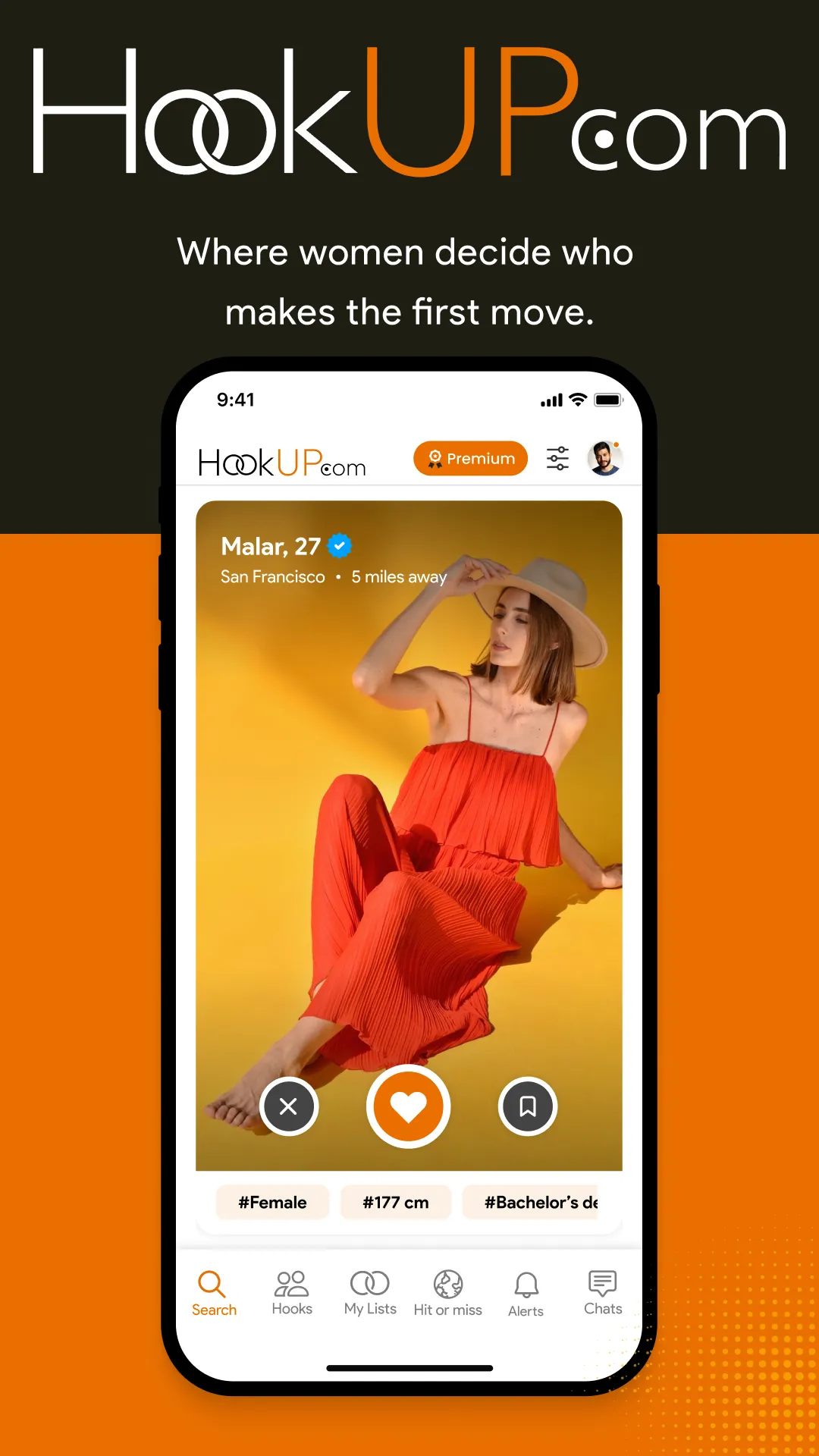
- Opening the app during breaks to explore nearby profiles
- Checking messages and responding to ongoing conversations
- Adjusting discovery filters based on location changes
- Using the app while traveling to explore local connections
- Managing conversations through a single, organized inbox
- Updating profile details to reflect current preferences
In most cases, users engage with HookUP in short, frequent sessions rather than long browsing periods.
At AppsInsight.co, we believe understanding who an app is for is just as important as understanding what it does. HookUP fits clearly within its intended use case and delivers a focused experience for the right audience.
Key Features of HookUP
HookUP is built around a clear set of features that focus on simplicity, direct interaction, and controlled discovery. Each feature is designed to reduce friction and help users move from profile creation to conversation with minimal effort. Below is a detailed explanation of the core features that define how the app works in real use.
Profile Creation and Structured Personal Information
HookUP allows users to create a profile that focuses on essential details rather than excessive customization. The profile setup process is guided and easy to complete, ensuring that users can get started quickly. Profiles typically include photos, basic personal information, and preference indicators. This structure helps other users understand who they are connecting with at a glance, which improves clarity and reduces unnecessary back-and-forth.
Location-Aware Discovery System
One of the central features of HookUP is its location-based discovery. The app uses location data to surface profiles that are relevant to the user’s current area. This makes connections feel more timely and practical. The discovery feed updates based on movement or location changes, allowing users to explore new profiles when they travel or change settings.
Preference-Based Matching Logic
HookUP includes a matching system that considers user-defined preferences. Rather than relying on random discovery, the app aligns profiles based on selected criteria. This helps users see profiles that are more relevant to their intent, making interactions feel more purposeful and organized.
HookUP Shorts for Expressive Profile Sharing
HookUP includes a dedicated HookUP Shorts feature that allows users to share short video clips directly on their profiles. This feature is designed to help users present themselves beyond static photos and written descriptions, adding more context and personality to profiles.
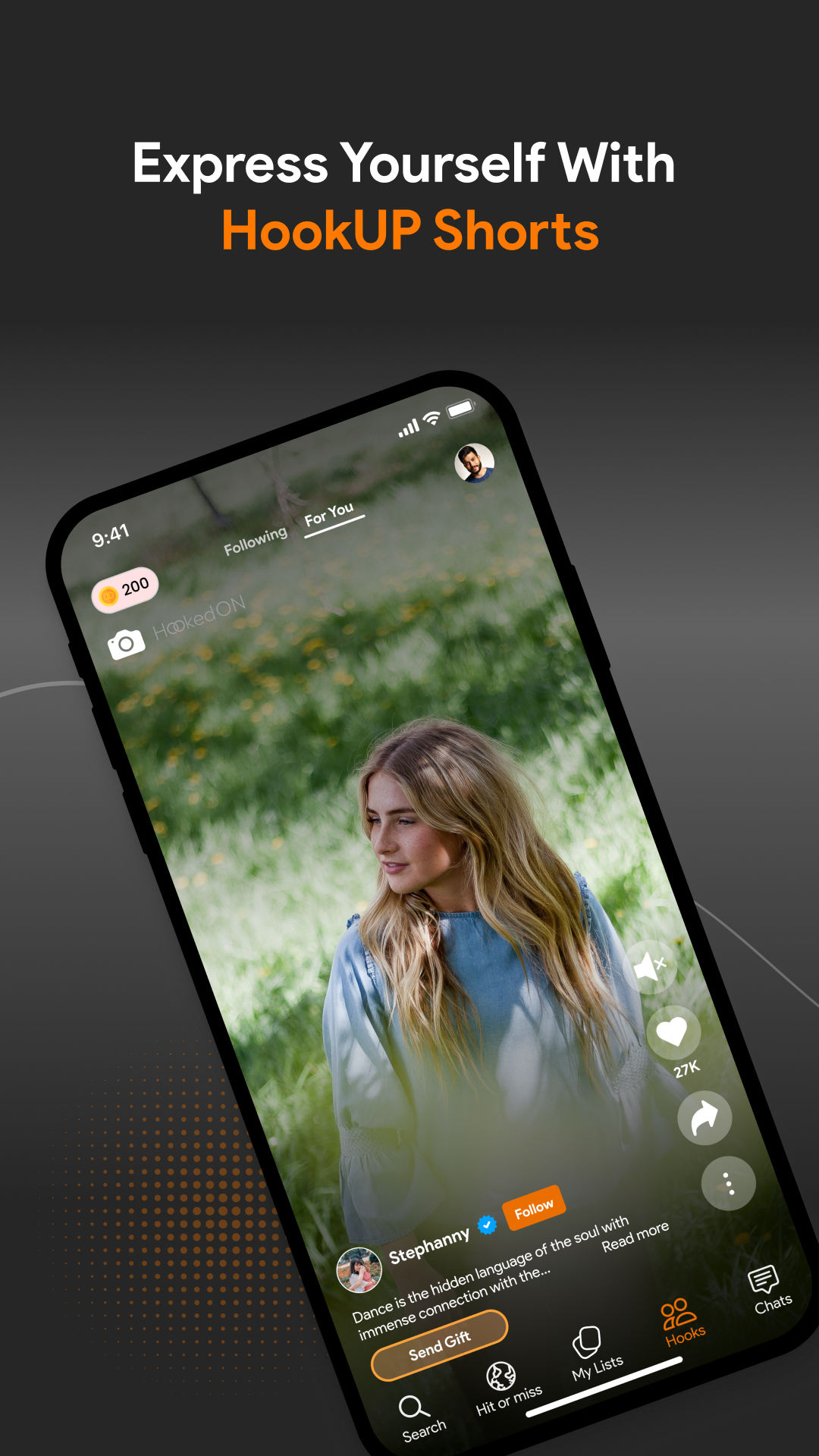
HookUP Shorts enables users to record or upload brief videos that reflect their interests, mood, or daily moments. These videos appear as part of the profile experience, making discovery more engaging and informative for viewers. For users browsing profiles, Shorts provide a quicker and more natural way to understand someone’s presence before starting a conversation.
From a usability perspective, the feature is integrated smoothly into the profile section. Creating and viewing Shorts does not interrupt the core flow of discovery or messaging. Instead, it complements existing profile elements and supports more confident connection decisions.
HookUP Shorts enhances profile depth while keeping interaction simple. It works especially well for users who prefer visual expression and want to communicate personality in a more direct and human way.
Real-Time In-App Messaging
Messaging is the core interaction method within HookUP. The in-app chat system is designed for clarity and speed. Conversations are easy to access, messages load quickly, and the interface keeps ongoing chats organized. This allows users to maintain multiple conversations without confusion and makes daily communication feel seamless.
Privacy and Visibility Controls
HookUP provides users with control over how they appear and who can interact with them. Privacy settings allow adjustments to profile visibility, messaging permissions, and discovery preferences. These tools help users shape their experience and feel more comfortable engaging on the platform.
Notification Management and Alerts
The app includes a notification system that keeps users informed about messages, matches, and activity. Notifications can be adjusted to match personal preferences, allowing users to stay updated without feeling overwhelmed. This feature supports both active and passive usage styles.
Search and Advanced Filtering Options
HookUP offers filtering tools that help narrow down discovery results. Users can refine what they see by adjusting filters related to preferences and location. This feature is particularly useful for users who want more control over who appears in their discovery feed.
Account Verification and Trust Indicators
To support transparency, HookUP includes account verification features. Verified profiles help users feel more confident during interactions and reduce uncertainty when starting conversations. This feature supports a more structured and trustworthy environment.
Cross-Platform Accessibility
HookUP is accessible across mobile devices and web browsers. This cross-platform support allows users to switch between devices without losing access to conversations or settings. It also supports different usage habits, whether users prefer mobile sessions or desktop access.
Account and Subscription Management Tools
Within the settings section, users can manage account details, subscriptions, and preferences in one place. These tools are clearly labeled and easy to access, making it simple to update plans, review account status, or adjust personal information.
Together, these features create an experience that prioritizes clarity, direct communication, and ease of use. HookUP focuses on doing fewer things well rather than offering unnecessary complexity, which is reflected in how these features work together during everyday use.
How to Use HookUP
Using HookUP is a structured process designed to help users move from installation to active communication with clarity. The app follows a logical flow, making it easy for first-time users to understand while still offering flexibility for regular use. Below is a detailed, step-by-step explanation of how HookUP works in real usage.
Step 1: Download and Install the App
HookUP can be accessed by downloading the mobile application from the official app stores or by using the web version through its website. On mobile devices, installation follows the standard process used by most apps and usually completes within a few moments, depending on your internet connection. Once installed, the app icon appears on your device, ready for use.
Step 2: Create an Account
After opening HookUP for the first time, users are guided to the account creation screen. The app requests basic information to set up an account, such as login credentials and confirmation details. This step is designed to be quick and does not require extensive information upfront. Account verification may be required to ensure smooth access to the platform.

Step 3: Complete Your Profile
Once the account is active, HookUP prompts users to complete their profile. This includes adding photos, entering personal details, and selecting preferences. A complete profile improves how the app presents you to others and helps the discovery system work more accurately. Users can return to this section at any time to update information as preferences change.
Step 4: Configure Initial Settings
Before exploring profiles, users are encouraged to review and adjust key settings. These include location permissions, notification preferences, visibility options, and privacy controls. This step allows users to decide how they appear on the platform and how often they receive alerts, creating a more personalized experience from the start.
Step 5: Start Exploring Profiles
After setup is complete, users are taken to the main discovery section. Here, HookUP displays profiles based on location and selected filters. Users can browse through profiles at their own pace, view details, and decide which connections they want to explore further. The layout keeps profiles easy to review without overwhelming the screen.
Step 6: Use Filters to Refine Discovery
HookUP provides filtering options that allow users to narrow down the profiles they see. Filters help adjust discovery results according to preferences, making the experience more relevant. This step is especially useful for users who want a more focused browsing experience rather than viewing a broad range of profiles.
Step 7: Begin Conversations Through Messaging
When a user finds a profile they want to interact with, communication begins through the in-app messaging system. Messages are organized in a dedicated section, making it easy to manage multiple conversations. The messaging interface is designed to support ongoing communication without distractions, allowing users to respond at their convenience.
Step 8: Manage Daily Usage Flow
For regular users, daily interaction with HookUP usually involves checking messages, responding to conversations, and browsing new profiles. The app is structured for short, frequent sessions, making it suitable for quick check-ins throughout the day rather than long browsing periods.
Step 9: Adjust Profile and Preferences Over Time
As user preferences evolve, HookUP allows profile details and settings to be updated at any time. Users can change photos, modify preferences, and adjust visibility settings to reflect current intent. This flexibility helps keep the experience relevant without requiring a full setup process again.
Step 10: Access Subscription and Account Controls
Users who choose to upgrade can manage subscriptions directly within the app or through the platform where the purchase was made. Account controls also include options for privacy management, notification settings, and account deactivation. These controls are clearly labeled to avoid confusion.
Step 11: Use Support and Help Features
If users encounter issues or have questions, HookUP provides access to support and help resources within the app. These sections guide users through common actions and troubleshooting steps, ensuring continued smooth use of the platform.
Overall, HookUP is designed to guide users step by step from installation to regular interaction. Each stage builds naturally on the previous one, making the app accessible for new users while remaining efficient for long-term use.
HookUP App User Interface & Overall Experience
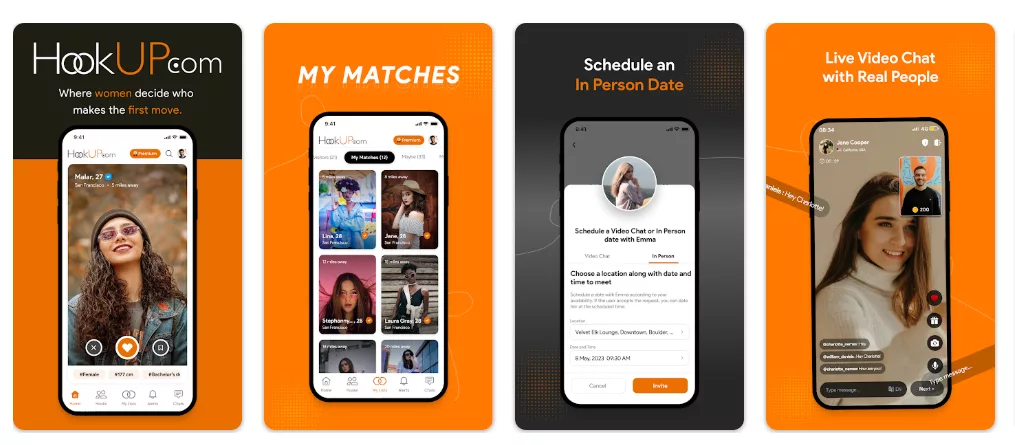
The user interface of HookUP is designed with a clear focus on simplicity and usability. From the moment the app is opened, the layout communicates what each section is meant to do, which reduces hesitation and helps users move forward without confusion. The overall experience feels structured and predictable, allowing users to focus on interaction rather than learning how the app works.
Visual Design and Layout Structure
HookUP uses a clean visual structure with balanced spacing and readable text sizes. The color palette is consistent across screens, which helps create familiarity as users move between different sections. Key actions such as profile access, discovery, and messaging are placed where users naturally expect them to be. This layout choice supports quick decision-making and minimizes unnecessary screen transitions.
Navigation Flow and Screen Organization
Navigation within HookUP follows a logical path. Primary sections are separated clearly, and switching between them does not interrupt ongoing activity. Users can move from profile discovery to messaging and then to account settings without losing context. This smooth navigation flow makes the app suitable for both short sessions and longer periods of use.
Ease of Learning for New Users
The app does not rely on tutorials or pop-up instructions to explain its functions. Instead, the interface itself guides the user through visual cues and straightforward labels. First-time users can understand how to browse profiles, start conversations, and manage their accounts within a single session. This ease of learning supports confident usage from the start.
Interaction and Responsiveness
User interactions within the app feel responsive and consistent. Taps, swipes, and screen transitions occur smoothly, which helps maintain engagement during use. Messaging screens update in real time, and profile actions register without noticeable delay. This responsiveness contributes to a stable and dependable experience during regular use.
Customization and Control Options
HookUP offers customization options that focus on functional control rather than visual changes. Users can adjust notification preferences, visibility settings, and discovery parameters to match their comfort level. These controls are placed in clearly labeled settings sections, making them easy to find and adjust when needed.
Ads, Interruptions, and Content Flow
The overall experience remains focused on core interactions. Any limitations related to access are presented clearly within the app, without disrupting navigation or messaging flow. Screens remain uncluttered, and users can continue using essential features without unexpected interruptions.
Consistency Across Devices
HookUP maintains a consistent interface across mobile and web platforms. Icons, layout structure, and feature placement remain familiar, which allows users to switch devices without re-learning the app. This consistency supports flexibility and contributes to a cohesive overall experience.
Overall User Experience Impression
As a complete experience, HookUP feels organized, accessible, and easy to manage. The interface supports the app’s purpose by staying out of the way and letting users focus on discovery and communication. The design choices favor clarity and efficiency, which helps maintain a comfortable and reliable daily usage pattern.
Understanding HookUP Pricing and Subscription Plans
HookUP follows a freemium pricing structure that allows users to explore the platform before deciding on a paid membership. The app can be downloaded and used for free, but access to features in the free version is limited. To help users understand the full experience, HookUP provides a 36-hour free trial, during which all premium features are unlocked. This trial period gives users enough time to evaluate whether the subscription aligns with their needs and usage style.
After the free trial ends, users can choose from multiple subscription plans depending on their preferred duration and level of commitment.
HookUP Pricing Breakdown
| Type of Plan | Price of the Plan |
|---|---|
| Annual Plan | $119.99 |
| 6-Month Plan | $89.99 |
| 3-Month Plan | $59.99 |
The pricing structure is designed to offer flexibility. Longer plans provide extended access without the need for frequent renewals, while shorter plans suit users who prefer to evaluate the app over a limited period.
Features Included with Free Trial and Paid Subscription
With either the 36-hour free trial or an active subscription, users gain access to the full set of premium features. These features expand how users interact with the platform and improve discovery and communication.
Premium access includes real-time connections with nearby people, allowing users to discover and engage with others based on current location. Private messaging and secure chat options are fully unlocked, supporting uninterrupted conversations. The swipe and match feature becomes fully functional, making profile discovery faster and more interactive. Advanced filters allow users to customize searches based on personal preferences, improving relevance. Users can also share short videos, which helps express personality beyond static profile information.
Free Version vs Paid Plans
The free version is suitable for users who want to explore the app’s interface, create a profile, and understand the basic flow of discovery. It works well for light or occasional use. Paid plans are better suited for users who want consistent access to messaging, enhanced discovery tools, and personalization features.
Overall, HookUP’s pricing model is structured to let users try the complete experience first, then choose a plan that matches how often and how deeply they want to use the app.
Final Say by AppsInsight
HookUP is designed for users who value clarity, speed, and simplicity in social connection apps. It works best for adults who want to discover and communicate with others through a structured, location-aware platform without unnecessary layers or distractions. The app keeps its focus on direct interaction, which makes it easy to understand and comfortable to use daily.
HookUP performs especially well in situations where users prefer short, frequent sessions rather than long browsing periods. Profile discovery, matching, and messaging are organized in a way that supports quick decisions and smooth conversations. The availability of a free trial also allows users to experience the full feature set before choosing a subscription plan, which helps set clear expectations.
Overall, HookUP delivers a balanced experience that aligns well with its intended purpose. It offers practical features, a consistent interface across devices, and flexible subscription options. For users seeking a straightforward and reliable social discovery app, HookUP presents a clear and usable solution that fits naturally into everyday digital routines.
AppsInsight Rating
| Rating Category | Score (Out of 5) |
|---|---|
| Features | 4.2 |
| Ease of Use | 4.4 |
| Pricing Value | 4.0 |
| Performance | 4.3 |
| Reliability | 4.2 |
| Overall Rating | 4.2 / 5 |
FAQs
Is HookUP free?
HookUP offers a free version that allows users to create a profile, explore basic discovery features, and access limited messaging. The free plan is designed for users who want to understand how the app works before committing to a subscription. While some advanced tools are restricted, the free version provides enough functionality to experience the platform’s core flow. Users can upgrade at any time through in-app subscription options.
How does HookUP work?
HookUP works by allowing users to create profiles and discover other users based on location and preferences. Once a profile is set up, the app presents relevant matches that users can interact with through in-app messaging. The system is designed to keep discovery, communication, and account management in one place. This structure makes HookUP easy to use for both new and returning users.
Is HookUP safe to use?
HookUP includes built-in privacy and account control tools that help users manage their interactions. Users can adjust visibility settings, manage who can contact them, and access support features when needed. While no app can guarantee outcomes, HookUP provides standard safety tools that support responsible usage. Users are encouraged to review privacy settings during initial setup.
How do I cancel a HookUP subscription?
HookUP subscriptions can be canceled through the platform where the purchase was made, such as the app store or account settings on the web. Once canceled, access to paid features continues until the billing period ends. The app does not lock users into long-term commitments, making subscription management straightforward.
Does HookUP work offline?
HookUP requires an internet connection to function properly. Profile browsing, messaging, and discovery features depend on real-time data. While some cached content may appear temporarily, full functionality is only available when connected to the internet.
Why is HookUP not working?
If HookUP is not working as expected, common reasons include connectivity issues, outdated app versions, or temporary service interruptions. Updating the app and checking network settings usually resolves most problems. Users can also access support through the app’s help section.
How to delete a HookUP account?
Users can delete their HookUP account through the account settings section. The process involves confirming the request to ensure security. Once completed, profile data is removed according to platform policies. This option is available to all users, regardless of subscription status.
Is HookUP worth paying for?
Whether HookUP is worth paying for depends on how often you use the app. Paid plans unlock additional discovery tools, messaging access, and filters. For users who engage regularly, subscriptions can improve the overall experience. Casual users may find the free version sufficient.