


Forecasting has always been one of the hardest parts of running a business. From predicting sales to planning budgets, traditional spreadsheets often leave too much room for error. In 2026, however, artificial intelligence is changing the game—AI-driven forecasting tools are making financial planning faster, smarter, and far more accurate.
According to Gartner, by 2030, nearly 70% of finance teams are expected to use AI and advanced analytics to support forecasting and decision-making. This shift means businesses of all sizes can now rely on real-time insights instead of outdated estimates.
Whether you’re a startup trying to manage cash flow or a large enterprise planning across global markets, the best AI forecasting tools in 2026 offer automation, anomaly detection, and scenario modeling that help you plan with confidence.
About AI Forecasting Tools
AI forecasting tools are software platforms that use artificial intelligence and machine learning to predict financial and business outcomes. Unlike traditional forecasting methods that rely on static spreadsheets and manual calculations, these tools continuously update projections based on real-time data. This allows businesses to anticipate changes faster and make smarter decisions with greater accuracy.
What makes AI forecasting powerful is its ability to learn from both historical financial data and external market trends. Instead of guessing or relying on outdated models, these tools detect patterns, flag anomalies, and provide scenario planning so companies can prepare for multiple outcomes.
For example, they can highlight how a shift in sales or a sudden rise in expenses might affect cash flow months in advance.
In short, AI forecasting tools combine automation, analytics, and visualization into a single platform—enabling businesses to transition from reactive planning to proactive, data-driven decision-making.
Why Businesses Need AI Forecasting Tools
Every business, no matter the size, needs to plan for the future. The problem is that traditional forecasting methods—manual spreadsheets, outdated models, and hours of number crunching—leave too much room for error. That’s where AI forecasting tools come in.
These platforms save time by automating routine work like updating financial models, consolidating data from multiple sources, and generating reports. Instead of spending days adjusting spreadsheets, finance teams can instantly access projections that are always current.
For startups, this means clearer visibility into runway and burn rate. For enterprises, it means scalable forecasting that connects finance, HR, sales, and operations.
Another reason businesses rely on AI forecasting is accuracy. By analyzing both historical financial data and external market signals, these tools produce forecasts that adapt in real time. This makes it easier to spot risks early, test different scenarios, and allocate resources wisely.
In today’s fast-changing economy, using AI forecasting tools isn’t just about efficiency—it’s about making confident, forward-looking decisions that keep you ahead of uncertainty.
Looking for? Leading AI Accounting Software Tools for Business
How AI Forecasting Tools Work
At their core, AI forecasting tools turn raw business data into actionable predictions. They combine automation, machine learning, and real-time data syncing to give businesses a constantly updated view of future performance. Here’s how the process usually works:
- Data Collection: The tool pulls financial and operational data from sources like QuickBooks, CRMs, ERPs, and payment systems. This ensures forecasts are built on the latest numbers rather than stale spreadsheets.
- Machine Learning Analysis: AI models study historical patterns and external trends (like market data or customer demand) to establish baselines. Over time, the system learns and refines its accuracy.
- Real-Time Forecasting: As new transactions and updates flow in, the forecasts automatically adjust—keeping revenue, expense, and cash flow projections relevant to current conditions.
- Scenario Modeling: Businesses can run “what-if” analyses to see how changes—such as higher sales, reduced budgets, or sudden market shifts—impact future outcomes.
- Visualization & Insights: Interactive dashboards present KPIs, trends, and anomalies in clear visuals, so decision-makers can act quickly with confidence.
AI forecasting tools transform forecasting from a static, backward-looking process into a dynamic, forward-looking strategy.
Top 8 AI Forecasting Tools in 2026
1) Fuelfinance
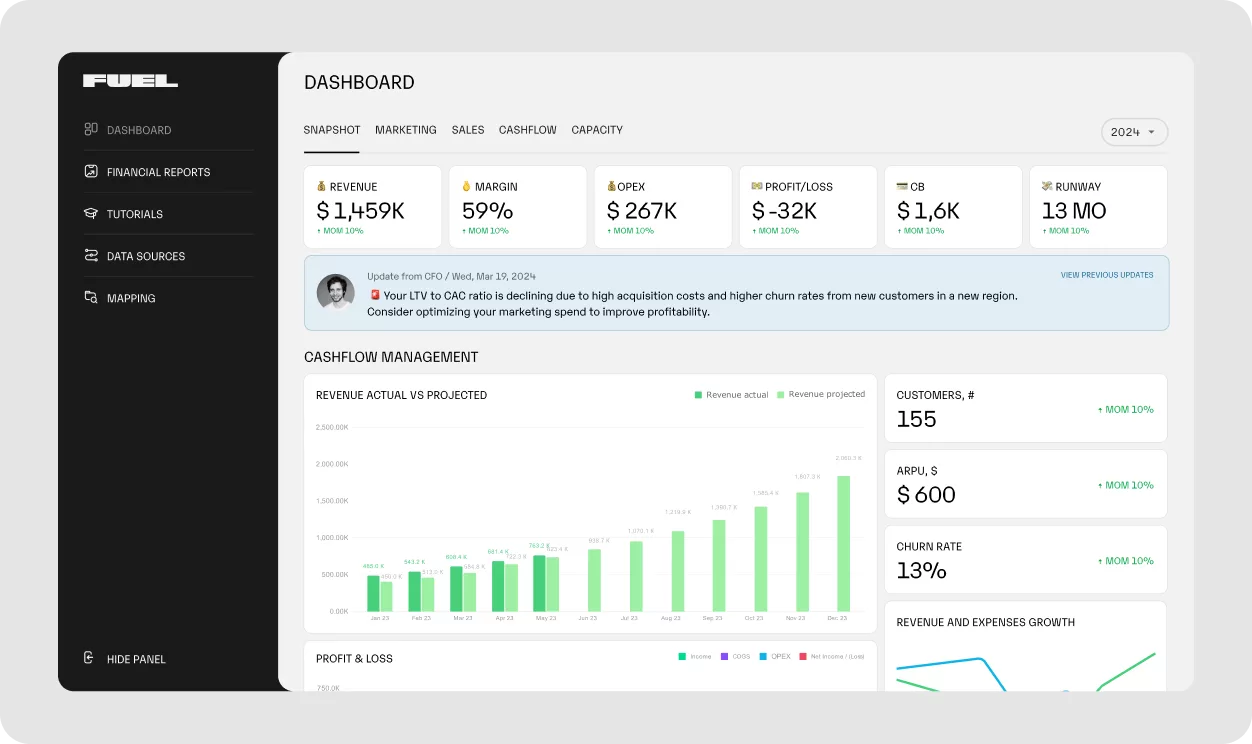
Fuelfinance is one of the most versatile AI forecasting tools designed for startups and SMBs. It combines AI-powered forecasting models with outsourced CFO services, giving smaller businesses access to enterprise-grade financial planning.
By analyzing historical financial data, detecting market trends, and flagging anomalies, Fuelfinance creates reliable projections for revenue, expenses, and cash flow. What makes it stand out is its real-time dashboard that updates continuously as new data flows in from connected platforms like QuickBooks, Stripe, or HubSpot.
The platform doesn’t just automate reporting—it also recommends KPIs based on your business model, helping founders track the right metrics instead of wasting time on irrelevant ones. With anomaly detection, users get early warnings about unusual spending patterns or sudden shifts in performance.
Paired with human financial managers who interpret the insights, Fuelfinance provides both automation and expertise in one package. For growing businesses tired of spreadsheet chaos, it’s a strong all-in-one solution.
Key Features:
- AI forecasting model for real-time revenue, expense, and cash flow tracking
- Automated financial statement generation (P&L, balance sheet, cash flow)
- All-in-one visual dashboard with 300+ integrations
- Smart KPI tracking tailored to your business model
- AI-powered anomaly detection with plan vs. actual comparisons
- Human + AI expertise for financial insights
Best For:
Startups and SMBs that need automated forecasting, smart KPI tracking, and outsourced CFO-level guidance.
Customer Reviews:
- Capterra: ⭐ 5.0
- G2: ⭐ 4.9
We have listed! Logistics Management Software
2) Anaplan
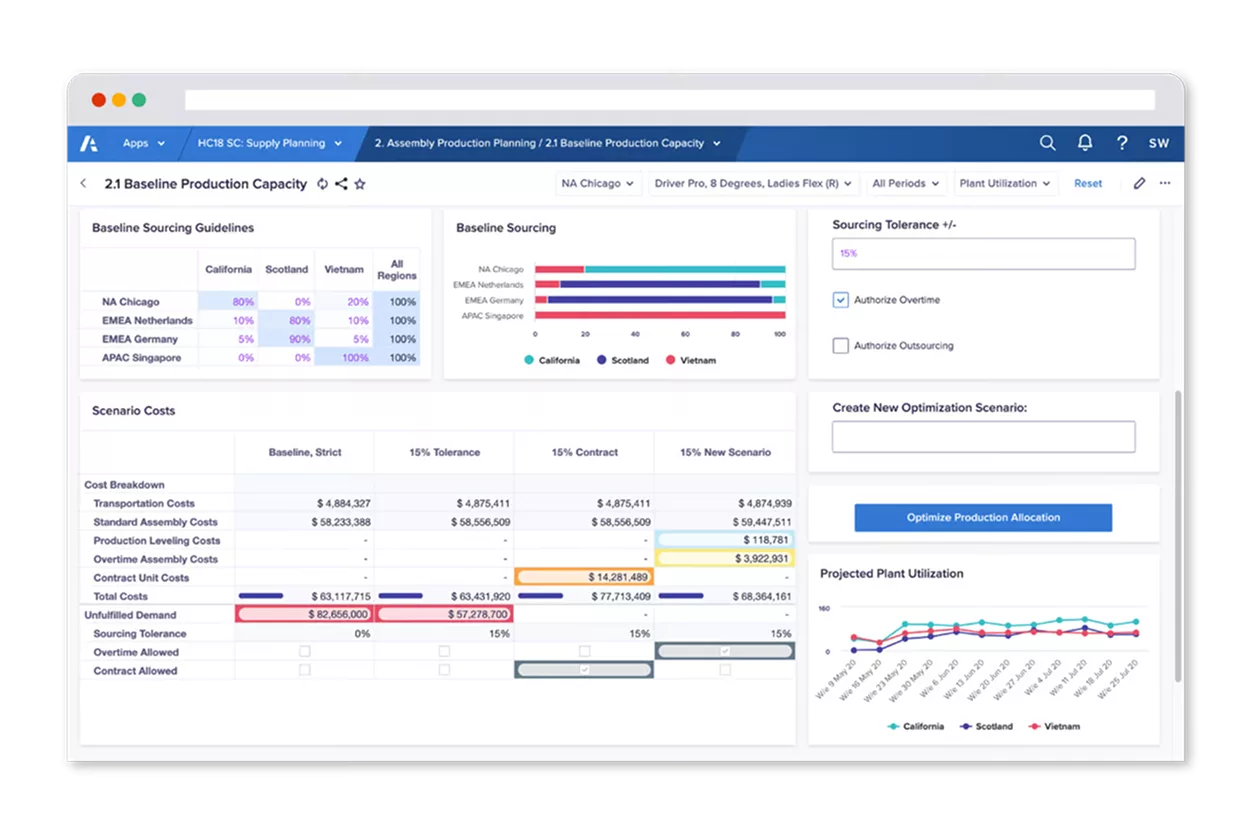
Anaplan is a leading enterprise-level financial planning platform built for large organizations with complex operations. Unlike smaller AI forecasting tools that focus only on finance, Anaplan enables “connected planning,” bringing together finance, HR, sales, supply chain, and marketing into one unified system. Its AI engine, PlanIQ, combines internal historical data with external market signals to deliver more accurate forecasts for demand, revenue, and expenses.
One of Anaplan’s strengths is its ability to handle multi-dimensional modeling. Businesses can create scenarios across product lines, regions, or currencies and test how changes in one variable affect the entire business. Its Optimizer feature helps companies allocate resources effectively, while predictive insights uncover market opportunities and risks. This makes Anaplan a favorite among enterprises that need a collaborative, scalable, and data-rich platform for corporate performance management. While it requires more setup than tools for SMBs, the payoff is deep, cross-departmental planning power.
Key Features:
- PlanIQ for AI-driven forecasting and predictive analytics
- Connected planning across finance, HR, sales, and supply chain
- Multi-dimensional scenario modeling (time, location, product, currency)
- Predictive insights to refine sales and demand planning
- Optimizer for resource and budget allocation
Best For:
Enterprises with complex financial structures that require connected planning and advanced scenario modeling.
Customer Reviews:
- Capterra: ⭐ 4.3
- G2: ⭐ 4.6
Also listed! Employee Time-Tracking Apps
3) Workday Adaptive Planning

Workday Adaptive Planning is a robust platform designed for enterprises managing large-scale financial and workforce planning. Positioned among the top AI forecasting tools, it enables finance, HR, and sales teams to collaborate on budgets, forecasts, and scenario modeling. Its AI-driven forecasting engine analyzes historical data to create baseline projections, while continuously refining them as new information flows in.
What makes Workday Adaptive Planning unique is its focus on driver-based forecasting. Instead of only projecting revenue and expenses, the tool models forecasts around key business drivers—such as headcount, operating costs, or sales capacity—so teams can plan for multiple outcomes.
The platform also includes anomaly detection to flag unusual trends, ensuring accuracy in forecasts. Beyond finance, it supports workforce planning, helping businesses account for salaries, hiring needs, and employee costs in their long-term projections.
With its collaborative features, it keeps finance and operations aligned in fast-changing environments.
Key Features:
- AI-driven financial forecasting for revenue, expenses, and cash flow
- Driver-based forecasting using business drivers like sales growth and headcount
- Anomaly detection for unusual financial trends
- Workforce and sales planning capabilities
- Collaboration across finance, HR, and sales teams
Best For:
Large enterprises that need integrated forecasting across finance, workforce, and operations.
Customer Reviews:
- Capterra: ⭐ 4.5
- G2: ⭐ 4.3
4) Planful
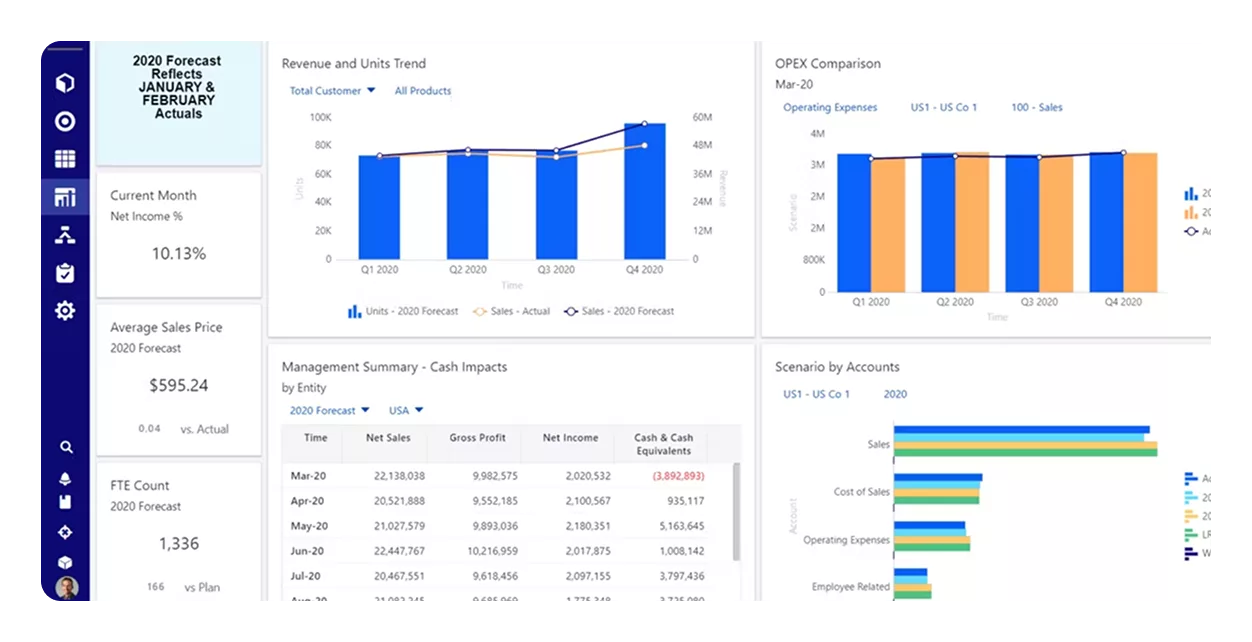
Planful is a financial performance management platform built for mid-to-large businesses that need structured budgeting, forecasting, and reporting. Unlike more flexible, startup-focused AI forecasting tools, Planful follows a process-driven approach, making it a great fit for organizations that require clear workflows and multi-step approvals.
Its AI engine, Planful Predict, leverages machine learning to detect patterns in historical financial data, improving forecast accuracy and reducing reliance on manual inputs.
A key strength of Planful is its ability to deliver rolling forecasts. Instead of static, one-time annual budgets, the platform continuously updates projections in response to actual performance and market shifts. It also automates accounting and financial close processes, streamlining reconciliation and consolidation across departments.
With its self-service reporting tools, finance teams can easily generate dashboards and analyze KPIs without relying heavily on IT support. For businesses that want structure, consistency, and automation in financial planning, Planful delivers.
Key Features:
- Planful Predict with AI-driven trend analysis and anomaly detection
- Rolling forecasts updated in real time
- Automation for accounting consolidation and financial close
- Self-service reporting dashboards for finance teams
- Standardized workflows for budgeting and approvals
Best For:
Mid-to-large businesses that prefer structured, template-driven financial planning with automated reporting and rolling forecasts.
Customer Reviews:
- Capterra: ⭐ 4.3
- G2: ⭐ 4.3
Looking for? Free CRM For Small Business
5) Vena Solutions
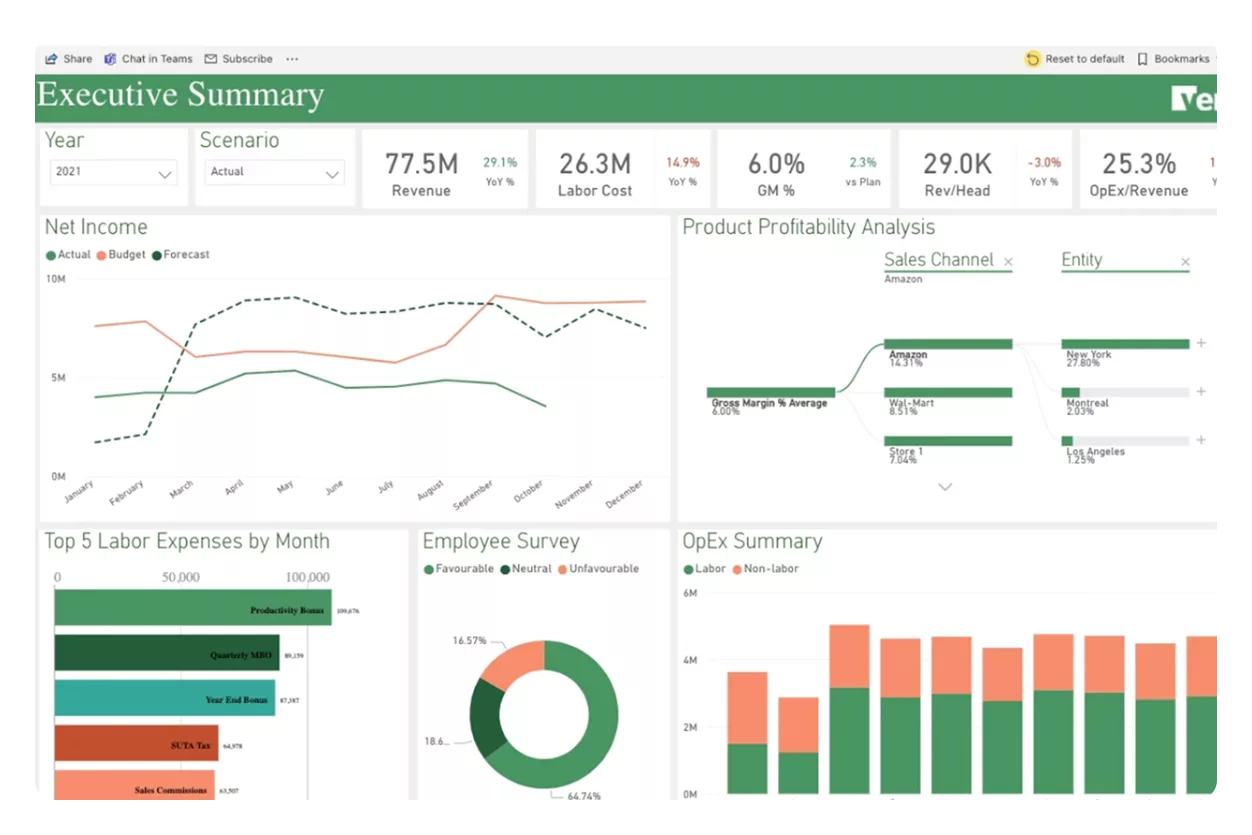
Vena Solutions is a financial planning and analysis (FP&A) platform that blends the familiarity of Microsoft Excel with the power of automation and AI. Unlike standalone AI forecasting tools with unique interfaces, Vena keeps Excel at the core—making it an ideal solution for finance teams already comfortable working with spreadsheets but wanting greater automation, collaboration, and control.
Its Vena Insights + AI module provides self-service analytics, anomaly detection, and automated reporting, helping finance teams uncover trends and improve forecast accuracy. A standout feature is the Copilot for FP&A, which leverages Microsoft 365 integration to automate repetitive tasks like report generation, data consolidation, and variance analysis.
Vena also centralizes data storage, ensuring teams work with a single source of truth, while version control makes it easy to track changes and roll back to earlier data when needed.
For businesses that want to modernize forecasting without abandoning Excel, Vena offers the best of both worlds: advanced AI capabilities within a familiar environment.
Key Features:
- Vena Insights + AI for anomaly detection and trend analysis
- Microsoft 365 Copilot integration for automating FP&A tasks
- Financial modeling and data collection across multiple sources
- Centralized database with strong version control
- Automated variance analysis and reporting
Best For:
Enterprises and finance teams that rely heavily on Excel but want AI-powered forecasting and workflow automation.
Customer Reviews:
- Capterra: ⭐ 4.6
- G2: ⭐ 4.5
6) Pigment

Pigment is a modern business planning and forecasting platform that brings finance, HR, sales, and operations together in a single system. It’s designed for mid-to-large organizations that need collaboration across departments and real-time scenario modeling. Unlike traditional AI forecasting tools that focus narrowly on finance, Pigment enables cross-functional planning so companies can align financial goals with workforce and operational needs.
Its built-in AI planning assistant helps users ask financial questions, drill into data, and uncover insights without needing deep technical expertise. The platform also supports scenario planning, allowing teams to model multiple “what-if” situations and evaluate how different business decisions or market changes will affect future performance.
In addition, Pigment streamlines headcount planning by letting HR and finance teams collaborate on hiring strategies, budgets, and actual vs. planned workforce costs—all within one shared system.
With its strong visual dashboards and interactive models, Pigment provides leaders with clarity and confidence to make smarter, faster decisions.
Key Features:
- AI planning assistant for real-time financial insights
- Scenario modeling to test multiple outcomes
- Automated budgeting and rolling forecasts
- Headcount planning with HR + finance collaboration
- Visual, interactive dashboards for performance tracking
Best For:
Mid-to-large businesses that want collaborative planning across finance, HR, sales, and operations.
Customer Reviews:
- G2: ⭐ 4.6
7) Cube Software
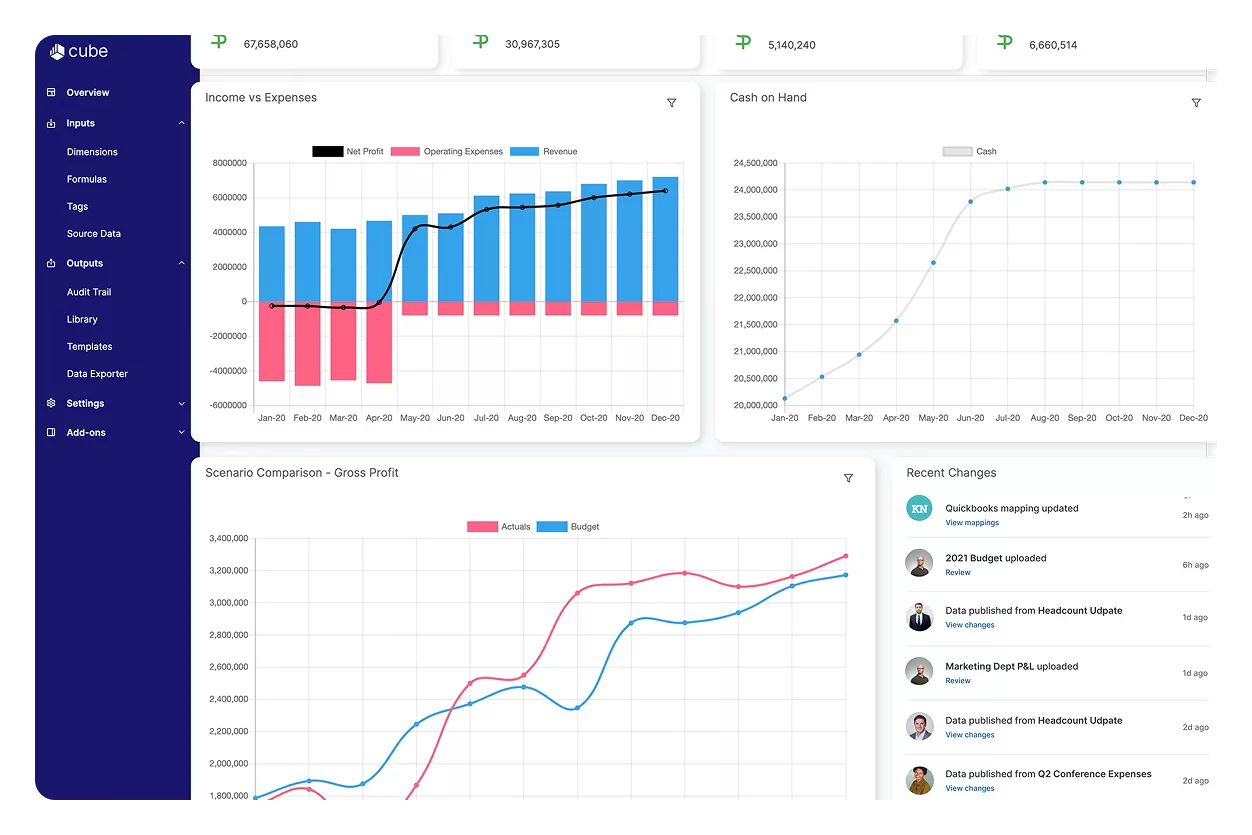
Cube Software is a financial planning and analysis (FP&A) platform that enhances traditional spreadsheets like Excel and Google Sheets with automation, AI forecasting, and collaboration features. Unlike many standalone AI forecasting tools, Cube is built as a layer on top of the tools finance teams already use, making adoption seamless.
This approach allows businesses to keep their preferred workflows while gaining the benefits of automation, centralized data, and real-time scenario modeling.
One of Cube’s strengths is its ability to run multi-scenario modeling, letting finance teams test multiple business outcomes by adjusting key drivers such as sales, expenses, or customer demand. The platform also automates financial reporting by consolidating data from multiple sources, reducing manual effort and improving accuracy.
With its customizable dashboards, businesses can visualize KPIs, track performance, and detect trends without relying solely on raw spreadsheets. For SMBs that want automation without losing spreadsheet familiarity, Cube is a strong choice.
Key Features:
- Multi-scenario financial modeling for better planning
- Automated financial reporting with data consolidation
- Customizable dashboards for KPI and trend analysis
- Spreadsheet-native interface (Excel & Google Sheets)
- Collaboration features for finance teams
Best For:
SMBs that want to keep using spreadsheets but need AI-powered forecasting, reporting, and collaboration.
Customer Reviews:
- Capterra: ⭐ 4.6
- G2: ⭐ 4.5
8) Datarails
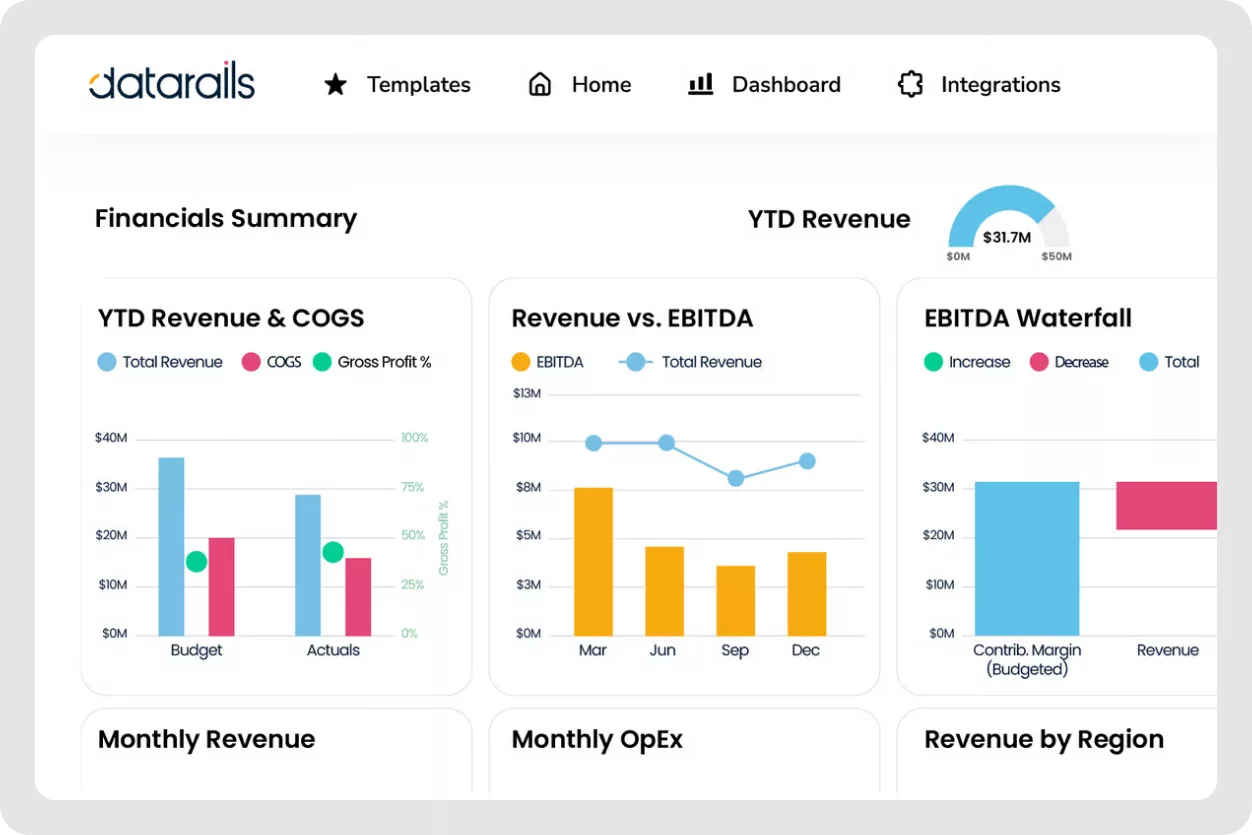
Datarails is a financial planning and analysis (FP&A) platform designed for businesses that want to modernize forecasting while continuing to work in Excel. Instead of replacing spreadsheets, Datarails enhances them with automation, AI insights, and real-time collaboration.
This makes it one of the most accessible yet powerful AI forecasting tools for mid-to-large businesses that want to bridge the gap between manual spreadsheets and enterprise-level FP&A systems.
The standout feature is FP&A Genius, an AI chatbot that answers financial planning questions, identifies patterns, and generates instant insights based on company data. Users can run scenario modeling directly within Excel, simulating best- and worst-case outcomes by adjusting revenue, expense, or cash flow assumptions.
Datarails also centralizes financial data, supports team collaboration with version control, and creates storyboards—visual narratives that turn complex numbers into digestible reports for executives and stakeholders.
By combining AI automation with spreadsheet familiarity, Datarails makes forecasting smarter, faster, and more collaborative without forcing finance teams to abandon tools they already know.
Key Features:
- FP&A Genius AI chatbot for instant insights
- Scenario modeling for best- and worst-case planning
- Centralized data with version control for collaboration
- Automated variance analysis and data consolidation
- Storyboards for financial data visualization and reporting
Best For:
Mid-to-large businesses that want to keep Excel but enhance it with AI forecasting and real-time collaboration.
Customer Reviews:
- Capterra: ⭐ 4.8
- G2: ⭐ 4.6
Comparison of the Best AI Forecasting Platforms
With so many options available, it helps to see the top AI forecasting tools side by side. This comparison highlights their standout AI features, ideal use cases, and customer ratings, making it easier to decide which one fits your business best.
| Tool | AI Forecasting Features | Best For | Rating |
|---|---|---|---|
| Fuelfinance | AI models, KPI tracking, anomaly detection, automated 3-statement generation, 300+ integrations | Startups & SMBs needing all-in-one financial forecasting | Capterra: ⭐ 5.0 / G2: ⭐ 4.9 |
| Anaplan | PlanIQ machine learning forecasts, connected planning, multi-dimensional scenario modeling, Optimizer | Large enterprises with complex financial planning | Capterra: ⭐ 4.3 / G2: ⭐ 4.6 |
| Workday Adaptive Planning | AI-driven & driver-based forecasting, anomaly detection, workforce & sales planning | Enterprises managing workforce + financial planning | Capterra: ⭐ 4.5 / G2: ⭐ 4.3 |
| Planful | Planful Predict, rolling forecasts, accounting close automation, self-service reporting | Mid-to-large businesses needing structured budgeting | Capterra: ⭐ 4.3 / G2: ⭐ 4.3 |
| Vena Solutions | AI Insights, Microsoft 365 Copilot, Excel-native FP&A, centralized database & version control | Enterprises that rely on Excel but want AI automation | Capterra: ⭐ 4.6 / G2: ⭐ 4.5 |
| Pigment | AI planning assistant, scenario modeling, headcount planning, rolling forecasts | Mid-to-large businesses needing collaborative planning | G2: ⭐ 4.6 |
| Cube Software | Multi-scenario modeling, automated reporting, customizable dashboards, spreadsheet-native interface | SMBs that want FP&A automation within spreadsheets | Capterra: ⭐ 4.6 / G2: ⭐ 4.5 |
| Datarails | FP&A Genius AI chatbot, scenario modeling, variance analysis, storyboards for visualization | Mid-to-large businesses enhancing Excel with AI | Capterra: ⭐ 4.8 / G2: ⭐ 4.6 |
How to Choose the Right AI Forecasting Tool
With so many powerful AI forecasting tools on the market, the best choice depends on your business size, industry, and goals. Here are a few things to consider before making your decision:
1) Business Size and Complexity
- Startups and SMBs often benefit from tools like Fuelfinance or Cube Software, which simplify forecasting and integrate with existing systems.
- Mid-to-large businesses may prefer Planful, Pigment, or Vena, which support structured budgeting and multi-team collaboration.
- Enterprises with global operations or complex financial structures usually choose Anaplan or Workday Adaptive Planning for connected planning at scale.
2) Spreadsheet vs. Standalone Platform
If your team prefers working in Excel or Google Sheets, solutions like Vena, Cube, or Datarails extend spreadsheet power with AI automation. If you’d rather switch to an all-in-one dashboard, Fuelfinance or Anaplan are better fits.
3) Integration Needs
Check how well the tool connects with your existing tech stack. For example, Fuelfinance offers 300+ integrations, while Anaplan ties into ERP and CRM systems for enterprise-wide planning.
4) Budget and ROI
Free or affordable tools work well for startups, but enterprises should view AI forecasting as a long-term investment that pays off in accuracy, efficiency, and strategic insight.
5) Usability and Support
Always test the platform through demos or free trials. Forecasting should empower your team—not slow them down with complexity. Consider how much training and support the vendor offers.
Choosing the right tool means finding the balance between automation, collaboration, and ease of use that fits your business today while supporting growth tomorrow.
Sum up
Forecasting no longer has to be a guessing game. With the rise of AI forecasting tools, businesses in 2026 can finally move away from static spreadsheets and toward real-time, data-driven planning. From startups managing cash flow to enterprises modeling global scenarios, these platforms provide the automation, anomaly detection, and predictive insights needed to plan with confidence.
Tools like Fuelfinance make financial forecasting accessible for SMBs, while Anaplan and Workday Adaptive Planning deliver enterprise-grade connected planning. For teams that love spreadsheets but want more power, Vena, Cube, and Datarails offer the perfect blend of familiarity and AI-driven innovation. What all of these tools share is the ability to help businesses see risks earlier, respond faster, and make smarter decisions.
As the business world grows more unpredictable, adopting AI-powered forecasting isn’t just an advantage—it’s quickly becoming a necessity.
FAQs About AI Forecasting Tools
How much do AI forecasting tools cost?
Pricing varies widely depending on the size of your business and the complexity of the platform. Tools aimed at startups and SMBs, such as Fuelfinance or Cube Software, often start at a few hundred dollars per month. Enterprise platforms like Anaplan or Workday Adaptive Planning can cost several thousand dollars per month, especially when deployed across multiple departments. Many vendors also charge additional fees for integrations, onboarding, and support.
Which AI forecasting tool is best for small businesses?
For startups and SMBs, tools like Fuelfinance and Cube Software stand out. They’re built to simplify forecasting, automate financial reporting, and eliminate spreadsheet chaos without overwhelming smaller teams. Both integrate easily with existing bookkeeping tools like QuickBooks, making them practical choices for growing businesses.
Are AI forecasting tools more accurate than manual forecasting?
Yes. Unlike manual forecasting in spreadsheets, AI forecasting tools continuously update projections with real-time financial and operational data. They also use machine learning to detect patterns and account for market changes, which improves accuracy over time. While no forecast is perfect, AI significantly reduces human error and bias.
Can AI forecasting tools replace financial analysts?
Not entirely. These platforms automate repetitive tasks like data consolidation, variance analysis, and anomaly detection, freeing analysts to focus on strategic insights. Think of AI as a powerful assistant—it crunches the numbers and highlights risks, while analysts interpret the results and guide decision-making.
Are AI forecasting tools secure for handling financial data?
Yes, most reputable platforms use bank-grade encryption, secure cloud hosting, and role-based access to protect sensitive financial data. Enterprise-level tools like Anaplan, Workday, and Datarails often comply with global standards such as SOC 2, GDPR, and ISO. That said, it’s always best to review a vendor’s security certifications and ensure your team follows proper access controls.
What’s the future of AI forecasting in business?
AI forecasting is moving beyond simple financial projections into predictive and prescriptive analytics. Future AI forecasting tools will not only predict outcomes but also recommend actions—such as adjusting budgets, reallocating resources, or re-prioritizing hiring. Expect deeper integration with ERP, CRM, and HR platforms, more advanced anomaly detection, and even voice-enabled forecasting assistants. In short, AI will evolve from “number cruncher” to “strategic advisor.”