




What is Cursor?
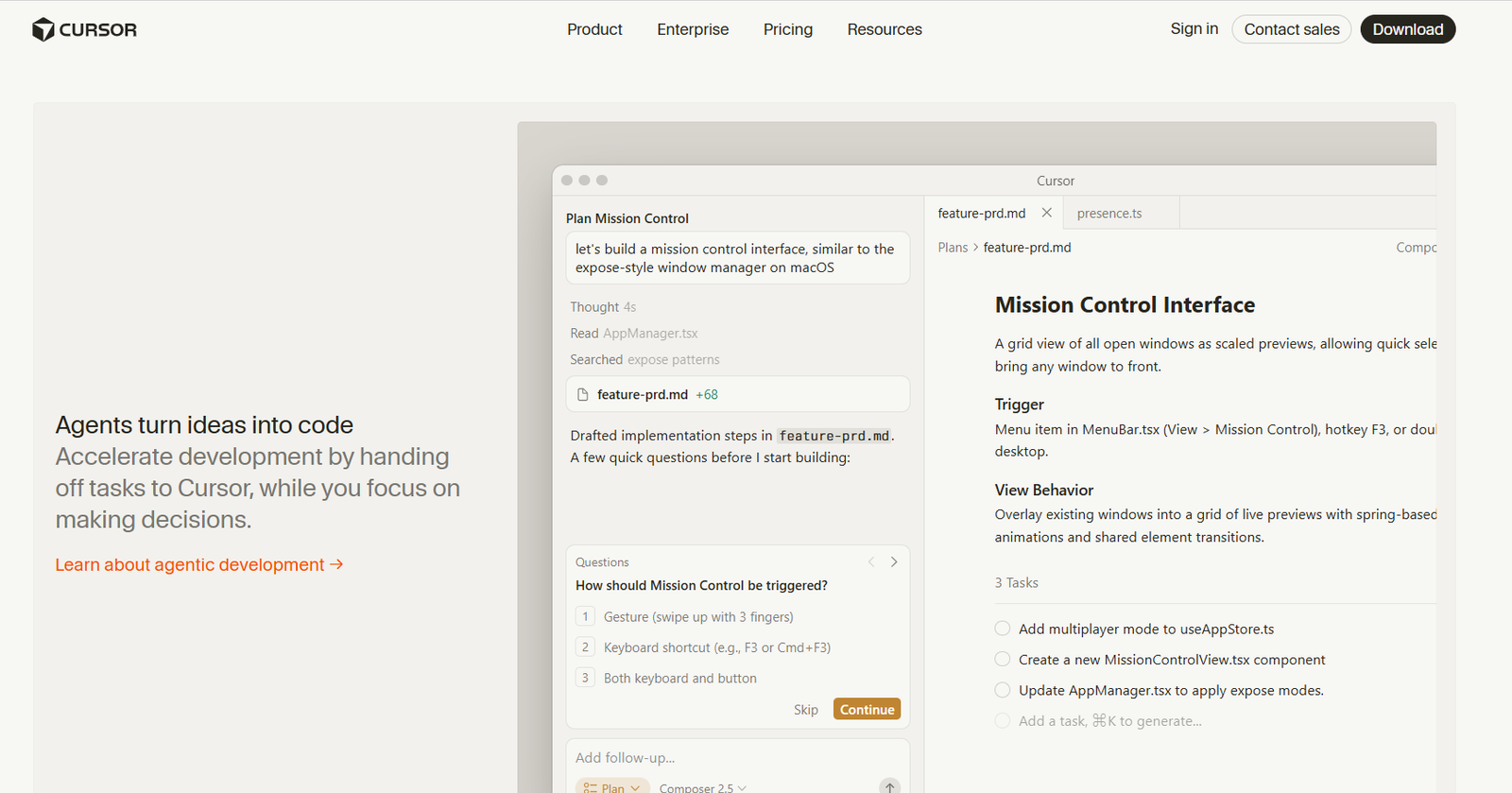
AI coding agent for software teams Cursor is a coding agent for building software.

Our verdict
Final Verdict: Is Cursor Worth It in 2026?
After spending significant time using Cursor, I can confidently say it's one of the most impressive AI-powered code editors I've used. It doesn't feel like a traditional IDE with an AI plugin added later. Instead, AI is deeply integrated into the development experience, making coding noticeably faster and more intuitive.
The first thing I noticed was how naturally Cursor understands the codebase. Unlike many AI coding assistants that generate isolated snippets, Cursor analyzes project context before suggesting changes. When I asked it to refactor functions, explain unfamiliar code, or fix bugs, the responses usually considered surrounding files rather than only the selected lines. That made the suggestions feel much more practical.
One feature I found myself using constantly was Chat with Codebase. Instead of manually searching through dozens of files, I could simply ask questions like "Where is user authentication handled?" or "Why is this API failing?" and receive meaningful answers almost instantly. This alone saved a considerable amount of development time.
I also liked how well Cursor handled repetitive coding tasks. Whether generating boilerplate code, writing API endpoints, creating React components, improving SQL queries, or documenting functions, it consistently produced clean and readable code that required only minor adjustments.
Performance was another pleasant surprise. Even when working on larger projects, the editor remained responsive, AI suggestions appeared quickly, and code completion felt smoother than many competing AI coding assistants I've tried.
Of course, Cursor isn't perfect. I still reviewed every AI-generated suggestion before using it in production. Complex business logic and security-sensitive code always benefit from human review, regardless of how capable the AI is. The free version is useful for testing, but developers who rely heavily on AI assistance will likely benefit more from the Pro plan.
Overall, I genuinely enjoyed using Cursor. It didn't replace my development skills, but it removed many repetitive tasks and allowed me to focus more on solving problems instead of writing boilerplate code.
What I Liked
- AI understands the entire project instead of only individual files
- Excellent code generation and intelligent autocomplete
- Chat with Codebase significantly speeds up debugging and navigation
- Great for refactoring, documentation, and boilerplate generation
- Clean interface built on a familiar VS Code experience
- Fast performance with responsive AI suggestions
- Supports modern programming languages and frameworks
What Could Be Better
- AI suggestions still require careful review before production deployment
- Some advanced features are available only in the Pro plan
- Very large repositories can occasionally slow AI indexing
- Beginners may rely too heavily on AI instead of learning core programming concepts
AppsInsight Recommendation
I recommend Cursor for software developers, startups, engineering teams, freelancers, and technical founders who write code daily. Whether you're building web applications, APIs, mobile apps, SaaS products, or enterprise software, Cursor can significantly improve development speed while reducing repetitive coding tasks. For developers looking to integrate AI into their daily workflow, it's one of the best coding assistants available in 2026.
Full review
Cursor is a coding agent for building software. It helps teams plan changes, write code, review work, and keep moving across desktop, CLI, Slack, and GitHub-style workflows. The homepage positions it as an agentic development tool, not just an autocomplete editor. It helps software teams that want AI in the middle of real engineering work: feature implementation, debugging, codebase search, and task handoff. A concrete differentiator on the site is the autonomy slider. You can use tab completion, targeted edits with Cmd+K, or hand off full tasks to agents. Cursor also pushes beyond the editor with cloud agents and automations. The site shows agents running on their own computers, working in parallel, and handling scheduled or triggered jobs like CI failures, Slack messages, or pull requests. That makes it a fit for teams that want AI tied into the rest of their delivery process, not isolated in a chat panel.
Who it's for
Best for
- Software engineers
- SaaS product teams
- ecommerce development teams
- engineering managers
- teams that use Slack and GitHub
- developers who want agentic coding help
How we tested
I personally used Cursor while working on coding tasks, debugging, refactoring existing code, and building small application components. My team and I evaluated its AI code generation, autocomplete, code editing, debugging assistance, terminal support, performance, integrations, and overall developer experience. I also considered feedback from experienced developers working at AppsInsight to ensure this review reflects both hands-on usage and long-term reliability.
At a glance
| Free plan | No |
|---|---|
| Free trial | No |
| Platforms | Web app |
| API | No |
| Apps Insight Score | 51/100 |
Why this app scored 51/100
Editorial Review 28/30
- Product quality 9/10 9/10
- Ease of use 5/5 5/5
- Feature depth 4/5 4/5
- Innovation 5/5 5/5
- Value for money 3/3 3/3
- Recommendation confidence 2/2 2/2
Trust & Verification 16/25
- AppsInsight badge installed Badge verified 15/15
- HTTPS website HTTPS 1/1
- Business support email Missing 0/1
- Privacy policy published Missing 0/2
- Terms of service published Missing 0/1
- Security certifications None listed 0/2
- Knowledge base / help center Missing 0/2
- Social profiles linked 1 profile linked 0/1
Community 0/20
- Verified reviews & rating 0 reviews (5 needed) 0/15
- Recent reviews No reviews yet 0/5
Product Profile 6/20
- Detailed description 151 words 1/3
- Screenshots 2 screenshots 1/3
- Demo video No demo video 0/2
- FAQ 4 items 1/2
- Feature list 8 items 1/2
- Pricing published No pricing published 0/3
- Pros & cons Pros & cons listed 1/1
- Integrations 5 integrations 1/2
- API available No 0/1
- Company details 0 of 3 details filled 0/1
Freshness 1/5
- Listing recently updated Updated 61 days ago 1/3
- Recent changelog entry No changelog entries 0/2
Editorial points are assigned by AppsInsight editors and cannot be purchased or influenced.
Integrations
Built for
Industry
SaaS & technology
Industry
Finance & insurance
Industry
Manufacturing
Industry
Professional services
How Cursor compares
| Feature | Cursor | OpenClaw | Decagon | Glean |
|---|---|---|---|---|
| Rating | 5.0 / 5 | 5.0 / 5 | 5.0 / 5 | 5.0 / 5 |
| Pricing | — | — | — | — |
| Starting price | — | — | — | — |
| Free plan | No | No | No | No |
| Free trial | No | No | No | No |
| Platforms | Web app | macOS, Windows, Linux | Web app | Web app |
| Best for | Software engineers, SaaS product teams, ecommerce development teams, engineering managers, teams that use Slack and GitHub, developers who want agentic coding help | Developers, solo founders, technical operators, AI enthusiasts, marketing agencies, SMB teams, support teams, internal ops teams | Enterprise SaaS teams, CX operations leaders, customer support automation teams, product-led companies, ops-heavy support organizations | Enterprise IT teams, Knowledge management teams, Internal support teams, Sales operations, HR and recruiting teams, Engineering orgs, Compliance-driven companies, Large SMBs with multiple internal systems |
Key features
AI Coding Agent
Assign development tasks to Cursor and let agents plan, build, test, and review code end to end.
Codebase Understanding
Cursor indexes the codebase so it can answer questions and work across larger projects.
Tab Completion and Targeted Edits
Use inline completions for small fixes or Cmd+K style edits for focused changes.
Cloud Agents
Run agents on their own computers to handle work in parallel and finish tasks without blocking your local session.
Slack and GitHub Workflow Support
Cursor shows up in Slack and reviews PR-style work, so teams can keep requests and updates in existing tools.
Model Selection
Choose from multiple models, including OpenAI, Anthropic, Gemini, SpaceXAI, and Cursor models.
Automations
Set up scheduled or triggered runs for recurring maintenance, incident follow-up, or CI repair work.
Mobile and CLI Access
Use Cursor from the command line and on iOS for work outside the desktop app.
Key benefits
- Cut the time spent on routine coding by handing off first-pass implementation and fixes to agents.
- Keep engineers in flow longer by moving between completion, edits, and full task delegation in one product.
- Reduce context switching when reviewing or coordinating work because updates can surface in Slack and GitHub workflows.
- Handle recurring maintenance jobs without setting aside a manual runbook every time.
- Support distributed teams that need the same assistant across desktop, terminal, and mobile touchpoints.
Pros & Cons
Pros
- Multiple entry points for the same workflow: desktop app, CLI, Slack, and cloud agents are all shown on the site.
- Flexible autonomy levels are a clear strength. The homepage explicitly shows tab completion, Cmd+K edits, and full agent mode.
- Model choice is broad. Cursor says you can use models from OpenAI, Anthropic, Gemini, SpaceXAI, and Cursor.
- Automation support goes beyond ad hoc prompts. The site shows scheduled and trigger-based agents for repetitive work.
- Trusted by large teams and enterprises. The homepage says it is used by over half of the Fortune 500.
Cons
- No free plan is listed in the fact sheet.
- No free trial is listed in the fact sheet.
- Pricing details are not provided in the fact sheet, so buyers need to contact sales or sign in to learn more.
- The product is built around agentic development, so teams that only want a simple code autocomplete may find it more than they need.
Screenshots & media

Cursor alternatives
View all alternatives
Best AI Agents for Enterprise

Best AI Agent for Enterprise


Wispr Flow

AI dictation that cleans up speech in any app
Free plan
- iOS (iPhone & iPad)
- Android
- macOS
- Windows
Best AI Notetaker

Grain
AI notetaker for teams that turns meetings into usable context
Free plan
- Web app
- Browser extension
- iOS (iPhone & iPad)
- Android
More AI Agents apps
Best AI Notetaker
Grain
AI notetaker for teams that turns meetings into usable context
Free plan
- Web app
- Browser extension
- iOS (iPhone & iPad)
- Android
Wispr Flow
AI dictation that cleans up speech in any app
Free plan
- iOS (iPhone & iPad)
- Android
- macOS
- Windows
Best AI Agent for Enterprise
Best Purpose-Built AI Workflow Agent

Lindy
AI assistant for email, calendar, meetings, and follow-ups
Paid Subscription$49.997-day trial
- Web app
- iOS (iPhone & iPad)
- Android
User reviews
No reviews yet. Be the first to review this app.
Write a review
Already have an account? Log in to track your reviews.
Frequently asked questions
Does Cursor have a free plan?
No free plan is listed in the fact sheet.
Does Cursor offer a free trial?
No free trial is listed in the fact sheet.
What platforms does Cursor support?
The fact sheet lists web as the platform, and the homepage also shows desktop, CLI, and mobile touchpoints.
What is Cursor used for?
Cursor is used for development and collaboration, especially when teams want AI help with planning, coding, testing, and task handoff.