


Carousels Generator
AI studio that turns a topic or link into a branded LinkedIn or Instagram carousel
Free planPaid from $19/mo ($16/mo billed yearly)
- Web app

Layered photo editing and design with local AI and optional cloud tools
Layered photo editing and design with local AI and optional cloud tools Peakloom is a creative workspace for macOS and Windows that combines layered photo editing, graphic design, on-device AI and optional cloud generation.
Peakloom puts layer editing, supported local AI and icon/store-screenshot production in one workspace. Free access and several Pro options make it approachable. Watch watermarks, cloud credits, model downloads and the different trial renewal rules for direct versus Mac App Store use. This is source-based research, not an editing or security audit.
Peakloom is a creative workspace for macOS and Windows that combines layered photo editing, graphic design, on-device AI and optional cloud generation. Its official site also offers a browser version. The Free tier covers editing and local AI with a small export watermark, while Pro adds watermark-free output, PSD export, cloud tools and production features.
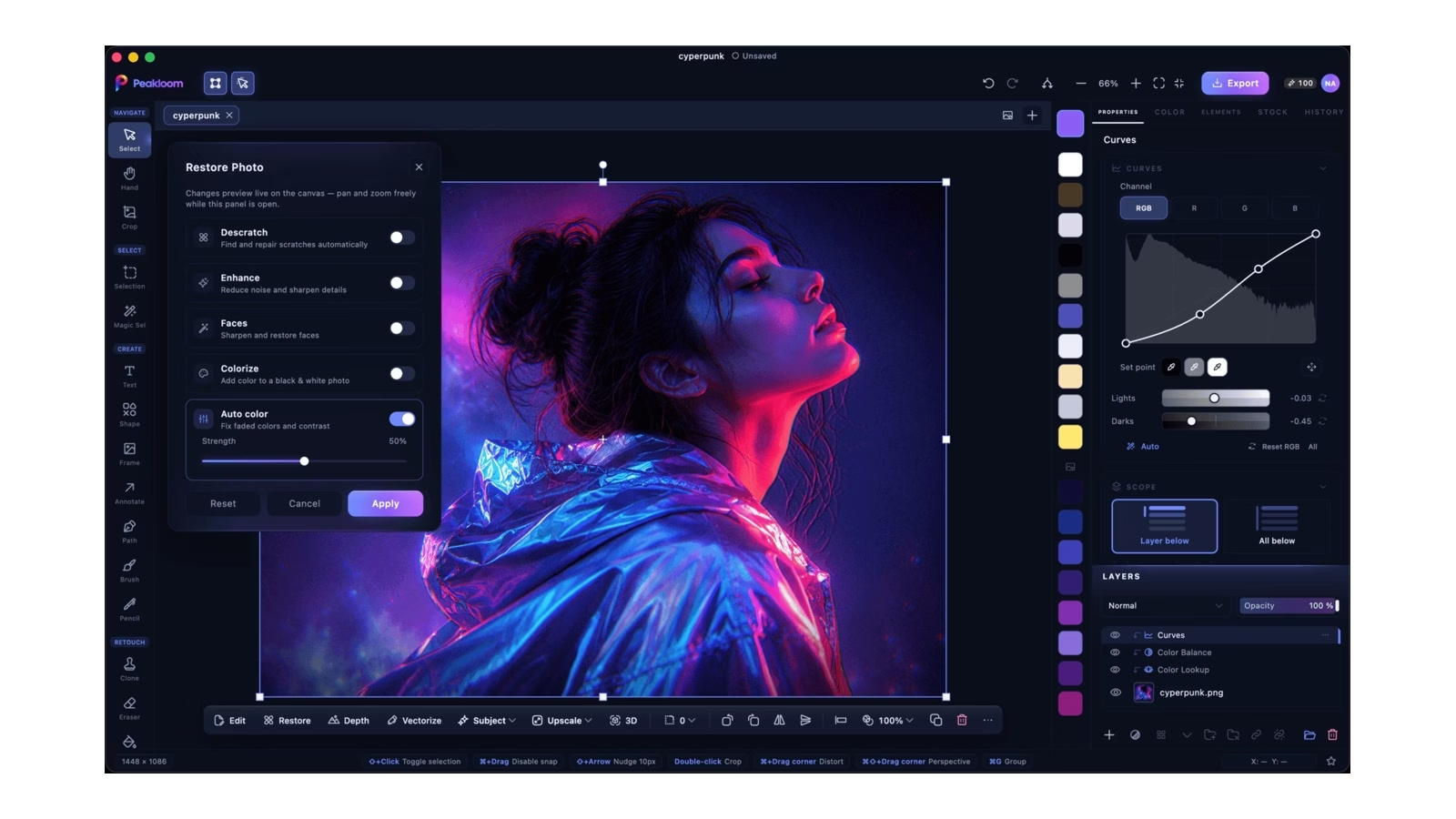
The appeal is keeping a photo, its editable layers and a finished design in one workspace. Official screenshots show real curves, layers, restoration controls, an icon-preview studio and a store-screenshot canvas. We inspected those interfaces and current official policies, but did not install the desktop app or test editing accuracy, file fidelity or performance.
Peakloom advertises layers, masks, adjustment layers, selection and compositing tools alongside AI-assisted edits. The current site describes local background removal, subject selection, object erase, restoration, upscaling and depth or face analysis. PSD import is available in
Peakloom is a creative workspace for macOS and Windows that combines layered photo editing, graphic design, on-device AI and optional cloud generation. Its official site also offers a browser version. The Free tier covers editing and local AI with a small export watermark, while Pro adds watermark-free output, PSD export, cloud tools and production features.
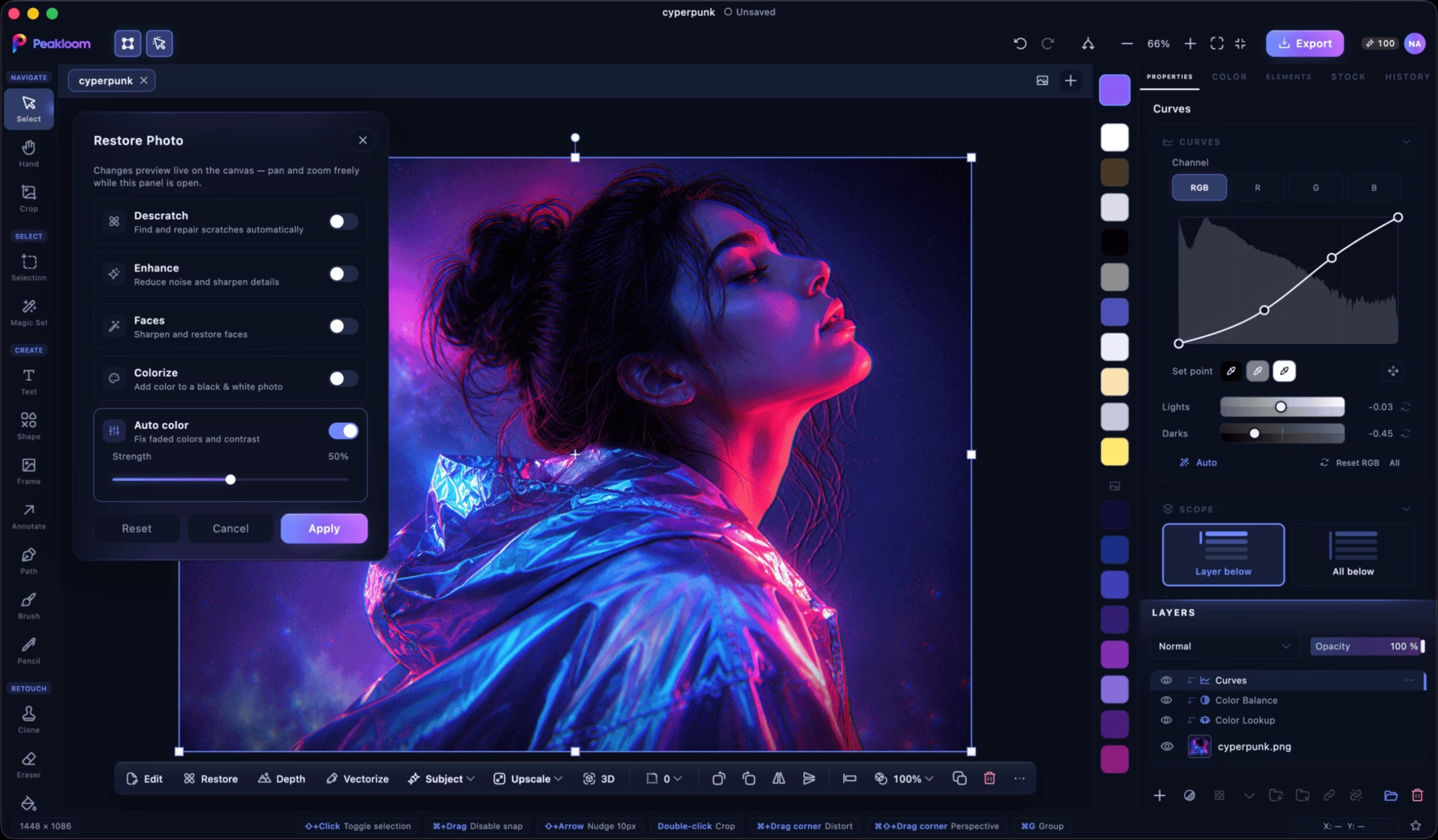
The appeal is keeping a photo, its editable layers and a finished design in one workspace. Official screenshots show real curves, layers, restoration controls, an icon-preview studio and a store-screenshot canvas. We inspected those interfaces and current official policies, but did not install the desktop app or test editing accuracy, file fidelity or performance.
Peakloom advertises layers, masks, adjustment layers, selection and compositing tools alongside AI-assisted edits. The current site describes local background removal, subject selection, object erase, restoration, upscaling and depth or face analysis. PSD import is available in Free and aims to preserve layers, effects, editable text and smart objects. Export back to PSD is a Pro feature.
It supports a native .peakloom project format and a range of image formats including RAW, PNG, JPG, TIFF, HEIC and AVIF. The site also lists LUT import and multi-page documents. Treat compatibility claims as a starting point, not a promise that a complex Photoshop project will round-trip unchanged; test a copy of your own file before relying on it for client work.
Templates, elements, fonts and brand kits extend the app beyond retouching. Its stock-photo search draws from Pexels, Unsplash and Pixabay, with photographer credits shown in the interface. Those third-party assets still carry their own terms. Batch Process runs locally and does not spend AI credits, according to the current pricing FAQ.
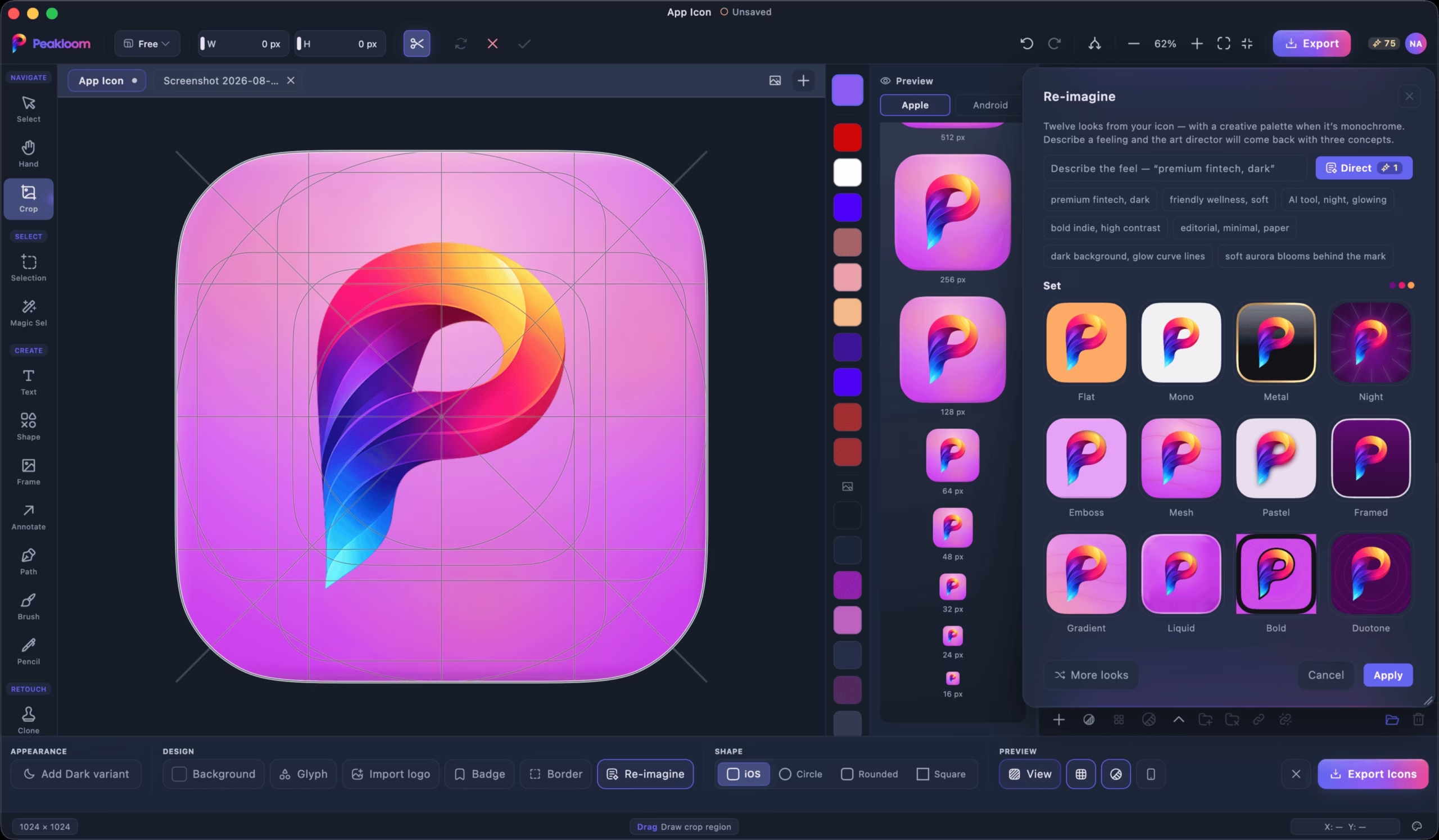
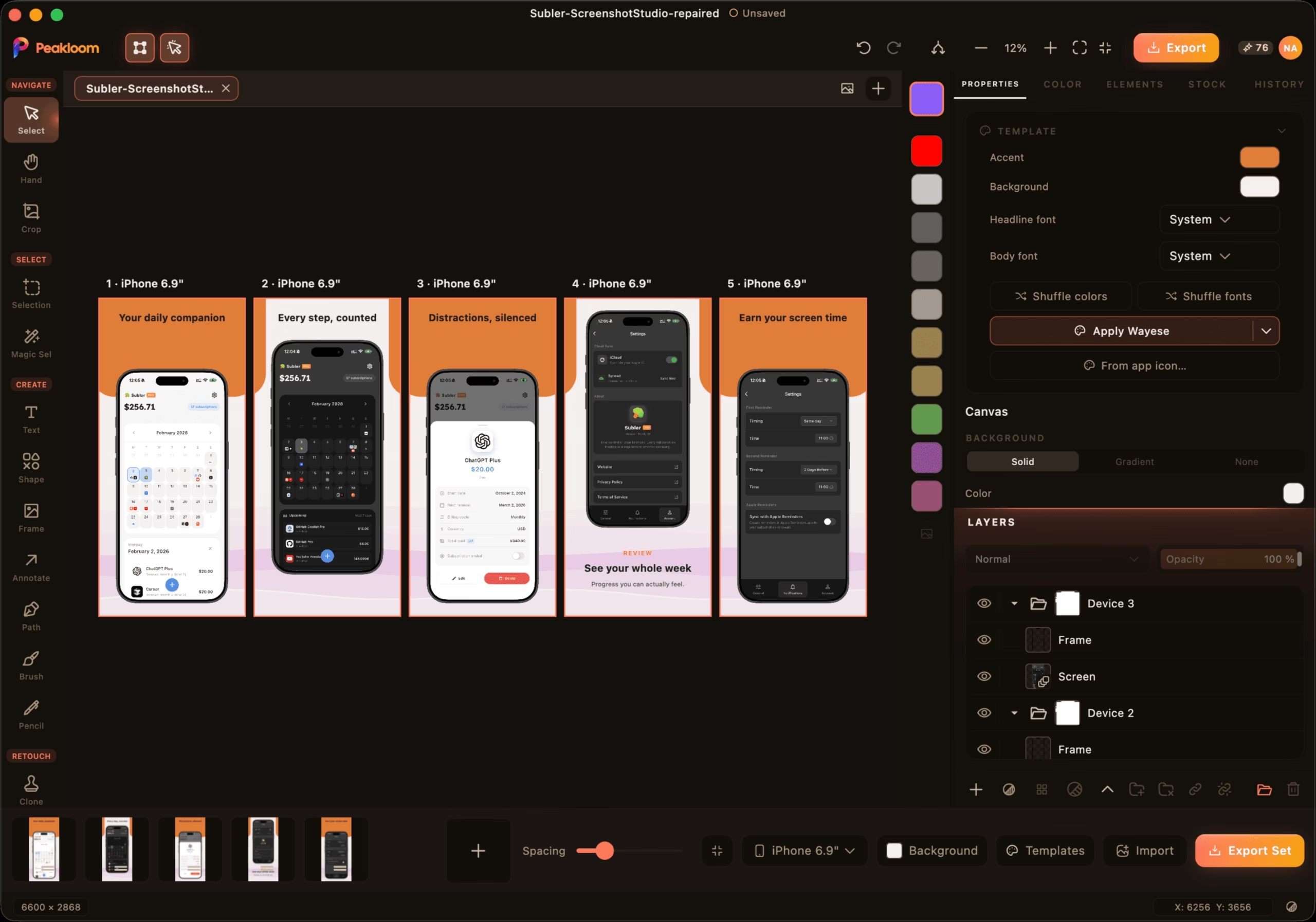
AppIcon Studio provides an icon canvas, keyline grid, small-size previews and platform export targets. Screenshot Studio builds store assets with vector device frames, multiple panels, templates and named export folders. Pro includes screenshot localization into more than 30 languages. These features suit app makers who want reusable editable production assets rather than flat marketing images.
Most editing AI runs on the user’s machine, but the whole app is not offline-only. The October 10, 2026 privacy policy lists cloud processing for Create with AI, certain Magic Layer modes, Generative Fill, AI Expand, AI Edit, AI Studio tools, cloud upscaling, Rotate Object, screenshot translation and AI icon generation. Prompts, text, images or references are sent only after a user chooses the relevant feature; the vendor says those inputs are deleted after processing and are not used to train models.
On-device models download when first needed, ranging from roughly 5MB to just under 1GB. Offline use therefore requires getting the needed models first. Some local engines have extra hardware or OS requirements: the homepage says the fastest Apple background-removal engine needs macOS14 on Apple silicon, while alternatives run on supported machines.
Free costs $0, needs no account for desktop editing and includes local AI, free templates and watermark-bearing exports. Pro is listed at $4.99 per month or $49.99 per year. Paid Pro includes 125 cloud AI credits each month, watermark-free and PSD export, Pro templates and Screenshot Studio. The current new-account offer gives six months of Pro with 50 credits per month during that free period.
The route changes the commitment. On direct Mac downloads, Windows and web, the six-month offer needs no card and returns to Free without charging when it ends. On the Mac App Store, it is an Apple subscription trial that renews into the paid plan unless cancelled before the end. Do not confuse the direct no-card offer with the store’s recurring subscription.
Lifetime is $179.99 once and includes future Pro updates plus 375 AI credits, with no monthly credit refill. Additional packs are listed at $9.99 for 250 credits, $24.99 for 700 and $54.99 for 1,700. Pack credits do not expire. Cloud generation spends credits; the site says Generative Fill costs three credits per megapixel, translation three per language and image generation/editing one to four depending on the model. The app is meant to show the cost before starting.
A Pro purchase follows the account across Mac and Windows and allows up to three devices at once. Subscriptions renew until cancelled and cancellation takes effect at the end of the paid period. Apple handles store refunds; direct buyers contact support. The friendly refund wording does not establish a fixed deadline or unconditional refund guarantee, and the terms defer to processor policy and applicable law.
Local editing keeps selected photo processing on the device, but Peakloom also describes account email, random device identifiers, purchase status, usage analytics and crash reporting. The website uses Google Analytics cookies. Signed-in app analytics can carry an account ID and hashed email. Optional onboarding choices are saved with the account even when usage sharing is off, and a one-way welcome-credit device hash survives account deletion to prevent repeated grants.
Saving a document to the Peakloom account stores the document, preview and up to ten versions on Amazon S3 in Singapore. Trash items are kept for 30 days; deleting the account removes documents and versions. This is separate from transient cloud AI inputs. Community publishing can make approved designs and profile information public, so local editing, cloud saving and publishing are not the same privacy mode.
The terms allow commercial use of results but require rights to source images and consent for edits of real people’s faces. They forbid deceptive impersonation and non-consensual imagery. The current terms also leave the operating entity and competent courts unnamed. We have not independently audited security, cloud deletion or legal enforceability.
The current homepage requires macOS13.3 Ventura or later on Apple silicon or Intel, or Windows10 64-bit or later on x64. Build numbers vary across the homepage, pricing and support pages; use the download page for the current installer rather than treating a cached version number as fixed.
Peakloom has a useful mix of layered editing, local AI and app-asset studios, with a free entry route and clear current price options. Watermarks, cloud credit limits, route-specific trial renewal, large model downloads and untested file fidelity are the main tradeoffs. Its privacy policy is fuller than short support claims about which tools call a server, so this profile follows the newer detailed policy.
We reviewed the official homepage, live monthly/yearly pricing states, privacy and terms dated October10, support, AI Studio and MCP page. We inspected genuine official editor, AppIcon and Screenshot Studio screenshots. The browser demo loaded a limited accessibility surface, so we did not count that as successful editing. No account creation, Pro activation, purchase, image upload or AI generation was performed.
Source review of homepage live monthly/yearly pricing terms/privacy dated October10 support AI Studio and MCP page. Inspected official editor AppIcon Studio and Screenshot Studio images. Browser demo had limited accessibility; no successful editing test claimed. No install account purchase image upload AI generation security audit or PSD fidelity test.
Current homepage lists build1.0.335 and browser access. Current policy describes cloud documents versions onboarding and optional community publishing. Build numbers differ across support/pricing pages; use download page for current installer.
| Pricing | Free+Paid |
|---|---|
| Starting price | 4.99 |
| Free plan | Yes |
| Free trial | Yes |
| Pricing page | View pricing |
| Platforms | Web app, macOS, Windows |
| API | No |
| Company | Peakloom |
| Apps Insight Score | 38/100 |
Editorial points are assigned by AppsInsight editors and cannot be purchased or influenced.
| Feature | Peakloom | Carousels Generator | Storybeat | Simplified |
|---|---|---|---|---|
| Rating | 3.6 / 5 | 4.1 / 5 | 4.0 / 5 | 3.8 / 5 |
| Pricing | Free+Paid | Free+Paid | Free+Paid | Paid Subscription |
| Starting price | 4.99 | $19/mo ($16/mo billed yearly) | — | $79/mo |
| Free plan | Included | Included | Included | Included |
| Free trial | Yes | No | No | No |
| Platforms | Web app, macOS, Windows | Web app | iOS (iPhone & iPad), Android | Web app, iOS (iPhone & iPad), Android |
| Best for | Photo editing and layered design App icon and store assets Creators wanting supported local AI | Founders, creators and marketers who want a consistent LinkedIn or Instagram carousel presence without design skills, and small teams that publish on a schedule and want brand consistency baked in. | Mobile-first social creators, small brands producing Stories and Reels, marketers needing reusable visual templates | Small marketing teams, agencies producing creative and social posts, teams needing client approvals |
Peakloom vs Carousels Generator Peakloom vs Storybeat Peakloom vs Simplified
0 /mo
4.99 /mo
49.99 billed annually
AI studio that turns a topic or link into a branded LinkedIn or Instagram carousel

Create social stories and reels with templates, music, and AI tools

Create, approve and schedule social posts in one workspace


Free AI-assisted image resizing for 103 social media sizes.

Free AI-assisted image resizing for 103 social media sizes.
Create, approve and schedule social posts in one workspace
AI studio that turns a topic or link into a branded LinkedIn or Instagram carousel
No reviews yet. Be the first to review this app.
Already have an account? Log in to track your reviews.