


Backblaze Computer Backup
Automatic unlimited file backup for one Windows PC or Mac per license
Paid Subscription$915-day trial
- macOS
- Windows

Encrypted file backups to your choice of local or cloud storage
Encrypted file backups to your choice of local or cloud storage Duplicati is a backup application that stores compressed, encrypted copies of selected files in a destination you choose.
Duplicati is useful for a storage-you-choose file backup plan. Start small, keep credentials and configuration outside the protected computer and prove recovery with a test restore. Compare total storage cost and database reconstruction effort, not only the free download.
Duplicati is a backup application that stores compressed, encrypted copies of selected files in a destination you choose. Its open-source core runs on Windows, macOS and Linux, with a local browser interface and command-line options. It suits users who want control over their backup destination and are prepared to check logs and test restores.
This review separates the free core application from Duplicati’s hosted Console, integrated storage and cloud-suite services. A free backup client is not free cloud capacity. The destination, account credentials, retention rules and encryption passphrase are part of the backup plan you must maintain.
Set up the files and destination first
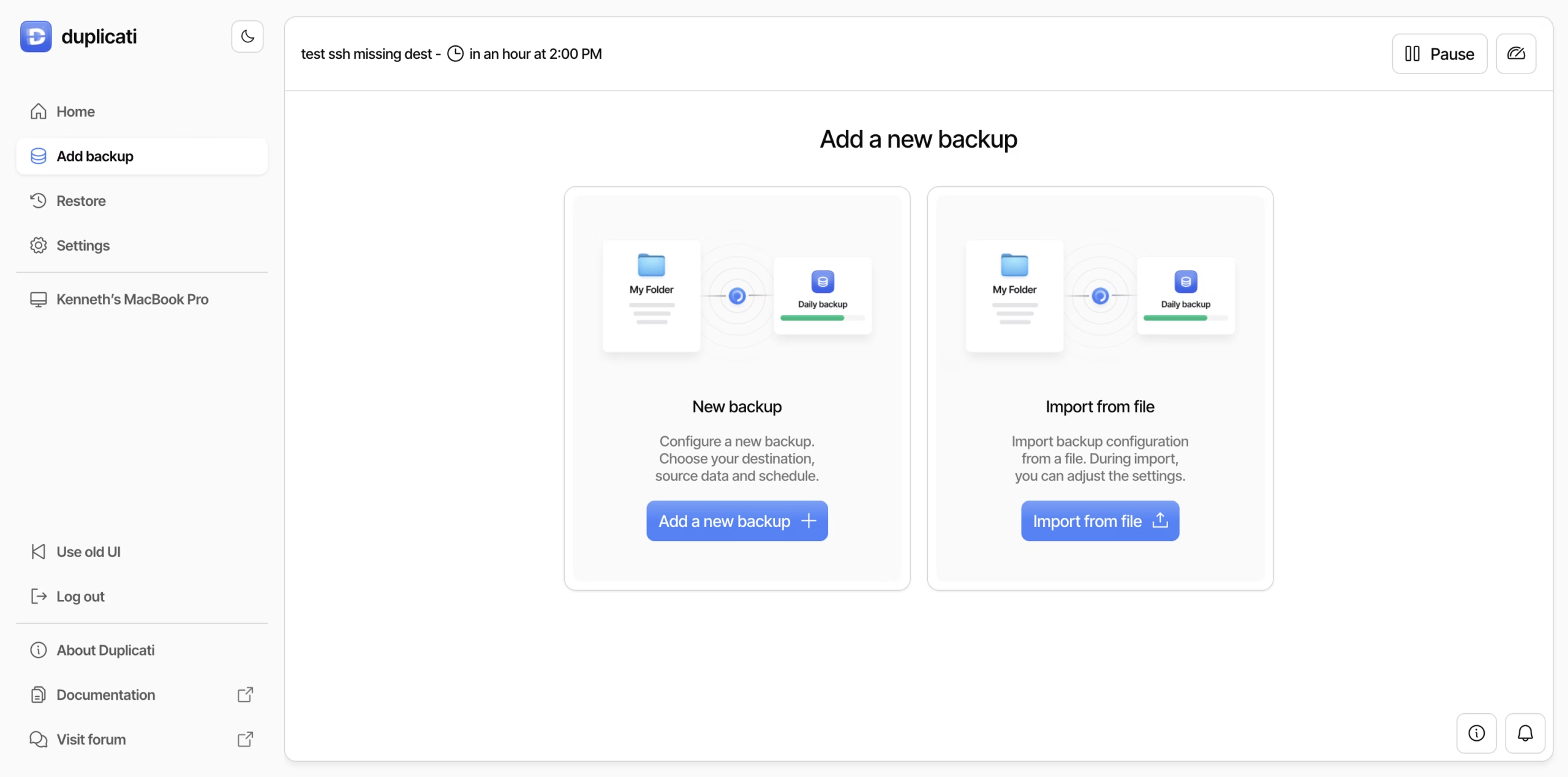
The official setup guide walks through destination access, source selection, scheduling and retention. Start with a small job, test its connection and inspect what the source selection includes. Filters can deliberately exclude files, but a filter mistake can also leave important data outside the backup.
Duplicati
Duplicati is a backup application that stores compressed, encrypted copies of selected files in a destination you choose. Its open-source core runs on Windows, macOS and Linux, with a local browser interface and command-line options. It suits users who want control over their backup destination and are prepared to check logs and test restores.
This review separates the free core application from Duplicati’s hosted Console, integrated storage and cloud-suite services. A free backup client is not free cloud capacity. The destination, account credentials, retention rules and encryption passphrase are part of the backup plan you must maintain.
Set up the files and destination first
The official setup guide walks through destination access, source selection, scheduling and retention. Start with a small job, test its connection and inspect what the source selection includes. Filters can deliberately exclude files, but a filter mistake can also leave important data outside the backup.
Duplicati supports multiple storage routes, including local storage and remote services such as SFTP, WebDAV and object storage. Choose a destination that remains accessible if the original computer fails. Keeping the only backup on the same failing disk does not solve that failure scenario.
The file-backup workflow should not be confused with a bootable whole-machine image. Databases, virtual machines and other changing application data may need a consistent export or supported snapshot workflow. Merely selecting a folder does not prove that its live contents can be restored into a working application.
Encryption and passphrase handling
The repository documents AES 256 and GPG encryption before upload. Use encryption for a destination that should not see file contents, then keep the passphrase available through a safe recovery route. The official restore guide is clear: an encrypted backup cannot be restored without its passphrase.
Encryption is one part of protection, not a guarantee against every loss. Someone who can delete remote backup volumes can still damage availability, even if they cannot read those volumes. Storage permissions, deletion protection where supported and a second independent copy deserve separate attention.
Do not describe ordinary encrypted storage as automatically immutable. Supported backend locking needs the correct destination and configuration. Verify the behavior, retention period and cost before depending on it during a ransomware incident.
Scheduling, versions and storage use
After the first backup, Duplicati uses incremental data, compression and deduplication to reduce transfers and storage. A built-in scheduler runs jobs at selected times. Those benefits depend on the computer running, the selected files being accessible and the destination accepting the operation.
Retention decides which old versions remain. Set it for the mistakes you need to recover from, not merely the smallest storage bill. Keeping too few versions may remove the clean copy before you notice a bad edit or damaged source file. Old remote data and cleanup operations also affect capacity and provider fees.
Review backup outcomes and failures. A green status is useful evidence of one operation, but does not prove every file you care about was selected or that recovery on a different machine will be straightforward.
Restore tests and the local database
Duplicati keeps a local SQLite database that maps its remote backup data. With that database, browsing and restoring is faster. If it is lost, Duplicati can use remote metadata and indexes to rebuild all or part of that map. Missing indexes, damaged remote data, repository size and network speed can make reconstruction slower or prevent normal recovery.
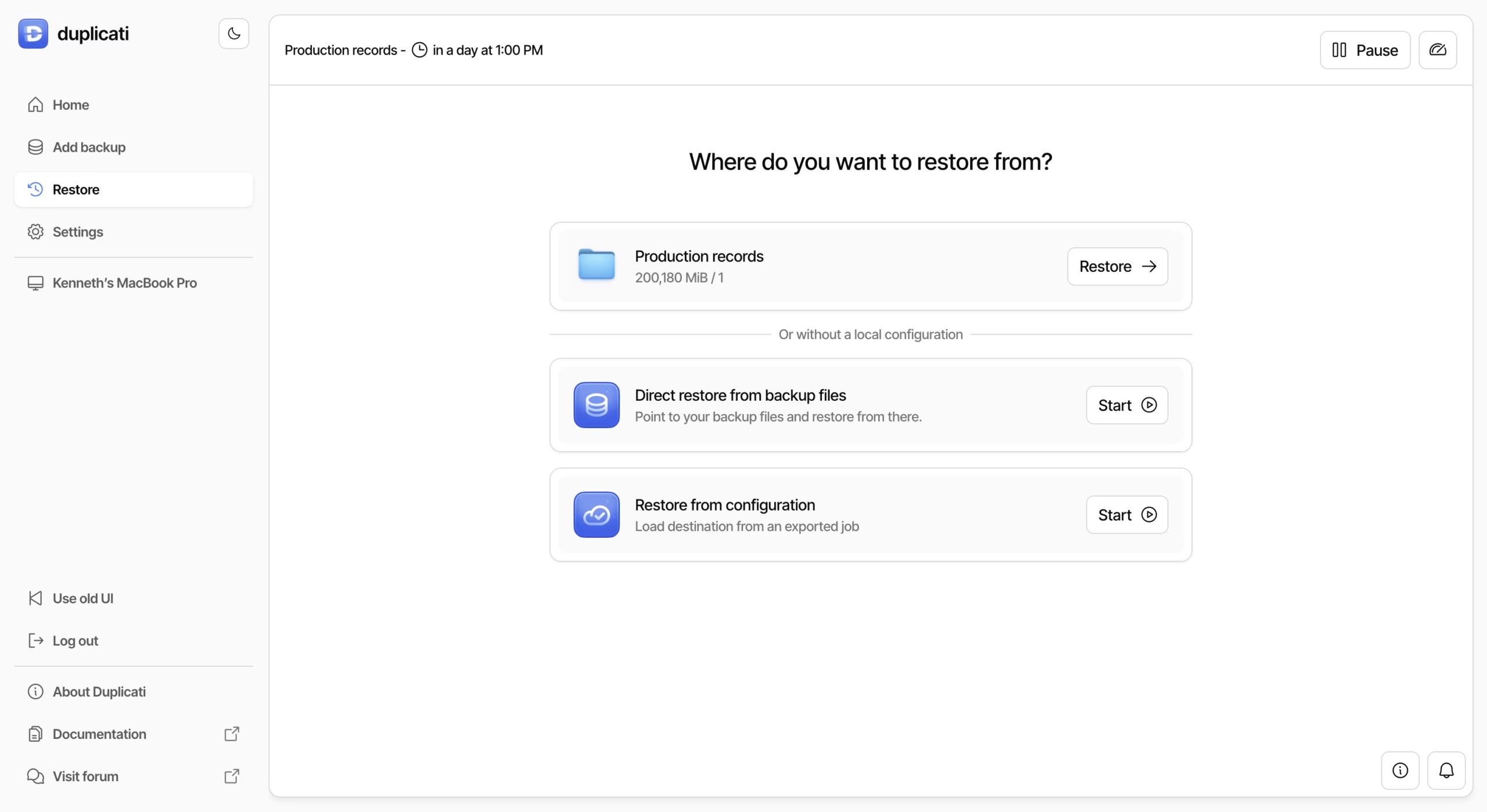
The official restore guide also supports direct restore when no local configuration remains. You still need destination access and the encryption passphrase. Export the configuration safely and retain the recovery information outside the computer being protected.
Test a restore to a separate folder, open the recovered files and include a scenario without the original local database. The project’s recovery tools provide another route for damaged situations, but best-effort recovery is not a promise that missing data can be recreated. Remote verification checks and an actual file restore answer different questions.
Free core and current Console pricing
The core backup application is free and open source under MIT, with separate licenses for incorporated third-party components and any proprietary directory. The current Console Free plan is a separate monitoring service for up to 2 machines and the last 200 backups. Its limits should not be presented as a limit on how many standalone core installations may exist.
Console Pro is currently $2.50 per machine per month on monthly billing, or $2 per machine per month billed annually, for up to 100 machines. The current plan lists missed-backup alerts, remote management, three-year monitoring retention,100 GB storage per machine and priority support. The annual equivalent is $24 per machine before any tax or additions.
Enterprise starts at $3 per machine per month with a minimum of 10 machines and a yearly contract. The pricing page lists added organization management, SSO with MFA and deployment/credential features. Additional integrated storage is listed at $0.60 per additional 100 GB per month, billed yearly. Cloud-suite backup has separate per-user pricing and is not included in the core tier described here.
Third-party storage fees, transfers, requests, retrieval charges and taxes can still change the total. Check the live provider and Console checkout for the setup you actually want. This review quotes the current public plan display rather than a complete purchase quote.
Platforms and current release
The GUI package contains a local webserver, browser interface and tray/status icon. That does not make the core an account-only SaaS application. The installation guide covers Windows, macOS and Linux packages, with additional command-line, agent and Docker routes for other deployment needs.
The latest stable release checked was 2.4.0.1, published October 7, 2026. Older reviews and community discussions may cover earlier beta behavior, licenses or pricing. Use current release notes and installation guidance before upgrading a working backup setup, and retain a tested recovery route.
The screenshots in this profile are real setup and restore interface examples from official documentation. They are not generated interface images or proof that we completed a live backup. Their example jobs and machine labels belong to the documentation, not to this reviewer’s device.
Support, privacy and tradeoffs
The open-source project has documentation, a forum and repository issue tracking. Paid Console plans list additional support. This listing does not infer a paid response-time guarantee for the free core or an independent compliance certification from security marketing.
Encrypted backup contents and hosted-service account data are different privacy questions. Duplicati’s service privacy policy describes account, device and activity information, analytics, service providers and international transfers. A storage provider has its own policy. Review both before connecting a sensitive business setup.
The local-database design, destination setup and recovery testing make Duplicati more work than an appliance-like backup service. Independent reviews and community discussions raise recovery and maintenance concerns, but historical reports should not be treated as a measured failure rate for the current release. The practical answer is to test your own restore path.
Our verdict and alternatives
Duplicati is worth considering when you want a free file-backup client with encryption, scheduling and flexible storage. It is less suitable for someone expecting included unlimited storage or a one-click whole-system image. Keep credentials and configuration available, monitor jobs and prove recovery before relying on the setup.
Kopia is another option for a storage-you-choose workflow. Backblaze Computer Backup offers a different subscription model with supplied cloud storage for a supported computer. Compare costs, selection/retention rules and actual restore effort rather than the free-download label alone.
This is a documentation-based review on October 13, 2026. We checked official pricing, installation/setup/restore guides, repository, license, latest release, service policies and recovery explanations, plus an independent review and community discussions. We did not run a production backup or benchmark. Our inputs total 19/30: quality 6/10, ease 3/5, depth 4/5, innovation 3/5, value 2/3 and confidence 1/2, scaled to 3.2/5. Unknown company founding, founders and team size remain blank.
Sources
Documentation-based review on October 13, 2026. Checked current pricing, official install/setup/restore guides, repository/license, latest stable release, service policies, local-database recovery explanation, independent review and community discussions. No production backup or speed benchmark. Real official documentation screenshots, not generated UI. Unknown founders, founding year and team size stay blank.
Latest stable checked: 2.4.0.1, October 7, 2026. Official release includes recovery/database, packaging, remote-control and cloud-suite fixes. Current core MIT license excludes separately licensed proprietary content and third-party components.
| Pricing | Open source |
|---|---|
| Free plan | Yes |
| Free trial | No |
| Pricing page | View pricing |
| Platforms | macOS, Windows, Linux |
| API | No |
| Company | Duplicati, Inc. |
| Apps Insight Score | 38/100 |
| Implementation | Medium |
| Learning curve | Intermediate |
Editorial points are assigned by AppsInsight editors and cannot be purchased or influenced.
| Feature | Duplicati | Backblaze Computer Backup | Kopia |
|---|---|---|---|
| Rating | 3.2 / 5 | 3.3 / 5 | 3.2 / 5 |
| Pricing | Open source | Paid Subscription | Open source |
| Starting price | — | $9 | — |
| Free plan | Yes | Included | Yes |
| Free trial | No | Yes (15 days) | No |
| Platforms | macOS, Windows, Linux | macOS, Windows | macOS, Windows, Linux |
| Best for | Technical home users and teams comfortable managing storage, schedules and restore tests | One Windows PC or Mac, Large eligible personal file collections, Automatic off-site backup | Technical users, encrypted file snapshots, self-managed storage |
0 /mo
0 billed annually
Automatic unlimited file backup for one Windows PC or Mac per license
Open-source encrypted file snapshots with your choice of local or cloud storage
Open-source encrypted file snapshots with your choice of local or cloud storage
Automatic unlimited file backup for one Windows PC or Mac per license
No reviews yet. Be the first to review this app.
Already have an account? Log in to track your reviews.