
Sign In

Bucketree logo

Bucketree

Native Mac management for Backblaze B2 buckets, keys and file operations.
3.9 Editor rating
#1 in File Storage Rank
41
AppsInsight Score Needs Improvement
Free plan Paid from $25/year for 3 Macs Free trial File Storage
Also listed in API Tools
  • Trusted by 10,000+ buyers worldwide
  • 500+ verified reviews from real users
  • Updated weekly fresh & accurate data
  • Independent editorial research 100% unbiased

What is Bucketree?

Native Mac management for Backblaze B2 buckets, keys and file operations. Bucketree: B2 administration with a Mac front door Bucketree is a native Mac file manager for Backblaze B2, published by MacUpp, a Web Upp Limited brand.
Bucketree screenshot

Our verdict

A focused option for Mac-based B2 users who want files, versions, keys and lifecycle work together. The native interface and detailed documentation look useful, but compatibility is narrow and destructive actions remain the user's responsibility. Our 3.9/5 desk-research score is provisional, not a hands-on endorsement.

Reviewed by Ashley Richmond Chief Marketing Officer at AppsInsight Last updated October 3, 2026

Full review

Bucketree: B2 administration with a Mac front door

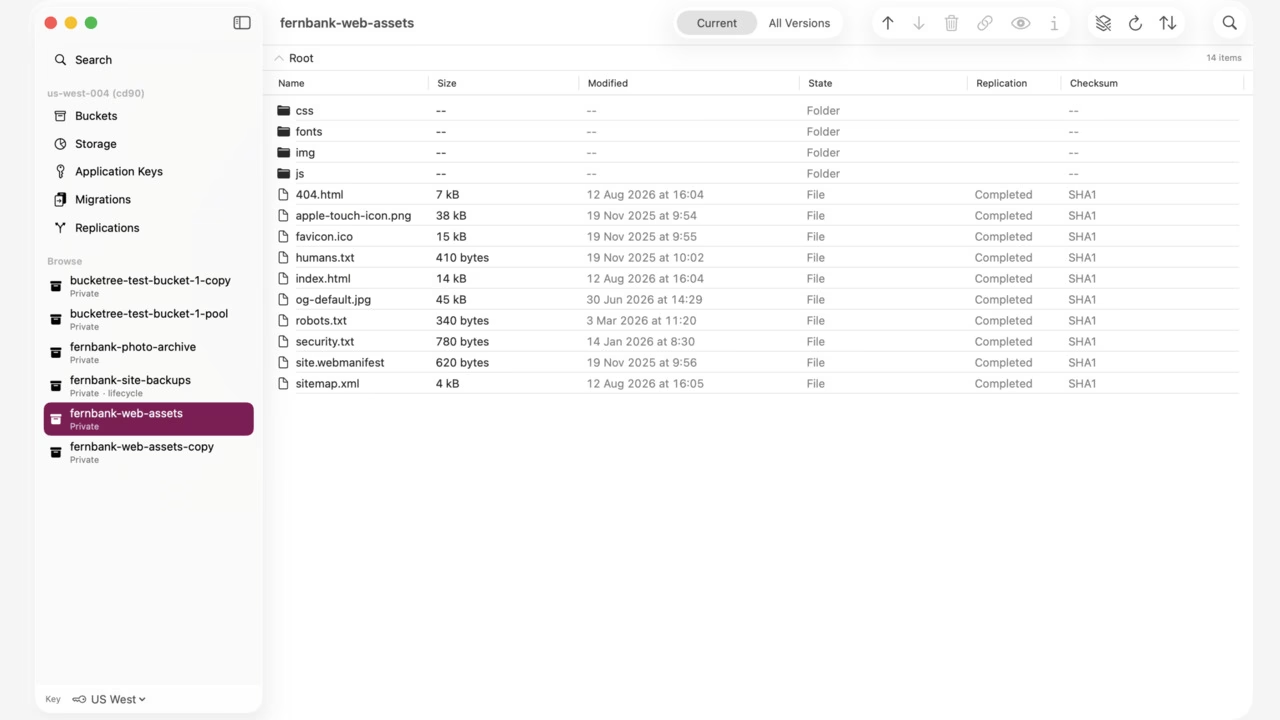
Bucketree is a native Mac file manager for Backblaze B2, published by MacUpp, a Web Upp Limited brand. It combines an object browser, transfers, version visibility, cross-bucket search, application keys, lifecycle rules and storage cleanup. It is for people already keeping data in B2, not a general cloud drive or backup service.

Where it earns its place

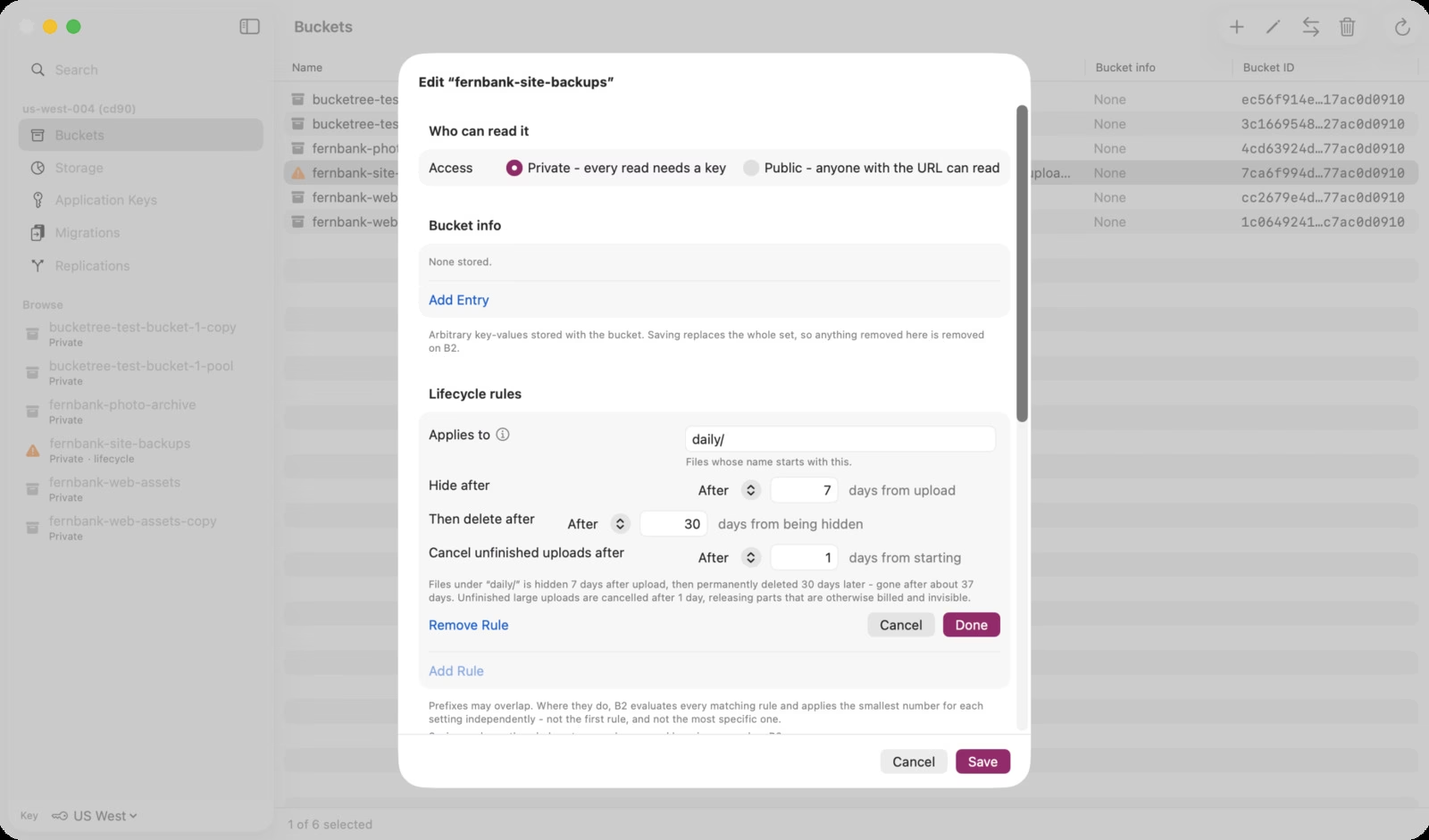
The useful distinction is visibility. Hide markers are not permanent deletion, unfinished upload parts can remain billed, and lifecycle policies have separate clocks. Bucketree puts those states into a familiar Mac interface and supports server-side copy/move, cross-account migration and B2 replication workflows. Those workflows still need planning, scoped keys and independent backups. Deleting all versions and enabling Object Lock can be irreversible.

Fit, price and limits

You need macOS 26 or later on Apple silicon and a B2 account/Application Key. There is no Intel, Windows,

Bucketree: B2 administration with a Mac front door

Bucketree is a native Mac file manager for Backblaze B2, published by MacUpp, a Web Upp Limited brand. It combines an object browser, transfers, version visibility, cross-bucket search, application keys, lifecycle rules and storage cleanup. It is for people already keeping data in B2, not a general cloud drive or backup service.

Where it earns its place

The useful distinction is visibility. Hide markers are not permanent deletion, unfinished upload parts can remain billed, and lifecycle policies have separate clocks. Bucketree puts those states into a familiar Mac interface and supports server-side copy/move, cross-account migration and B2 replication workflows. Those workflows still need planning, scoped keys and independent backups. Deleting all versions and enabling Object Lock can be irreversible.

Fit, price and limits

You need macOS 26 or later on Apple silicon and a B2 account/Application Key. There is no Intel, Windows, mobile or general S3/R2/Wasabi client. It browses and transfers rather than mounting a Finder drive. Console-only snapshots, reports and caps/alerts remain in Backblaze. MCP is coming soon, not live.

Three Macs cost $25/€22/£19 annually or $99/€89/£79 once for the current major version. Ten Macs cost $75/€69/£59 annually only. No monthly licence is shown. The 30-day no-card trial requires email and makes migration/replication scan-only. Browsing/downloading remain after expiry, other operations require a licence. Annual plans renew until cancelled; official refund policy states 30 days with no reason needed. Freemius is merchant of record; applicable tax and Backblaze storage/extra egress are separate.

Current FAQ and Backblaze transaction pricing make A/B/C calls free, including listing; scans cost time, not per-listing fees. The client counts storage rather than showing a live bill. Vendor says keys stay in macOS Keychain with optional iCloud sync and file traffic goes directly to B2, but licensing/update traffic still reaches vendor/Freemius. These are documented claims, not a security audit.

Ashley Richmond’s editorial view

I’d shortlist Bucketree for an Apple silicon Mac user who wants clearer control over a B2 account without changing storage providers. The focused depth is the attraction; the same focus rules it out for mixed-cloud or older-Mac workflows. Start with the trial, a scoped key and noncritical data before authorising destructive work.

Desk-research disclosure: This review is based on official product pages, docs, pricing, legal/privacy policies and Backblaze API pricing, checked September 30, 2026. We inspected official screenshots but did not install the app, benchmark transfers, test recovery or audit security. Vendor performance/privacy claims are not independently verified. Homepage billed-listing wording conflicts with newer FAQ and current Backblaze pricing; this review uses the latter. Source links are retained in the review methodology.

Who it's for

Best for

  • Apple silicon Mac users with B2 buckets
  • B2 administrators
  • small studios managing files and version cleanup

Not ideal for

  • Intel Macs
  • Windows/mobile users
  • mixed-cloud storage
  • Finder drive mounting
  • backup automation or a live billing dashboard

How we tested

Ashley Richmond desk research, September 30, 2026. Official Bucketree site, pricing, FAQ, what-it-does, terms, privacy, refunds, legal-notice and security pages plus the MacUpp docs and Backblaze transaction pricing inspected; no hands-on test performed. Sources: https://bucketree.app/ , https://bucketree.app/pricing/ , https://bucketree.app/faq/ , https://bucketree.app/what-it-does/ , https://bucketree.app/terms-of-service/ , https://bucketree.app/privacy-policy/ , https://bucketree.app/refunds/ , https://bucketree.app/legal-notice/ , https://bucketree.app/security/ , https://docs.macupp.com/bucketree/ , https://www.backblaze.com/cloud-storage/transaction-pricing

At a glance

PricingFree+Paid
Starting price$25/year for 3 Macs
Free planYes
Free trialYes
Pricing pageView pricing
PlatformsmacOS
APINo
CompanyWeb Upp Limited (MacUpp)
Apps Insight Score41/100
ImplementationMedium
Learning curveIntermediate

Why this app scored 41/100

Editorial Review 23/30
  • Product quality 8/10 8/10
  • Ease of use 4/5 4/5
  • Feature depth 4/5 4/5
  • Innovation 3/5 3/5
  • Value for money 3/3 3/3
  • Recommendation confidence 1/2 1/2
Trust & Verification 5/25
  • AppsInsight badge installed Badge not installed 0/15
  • HTTPS website HTTPS 1/1
  • Business support email Provided 1/1
  • Privacy policy published Provided 2/2
  • Terms of service published Provided 1/1
  • Security certifications None listed 0/2
  • Knowledge base / help center Missing 0/2
  • Social profiles linked 0 profiles linked 0/1
Community 0/20
  • Verified reviews & rating 0 reviews (5 needed) 0/15
  • Recent reviews No reviews yet 0/5
Product Profile 10/20
  • Detailed description 439 words 3/3
  • Screenshots 2 screenshots 1/3
  • Demo video No demo video 0/2
  • FAQ 6 items 1/2
  • Feature list 8 items 1/2
  • Pricing published Plan tiers published 3/3
  • Pros & cons Pros & cons listed 1/1
  • Integrations 0 integrations 0/2
  • API available No 0/1
  • Company details 1 of 3 details filled 0/1
Freshness 3/5
  • Listing recently updated Updated 0 days ago 3/3
  • Recent changelog entry No changelog entries 0/2

Editorial points are assigned by AppsInsight editors and cannot be purchased or influenced.

Built for

Key features

Native B2 object browser
Browse multiple accounts, buckets, current files, versions and hide markers in a Mac interface.
Transfers and previews
Upload/download with checksum handling and Quick Look previews.
Cross-bucket search
Search names, extensions, sizes, dates and version states across buckets; listing walks take time.
Server-side copy and move
Copy or move objects between buckets without routing the object data through the Mac.
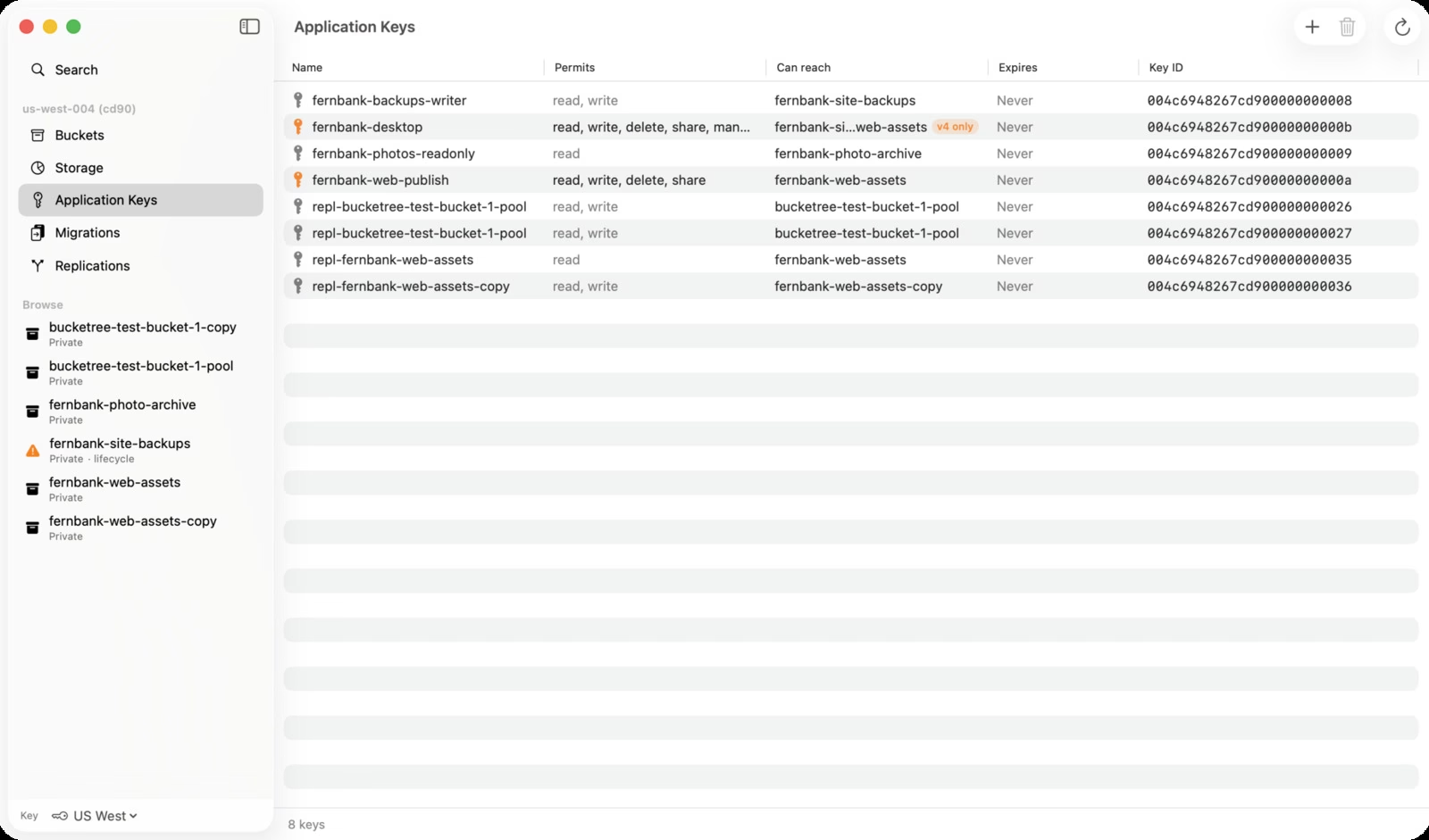
Application key management
Create, scope and revoke keys; controls reflect the supplied key capabilities.
Bucket policy editing
Manage lifecycle rules, CORS, encryption, Object Lock and retention with irreversible-change cautions.
Storage cleanup
Find old versions and unfinished upload parts; preview and bulk-delete unwanted stored data.
Migrations and replication
Scan and plan cross-account migrations and B2 replication; trial is scan-only for these operations.

Key benefits

  • Reduce repeated trips to the B2 web console for routine file and key work.
  • See stored versions and abandoned parts that can keep storage bills growing.
  • Search and organise multiple B2 buckets from a native Mac interface.
  • Choose an annual licence or a current-major-version pay-once licence for three Macs.

Pricing

Free planPaid from $25/year for 3 MacsFree trial

Trial / expired read-only access

  • Email required. 30-day no-card trial; browse and download remain after expiry. Trial includes the application except migration/replication scan-only; after expiry other operations stop until a licence is purchased.

Three Macs annual

$25 USD / €22 / £19 per year billed annually

  • All application features on 3 Macs; no monthly option. Annual auto-renew
  • cancel stops next renewal and retains paid year.

Three Macs pay once

  • All features on 3 Macs for current major version. 99 USD / 89 EUR / 79 GBP one-time
  • no annual charge for the current major version. Future separately sold major versions not included
  • discounted upgrade stated.

Ten Macs annual

$75 USD / €69 / £59 per year billed annually
  • All features on 10 Macs
  • yearly only
  • no monthly option. Licence counts machines not people; storage/egress and applicable taxes separate. Freemius merchant of record; 30-day no-reason refund policy.

View official pricing

Pros & Cons

Pros

  • Genuine native UI with file, key and bucket-policy workflows.
  • Three-Mac licence and ten-Mac annual team option; no feature-tier upsell.
  • 30-day no-card trial; read/download access remains after expiry.
  • Detailed official docs explain B2 hide markers, lifecycle clocks and irreversible actions.

Cons

  • Requires macOS 26+ on Apple silicon and a B2 account/key; no Intel, Windows, mobile or general S3/R2/Wasabi support.
  • Deleting all file versions is permanent and enabling Object Lock cannot be undone; keep independent backups and least-privilege keys.
  • Backblaze storage/extra egress are separate; scans are not a live bill, and console-only reports/caps/snapshots remain outside the client.
  • Keychain/file-to-B2 claims do not mean zero vendor traffic: update/licensing data reaches vendor/Freemius; security/performance untested, MCP coming soon.

Screenshots & media

User reviews

No reviews yet. Be the first to review this app.

Write a review

Already have an account? Log in to track your reviews.

Frequently asked questions

What is Bucketree?
A native Mac file manager for Backblaze B2: browse versions, transfer and search objects, manage keys and bucket policies. It does not mount a Finder drive or replace a backup system.
Which Macs and cloud providers work?
macOS 26 or later on Apple silicon, with a Backblaze B2 account and Application Key. No Intel Mac or general Amazon S3, Cloudflare R2 or Wasabi support is stated.
What are the licence prices?
Three Macs cost $25/€22/£19 yearly or $99/€89/£79 once for the current major version. Ten Macs cost $75/€69/£59 yearly only. No monthly option. Freemius handles tax/VAT; Backblaze storage and extra egress are separate.
What happens after the trial?
The 30-day trial asks for email but no card. Migration and replication are scan-only during trial. Browsing/downloading remain after expiry, while other features require a licence. Annual cancellation stops next renewal; official refund policy offers 30 days, no reason needed.
Do listing scans cost B2 API fees?
Current Bucketree FAQ and Backblaze transaction pricing say class A/B/C calls, including listings, are free. Scanning takes time and can be stopped. Storage and downloads beyond the egress allowance are billed separately; the client does not expose the live Backblaze bill.
What security and deletion limits matter?
Vendor says credentials use macOS Keychain with optional iCloud sync and files go directly to B2. Update/licensing traffic still goes to vendor/Freemius. Use least-privilege keys and independent backups: deleting every version and enabling Object Lock can be irreversible. MCP is coming soon, not a current feature. No hands-on security test was performed.