Businesses face relentless pressure to optimize every process. ERP Software for Businesses delivers that edge by unifying finance, procurement inventory, sales, customer service, and HR into one seamless platform. Imagine real-time visibility across departments, eliminating guesswork and delays. Growth explodes when data flows freely fueling informed decisions.
Scalability stands out as a core strength. Startups scale from 10 to 1000 users without rework. Enterprises handle massive volumes with robust performance. Cloud options slash hardware costs while on-premise setups offer total control. Integration with CRM tools and e-commerce platforms amplifies reach.
A key draw lies in automation. Routine tasks vanish, freeing teams for innovation. Reporting becomes instant with customizable dashboards. Compliance is simplified through built-in audit trails. According to Statista 81% of manufacturers now use ERP, boosting output by up to 23%.
This comprehensive guide walks you through evaluation criteria, feature types, implementation steps, and pitfalls. Equip yourself to choose wisely. Transform chaos into coordinated excellence. Unlock the full potential of ERP Software for Businesses and watch profits soar.
What Makes ERP Software Essential for Businesses
ERP stands as the backbone of modern operations. It centralizes data from every corner, creating a single source of truth. Finance teams track expenses instantly. Inventory managers prevent stockouts proactively. Sales reps access customer histories on demand. This unity slashes errors and accelerates workflows.
Productivity skyrockets with ERP in place. Gartner reports that companies achieve 20% higher output after adoption. Automation handles repetitive tasks like invoice processing and order fulfillment. Teams focus on high-value activities, driving revenue growth.
The benefits of ERP Software shine brightest in cost control. Deloitte analysis shows firms reduce operational expenses by 15-25% through streamlined processes. Duplicate data entry disappears. Manual reconciliations end. Real-time analytics spot inefficiencies early, enabling swift fixes.
Scalability future-proofs your setup. Add modules as needs evolve without starting over. Global businesses manage multi-site operations effortlessly with multi-currency and language support. Remote access via mobile apps keeps everyone aligned regardless of location.
Competitive advantage emerges naturally. Faster decision-making outmaneuvers rivals. Customer satisfaction rises with quicker responses and personalized service. ERP Software for Businesses empowers agility in volatile markets. Embrace it to lead, not follow.
Trending blog! How to Figure the Cost of ERP Implementation: A Comprehensive Guide
Key Factors to Evaluate When Selecting ERP Software
Pinpoint your business scale upfront. Small teams thrive on lightweight cloud ERP with minimal setup. Mid-sized firms need balanced features for expansion. Enterprises demand heavy-duty processing for complex operations. Match the solution to your current and projected size.
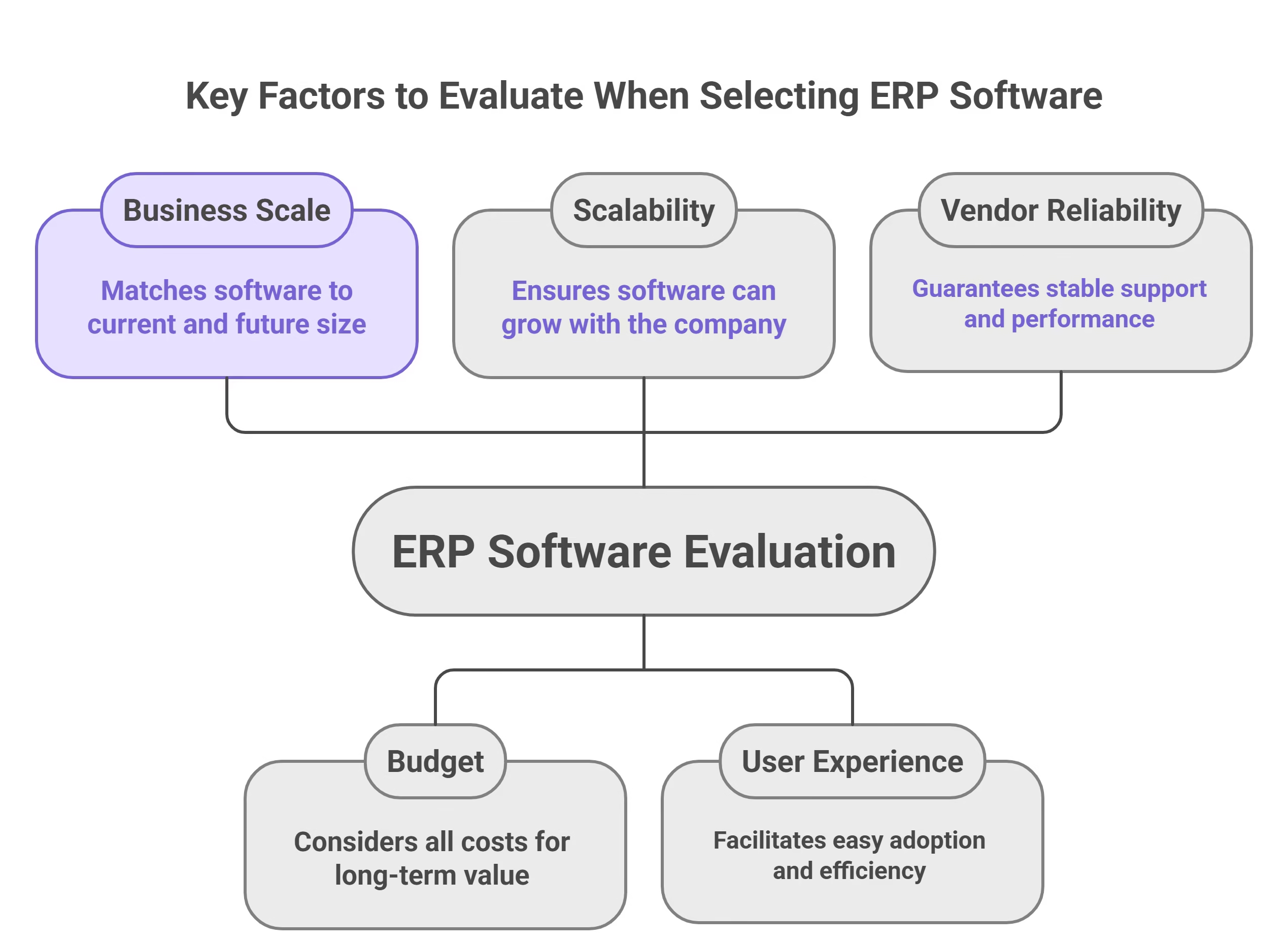
Budget demands sharp focus. Tally licensing fees implementation training and ongoing support costs. Hidden expenses like data migration often surprise buyers. Aim for total cost of ownership under three years. ROI calculators from vendors clarify projections.
Scalability tops the list for longevity. Verify user limits module expansions and performance under load. Integration prowess links seamlessly with CRM accounting and e-commerce tools. Avoid silos that breed inefficiency.
User experience accelerates adoption. Intuitive interfaces cut training time by half. Mobile responsiveness suits field teams. Security protocols guard against breaches with encryption role-based access and compliance certifications like GDPR or SOC 2.
Vendor reliability seals the deal. Check uptime SLAs customer reviews and local presence. IT consulting companies excel at matching solutions to unique needs. Test demos rigorously. Prioritize these factors to secure a powerhouse fit.
Read once! Major Disadvantages Of ERP: Challenges And Drawbacks
Top Features to Look for in ERP Software for Businesses
Seek powerhouse capabilities that align with dynamic demands. ERP Software for Businesses demands features blending power usability and innovation. Dive deep into must-haves that deliver ROI fast.
1) Core Modules for Seamless Operations
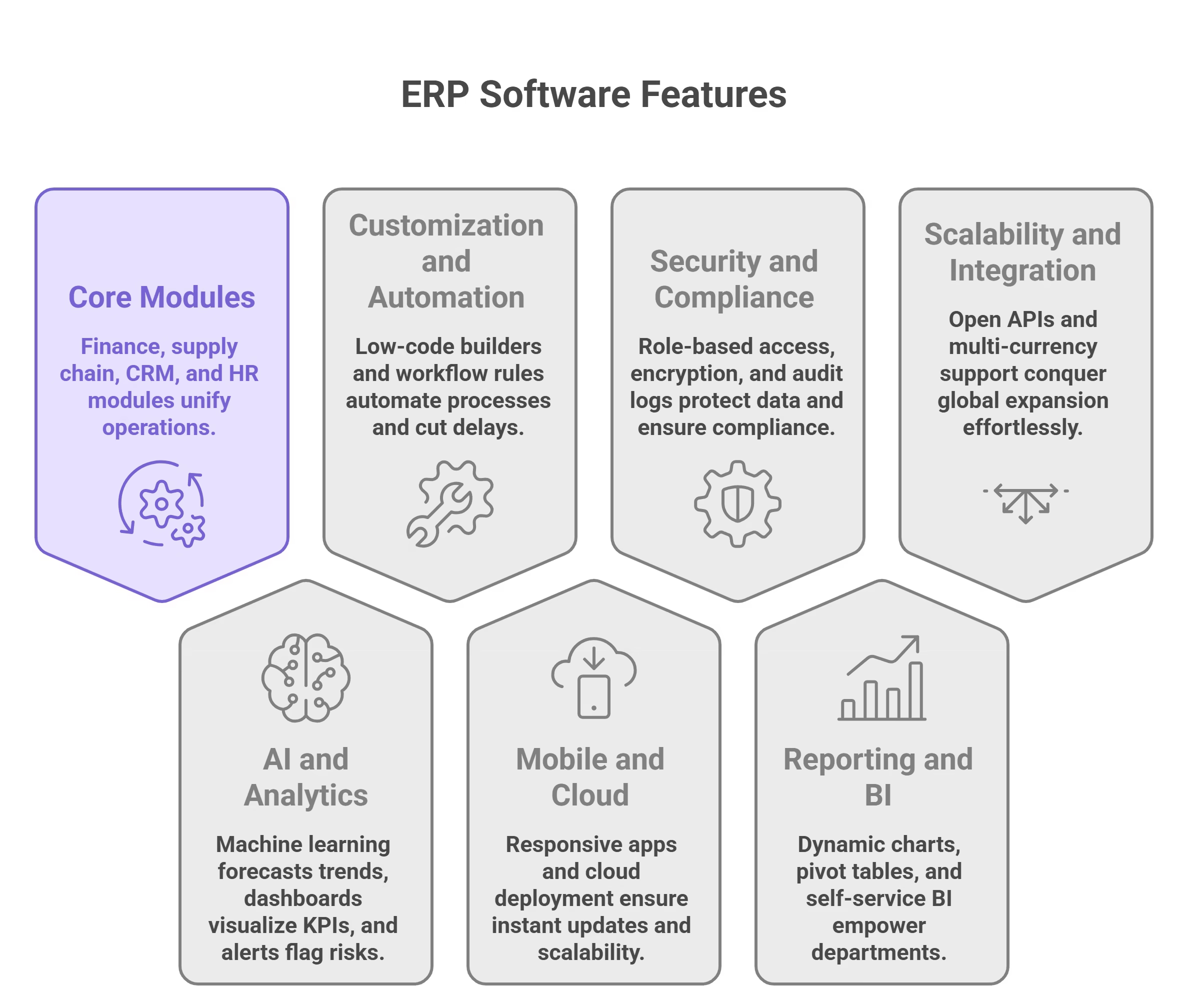
Start with finance covering AP AR general ledger and budgeting. Supply chain manages vendors inventory and fulfillment end-to-end. CRM tracks interactions from leads to loyalty. HR automates onboarding payroll and analytics. These foundations unify operations eliminating fragmented tools.
2) AI and Analytics for Predictive Edge
Machine learning forecasts sales trends reducing stockouts. Real-time dashboards visualize KPIs with drill-downs. Automated alerts flag risks early. Forrester data shows 75% of adopters sharpen strategies via AI insights. Natural language queries simplify data access for non-tech users.
3) Customization and Workflow Automation
Low-code builders let teams design custom forms reports and processes. Drag-and-drop interfaces speed development. ERP Software Services enhance with bespoke integrations. Workflow rules automate purchase orders approvals and escalations cutting delays by 40%.
4) Mobile and Cloud Accessibility
Responsive apps work on phones tablets and desktops. Offline mode syncs data later. Push notifications ensure instant updates. Cloud deployment scales instantly with 99.9% uptime guarantees.
5) Security and Compliance Built-In
Role-based access biometric authentication and encryption protect data. Audit logs track every action. GDPR HIPAA and SOX compliance comes standard. AI monitors for anomalies blocking threats proactively.
6) Reporting and BI Powerhouse
Dynamic charts pivot tables and scheduled exports thrill executives. Self-service BI empowers departments. Integration with Power BI or Tableau amplifies depth. Export to PDF Excel or APIs for external sharing.
7) Scalability and Integration Flexibility
Handle 100 to 10000 users without hiccups. Open APIs connect CRM e-commerce and industry tools seamlessly. Multi-currency multi-language support conquers global expansion effortlessly.
These features turn ERP into a growth engine. Prioritize demos showcasing them live. ERP Software Development Companies often build extensions for unique needs. Invest here for transformative results.
Common Types of ERP Software Solutions
Navigate the ERP landscape with clarity. Businesses weigh deployment models against priorities like cost speed control and scalability. Understand each to select wisely.
1) Cloud-Based ERP: Speed and Flexibility Unleashed
Access via browser from anywhere. Providers manage infrastructure updates and backups. Pay-per-use pricing starts low scaling seamlessly. Ideal for volatile growth or limited IT staff. Features like auto-scaling handle peak loads effortlessly. IDC highlights 30% surge in 2025 adoptions thanks to remote work demands. Drawbacks include subscription costs and data sovereignty concerns.
On-Premise ERP: Ultimate Customization and Security
Run on dedicated servers granting full ownership. Modify source code for niche requirements. Perfect for industries like defense or finance needing air-gapped systems. Initial investment covers hardware software and setup. Long-term control justifies expense for stable enterprises. Maintenance falls on internal teams.
Hybrid ERP: Best of Both Worlds
Sync on-premise data with cloud modules. Core finance stays secure while CRM floats in cloud. Balances compliance with agility. Growing popular for global firms managing regional rules.
SaaS ERP: Plug-and-Play Power
Vendor delivers everything ready-to-use. Deploy in days not months. Automatic enhancements keep pace with innovations. Custom Software Development Companies layer unique features atop platforms like NetSuite or Dynamics 365. Excels for SMEs chasing quick ROI.
Open-Source ERP: Community-Driven Innovation
Free downloads like Odoo or ERPNext spark creativity. Vast plugins cover niches. Requires developer skills for tweaks. Cost-effective for tech-savvy teams avoiding vendor lock-in.
Statista notes 81% of new deployments favor cloud or SaaS. Test via POCs. Align with IT maturity budget and strategic goals for flawless fit.
Steps to Implement ERP Software Successfully
Execute ERP rollout flawlessly with this expanded 10-step framework. Designed for minimal disruption rapid value capture and sustained optimization. Panorama Consulting data confirms structured approaches boost success by 70%. Dive into phases below.
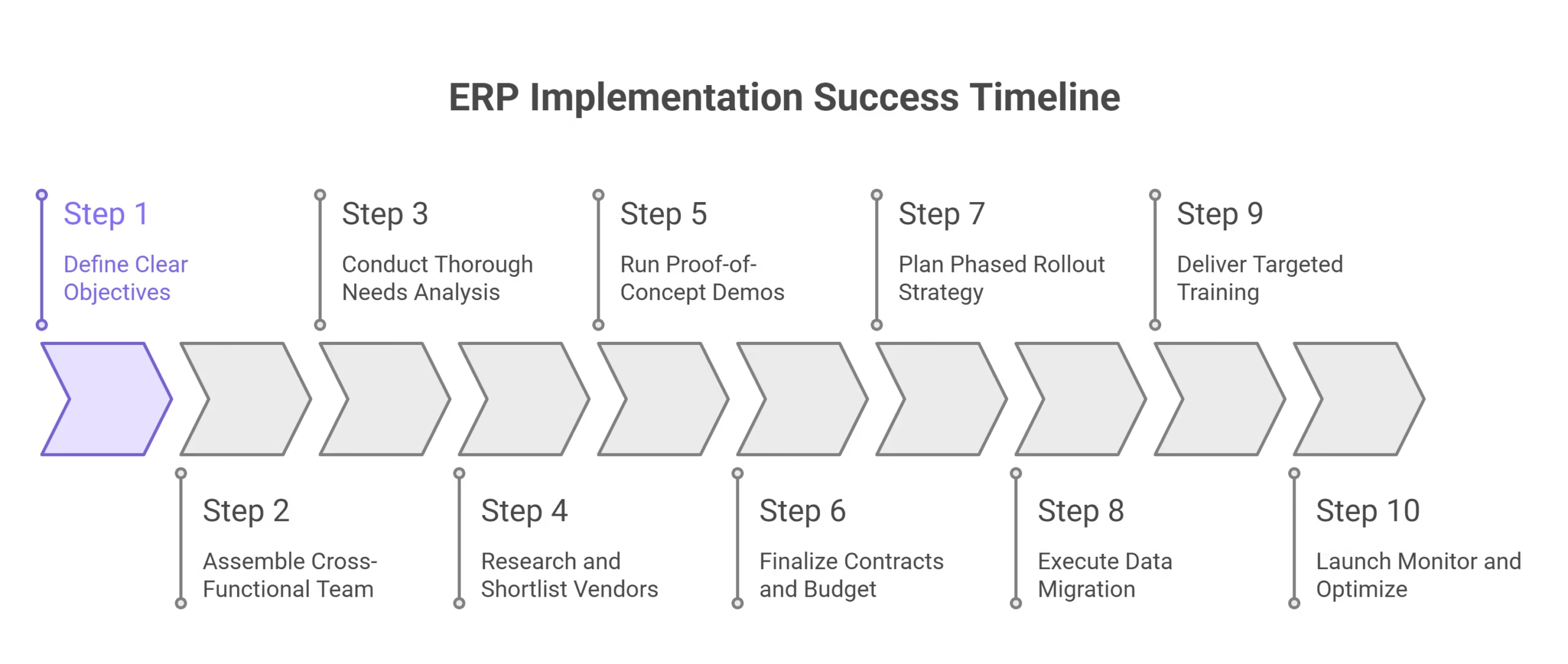
Step 1: Define Clear Objectives
Articulate specific measurable goals tied to KPIs. Examples include slashing inventory costs 25% or speeding order-to-cash by 40%. Secure executive sponsorship to drive accountability.
Step 2: Assemble Cross-Functional Team
Form a core group blending IT finance operations HR and end-users. Appoint a dedicated project manager with decision power. Bring in IT consulting companies for unbiased expertise if internal skills gap.
Step 3: Conduct Thorough Needs Analysis
Document current workflows via workshops and audits. Prioritize pain points like manual reporting or siloed data. Create a requirements traceability matrix for vendor alignment.
Step 4: Research and Shortlist Vendors
Craft detailed RFPs covering functional technical and support needs. Evaluate 20+ options narrowing to top 5 via scorecards on scalability pricing and references.
Step 5: Run Proof-of-Concept Demos
Simulate real operations with your data. Test edge cases integrations and mobile access. Gather quantitative feedback on speed usability and gaps.
Step 6: Finalize Contracts and Budget
Haggle SLAs uptime guarantees and data ownership. Budget comprehensively: 40% software 30% implementation 20% training 10% contingency.
Step 7: Plan Phased Rollout Strategy
Divide into waves starting with finance or CRM. Time around low-business periods. Define go-live criteria and rollback plans.
Step 8: Execute Data Migration
Profile cleanse transform and load data iteratively. Employ ETL tools like Talend. Validate 100% accuracy with reconciliation reports.
Step 9: Deliver Targeted Training
Roll out role-specific programs: e-learning for basics simulations for power users. Train-the-trainer creates internal sustainers. Measure readiness via certifications.
Step 10: Launch Monitor and Optimize
Hyper-care first 90 days with daily standups. Dashboard KPIs like adoption rates error logs and ROI progress. Conduct post-mortem tweak via agile sprints.
Incorporate Trending App Development Technologies such as low-code for rapid custom apps, bridging gaps. Regular audits every 6 months ensure evolution. This roadmap turns complex projects into triumph, delivering ERP Software for Businesses that propels growth.
Challenges and Solutions in ERP Adoption
Conquer ERP hurdles head-on. Common pitfalls derail 30% of projects but smart strategies flip them into strengths. McKinsey emphasizes proactive leadership lifts success to 70%. Explore key challenges with actionable fixes.
User Resistance and Change Fatigue
Employees dread new systems fearing job loss or complexity. Resistance slows adoption spiking shadow IT use.
Solutions: Launch early communications painting vivid before-after visions. Involve users in design via workshops fostering ownership. Gamify training with badges leaderboards and incentives. Appoint department champions for peer support. Celebrate micro-wins like first automated report. Track sentiment via pulse surveys adjusting tactics real-time.
Data Migration Complexities and Quality Issues
Legacy data riddled with duplicates inconsistencies triggers 25% failure rate. Migration downtime disrupts operations.
Solutions: Audit data exhaustively profiling volumes formats and quality. Cleanse standardize and enrich pre-transfer. Leverage ETL specialists with tools like Informatica. Migrate in waves testing subsets rigorously. Run parallel legacy-new systems during cutover. Post-migration validate via sampling and automated checks.
Budget Overruns and Scope Creep
Initial quotes balloon 50% from add-ons delays. Unplanned customizations drain reserves.
Solutions: Freeze requirements post-selection with change control boards. Phase funding linking tranches to milestones. Build 20% contingency tracking variances bi-weekly. Opt out-of-box features delaying bespoke work. Engage ERP Software Services for fixed-price modules.
Vendor Reliability and Support Shortfalls
Weak partners ghost post-sale or deliver buggy code. Integration snags emerge late.
Solutions: Vet via 10+ references site visits and escrow agreements. Demand 99.9% uptime SLAs with penalties. Contract multi-year roadmaps with quarterly reviews. Maintain backup vendors for critical fixes.
Technical Integration and Customization Traps
Legacy apps clash with ERP APIs. Over-customizing erodes upgrade paths.
Solutions: Prioritize API-first platforms with middleware like Boomi. Prototype integrations early. Limit custom code to 20% using configuration engines. Adopt Trending App Development Technologies for low-code extensions. Plan annual upgrades testing impacts upfront.
Arm these defenses to transform challenges into competitive moats. IT consulting companies guide through turbulence ensuring ERP fuels not frustrates growth.
Sum up
Mastering ERP selection propels businesses forward. ERP Software for Businesses integrates operations delivers insights and scales effortlessly. Weigh factors like scalability features types and implementation rigorously.
Armed with this blueprint avoid pitfalls secure wins. Businesses adopting smartly report 23% output gains per Statista. Transform your enterprise into a lean powerhouse.
Reach out to AppsInsight to find the best solutions providers perfectly matched to your goals. Start your journey to operational excellence now.